1
I N S T A L L A T I O N
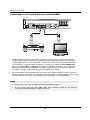
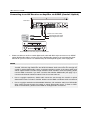
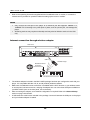
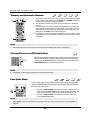
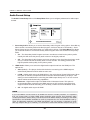
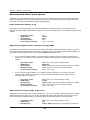
Connecting to an A/V Receiver or Amplifier via S/PDIF (Coaxial / Optical)
Rear Panel
Connect one of these cables:
Coaxial Digital Audio Cable
Coaxial In
Optical Digital Audio Cable
Optical In
AUDIO/VIDEO MULTI-CHANNEL RECEIVER
Receiver/Amplifier with Dolby Digital or DTS Decoder
x
Please use either a 75-Ohm coaxial digital audio cable with RCA-style connectors or an S/PDIF
optical digital audio cable to connect one of the digital audio outputs to the corresponding input
terminal on your A/V receiver. For detailed setup of coaxial/optical signals, refer to page 66.
NOTE
x
Due to bandwidth limitations, high resolution audio formats such as Dolby Digital Plus, Dolby
TrueHD, DTS-HD High Resolution and DTS-HD Master Audio cannot be sent through the
coaxial or optical digital audio output. A reduced resolution version of the same audio track
will be output instead. To listen to high resolution audio formats in their best quality, please
use the HDMI connection if you have a receiver that handles HDMI audio (see page 11) or
use the multi-channel analogue outputs if you do not (see page 16).
x
Due to copyright restrictions, SACD audio cannot be sent through the coaxial or optical
digital audio output. To listen to SACDs, please use the HDMI or analogue audio connections.
x
Due to copyright restrictions and bandwidth limitations, full resolution audio from DVD-Audio
discs cannot be sent through the coaxial or optical digital audio output. To listen to DVDAudio in full resolution, please use the HDMI or analogue audio connections.
17