1
Software for Educators
Objectives
After completing this chapter, you will be able to do the following:
[ISTE NETS-T Standards 1 b; 2 a-d; 3 a, d; 4 b; 5 a-c]
■
Explain the role of an operating system
and list the main operating systems used
on today’s computers
■
Define and describe a user interface and a
graphical user interface
■
Identify the important features of widely
used software applications
■
Describe the advantages of software suites
A
■
Explain how to create documents
■
Discuss why the use of video authoring
and editing software is important for
K-12 schools
■
Explain the difference between software
application, Web application, and app
■
Explain how to work with different
versions of software applications
n essential aspect of building computer literacy is learning about software, which is the series of
instructions that tell computer hardware how to perform tasks. Having a solid understanding of
software — especially application software — will help you comprehend how administrators,
teachers, students, and other individuals use personal computers in today’s society. It also will help you
use your computer and other technologies to be more productive, organized, and well informed.
Application software such as word processing, spreadsheet, project planning, and e-mail programs can help you perform tasks such as creating documents, visualizing data, managing projects, and communicating with others. Before discussing various software applications used by
teachers and students, however, this chapter provides a basic overview of the operating system
and the user interface used on Macs, PCs, and mobile devices. The user interface controls how
you work with any software, including application software.
Understanding software can help advance your personal and professional goals by helping you
manage student records, teach students with different academic needs, and work more productively.
This chapter introduces you to the learning aids and tools available to help you and your students
learn to use software applications. You can refer back to this chapter as you learn more about how
computers are used today and how they can help you in your teaching career.
100
Web Info
For more information
about Windows, visit
the Computer
Concepts CourseMate
Web site at www.
cengagebrain.com,
navigate to the
Chapter 3 Web Info
resource for this
book, and then click
Windows.
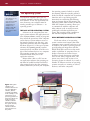
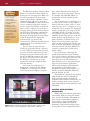
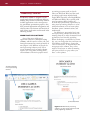
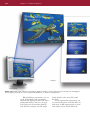
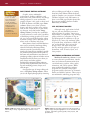
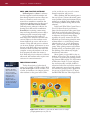
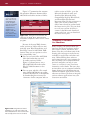
Figure 3-1 System
software is the
interface between the
user, the application
software, and the
computer’s hardware.
In this example, a user
instructs the word
processing software to
print a document, the
word processing
software sends the
print instructions to
the system software,
and the system
software sends the
print instructions to
the printer.
Chapter 3 Software for Educators
The Operating System
As with most computer users, you are
probably somewhat familiar with application software. To use any application software, however, your computer must be
running another type of software — an
operating system.
THE ROLE OF THE OPERATING SYSTEM
Software can be categorized into two
types: system software and application software. System software consists of programs
that control the operations of the computer
and its devices. System software serves as
the interface between you (the user), your
application software, and your computer’s
hardware (Figure 3-1). One type of system
software, the operating system, contains
instructions that coordinate all of the activities of the hardware devices in a computer.
The operating system also contains
instructions that allow you to run
application software.
Before either a Mac or a PC can run
any application software, the operating system must be loaded from the hard disk or
other storage location into the computer’s
memory. Each time you start your computer,
the operating system is loaded, or copied,
into memory. After the operating system is
loaded, it tells the computer how to perform
functions, such as processing program
instructions or transferring data between
input and output devices and memory. The
operating system, which remains in memory
while the computer is running, allows you
to communicate with the computer and
other software, such as word processors,
gradebooks, and other application programs. The operating system continues to
run until the computer is turned off.
USING DIFFERENT OPERATING SYSTEMS
Each new release of an operating
system contains new features that make
computers more powerful and easy to use.
In addition, the newest operating systems
provide enhanced integration with the
World Wide Web and increase the multimedia capabilities of computers. Due to
budget constraints and other factors,
however, schools, businesses, and home
users do not always upgrade their computers every time a new version of an
operating system is released. As a result, a
number of different versions of operating
systems currently are running on school,
business, and home computers.
System Software
Sy
Application Software
The Operating System
STAND-ALONE OPERATING SYSTEMS
iOS Apple’s iOS (previously known as
A stand-alone operating system is a
complete operating system that works on
a desktop computer, notebook computer,
or mobile computing device. Examples of
currently used stand-alone operating systems are Windows 7 and Mac OS X.
iPhone OS) is an operating system developed by Apple and used on the iPad, iPod
Touch, iPhone, and Apple TV. Apple allows
programmers worldwide to design apps
specifically for devices supporting this
operating system. iOS-based apps are available for download at the Apple App Store.
WINDOWS 7 Windows 7 is Microsoft’s
fastest, most efficient operating system to
date, offering quicker program start up,
multitasking capabilities, built-in diagnostics, automatic recovery, improved security,
enhanced searching and organizing capabilities, and an easy-to-use interface
(Figure 3-2). Previous versions of
Microsoft Windows still widely in use
today include Windows Vista and
Windows XP.
MAC OS X Mac OS X is an operating system that supports multitasking and is
available only for computers manufactured by Apple. The latest version, Mac
OS X Lion (released summer 2011),
includes features from previous versions
of the Macintosh operating system and
many new features such as the Mac App
Store, which offers endless possibilities for
browsing and purchasing apps. Newly
purchased apps install in one step and
appear right in the new Launchpad, which
gives users instant access to apps. Another
new powerful feature, Mission Control,
provides users with a bird’s-eye view of
everything, all in one place.
GOOGLE ANDROID Google Android is an
operating system designed by Google for
mobile devices. Used on more than 20 different types of mobile devices, including tablet computers, Google Android allows
programmers to design programs specifically
for devices supporting this operating system.
101
Web Info
For more information
about Mac OS, visit
the Computer
Concepts CourseMate
Web site at www.
cengagebrain.com,
navigate to the
Chapter 3 Web Info
resource for this
book, and then click
Mac OS.
BLACKBERRY OS BlackBerry OS is a proprietary operating system developed by
Research In Motion for Blackberry’s line
of smartphones and Playbook tablet
computers.
EMERGING OPERATING SYSTEMS
One emerging operating system that has
the potential to revolutionize computing is
Google’s Chrome OS. Chrome OS (based on
Google Android) is an operating system
designed to work exclusively with Webbased and cloud-based applications and to
run on Chromebook computers.
Chromebook computers are covered in
Chapter 4 and Web-based and cloud-based
applications are detailed in the special feature that follows Chapter 6, A World
without Wires – Tablets, Apps, and More.
FAQ
What programs
are included with
Windows?
Every version of
Windows includes
Calculator, Notepad,
WordPad, Internet
Explorer, Windows
Photo, Windows Mail,
Windows Calendar,
and a variety
of games.
EMBEDDED OPERATING SYSTEMS
The operating system on mobile
devices and many consumer electronics,
called an embedded operating system,
resides on an internal chip, rather than a
hard drive. Most of today’s embedded
operating systems support multi-touch,
which means they recognize multiple
points of contact and allow users to interact using a stylus or finger motions, such
as tapping a button on the screen and
sliding a finger to drag an object.
Embedded operating systems allow users
to interact with hundreds of thousands of
applications, known as apps. Three popular embedded operating systems include
Apple’s iOS, Google Android, and
Blackberry OS.
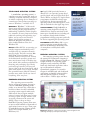
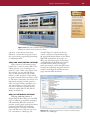
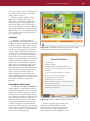
Figure 3-2 Windows 7 has a new interface, easier navigation and
searching techniques, and improved security.
102
Chapter 3 Software for Educators
THE ROLE OF THE USER INTERFACE
FAQ
Can I simply
turn the
computer
off when I am
finished?
No! You must use
the operating
system’s shut-down
procedure so various
processes are closed
in sequence and
items in memory are
released properly.
All software, including the operating
system, is designed to communicate with the
user in a certain way, through a user interface. A user interface controls how you enter
data or instructions (input) and how information is presented on the screen (output).
One of the more common user
interfaces is a graphical user interface.
A graphical user interface, or GUI (pronounced gooey), combines text, graphics,
and other visual cues to make software easier to use.
Application Software
Recall that application software consists
of programs designed to perform specific
tasks for users. Application software,
also called application programs, can be
used for the following purposes:
■
As a productivity/business tool
■
Assisting with graphics and multimedia
projects
■
Supporting school and professional
activities
Helping with home and personal
activities
■
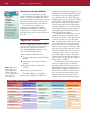
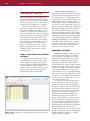
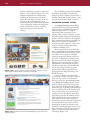
Figure 3-3 The five
major categories of
popular application
software. You likely
will use software from
more than one of
these categories.
■
Facilitating communications
The table in Figure 3-3 categorizes
popular types of application software by
their general use. These five categories are not
all-inclusive nor are they mutually exclusive;
for example, e-mail can support productivity, a software suite can include Web page
authoring tools, and tax preparation software
can be used by a business. In the course of a
day, week, or month, you are likely to find
yourself using software from many of these
categories, whether you are at school, home,
or work. Even though you may not use all
of the applications, you should at least be
familiar with their capabilities.
Communications applications, such as
e-mail, Web browsers, and others, were
discussed in Chapter 2. This chapter gives
a general overview of each of the other
four categories and provides specific examples of applications in each category that
are used on both PCs and Macs. Finally,
there is a new category of software, called
Apps, that has recently exploded in terms
of both availability and use over the past
two to three years. Apps are covered in
each end-of-chapter section called Apps
Corner and in the special feature that follows Chapter 6, A World without Wires –
Tablets, Apps, and More.
A wide variety of application software,
such as word processing, is available as
packaged software that can be purchased
from software vendors in retail stores or on
the Web. Many application software programs also are available as shareware, freeware, and public-domain software; these
programs, however, usually have fewer
capabilities than retail software programs.
Categories of Application Software
Productivity/
Business
Graphic Design/
Multimedia
• Word Processing
• Desktop Publishing
• Spreadsheet
• Paint/Image Editing
• Presentation Graphics • Multimedia
Authoring
• Database
• Web Page
• Personal Information
Authoring
Management
• Software Suite
School
Home/Personal
Communications
• School/Student
Management
• Personal Finance
• E-Mail
• Tax Preparation
• Web Browser
• Legal
• Chat Rooms
• Entertainment
• Newsgroups
• Gradebook
• K-12 Educational
Software
Applications
• Special Needs
• Instant Messaging
• Blogs
• Wikis
Application Software
STARTING A SOFTWARE APPLICATION
interact with the Paint program on a PC
using Microsoft Windows.
An icon is a small image that represents
a program, an instruction, or some other
object. A button is a graphical element
(usually a rectangular or circular shape)
that when selected, causes a specific action
to take place. Typically you click a button
using a pointing device, such as a mouse, to
select it. You also can select a button using
the keyboard. Icons, text, or a combination
of both are used to identify buttons.
To use application software, you must
instruct the operating system to start the
program. Both Mac OS and Microsoft
Windows use the concept of a desktop
to make the computer easier to use. The
desktop is an on-screen work area that
uses common graphical elements such as
icons, buttons, windows, menus, and dialog boxes to make it easy and intuitive for
users to interact with the computer.
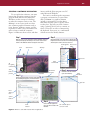
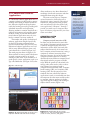
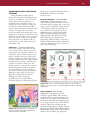
Figure 3-4 illustrates how to start and then
Step 1
When you turn on a PC-compatible computer, Windows loads into
memory and displays the desktop on the screen. Click the Start
button on the Windows taskbar to display the Start menu.
icons
Start menu
Step 2
Click All Programs on the Start menu to display the All
Programs list. Click Accessories in the All Programs list
and then point to Paint in the Accessories list.
All Programs Accessories
list
folder
desktop
Accessories
list
Paint
command
All
Programs
command
Start
button
pointer
103
taskbar
Step 5
document
filename
Step 3
Click Paint. The Paint window
Paint
opens on the desktop.
window
Instruct the Paint program to print the photo. When
the Print dialog box appears, click the Print button.
title bar
Print
dialog
box
option
button
Step 4
Print
button
Figure 3-4 How to start and interact with an application.
Instruct the Paint program to
open a file that is stored on the file contains photo
stored on disk
hard disk.
104
Integration
Strategies
To learn more about
how to integrate
content-specific
software applications,
such as Kidspiration,
Tessellation
Exploration, and
Thinkology, visit the
Computer Concepts
CourseMate Web site
at www.cengagebrain.
com, and then
navigate to the
Chapter 3 Software
Corner resource for
this book.
Chapter 3 Software for Educators
The Windows desktop contains a Start
button in its lower-left corner, which can
be used to start an application. When you
click the Start button, the Start menu
opens on the desktop. A menu is a list of
commands from which you can make a
selection. Commands are instructions that
cause a computer program to perform a
specific action. For example, as shown in
Steps 1 and 2 of Figure 3-4 on the previous page, when you click the Start button
and click the All Programs command on
the Start menu, the All Programs list is
displayed. Clicking the Accessories folder
in the All Programs list displays the
Accessories list. As shown in the
Accessories list, Windows includes several
applications, such as Calculator, Paint,
and WordPad.
You can start an application by
clicking its program name on a menu or
in a list. Doing so instructs the operating
system to start the application by transferring the program’s instructions from a
storage medium into memory. For example, if you click Paint in the Accessories
list, Windows transfers the program
instructions from the computer’s hard
disk into memory.
Once started, an application is
displayed in a window on the desktop.
A window is a rectangular area of the
screen that is used to display a program,
data, and/or information (see Step 3 of
Figure 3-4 on the previous page). The top
of a window has a title bar, which is a
horizontal space that contains the window’s name.
Any document you are working on or
you have saved exists as a file. A file is a
named collection of data, such as a document that you create, a program, or a set
of data used by a program. To distinguish
among various files, you assign each file
a filename, which is a unique set of letters, numbers, and other characters that
identifies the file. The title bar of the document window usually displays a document’s filename, as shown in Step 4 of
Figure 3-4 on the previous page. Also
shown in Step 4 of Figure 3-4 is the contents of the file Baby Buffalo displayed in
the Paint window. The Baby Buffalo file
contains a photograph created with a
digital camera.
One of the major advantages of a
graphical user interface is that elements
such as icons, buttons, and menus, usually
are common across applications. After you
learn the purpose and functionality of
these elements, you can apply that knowledge to several software applications.
Many of the features just described also
are applicable to the desktop of the
Macintosh operating system (Figure 3-5),
which is arranged somewhat differently
than the desktop of a PC.
The features of a graphical user interface
make it easier for users to communicate
with a personal computer. You will see
examples of these features and how they are
used as you learn about various software
applications used by schools, businesses, and
individuals.
WORKING WITH SOFTWARE
APPLICATIONS
Figure 3-5 The Mac OS X desktop contains features similar to a PC
desktop, however, the arrangement of the features is different.
While using many software applications,
you have the ability to create, edit, format,
print, and save documents. A document is a
piece of work created with an application
and saved on a storage medium with a
unique filename. Many users think of
documents as files created using word processing software. To a computer, however, a
Application Software
document is nothing more than a collection
of characters, so a spreadsheet or graphic is
as much a document as a letter or report.
During the process of developing a document, you likely will switch back and forth
among the following activities.
Creating involves developing the
document by entering text or numbers,
designing graphics, and performing other
tasks using an input device, such as a
keyboard or mouse. If you design a map
using the graphics tools in Paint, for
example, you are creating a document.
Editing is the process of making
changes to the document’s existing content.
Common editing tasks include inserting,
deleting, cutting, copying, and pasting
items in a document. For example, using
Paint, you can insert, or add, text to a
map, such as the names of key landmarks.
When you delete, you remove text or
objects. To cut involves removing a portion
of the document and electronically storing
it in a temporary storage location called the
Clipboard. When you copy, a portion of
the document is duplicated and stored on
the Clipboard. To place whatever is stored
on the Clipboard into the document, you
paste it into the document.
Header Example
Formatting involves changing the
appearance of a document. Formatting is
important because the overall look of a
document can significantly affect its ability
to communicate effectively. For example,
you might want to increase the size of the
text to improve readability.
One often-used formatting task involves
formatting text by changing the font, font
size, or font style of text. A font is a name
assigned to a specific design of characters.
Arial and Times New Roman are examples
of fonts. The font size specifies the size of
the characters in a particular font. Font size
is gauged by a measurement system called
points. A single point is about 1/72 of an
inch in height. The text you are reading in
this book is 10.5 pts. Thus, each character is
about 10/72 of an inch in height. A font
style is used to add emphasis to a font.
Examples of font styles are bold, italic, and
underline. Examples of these and additional
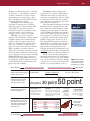
formatting features are shown in Figure 3-6.
While you are creating, editing, and
formatting a document, it is held temporarily in memory. As you work, you normally
save your document for future use. Saving
is the process of copying a document from
memory to a storage medium, such as a
header appears at top of every page
FONT & FONT STYLES
Examples show different typefaces
in bold, underline, or italic.
Courier
Courier Bold
POINT SIZES
6 point
Examples show different point
sizes, which can be used to
make type larger or smaller.
COLUMNS & ALIGNMENT
Examples show four columns
with different alignments.
TABLES & GRAPHICS
Example shows a three-column
table, which can be moved as a
single object, shading applied to
every other row, and a border
around the table.
Footer Example
105
Helvetica
Helvetica Underlined
30 point
April 21, 2013
14 point
50 point
This is an example of justified
alignment. The spacing
between words is adjusted so
the words at the beginning
and the end of the lines are
aligned with the left and right
column margins.
Part Number
Description
A101
widget
$ 9.95
B202
gizmo
$ 14.95
C303
thingee
$ 19.95
D404
doodad
$ 24.95
footer appears at bottom of every page
Figure 3-6 Examples
of formatting features
available with many
productivity programs.
Times New Roman
Times New Roman Italic
12 point
10 point
This is an example of
left alignment. Notice
how the words at the
beginning of each line
are aligned with the
left column margin.
For more information
about fonts, visit the
Computer Concepts
CourseMate Web site
at www.cengagebrain.
com, navigate to the
Chapter 3 Web Info
resource for this
book, and then
click Font.
date (and time) can appear in header or footer
8 point
20 point
Web Info
This is
an example
of center
alignment. The
words are
centered in
the column.
This is an example
of right alignment.
Notice how the
words at the end of
each line are aligned
with the right column
margin.
Price
Example shows
that a graphic
can be placed
anywhere on page.
automatic page number can
appear anywhere in header or footer
1
106
Chapter 3 Software for Educators
USB flash drive or hard disk. You should
save the document frequently while working with it so your work will not be lost if
the power fails or the computer crashes.
Many applications also have an optional
AutoSave feature that automatically saves
open documents at specified time periods.
You should save your work frequently,
however, and not rely on the AutoSave
feature.
After you have created a document,
you can print it many times, with each
copy looking just like the first. Printing is
the process of sending a file to a printer to
generate output on a medium, such as
paper. You also can send the document to
others electronically, if your computer is
connected to a network.
In some cases, when you instruct a
program to perform an activity such as
printing, a dialog box opens. A dialog box
is a special window displayed by a program
to provide information, present available
options, or request a response using command buttons, option buttons, text boxes,
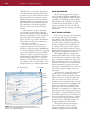
and check boxes (Figure 3-7). A Save As
dialog box, for example, gives you many
save options, such as saving a file to a different location or in a different file format.
Save As dialog box
Close button
Get
Help
button
text
box
check
boxes
command
buttons
Figure 3-7 This Save As dialog box shows elements
common to many dialog boxes, such as text boxes, check
boxes, and command buttons.
VOICE RECOGNITION
Many software applications support
voice recognition. Voice recognition, also
called speech recognition, is the computer’s
capability of distinguishing spoken words.
You speak into the computer’s microphone
and watch your words display on your
screen as you talk. You also can edit and
format a document by speaking or spelling
instructions.
NOTE TAKING SOFTWARE
Did you ever experience the frustration
of not being able to read your written
notes before a test? Have you looked
through page after page of your written
notes for answers to specific questions but
couldn’t find them? These problems may
be a thing of the past for today’s digital
kids. In fact, note taking software for this
digital generation may be a perfect solution
both inside and outside the classroom.
Note taking software is application
software that enables users to enter typed
text, handwritten comments, graphs, drawings, or sketches anywhere on a page and
then save the page as part of an electronic
notebook. The software can convert handwritten comments to typed text or store
the notes in a handwritten form. Users also
can include audio recordings as part of
their notes.
After notes are captured (entered and
saved), users can organize them, reuse
them, and share them easily. The software
allows the users to search through saved
notes for specific text. Users can search
through an entire notebook. Users can flag
important notes with color, highlight, and
shapes. On a desktop or notebook computer, users enter notes primarily via the
keyboard or microphone. On a tablet computer, however, the primary input device is
your finger or a stylus. Students may find
note taking software more convenient and
easier to use during class lectures, in libraries, and in other settings that previously
required a pencil and tablet of paper for
recording thoughts and discussions.
Note taking software incorporates
many of the features found in word
processing software, such as checking
spelling, changing fonts and font sizes,
Application Software
adding colors, recognizing voice input,
inserting audio and video files, providing
research capabilities, and so much more.
By using note taking software (Figure 3-8),
students can have digital documents that
are legible, searchable, and editable; however, most students are still taking notes
the traditional way, with paper and pencil.
Although more and more K-12 students
are bringing their laptops to class and typing their notes, many of these students cannot type as fast as they can write. With the
power of note taking software, students
can increase their comprehension and capture more of the content.
Many experts are predicting that as
tablet computers and other mobile note
taking devices become mainstream,
printed school and college textbooks will
become obsolete. Instead, digital students
will interact with digital versions of their
textbooks (Figure 3-9). In fact, several
publishers are perfecting various ways of
providing their content via the Web, tablet computers, and traditional printed
versions of their textbooks to determine
which one is successful with students.
107
Integration
Strategies
To learn more about
how to use and
integrate Microsoft’s
note taking software,
OneNote, visit the
Computer Concepts
CourseMate Web site
at www.cengagebrain.
com, and then
navigate to the
Chapter 3 Digital
Media Corner
resource for this book.
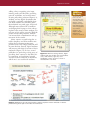
Figure 3-8 With note taking software, digital
students and other mobile users can handwrite
notes, draw sketches, type text, send
handwritten e-mails, and more. Shown is
NoteTaker HD on an iPad.
Figure 3-9 Education will reap many benefits as tablet computers and the multitude of software
products being developed for them become mainstream.
108
Chapter 3 Software for Educators
Productivity Software
Productivity software is designed to make
people more effective and efficient while performing daily activities. Productivity software
includes applications such as word processing, spreadsheet, presentation graphics, database, personal information management, and
software suites. The features and functions of
each of these applications are discussed in the
following sections.
WORD PROCESSING SOFTWARE
One of the more widely used
application software is word processing
software, which is used to create, edit, and
format documents that consist primarily of
text (Figure 3-10). Millions of people use
word processing software every day to
create documents such as letters, memos,
reports, fax cover sheets, mailing labels,
and newsletters. The more popular word
processing programs used in schools
today are Microsoft Word and the word
processing applications included with
Apple iWork (formally called AppleWorks)
and Microsoft Works. By acquiring solid
word processing skills, teachers can
increase their productivity significantly by
using word processing software to create
written documents, such as lesson plans,
handouts, parent communications, and
student tests.
In addition to supporting basic text,
word processing software has many formatting features to make documents look
professional and visually appealing.
When developing a newsletter, for example, you can change the font and font size
of headlines and headings, change the
color of characters, or organize text into
newspaper-style columns. Any colors
used for characters or other formatting
will print as black or gray unless you
have a color printer.
document displays
in word processing
window
printed document
Figure 3-10 With word processing
software, you can create professional and
visually appealing documents.
Productivity Software
Most word processing software also
can incorporate many types of graphics.
For example, you can enhance a document
by adding a border, which is a decorative
line or pattern along one or more edges of
a page or graphic. One type of graphic
commonly included with word processing
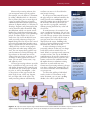
software is clip art, which is a collection of
drawings, diagrams, and photographs that
can be inserted in other documents. Clip
art collections, which can contain several
hundred to several thousand images, usually are grouped by type, such as buildings,
people, or nature (Figure 3-11). If you
want to use clip art not included in your
word processing software package, you
import (bring into) the clip art into a word
processing document from another source
such as a purchased CD collection or from
a Web site. You can also create graphics
using Paint and other image editing software. You can import these graphics into
your document too. Paint and image editing software are discussed later in this
chapter. After you insert, or import, a clip
art image or other graphic into a document, you can move, resize, rotate, crop,
and adjust its color.
All word processing software provides
basic capabilities to help you create, edit,
and format documents. For example, you
can define the size of the paper on which
to print, as well as the margins — that
is, the portion of the page outside the
main body of text, on the top, bottom,
left, and right sides of the paper. The
word processing software automatically
readjusts any text so it fits within the
new margin settings.
If you type text that extends beyond
the page margin or window boundary, the
word processor uses wordwrap to automatically position text at the beginning of
the next line. Wordwrap allows you to
type words in a paragraph continually
without pressing the Enter key at the end
of each line.
In some instances, for example if you
create a multipage document, you can view
only a portion of a document on the screen
at a time. The top portion of the document
moves upward, or scrolls, off the screen as
you type more lines of text than can be
displayed on the screen. Scrolling is the
process of moving different portions of the
document into view on the screen.
A major advantage of using word
processing software is that you can change
easily what you have written. You can
insert, delete, or rearrange words, sentences,
or entire sections. You can use the find or
search feature to locate all occurrences of a
particular character, word, or phrase. This
feature can be used in combination with
the replace feature to substitute existing
characters or words with new ones.
Current word processing software packages
even have a feature that automatically corrects errors and makes word substitutions
as you type text.
To review the spelling of individual
words, sections of a document, or the
entire document, you can use a spelling
checker, also called a spell checker.
Web Info
For samples of clip
art available on the
Internet, visit the
Computer Concepts
CourseMate Web site
at www.cengagebrain.
com, navigate to the
Chapter 3 Web Info
resource for this
book, and then click
Clip Art.
Web Info
For details about
spelling bees, visit the
Computer Concepts
CourseMate Web site
at www.cengagebrain.
com, navigate to the
Chapter 3 Web Info
resource for this
book, and then click
Spelling.
Trout
Puppy
Lion 1
109
Puffin
Iris
Conch 1
Mammoth
Figure 3-11 Clip art consists of previously created illustrations that can be added to documents. Clip art collections include
graphic images that are grouped by type. These clip art examples are from an animals and nature collection.
110
Chapter 3 Software for Educators
A spelling checker compares the words in
the document with an electronic dictionary
that is part of the word processing software (Figure 3-12). You can customize the
electronic dictionary by adding words,
such as names of companies, schools,
streets, and cities, and personal names, so
the software can spell check those words
as well. Many word processing software
packages allow you to check the spelling
of a whole document at one time or check
the spelling of single words as you type.
You also can insert headers and footers into a word processing document. A
header is text you want at the top of each
page; a footer is text you want at the bottom of each page. Page numbers, as well as
company and school names, report titles,
or dates are examples of items frequently
included in headers and footers.
Many word processing programs
make it quick and easy for teachers and
students to create personalized documents using templates and special programs called wizards. A template is a
document that contains the formatting
necessary for a specific document type. A
wizard, or assistant, is an automated tool
that helps you complete a task by asking
you questions and then automatically
performing actions based on your
answers. Many software applications
include wizards. Word processing
software, for example, uses wizards and
templates to help you create blogs,
memos, résumés, meeting agendas, letters, and other professional looking
documents (Figure 3-13).
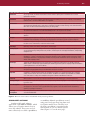
In addition to these basic features, most
current word processing packages provide
many other features, some of which are listed
in the table in Figure 3-14.
Figure 3-12 Spell checkers are included with most
word processors. Shown is the spell checker included
with Apple iWork.
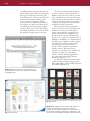
[a] Apple iWork
[b] Microsoft Word
Figure 3-13 Templates allow teachers and students to
create personalized flyers, newsletters, certificates,
résumés, and more quickly. Figure 3-13a shows some of
the templates available in Apple iWork, and Figure 3-13b
shows some of the templates available in Microsoft Word.
Productivity Software
111
Some Word Processing Features
AutoCorrect
As you type words, the AutoCorrect feature corrects common spelling errors. AutoCorrect also corrects
capitalization mistakes.
AutoFormat
As you type, the AutoFormat feature automatically applies formatting to the text. For example, it automatically
numbers a list or converts a Web address to a hyperlink.
Collaboration
Collaboration includes discussions and online meetings. Discussions allow multiple users to enter comments in
a document and read and reply to each other’s comments. Through an online meeting, users share documents
with others in real time and view changes as they are being made.
Columns
Most word processing software can arrange text in two or more columns to look like a newspaper or magazine.
The text from the bottom of one column automatically flows to the top of the next column.
Grammar Checker
The grammar checker proofreads documents for grammar, writing style, sentence structure errors, and reading
statistics.
Ink Input
Ink input supports input from a digital pen. Word processing software that supports ink input incorporates a user’s
handwritten text and drawings in a word processing document. Ink input is popular on tablet computers.
Macros
A macro is a sequence of keystrokes and instructions that a user records and saves. When you want to execute
the same series of instructions, execute the macro instead.
Mail Merge
Mail merge creates form letters, mailing labels, and envelopes.
Reading Layout
For those users who prefer reading on the screen, reading layout increases the readability and legibility of an
on-screen document by hiding unnecessary toolbars, increasing the size of displayed characters, and providing
navigation tools.
Research
Some word processing software allows you to search through various forms of online and Internet reference
information — based on selected text in a document. Research services available include a thesaurus, English
and bilingual dictionaries, encyclopedias, and Web sites that provide information such as stock quotes, news
articles, and company profiles.
Smart Tags
Smart Tags automatically appear on the screen when you perform a certain action. For example, typing an
address causes a Smart Tag to appear. Clicking this Smart Tag provides options to display a map of the address
or driving directions to or from the address.
Tables
Tables organize information into rows and columns. In addition to evenly spaced rows and columns, some
word processing programs allow you to draw tables of any size or shape.
Templates
A template is a document that contains the formatting necessary for a specific document type. Templates
usually exist for memos, fax cover sheets, and letters. In addition to templates provided with the software,
users have access to many online templates through the software manufacturer’s Web site.
Thesaurus
With a thesaurus, a user looks up a synonym (word with the same meaning) for a word in a document.
Tracking Changes
If multiple users work with a document, the word processing software highlights or color-codes changes made
by various users.
Voice Recognition
With some word processing programs, users can speak into the computer’s microphone and watch the spoken
words appear on the screen as they speak. With these programs, users edit and format the document by
speaking or spelling an instruction.
Web Page
Development
Most word processing software allows users to create, edit, format, and convert documents to be displayed
on the World Wide Web.
Figure 3-14 Some of the features included with word processing software.
SPREADSHEET SOFTWARE
Another widely used software
application is spreadsheet software, which
allows you to organize numeric data in
rows and columns. These rows and columns collectively are called a spreadsheet,
or worksheet. Manual spreadsheets created
using pencil and paper have long been used
to organize numeric data. The data in an
electronic spreadsheet is organized in the
same manner as it is in a manual spreadsheet (Figure 3-15 on the next page).
112
Chapter 3 Software for Educators
function in cell D9
Figure 3-15 With spreadsheet
software, you create worksheets
that contain numeric data
arranged in rows and columns.
cell D9 cell D5
Individuals who frequently work with
numbers, such as financial statements and
payroll, use spreadsheets. Many teachers
interact with spreadsheet programs on a
daily basis. Every time teachers enter
students’ grade or attendance information
into a computer, they are entering information into a special spreadsheet program,
called an electronic gradebook. K-12
gradebook programs are discussed later
in this chapter.
As with word processing software, most
spreadsheet software has basic features to
help you create, edit, and format electronic
spreadsheets. These features, which are
included in several popular spreadsheet
packages, are described below. Spreadsheet
software included in Microsoft Works and
Apple iWork, as well as Microsoft Excel
that is packaged with Microsoft Office, are
the programs typically used in schools.
Spreadsheet files normally have
thousands of columns and rows. Each
column is identified by a letter, and each
row is identified by a number. The column letters begin with A and row numbers begin with 1. Only a small fraction
of these columns and rows are displayed
on the screen at one time. You can scroll
to view different parts of a worksheet on
your screen.
The intersection of a column and row
is called a cell. Cells are identified by the
column and row in which they are located.
For example, the intersection of column D
and row 5 is referred to as cell D5. In
Figure 3-15 above, cell D5 contains the
number 5,347.13, which represents Junior
year Tuition & Books expenses.
Cells may contain three types of data:
labels (text), values (numbers), and formulas. The text, or label, entered in a cell is
used to identify the data and help organize
the spreadsheet. Using descriptive labels,
such as Room & Board, Tuition & Books,
and Clothes, helps make a spreadsheet
more meaningful.
Many of the spreadsheet cells shown in
Figure 3-15 contain a number, or a value.
Other cells, however, contain formulas that
are used to generate values. A formula performs calculations on the numeric data in
the spreadsheet and displays the resulting
value in the cell containing the formula.
In Figure 3-15, for example, cell D9
contains a special formula called a function,
which is used to calculate the projected total
expenses for the student’s junior year. A
function is a predefined formula that performs common calculations, such as
adding the values in a group of cells.
For example, instead of using the
Productivity Software
line chart
column chart
pie chart
Figure 3-16 Three basic types of charts provided with spreadsheet software are line
charts, column charts, and pie charts. The line chart, column chart, and pie chart shown
were created from the data in the worksheet in Figure 3-15.
formula =D4+D5+D6+D7+D8 to calculate
the projected total expenses for the student’s
junior year, you should use the function
=sum(D4:D8), which adds, or sums, the
contents of cells D4, D5, D6, D7, and D8.
Another standard feature of spreadsheet software is the capability of turning
numeric data into a chart that graphically
illustrates the relationship of the numeric
data. Visual representation of data in charts
often makes it easier to analyze and interpret information. Most charts are variations
of three basic chart types — line charts, column charts, and pie charts, as shown in
Figure 3-16. It is important to pick the
chart type that provides the best visualization for your data. To improve their appearance, most charts can be displayed or
printed in a three-dimensional format.
As with word processing software, you
can create professional looking spreadsheets quickly using wizards. Using the
wizards in most popular spreadsheet packages is easy and allows you to create
gradebooks, classroom and school schedules, charts, and more. Spreadsheet software also incorporates many of the
features of word processing software, such
as a spelling checker, font formatting, and
the capability of converting an existing
spreadsheet document into the standard
document format for the World Wide Web.
Because individual rows, columns, cells, or
any combination of cells can be formatted,
school districts and businesses often
use spreadsheet programs to create
their standardized forms.
DATABASE SOFTWARE
A database is a collection of data
organized in a manner that allows access,
retrieval, and use of that data. In a manual system, information is recorded on
paper and stored in a filing cabinet
(Figure 3-17). In a computerized database, such as the one shown in Figure 3-20
on page 115, data is stored in an electronic format on a storage medium.
Database software allows you to create
a computerized database; add, change,
and delete data; sort and retrieve data
from the database; and create forms and
reports using the data in the database.
Database software is used extensively
by businesses and other organizations to
organize data and information about
customers, employees, equipment, product
Figure 3-17 A database is similar to a manual
system in which related data items are stored
in files.
113
114
Chapter 3 Software for Educators
FAQ
How big is the
largest database?
According to a
recent survey, the
world’s largest
database holds more
than 6 quadrillion
characters. In the
next few years, the
size of the largest
database is expected
to double and then
double again.
inventory, sales information, and more.
Schools use databases to organize data
and information about students, staff
members, school policies, equipment
inventories, book inventories, purchases,
and more. Database programs typically
used in schools include Microsoft Access,
FileMaker Pro, and the database software
included in Microsoft Works.
When you use a database, you need
to be familiar with the terms file, record,
and field. Just as in a manual system, a
database file is a collection of related data
that is organized in records. Each record
contains a collection of related facts called
fields. A field is the smallest unit of information you can access in a database. For
example, a student database file might
consist of records containing names,
address information, and parental or
guardian information. All of the data that
relates to one student is considered a
record. Each fact in a record, such as the
street address or telephone number, is
called a field.
Figures 3-18 through 3-20 present the
development of a database containing basic
information about students enrolled in
nner
Ms. Ta
ss
ade Cla
r
G
d
n
Seco
Ms. Eileen Tanner’s second grade class at
Martin Luther King Elementary School.
This simple database contains the following
information about each student: first name,
last name, guardian’s address, name, and
telephone number.
Before you begin creating a database,
you should make a list of the data items
you want to organize (Figure 3-18). Each
set of related information will become a
record. Each item will become a field in
the database. A field entry screen from
Microsoft Works is shown in Figure 3-19.
To identify the different fields, assign each
field a unique name that is short, yet
descriptive. For example, the field name for
a student’s last name could be Last Name,
the field name for a student’s first name
could be First Name, and so on. Database
programs differ slightly in how they
require the user to enter or define fields.
After the database structure is created by
defining the fields, data for individual database records can be entered. After data for all
records is entered, the database can be used
to produce information. Figure 3-20 shows
the database after the information about the
students has been entered.
select format
type here
enter field
name here
Add button
Done button
sta
e
Jose Co nd Brook Lan
ra
G
3850
osta
Maria C
58
555-64
ngelo
Angel A rs West
e
w
247 Po
gelo
n
A
e
Milli
79
555-68
iner
Erin Jo le Lake Road
rip
off
1320 T r
th Belan
ine
Elizabe n Ridge Lane
o
Billy J
ia
31
147 Ind ayle
2
-6
555
G
Debbie
56
orris
555-56
Cindy M Ridge Drive
k
ett
254 Oa is
th Corb
rr
Sara Be bar Avenue
o
M
e
e
L
un
9
9
1094 D rd
9
555-8
Fo
Pauline
25
555-32
one
record
Figure 3-18 This figure shows a partial list of the
student information Ms. Tanner will be entering in her
student database.
Figure 3-19 To create database fields in Microsoft Works,
you simply type each field name, select the format
associated with each field, and then click the Add button.
After entering all the fields and clicking the Done button in
the Create Database dialog box, you are ready to enter the
data in the new database.
Productivity Software
115
fields
records
Figure 3-20 After data has been entered into a database, the records can
be arranged in any order specified by users. In this example, the records
have been organized alphabetically based on students’ last names.
As with word processing and spreadsheet software, database software includes
wizards that allow teachers and students to
create databases for use as address books,
directories of parents and students, equipment and book inventories, and so on.
PRESENTATION GRAPHICS SOFTWARE
Using presentation graphics software, you
can create documents called presentations,
which you then use to communicate ideas,
messages, and other information to a group,
such as a class or people in an auditorium.
The presentations can be viewed as slides that
are displayed on a large monitor or projected
onto a screen. Slides also can be made into
traditional overhead transparencies or
printed and given to students as a handout
(Figure 3-21 on the next page).
Presentation programs typically used
in schools are the presentation software
included with Apple iWork, Keynote,
and Microsoft PowerPoint packaged with
Microsoft Office.
Presentation graphics software
typically provides an array of predefined
presentation formats that define
complementary colors for backgrounds,
text, and other special effects.
Presentation graphics software also provides a variety of layouts for each individual slide so you can create a title slide,
a two-column slide, a slide with clip art,
and slides with other formats. Any text,
charts, and graphics used in a slide can
be enhanced with 3D and other effects
such as shading, shadows, and textures.
With presentation graphics software,
you can incorporate objects from the
clip art/image gallery into your slides to
create multimedia presentations. A clip
art/image gallery includes clip art images,
pictures, videos, and audio files. A clip
art/image gallery can be stored on a hard
disk, a CD, or a DVD; you can also
access clip art/image galleries on the Web.
As with clip art collections, a clip art/
image gallery typically is organized by
categories, such as academic, business,
entertainment, and transportation. For
example, the transportation category may
contain a clip art image of a bicycle, a
photograph of a locomotive, a video of
an airplane in flight, and an audio of a
Model T car horn.
Web Info
For more information
on Apple’s Keynote,
visit the Computer
Concepts CourseMate
Web site at www.
cengagebrain.com,
navigate to the
Chapter 3 Web Info
resource for this
book, and then click
Keynote.
116
Chapter 3 Software for Educators
handout
screen display
Figure 3-21 Teachers and students use presentation graphics software to create electronic slides. The slides can be displayed
on a computer, projected on a screen, printed and handed out, or made into transparencies.
When building a presentation, you can
set the slide timing so the presentation
automatically displays the next slide after a
predetermined delay. You also can apply
special effects to the transition between
each slide. For example, one slide might
slowly dissolve as the next slide comes
into view.
To help organize the presentation, you
can view small versions of all the slides in a
slide sorter. A slide sorter presents a screen
view similar to how 35mm slides look
Productivity Software
117
transparency
Web Info
on a photographer’s light table. The slide
sorter allows you to arrange the slides in
any order or display them one at a time by
clicking the mouse or pressing a key on the
keyboard (Figure 3-22 on the next page).
Presentation graphics software also
incorporates some of the features provided
in word processing software, such as spell
checking, formatting, and converting an
existing slide show into a format that can
be viewed on the World Wide Web.
Presentation graphics programs are
important software programs for K-12
schools. Teachers can create and integrate electronic presentations into any
classroom curriculum as an exciting
For tips on using
graphics effectively in
a presentation, visit
the Computer
Concepts CourseMate
Web site at www.
cengagebrain.com,
navigate to the
Chapter 3 Web Info
resource for this
book, and then click
Presentation.
118
Chapter 3 Software for Educators
FAQ
Is PowerPoint
hard for young
students to use?
No, students as
young as six and
seven years old are
creating PowerPoint
presentations.
Figure 3-22 This slide sorter screen shows a small version of each slide.
Using a pointing device or the keyboard, users can rearrange the order of
the slides.
alternative to the traditional lecture-only
teaching style (Figure 3-23). Students
take great pride in creating their own
presentations using presentation graphics
software. Later chapters provide real-life
examples of how teachers integrate presentation graphics software into their
instruction and curriculum. A unique feature of presentation graphics software is
that it allows you to create a presentation that presents information in a
nonlinear format. When using overhead
transparencies, teachers traditionally
show one transparency after another in a
predetermined order — that is, linear
teaching and learning.
With presentation graphics software
programs, teachers and students can create
Figure 3-23 Electronic slide presentations are an exciting alternative to the traditional
lecture-only teaching style.
Productivity Software
presentations easily with links to a variety
of information sources. Teachers and students, for example, can create presentations with links to other slides, other
presentations, other files and software
programs, animations, videos, audio files,
and even sites on the World Wide Web
(Figure 3-24) if the presentation computer
is connected to the Internet. Using these
links, teachers and students can branch off
in a nonlinear fashion at any point in a
presentation, to display or access additional information.
The ability to modify presentation
content according to student interest makes
presentation graphics software a powerful
teaching and learning tool. The In the Lab
end-of-chapter section in Chapter 5
discusses using and integrating Microsoft
PowerPoint in more depth.
Figure 3-24 By clicking a hyperlink in a PowerPoint presentation, teachers and students can access another
slide, slide presentation, sound files, videos, or a Web site if connected to the Internet.
hyperlinks
to the Web
119
120
Chapter 3 Software for Educators
PERSONAL INFORMATION MANAGERS
A personal information manager (PIM)
is a software application installed on
smartphones that includes an appointment
calendar, address book, notepad, and other
features to help you organize personal
information such as appointments, task
lists, and more. A PIM allows you to take
information that you tracked previously in
a weekly or daily calendar, and organize
and store it on your computer or smartphone. PIMs can manage many different
types of information, such as telephone
messages, project notes, reminders, task
and address lists, and important dates and
appointments (Figure 3-25).
An appointment calendar allows you
to schedule activities for a particular day
and time. With an address book, you can
enter and maintain names, addresses, and
telephone numbers of coworkers, family
members, and friends. Instead of writing
notes on a piece of paper, you can use a
notepad to record ideas, reminders, and
other important information.
Most smartphones contain many
other features and built-in software programs in addition to those shown in
Figure 3-25, including Web browsing,
instant messaging, and more. One of
these features allows users to synchronize,
or transfer, information and programs
from the smartphone to a personal computer and vice versa—a process known
as syncing.
WEB APPLICATIONS
A Web application, or Web app, is an
application that allows users to access and
interact with software from any computer
E-mail
Spreadsheet
Travel and mapping
Presentation
Figure 3-25 In addition to an appointment calendar, an address book, and a notepad, current
smartphones include business and other software such as e-mail, spreadsheet, presentation, and travel
and mapping.
Productivity Software
or device that is connected to the
Internet — which is sometimes called
cloud computing. Users often interact with
Web applications, directly at the Web site
(referred to as the host) through their Web
browser. Some Web sites, however, require
you to download the software to your
local computer or device. Web application
hosts often store users’ data and information on their servers. Some Web applications provide users with an option of
storing data locally on their personal
computer or mobile device.
Many of the previously discussed
types of application software are available
as Web applications. In addition, thousands of games are available as Web
applications. Some Web application hosts
provide free access to their software, such
as Google Docs, while others, such as
Google Earth, offer part of their Web
application free but charge for access to
more features. Some Web applications,
such as online tax preparation programs,
allow you to use the Web application free
but require you to pay a fee when a certain action occurs. For example, you can
prepare your tax return free, but if you
elect to print it or file it electronically, you
pay a minimal fee.
Experts often use the term Web 2.0 to
describe Web applications. Recall that
Web 2.0 refers to Web sites that provide
users with a means to facilitate participatory environments by sharing personal
information and collaborating. Web 2.0
also allows users to modify Web site content and/or have application software built
into the site for visitors to use.
IS AN APP DIFFERENT FROM A WEB
APPLICATION OR AN APPLICATION
SOFTWARE PROGRAM?
As discussed earlier in this chapter,
Web applications and application software
programs are usually multipurpose programs. Users can purchase application software from a software vendor, retail store,
or Web-based business. Users typically
install purchased application software on a
computer before they run it. There are
advantages and disadvantages to using
installed software. Advantages include
faster processing time because the application is on your computer and access to the
program even when Internet access is not
available. Disadvantages include disk space
is required on your computer to store the
software and it can be costly to upgrade as
vendors release new versions. As an alternative, some users opt to access Web applications described earlier. With Web
applications, users pay a fee to use the
application via the Internet but it is not
installed locally.
Today, virtually all mobile device
users download and use apps on their
smartphones, tablet computers, and other
mobile devices. So what is an app? In
2011, the American Dialect Society voted
app the word of the year. An app, also
called a mobile app, is a program you can
download and use primarily on your
mobile device. Apps often are single purpose programs, such as a weather app, a
coupon app, and so on. There are thousands of apps available to meet your
needs and all can be purchased and downloaded via your computer, smartphone, or
mobile device.
Apple created and marketed the concept
of an app as a free or $1–$5 unit and
offered apps for download from their App
Store. What Apple did for apps is similar to
what they did for music (i.e., iTunes) —
they made single purpose software programs available at their user-friendly App
Store. Today, over 500,000 apps are available from Apple’s App Store for use on
iPads, iPhones, and the iPod Touch.
Hundreds of thousands of additional apps
are available from other vendor apps stores
for smartphones and tablet computers. To
explore hundreds of education apps (like
the one shown in Figure 3-26 on the next
page), access each chapter’s end-of-chapter
section, Apps Corner.
While apps, Web applications, and
application software programs are all computer programs that help users accomplish
a task, apps are generally single purpose
programs whereas Web applications and
application software programs are usually
multipurpose programs.
121
122
Chapter 3 Software for Educators
Figure 3-26 There are apps for everyone at Apple’s App Store, including a
wide variety of apps for PK-12 teachers, administrators, and students.
SOFTWARE SUITES
A software suite is a collection of
individual application software packages
sold as a single package. The most popular
software suite used in businesses, universities,
and K-12 schools is Microsoft Office available both for PCs and Macs (Figure 3-27).
Microsoft Office 2010, the latest version of
Office, is available in a number of versions
including Home and Student, Home and
Business, and Professional.
For many school, home, and some business users, the capabilities of a less expensive software suite more than meet their
needs. Popular inexpensive software suites
include Microsoft Works for PCs and Apple
iWork, formerly AppleWorks, for Macs
(Figure 3-28). Microsoft Works contains
word processing, spreadsheet, database, and
communications software. Apple’s iWork
contains word processing, spreadsheet,
paint, and presentation software. In addition, individual programs included with
iWork are available at Apple’s App Store;
for additional information, see this chapter’s Apps Corner on page 145.
When you install a suite, you install
the entire collection of applications at once,
rather than installing each application
individually. At a minimum, comprehensive
suites, like Microsoft Office, typically include
word processing, spreadsheet, database, and
Figure 3-27 Microsoft Office is available in
versions for both PCs and Macs.
Figure 3-28 Apple iWork is available
for Macs.
Graphics and Multimedia Software
presentation graphics. Each application in a
software suite is designed specifically to
work as part of a larger set of applications
and to share common features.
Software suites offer two major
advantages: lower cost and ease of use.
Typically, buying a collection of software
packages in a suite costs significantly less
than purchasing the application packages
separately. Software suites provide ease of
use because the applications within a suite
normally use a similar interface and have
some common features. Thus, after you
learn how to use one application in the
suite, you are familiar with the interface of
other applications in the suite. For example, after you learn how to print using the
suite’s word processing program, you can
apply the same skill to the spreadsheet,
database, and presentation graphics
programs in the suite.
Graphics and Multimedia
Software
In addition to productivity software, many
individuals also work with software
designed specifically for their fields of work.
For example, engineers, architects, publishers,
and graphic artists often use powerful
software that allows them to work with
graphics and multimedia. Types of graphics
and multimedia software include desktop
publishing software, paint/image editing
software, clip art/image gallery, multimedia
authoring tools, video and audio editing
software, Web page authoring software, and
many others. The features and functions of
some of these applications are discussed in
the following sections.
process of arranging text and graphics in a
document. DTP software is ideal for the
production of high-quality color documents, such as newsletters, marketing literature, catalogs, and annual reports. In the
past, documents of this type were created
by slower, more expensive traditional publishing methods, such as typesetting.
Today’s DTP software also allows you to
convert a color document into a format for
use on the World Wide Web.
Many home, school, and small business
users use a simple, easy-to-understand DTP
software program (such as Microsoft
Publisher), which is designed for individual
desktop publishing projects. Using this
DTP software, you can create newsletters
and brochures, postcards and greeting
cards, letterhead and business cards, banners, calendars, logos, and other such documents (Figure 3-29). Personal DTP
software guides you through the development of these documents by asking a series
of questions, offering numerous predefined
layouts, and providing standard text you
can add to documents. As you enter text,
the personal DTP software checks your
spelling. You can print your finished publications on a color printer or place them on
the Web.
123
FAQ
I cannot open
some files on the
Web, including
brochures,
applications,
education articles,
and reports. Why?
To open a file, you
must have the same
application the file
was created with
unless the file has
been saved using the
Adobe PDF format.
The PDF format
allows readers to view
a document even
when they do not
have the same
program used to
create the original
document. To view
and print a PDF file,
simply download the
free Adobe Acrobat
Reader software from
the Adobe Web site
(adobe.com).
DESKTOP PUBLISHING SOFTWARE
Desktop publishing (DTP) software
allows you to design, produce, and deliver
sophisticated documents that contain text,
graphics, and brilliant colors. Although
many word processing packages have some
of the capabilities of DTP software, professional designers and graphic artists use
DTP software because it is designed specifically to support page layout, which is the
Figure 3-29 Teachers and students use desktop publishing software,
such as Microsoft Publisher, to create flyers, certificates, newsletters, and
other types of documents.
124
Integration
Strategies
To learn more about
how to use Adobe
Photoshop Elements
with your students,
visit the Computer
Concepts CourseMate
Web site at www.
cengagebrain.com,
and then navigate to
the Chapter 3
Software Corner
resource for this book.
Chapter 3 Software for Educators
PAINT/IMAGE EDITING SOFTWARE
Graphic artists, multimedia
professionals, desktop publishers, and
many others use paint software and image
editing software to create and modify
graphics (Figure 3-30), such as those used
in DTP documents and Web pages. Paint
software allows you to draw pictures,
shapes, and other graphics using various
tools on the screen, such as a pen, brush,
eye dropper, and paint bucket. Image
editing software provides the capabilities
of paint software as well as the capability
of modifying existing graphics. For example, you can retouch photographs, adjust
or enhance image colors, and add special
effects such as shadows and glows.
Many home, school, and small business
users opt for personal paint/image editing
software. Personal paint/image editing
software provides a much easier-to-use
interface and usually has simplified capabilities, with functions tailored to the needs of
the home and small business user. Personal
paint/image editing software includes various
simplified tools that allow you to draw pictures, shapes, and other graphics.
Professional paint/image editing software
provides more sophisticated tools for drawing and modifying pictures, shapes, and
other images.
One popular type of image editing software, called photo editing software, allows
you to edit digital photographs by removing
Figure 3-30 With image editing software, users can create
and modify a variety of graphic images. Shown is Corel
Painter.
red-eye, adding special effects, or creating
electronic photo albums. When the photograph is complete, you can print it on labels,
calendars, business cards, and banners; or
place it on a Web page. Popular photo editing programs used by educators include
Photo Story and iPhoto.
CLIP ART/IMAGE GALLERY
Although many applications include
clip art, you may find that you want a
wider selection of graphics. One way to
obtain them is to purchase a clip art/image
gallery, which is a collection of clip art
and photographs. In addition to clip art
(Figure 3-31), many clip art/image galleries provide fonts, animations, sounds, videos, and audio files. You can use the
images, fonts, and other items from
the clip art/image gallery in all types of
documents, such as letters, flyers, and
class projects.
MULTIMEDIA AUTHORING SOFTWARE
Multimedia authoring software is used
to create electronic presentations, simulations, and software demonstrations that
can include text, graphics, video, audio,
animation, and screen captures. While
many multimedia authoring software
programs are available, two popular
programs used by educators are Camtasia
Studio and Adobe Captivate. These easy to
use multimedia authoring programs help
Figure 3-31 Clip art/image galleries provide thousands of
clip art images and photographs for use in documents such
as letters, newsletters, greeting cards, class projects, and
presentations.
Graphics and Multimedia Software
125
Integration
Strategies
To learn more about
using and integrating
various multimedia
authoring software
programs, visit the
Computer Concepts
CourseMate Web site
at www.cengagebrain.
com, and then
navigate to the
Chapter 3 Digital
Media Corner
resource for this book.
Figure 3-32 With video and audio editing software, teachers and
students can edit their home and school movies.
educators create video presentations.
Educators can use these programs even if
they do not have programming knowledge
or multimedia skills.
VIDEO AND AUDIO EDITING SOFTWARE
Video consists of full-motion images
played back at various speeds. With video
editing software, you can modify a segment of a video, called a clip (Figure 3-32).
For example, you can add and remove
clips, or add special effects like sounds,
banners, credits, and more. Video editing
programs normally allow you either to edit
or add audio components. Current PC and
Macintosh computers include extensive
audio and video editing capabilities; you
and your students can even make your
own videos. Popular programs used by
educators include iMovie, iLife, Movie
Maker, and Final Cut.
example, Figure 3-33 shows you how to
convert a word processing document into
the standard document format for the World
Wide Web automatically by saving it as a
Web page. After being saved, the document
can be published to the Web and viewed in
any Web browser. Word processing programs, for example, contain enough features
to satisfy the formatting and layout needs of
teachers and students for building resource
pages and other Web documents.
WEB PAGE AUTHORING SOFTWARE
Web page authoring software is
designed specifically to help you create Web
pages, in addition to organizing, managing,
and maintaining Web sites. As noted in
previous sections, many application software
packages include Web page authoring
features that you can use to create Web
pages and Web sites or that you can use to
save a document as a Web page. For
Figure 3-33 The figure shows how to convert a word processing
document into a Web page.
126
Chapter 3 Software for Educators
Software for School Use
Many school districts have undergone a
period of transition in how they maintain
student records and other pertinent information. An important factor driving this
transition is the installation of networks.
Having networks in schools allows
schools to manage and maintain information about students and teachers in a centralized way. At the lower technological
end, some schools still maintain all student
records manually or in software programs
on individual computers. Teachers and
other school personnel then periodically
input student records manually into student management software that stores
grades and attendance records. At the
higher technological end, some schools
maintain district-wide student management programs.
SCHOOL AND STUDENT MANAGEMENT
SOFTWARE
Schools that have networked at least
one computer in each classroom usually
install school and student management
software. When standardized throughout
the school district, these programs can
improve a school’s ability to manage and
analyze daily operations, budgets, and
student information dramatically.
Figure 3-34 An example of a gradebook that teachers can create using
Microsoft Excel.
School management software is a
centralized program that allows district and
school personnel to manage the school district operations, such as budgeting, inventory, technology, and expenses. Most school
management software packages allow a
school district to keep a database of all district assets, salaries and benefits, and food
services inventory; manage other school and
department budgets; and track transportation vehicle maintenance and use. Some
school management software also includes
databases for attendance and other student
information and has other functions similar
to student management software. Student
management software is a centralized program that allows administrators, teachers,
and other staff to manage and track information about students, which includes
attendance and academic records.
GRADEBOOK SOFTWARE
Gradebook software allows teachers to
track and organize student tests, homework, lab work, and other scores. Most
gradebook software allows you to track
thousands of students and hundreds of
assignments within the same gradebook
and sort students by name, student number,
or current average. Most programs allow
teachers to weight various scores automatically, apply grading curves, adjust letter
grade cutoffs, or use a customized grading
scale, such as Fair, Good, Excellent, and so
on. Grades can be displayed and entered as
points, percentages, letter grades, or in a
customized grading scale.
At some schools, teachers enter attendance and student grades into the same
gradebook program, which is installed on
all district computers. Not all schools have
one district-wide gradebook program for
teachers to use, however, so many teachers
choose their own gradebook program.
Numerous outstanding gradebook and
attendance programs are available for
teachers. Some of these are shareware programs; others have trial versions that you
can download from the Web for evaluation
purposes. Popular gradebook programs
include Engrade, MicroGrade, GradeQuick,
WebGrader, Easy Grade Pro, and
Gradebook Plus. You also can create a basic
gradebook using the wizards and templates
in Microsoft Excel (Figure 3-34), Apple
iWork, and other programs.
K-12 Educational Software Applications
K-12 Educational Software
Applications
An educational software application refers to
computer software products used to support
teaching and learning of subject-related content. Interactive digital media applications
enrich the learning process by providing individualized instruction and exploration;
allowing students to examine their skills in a
risk-free environment; and providing instant
feedback, testing, and review. Many educational software applications now are correlated to common core state standards.
The number and quality of educational
software applications designed specifically
for the K-12 learning environment have
increased dramatically in the past few years.
Educational software applications are available in many different designs, forms, and
curriculum levels, as shown in Figure 3-35.
The math program shown in Figure 3-35a
allows students to interact with video lessons
on math concepts created by an awardwinning teacher. There are an abundance of
grade-specific science applications, such as an
app called Molecules (see Figure 3-35b) that
[a] Video Calculus app
allows students to view three-dimensional
renderings of molecular structures and then
manipulate them using their fingers.
The next sections discuss computerassisted instruction, drill-and-practice,
educational games, tutorials, educational
simulations, integrated learning systems,
and curriculum-specific educational software applications. Chapters 5 through 7
provide you with ways to integrate these
types of software programs into your classroom curriculum.
COMPUTER-ASSISTED
INSTRUCTION (CAI)
Computer-assisted instruction (CAI)
has been used in education for more than
two decades. Computer-assisted instruction
is software designed to help teach facts,
information, and/or skills associated with
subject-related materials. At its most basic
level, computer-assisted instruction is using a
computer to enhance instruction. Most
educators, however, do not feel that the term
computer-assisted instruction accurately
describes the many different computer-based
educational software programs available
today. With the growth of educational technology, other names used to refer to education software have emerged, such as
computer-based instruction (CBI), computerbased learning (CBL), and computer-aided
learning (CAL). For the purposes of this
textbook, the term educational software
applications is used as an umbrella term that
emcompasses the other terms and that refers
to computer software products, including
apps, that support teaching and learning of
subject-related content (Figure 3-36).
[b] science app called Molecules
Figure 3-35 Digital media apps are great tools to
help teach difficult math and science concepts.
Figure 3-36 Starfalls ABCs allows younger
students to see, hear, and interact with letters and
sounds in words, sentences, and games.
127
Web Info
For links to popular
education-related
computer-based
applications, visit the
Computer Concepts
CourseMate Web site
at www.cengagebrain.
com, navigate to the
Chapter 3 Web Info
resource for this
book, and then
click Educational
Applications.
128
Chapter 3 Software for Educators
DRILL-AND-PRACTICE SOFTWARE
Drill-and-practice software is software
that first supplies factual information and
then through repetitive exercises allows students to continue to work on specific
materials to remember or memorize the
information. Another name for this type of
software is skills-reinforcement software.
Drill-and-practice software is effective for
learning basic skills and for remediation.
Remediation is reviewing content many
times and using alternative means to help a
student grasp the concepts being taught.
One of the important features of
drill-and-practice software and other educational software is that students receive
instant feedback on correct and incorrect
answers. Using drill-and-practice software
can increase students’ performance in areas
that are weak. Drill-and-practice software
usually has built-in features that allow the
computer to move the student to the next
level automatically when she masters a
level. Drill-and-practice software is effective
when used with students who require extra
assistance in content instruction.
EDUCATIONAL GAMES
Web Info
To access PBS Parents,
PBS KIDS, PBS KIDS
GO!, and PBS Teacher,
visit the Computer
Concepts CourseMate
Web site at www.
cengagebrain.com,
navigate to the
Chapter 3 Web Info
resource for this book,
and then click Ready
To Learn.
Today, the majority of educational
games are available on DVDs and the Web.
An educational game usually includes a set
of rules, and students can compete against
other students or the game itself. Games
can be an effective way to teach content
through repetition and practice.
Many students find educational games a
fun way to learn. Various educational games
create problem-solving environments forcing
students to use higher-order thinking skills,
for example, problem solving skills, to find
solutions.
In his book What Video Games Have to
Teach Us About Learning and Literacy,
James Gee discusses how video games (especially those in which the player takes on a
role of a fantasy character moving through
an elaborate world) teach many things,
regardless of specific content. Dr. Gee has
identified up to 36 learning principles, most
of them taken in a social learning context
(what he refers to as “social achievement
skills”), that are present in well-developed
games. Video games promote and facilitate
problem solving and students gladly accept
the challenge, even without any lengthy
introductory instruction.
Many games are provided for free to
students and teachers. For example, Ready
To Learn is an innovative learning partnership between PBS and the U.S. Department
of Education. Ready To Learn integrates
free and universally available children’s
educational television and online resources
with community outreach to help parents
and educators prepare today’s digital kids
for success in school. Figure 3-37 shows
the PBS KIDS Web site where digital kids
Figure 3-37 PBS KIDS is a great and safe Web resource for today’s
young digital kids up to 8 years old.
K-12 Educational Software Applications
up to 8 years old can learn and play with
all of their favorite characters through
games, music, and more.
PBS also provides a Web site, PBS
KIDS GO!, for digital kids ages 6–12,
where they can share their opinions and
stories, play games, solve puzzles, and
much more (Figure 3-38). The Ready to
Learn partnership also provides a Web site
for parents (PBS Parents) and for teachers
(PBS Teacher). To access all of these Ready
To Learn Web sites, see the Web Info on
the preceding page.
TUTORIALS
A tutorial is a teaching program
designed to help individuals learn to use a
product or concepts. Tutorials are designed
to tutor, or instruct. Many software products contain built-in tutorials to teach the
user how to use the software. Developers
create computer-based educational tutorials that cover an entire instructional area
so students can work their way through
the tutorial to learn content without any
additional or outside help or materials. The
teaching solutions provided by tutorials
range from a structured linear approach
with specific content objectives to a nonlinear approach, called branching, that
offers alternative paths through the lesson
based on students’ responses. Branching
reflects classroom learning theory by
allowing students to excel at their own
pace, providing feedback and remediation
when needed. Figure 3-39 provides some of
the features of effective educational
tutorials.
EDUCATIONAL SIMULATIONS
An educational computer simulation or
a video game is a computerized model of
real life that represents a physical or simulated process. These programs are unique
because the user can cause things to happen, change the conditions, and make decisions based on the criteria provided to
simulate real-life situations. These interactive programs model some event, reality,
real-life circumstances, or phenomenon.
Simulations offer learners the opportunity
to manipulate variables that affect the outcomes of the experience. Using simulation
is not a new teaching strategy.
Figure 3-38 The PBS KIDS GO! Web site provides games, digital
storytelling, and much more for digital kids ages 6–12.
Tutorial Features
•
•
•
•
•
•
•
•
•
•
•
•
User-friendly
Easy to navigate
Available on both PC and Mac platforms
Student-centered interactivity throughout
software
Learner control over delivery of content
Active instructional techniques
Innovative learning strategies
Real-life learning experiences
Motivational and appropriate for grade level
Contains valid testing
Appropriate scope and sequence of content
Evaluated by educators
Figure 3-39 Features of effective educational tutorials.
Interest is growing in programs, such
as SimCity, Sim Theme Park, and Sim
Coaster, that let students design, interact,
and provide more accurate explanations
and examples of real life. SimCity is a very
129
130
Chapter 3 Software for Educators
popular simulation program for education
(Figure 3-40). Students design cities, communities, neighborhoods, and businesses,
including the infrastructure, such as telephone lines, buildings, and more. As the cities grow in size and complexity, and as
natural disasters and other realistic problems
occur continuously, students find they must
use all available city resources, including
financial resources, to keep the cities
running.
Figure 3-40 SimCity, a popular simulation program, creates a real-life
environment for development of problem-solving skills.
Figure 3-41 Classworks from Curriculum Advantage is a popular open
learning system.
The availability of educational computer
simulations on the Web is experiencing
dramatic growth. A student can learn how a
building is demolished, how to dissect a frog,
see how a human heart works, and more.
INTEGRATED LEARNING SYSTEMS
An integrated learning system (ILS) is
a sophisticated software program usually
developed by an established educational
software corporation as a complete
educational software solution in one
package. These software solutions provide
individual student diagnostic data through
pretests, instruction based on the diagnostic
data, continuous monitoring of student performance with automatic adjustments
in instruction when needed, a variety of formats for teaching content, and content
available at multiple levels.
Most integrated learning systems also
offer a comprehensive management solution
for maintaining the software and for tracking student use and progress. Although
expensive, integrated learning systems are
praised as a comprehensive software solution for low-achieving schools. Integrated
learning systems are appealing to school
administrators, school boards, and principals because they offer a full, flexible solution in one package. Popular programs
include CompassLearning, Renaissance
Learning, Pearson Digital Learning, and
PLATO Learning.
A type of software application has
evolved that is similar to an ILS, called an
open learning system or an advanced
learning system. An open learning system
or an advanced learning system is an integrated learning system that includes software titles from leading publishers. What
makes this type of learning system different
from a traditional ILS is the number of different software titles and activities these
packages include. In addition, many ILS
applications prescribe the solution for the
student while the new open learning systems make the teacher the key player in
determining and prescribing the appropriate
assessment, choosing the ideal activities,
matching the software to objectives and
standards, and integrating the software into
their curriculum. A popular open learning
system is Classworks from Curriculum
Advantage (Figure 3-41).
K-12 Educational Software Applications
CURRICULUM-SPECIFIC EDUCATIONAL
SOFTWARE
Today, hundreds of high-quality
interactive and educational software programs are available for use by K-12 educators. Most of these programs are
available on CD and DVD or they are
installed on school networks; others are
available for download from the Web.
Many of these educational software applications are designed for curriculumspecific teaching and learning and can be
organized in categories as described in the
following sections. These major categories
are by no means inclusive, as many software programs are available for K-12
educators that can be used in dozens of
curriculum areas.
131
Magic Artist Online, Kid Works Deluxe,
MediaWorks, Kid Pix, and Adobe
Creative Suite.
Critical-thinking
applications stimulate students to use
critical-thinking skills. Students often are
presented with a problem and a variety of
ways to solve the problem. They must use
critical-thinking skills to obtain the correct solution to the problem. Criticalthinking software applications include
I SPY; Classroom Jeopardy; Building
Thinking Skills; The New Way Things
Work (Figure 3-43); Kidspiration;
Inspiration; Thinkin’ Things collections;
Clifford Thinking Adventures; Zoombinis
collection; SimCity; Decisions, Decisions
series; and Thinkology.
CRITICAL THINKING
Creativity applications
often have students start with a blank
canvas, which allows them to use their
imagination and ingenuity. Students can
control the design of their projects completely, using the tools provided by the
software application. Some applications
provide students with ideas and premade
backgrounds and images. Students typically have complete control over the
design, graphics, and path they create. A
number of popular software programs
are available that fit in this category.
Creativity software applications include
JumpStart Artist (Figure 3-42), iLife,
Inspiration, Kidspiration, Ultimate
Writing and Creativity Center,
StoryWeaver, Microsoft Publisher,
PaintShop Photo Pro, Photoshop, Disney
CREATIVITY
Figure 3-43 Dozens of critical-thinking applications are available for
students of all ages. Shown is a popular program called The New Way
Things Work.
Figure 3-42 JumpStart Artist is an example of
creativity software that helps young students
express themselves artistically.
EARLY LEARNING Early learning
applications are designed to provide
students in grades PreK-3 with a developmental head start in reading, language arts,
math, science, and other curriculum areas.
Students are presented with engaging graphics, a variety of paths, and a wide variety of
activities. These fun and interactive programs include Kidspiration (Figure 3-44 on
the next page), Bailey’s Book House, Millie’s
Math House, Trudy’s Time & Place House,
Sammy’s Science House, the JumpStart
132
Chapter 3 Software for Educators
Figure 3-44 Early learning software applications are
designed primarily for grades PreK-3 and provide students
with a developmental head start. Displayed is a popular
program called Kidspiration.
series of software titles, Reader Rabbit’s
Reading series, Sticky Bear, and many more
outstanding programs.
ESL and foreign
language applications provide K-12
students with assistance in learning
English and other languages (Figure 3-45
below). These applications enable students
to practice their skills in a nonthreatening
environment. These language-specific programs include Rosetta Stone, JumpStart
ESL/FOREIGN LANGUAGE
Spanish, Heartsoft Bestsellers ESL and
ELL, English for Kids, Instant Immersion
series, Phonics Tutor, Rocket French, and
dozens of other language programs
designed for students in all grades. You
also can download free translation software that lets your computer talk from the
ReadPlease Web site.
Language arts
applications, available for all grade levels,
support student learning throughout the
LANGUAGE ARTS
FAQ
What is translation
software?
Translation software
allows you and your
students to translate
English to Spanish,
French, German, and
other languages.
Translation software
allows you not only to
read but also to hear
the translation.
Figure 3-45 ESL and foreign language applications include
software programs for Spanish, English, French, and many
other languages. Shown is Rosetta Stone.
K-12 Educational Software Applications
133
Figure 3-46 Language arts software is available for all grade
levels. Shown is Reader Rabbit, a software designed for preschool
and kindergarten students.
reading and writing process (Figure 3-46
above). These applications try to engage
students, encouraging them to learn critical skills in a fun and creative environment. Popular language arts programs
include Edmark Reading Program series,
StoryWeaver, That Spelling is Right,
Clicker 5, the Reader Rabbit series,
Clifford Phonics, Amazing Writing
Machine, Reading for Meaning, Reading
Blaster series, Read 180, Simon Sounds It
Out, Chuck Wagon Bill’s Language Skills,
and dozens more.
Math applications help students
master basic and complex mathematics
and are available for all grade levels
(Figure 3-47 below). Many applications
provide students with skill practice and
problem-solving activities. Math programs
include the Math Advantage series,
Destination Math, Go Solve series,
Geometer’s Sketchpad, Math Blaster, Math
Workshop Deluxe, MathXpert, the Mighty
Math series, FASTT Math, Math
Companion, Tessellation Exploration, Wild
West Math, InspireData, and many more.
MATH
[a] Math Advantage - Algebra
[b] MathXpert
Figure 3-47 Math software engages and motivates students to learn basic and complex concepts.
Figure 3-47a shows a Math Advantage Algebra 1 title, and Figure 3-47b displays MathXpert software.
MathXpert is designed for high school students and covers hundreds of math concepts, including graphing.
Integration
Strategies
To learn more about
integrating math
and other software
programs into your
curriculum, visit the
Computer Concepts
CourseMate Web site
at www.cengagebrain.
com, and then
navigate to the
Chapter 3 Apps
Corner resource for
this book.
134
Chapter 3 Software for Educators
Figure 3-48 Science software allows all students to explore and interact with science
concepts. Shown is an interactive sample from Discovery Education Science.
Science applications are available
for all grade levels and assist students in
learning a wide variety of science concepts.
Digital media science applications can
assist students in mastering difficult or
abstract concepts by providing visual
representations.
Science applications include Thinkin’
Science, Sammy’s Science House, My
Amazing Human Body, I Love Science,
Discovery School series, Magic School Bus
series, A.D.A.M. Interactive Anatomy, BBC
Science Simulations, Discovery Education
SCIENCE
Science (Figure 3-48 above), Squibs Science,
Science Court series, and numerous others.
Social studies applications
encourage higher-order thinking skills,
provide reinforcement of facts, and allow
students to define their own path. A few
social studies programs include the Carmen
Sandiego series, Oregon Trail, Amazon Trail,
TimeLiner, Liberty’s Kids, 3D World Atlas,
Chronicle Encyclopedia of History
(Figure 3-49 below), and the Discovery
Education series.
SOCIAL STUDIES
Figure 3-49 Interactive digital media software, such as the
Chronicle Encyclopedia of History, allows students to understand
social studies concepts.
Software for Home and Personal Use
SPECIAL NEEDS SOFTWARE
Special needs software, also called
assistive technologies software, is designed
specifically for students with physical
impairments or learning disabilities to assist
them in completing school assignments and
everyday tasks (Figure 3-50). Special needs
software includes such programs as speech
synthesis software, text enlargement programs, talking calculators, and more.
Today, teachers have many software
options available to use as tools to enhance
teaching and learning of students with special needs. Many software applications discussed in this chapter and other chapters
also can be used to assist students with
special needs. When students use these
software programs in combination with
assistive devices, such as touch screens and
adaptive keyboards, their ability to succeed
increases. These and other special input
and output devices designed for use by students with special needs are discussed in
Chapter 4 and in each chapter’s Assistive
Technologies Corner.
Recall that the textbook Web site
includes an end-of-chapter section called
Apps Corner. Included with Apps for each
chapter is information on special needs
apps and information on how other teachers are integrating apps to help special
needs students. Finally, the Assistive
Technologies Corner at the end of this
chapter and on the Web provides extensive
information and links to special needs software programs.
Software for Home
and Personal Use
Many software applications are designed
specifically for home or personal use.
Personal software includes personal
finance software, tax preparation software,
legal software, entertainment software,
and more. Most of the products in this
category are relatively inexpensive, often
priced at less than $25–$50. The features
and functions of some of these applications
are discussed in the following sections. In
addition, many of these programs are now
available as apps for use on mobile devices.
To explore a wide variety of personal use
apps, visit your favorite apps store.
PERSONAL FINANCE SOFTWARE
Personal finance software is a simplified
accounting program that helps you pay
bills, balance your checkbook, track your
personal income and expenses, such as
credit card bills, track investments, evaluate financial plans, and maintain a home
inventory (Figure 3-51 on the next page).
Popular personal finance software includes
Quicken and Microsoft Money.
Using personal finance software can
help you determine where, and for what
purpose, you are spending money so you
can manage your finances. Reports can
summarize transactions by category (such
as dining), by payee (such as the electric
company), or by billing period (such as
the last two months). Bill-paying
features include the ability to
print checks on your printer or
have an outside service print
your checks.
Personal finance software
packages usually offer a variety
of online services, which require
access to the Web. For example,
you can track your investments
online, compare insurance rates
from leading insurance companies, and even do your banking
online. Online banking offers
access to account balances, provides bill payment services, and
allows you to download transactions and statements from the
Figure 3-50 Using assistive technologies software, teachers
help students with disabilities learn subject-related content.
Web directly to your computer.
135
Web Info
For more information
about a popular and
free text-to-speech
software program,
visit the Computer
Concepts CourseMate
Web site at www.
cengagebrain.com,
navigate to the
Chapter 3 Web Info
resource for this
book, and then click
ReadPlease.
136
Chapter 3 Software for Educators
FAQ
How many people
bank online?
The number of
people banking
online is approaching
75 million, with that
number expected to
continue growing.
Figure 3-51 Many home users work with personal finance software to assist them
with tracking personal expenses, paying bills, maintaining a home inventory, and more.
In addition, with online banking, you can
transfer money electronically from your
checking to savings or vice versa. To obtain
current credit card statements, bank statements, and account balances, you download transaction information from your
bank using the Web.
Financial planning features include
analyzing home and personal loans, preparing income taxes, and managing retirement
savings. Other features in many personal
finance packages include budgeting and
tax-related transactions.
TAX PREPARATION SOFTWARE
Figure 3-52 Tax preparation software can assist you in preparing your
federal and state tax returns efficiently and accurately. You can prepare
your return completely online or even file your return electronically.
Tax preparation software guides
individuals, families, or small businesses
through the process of filing federal taxes
(Figure 3-52). Popular tax preparation
software includes TurboTax, TaxACT, and
TaxCut. These software packages offer
money-saving tax tips, designed to lower
your tax bill. After you answer a series of
questions and complete basic forms, the
tax preparation software creates and analyzes your tax forms to search for potential errors and missed deduction
opportunities. After the forms are complete, you can print any necessary paperwork. Most tax preparation software
packages allow you to file your tax forms
electronically for a small fee — an increasingly popular option. In addition, most tax
preparation packages are now available as
Web applications.
Learning Aids and Support Tools
LEGAL SOFTWARE
Legal software assists in the preparation
of legal documents and provides legal advice
to individuals, families, and small businesses.
Legal software provides standard contracts
and documents associated with buying, selling, and renting property; estate planning;
and preparing a will (Figure 3-53). By
answering a series of questions or completing a form, the legal software tailors the
legal document to your needs.
Figure 3-53 Legal software provides legal advice
to individuals, families, and small businesses and
assists in the preparation of legal documents.
to these learning opportunities, many software applications and Web sites provide
Help, tutorials, and FAQs. Thousands of
printed and digital books also are available
to help you learn specific software packages.
Many tutorials are packaged with software
or are available free on the Web.
USING ONLINE HELP
Online Help is the electronic equivalent
of a user manual; it usually is integrated
into an application software package
(Figure 3-54). Online Help provides assistance that can increase your productivity
and reduce your frustrations by minimizing
the time you spend learning how to use an
application software package.
In most programs, a function key or a
button on the screen starts the Online Help
feature. When using a program, you can
use the Online Help feature to ask a question or access the Online Help topics in
subject or alphabetical order. In most cases,
Online Help has replaced the user manual
altogether, which means software developers no longer include user manuals with
the software.
Most Online Help also links to Web
sites that offer Web-based Help, which
After the legal document is created,
you can file the paperwork with the appropriate agency, court, or office; or you can
take the document to your attorney for her
review and signature.
ENTERTAINMENT SOFTWARE
Entertainment software includes
interactive games, videos, and other programs designed to support a hobby or just
provide amusement and enjoyment. For
example, you can use entertainment software
to play games, make a family tree, compose
music, or simulate flying an aircraft.
Learning Aids
and Support Tools
Learning how to use an application software
package effectively involves time and practice. To aid you in that learning process, your
school may offer professional development
classes or in-service workshops. In addition
Figure 3-54 Online Help provides assistance
from within your application or by connecting
to the Internet and accessing Web-based help
if the computer is connected to the Internet.
137
Web Info
For more information
on legal software,
visit the Computer
Concepts CourseMate
Web site at www.
cengagebrain.com,
navigate to the
Chapter 3 Web Info
resource for this
book, and then click
Legal Software.
138
Chapter 3 Software for Educators
provides updates and more comprehensive
resources in response to both technical and
non-technical issues about software. You
can often search Help Web sites for answers
to your questions, which you can enter in
complete sentences or simply by using keywords. Some Help Web sites contain chat
rooms, in which a user can talk directly
with a technical support person or join a
conversation with other users who may be
able to answer questions or solve problems.
OTHER LEARNING RESOURCES
If printed documentation is included
with a software package, often it is organized as reference material rather than
structured for learning. This makes it helpful after you know how to use a package,
but difficult to use when you are first
learning. For this reason, many trade
books (digital and printed) are available to
help you learn to use the features of software application packages. These books
are available where software is sold, in regular bookstores, or online. Web pages that
contain an FAQ (frequently asked
questions) section about application software abound on the Internet and help you
find answers to common questions.
Tutorials are step-by-step instructions
using real examples that show you how to
Figure 3-55 Many programs provide extensive Web-based help, including
tutorials, videos, and more.
use an application. Some tutorials are
printed manuals (Figure 3-55); others are
software-based or Internet-based, thus
allowing you to use your computer to
learn about an application software
package.
Many colleges and K-12 school
districts provide training on many of the
applications discussed in this chapter. If
you want more direction than is provided
in Help, trade books, FAQs, and tutorials,
contact your college or school district for
a list of workshops and continuing
education courses that they offer.
In addition to those discussed here,
many other software programs are available for use in schools, homes, and businesses. In the following chapters, you will
learn more about other types of educational software, including how-to guides,
computer-assisted instructional software,
educational games, tutorials, educational
simulations, multimedia authoring software, as well as multimedia applications.
Software Versions
and Upgrades
Software programs, including operating
systems, usually are designated by a version
number. A new version of a software product designed to replace an older version of
the same product is called an upgrade. As
software manufacturers develop a newer
version of a software package, the newer
version usually is assigned higher numbers.
Most manufacturers designate major
software releases by increasing the version
number by a whole number, for example,
version 4.0 to 5.0. To designate minor
software improvements, manufacturers
usually change the version number by less
than a whole number change, such as
version 4.0 to 4.2.
Sometimes manufacturers switch
their naming convention. For example,
Microsoft Office 2003 was replaced with
Office 2007, which in turn was replaced
with Office 2010. Similar versions of software can have different designations when
used on Macs and PCs. Microsoft Office
2011 for Macintosh computers, for example,
is basically the same as Microsoft Office
2010 for Windows computers.
Software Versions and Upgrades
If not prompted automatically by your
operating system or software program, you
should check periodically for critical
updates to your operating system and other
software programs. Most critical updates
and minor software upgrades are usually
free of charge.
USING DIFFERENT SOFTWARE
VERSIONS
Because of the cost of software, most
schools do not upgrade their software each
time a manufacturer releases a new version.
When schools purchase new computers,
however, the latest versions of operating
systems and application software often are
preinstalled on the computers.
Teachers and students should know
which versions of software applications
are installed on their school, classroom,
and home computers. Many software
programs include an About or Information
command on the Help menu to indicate
the software version. Often, teachers and
students have different versions of the
same software on their home and classroom computers; a teacher might have
PowerPoint 2003 on an older classroom
computer and PowerPoint 2007 or
PowerPoint 2010 on a new home
computer.
When working with different versions
of the same software, two general rules can
help make your work easier. First, an older
version of a software package may not
open a file created in a newer version of
the software. Second, newer versions
usually open files created in older versions.
To help alleviate the first problem,
most software programs allow you to save
a document in a format compatible with
earlier versions of the same software or in
a different file format that can be read by
another software program.
MICROSOFT OFFICE 2007/2010 Microsoft
Office 2007 introduced new file formats
called Microsoft Office Open XML
Formats. These formats are based on XML.
The new file formats are applied to Word
2007/2010, Excel 2007/2010, and
PowerPoint 2007/2010. Figure 3-56 summarizes some of the benefits of the Office Open
XML Formats. File extension names also are
different in Office 2007/2010. For example,
earlier versions of Word saved files with a
.doc extension; the default extension for
most Word 2007/2010 files is .docx, where
the “x” designates an XML file.
Benefit
Description
Compact Files
Files are automatically compressed and can be up to 75 percent smaller in some
cases. The Office Open XML Formats use zip compression technology to store
documents, offering potential cost savings as it reduces the disk space required
to store files and decreases the bandwidth needed to send files via e-mail, over
networks, and across the Internet. When you open a file, it is automatically
unzipped. When you save a file, it is automatically zipped again.
Improved Damaged
File Recovery
Files are structured in a modular fashion that keeps different data components in
the file separate from each other. This allows files to be opened even if a
component within the file (for example, a chart or table) is damaged or corrupted.
Better Privacy and More
Control Over Personal
Information
Documents can be shared confidentially because personally identifiable information
and business-sensitive information, such as author names, comments, tracked
changes, and file paths can be easily identified and removed using the Document
Inspector feature.
Figure 3-56 Some of the many benefits of Microsoft Office 2007/2010 Open XML Formats.
139
140
Web Info
To update earlier
versions of Microsoft
Office with the 2007
Compatibility Pack,
visit the Computer
Concepts CourseMate
Web site at www.
cengagebrain.com,
navigate to the
Chapter 3 Web Info
resource for this
book, and then click
Compatibility Pack.
Chapter 3 Software for Educators
Figure 3-57 summarizes the common
file extension differences between Office
2007/2010 and earlier versions of Office.
Program
Office
2007/2010
Files
Office 97-2003
Files
Word
.docx
.doc
Excel
.xlsx
.xls
PowerPoint
.pptx
.ppt
Figure 3-57 This figure shows the basic file
extensions for Word, Excel, and PowerPoint
2007/2010 compared to earlier versions of these
programs.
Because of the new XML formats,
earlier versions of Office will not automatically open Word, PowerPoint, and
Excel files created in 2007/2010 XML
format. There are two options to solve
this compatibility issue.
■ You can save your Office 2007/2010
file in the format that was used
by earlier versions of Office.
Figure 3-58 shows how to save a
Word 2007/2010 file in the earlier
Word 97-2003 document or .doc
format.
■ You can open and edit a file created
using Office 2007/2010 in an earlier
version of Word, Excel, or PowerPoint
by downloading the necessary file
converters. On the computer with an
Figure 3-58 Using Microsoft Word
2007/2010, you can save a Microsoft
Word 2007/2010 file in the format that
was used by earlier versions of Word.
earlier version of Office, go to the
Microsoft download center and
download the Microsoft Office
Compatibility Pack for Word, Excel,
and PowerPoint File Formats.
Important Note: For the converters to
work, your version of Microsoft
Office must already be updated with
the latest service pack. You can check
to see if your version of Office is
current at the Microsoft download
center and if not, you can download
the latest service pack.
Summary of Software
for Educators
In this chapter, you learned about user
interfaces and several software applications used in schools, businesses, and
homes. You also read about some of the
learning aids and support tools that are
available for application and other software. Understanding these software
applications increases your computer literacy and helps you to understand how
personal computers can help in your
career as a teacher, in your classroom
instruction, and at home. The next chapter introduces you to computer hardware;
future chapters provide information on
additional software applications used by
educators and show you how to integrate
various software applications into your
classroom curriculum.
End of Chapter
141
Key Terms
INSTRUCTIONS: Use the Key Terms to help focus your study of the terms used in this chapter. To further enhance
your understanding of the Key Terms in this chapter, visit the Computer Concepts CourseMate Web site at
www.cengagebrain.com, and then navigate to the Chapter 3 Key Terms resource for this book. Read the definition
for each term and then access current and additional information about the term from the Web.
address book [120]
advanced learning system [130]
app [121]
Apple iWork [122]
application program [102]
application software [102]
appointment calendar [120]
assistant [110]
assistive technologies software [135]
AutoSave [106]
BlackBerry OS [101]
border [109]
branching [129]
button [104]
cell [112]
chart [113]
Chrome OS [101]
clip art [109]
clip art collection [109]
clip art/image gallery [115]
Clipboard [105]
cloud computing [121]
command [104]
computer-assisted instruction (CAI)
FAQ (frequently asked
questions) [138]
field [114]
file [104]
filename [104]
find [109]
font [105]
font size [105]
font style [105]
footer [110]
formatting [105]
formula [112]
function [112]
Google Android [101]
gradebook software [126]
graphical user interface (GUI) [102]
header [110]
icon [103]
image editing software [124]
import [109]
insert [105]
integrated learning system (ILS) [130]
iOS [101]
[127]
copy [105]
creating [105]
creativity applications [131]
critical-thinking applications [131]
cut [105]
database [113]
database file [114]
database software [113]
delete [105]
desktop [103]
desktop publishing (DTP)
software [123]
dialog box [106]
document [104]
drill-and-practice software [128]
early learning applications [131]
editing [105]
educational computer simulation
[129]
educational game [128]
educational software application
[127]
embedded operating system [101]
entertainment software [137]
ESL and foreign language
applications [132]
label [112]
language arts applications [132]
legal software [137]
Mac OS X [101]
Mac OS X Lion [101]
math applications [133]
margin [109]
menu [104]
Microsoft Office Open XML
Formats [139]
Microsoft Works [122]
mobile app [121]
multimedia authoring software [124]
note taking software [106]
notepad [120]
online banking [135]
online help [137]
open learning system [130]
operating system [100]
page layout [123]
paint software [124]
paste [105]
personal finance software [135]
personal information manager
(PIM) [120]
photo editing software [124]
point [105]
presentation [115]
presentation graphics software [115]
printing [106]
productivity software [108]
record [114]
remediation [128]
replace [109]
saving [105]
school management software [126]
science applications [134]
scrolling [109]
search [109]
SimCity [129]
skills-reinforcement software [128]
slide sorter [116]
slide [115]
social studies applications [134]
software suite [122]
special needs software [135]
speech recognition [106]
speech synthesis software [135]
spell checker [109]
spelling checker [109]
spreadsheet [111]
spreadsheet software [111]
stand-alone operating system [101]
student management software [126]
synchronize [120]
system software [100]
tax preparation software [136]
template [110]
title bar [104]
trade book [138]
tutorial [129]
upgrade [138]
user interface [102]
value [112]
video [125]
video game [129]
voice recognition [106]
Web applications [120]
Web apps [120]
Web-based Help [137]
Web page authoring software [125]
window [104]
Windows 7 [101]
wizard [110]
word processing software [108]
wordwrap [109]
worksheet [111]
142
Chapter 3 Software for Educators
Checkpoint
INSTRUCTIONS: Use the Checkpoint exercises to check your knowledge level of the chapter. To complete the Checkpoint
exercises interactively, visit the Computer Concepts CourseMate Web site at www.cengagebrain.com, and then navigate
to the Chapter 3 Checkpoint resource for this book.
1. Label the Figure
Instructions: Identify each component of the Save As dialog box.
1.___________
2.___________
3.___________
4.___________
5.___________
6.___________
2. Matching
Instructions: Match each term from the column on the left with the best description from the col-
umn on the right.
____ 1. Clipboard
____ 2. database
____ 3. record
____ 4. command
____ 5. cell
a. collection of related fields
b. instructions that cause software to perform
specific actions
c. temporary storage location
d. where a column and row meet
e. collection of data organized in a manner that allows
access, retrieval, and use of that data
3. Short Answer
Instructions: Write a brief answer to each of the following questions.
1. What is a graphical user interface? Describe some common features of both the Windows and
Macintosh graphical user interface.
2. Name and describe four different types of productivity software used by K-12 teachers. Which
productivity software program do you use the most? Why?
3. What are the advantages of software suites? Describe three popular software suites used in
K-12 schools.
4. What is a database? How are databases used in K-12 schools?
5. What are the advantages of using presentation graphics software programs? What are the
disadvantages? How are teachers and students using presentation graphics programs?
End of Chapter
143
Teaching Today
INSTRUCTIONS: Teaching Today provides teachers with integration strategies and ideas for teaching, and more importantly, reaching today’s digital generation. Each numbered segment contains one or more links that reinforce the information presented in the segment. To display this page from the Web, visit the Computer Concepts CourseMate Web
site at www.cengagebrain.com, and then navigate to the Chapter 3 Teaching Today resource for this book.
1. Software Suites
Your school uses Macintosh computers. Your principal is considering purchasing Apple iWork for
all new classroom and lab computers. You have never used Apple iWork; however, you are familiar
with Microsoft Office for the Macintosh. Your principal also is interested in open source software,
for example Google Docs or Open Office. He has asked you to compare the different software programs and make a presentation to the school’s teachers. How are the programs the same? How are
the programs different? What type of support does each software program offer? Is one easier to use
than the other? Why or why not? Is one easier to learn than the other? Why or why not?
2. Build Interdisciplinary Projects
As an elementary teacher, you must teach all subjects to your
students. You have decided to teach a variety of your gradelevel skills using a project that is interdisciplinary, combining
language arts, social studies, math, and science. You also have
decided to integrate technology throughout the project not
only to do research but also to help students learn to become
better researchers, writers, and presenters. The topic of your
project is Ancient Egypt. You start by using the Media Center
to gather books, CDs, DVDs, reference materials, Web sites,
and more. Develop a project focused on Ancient Egypt that
uses the Internet, reference software, apps, word processing
software, your curriculum-specific software, and presentation graphics software. Where could you
locate sample lesson plans to help you get started? Explain your plan to integrate these software applications into an interdisciplinary project that includes two or more curriculum areas.
3. Cloud Computing
Cloud computing is a growing trend in technology; it is like having
your personal computer in the clouds. The best way to describe
cloud computing is to think of a place in the clouds that not only
stores information that was once stored on your computer but also
hosts software programs you can use to work with that information. In the classroom, cloud computing offers many benefits such
as increased productivity since documents are available from any
computer with an Internet connection (no more losing documents
or leaving the most up-to-date version at home), increased communication opportunities between students, parents, and teachers (who
can all have access to the same documents), and cost (cloud computing is often free!). There are multiple resources that utilize cloud
computing such as GoogleDocs, VoiceThread, Microsoft Cloud Power, and Animoto. Are cloud-based
computing applications changing the way you process and communicate information on a daily
basis? How is your school organization embracing the robust capabilities of cloud-based computing?
4. Software Vendors
Most state Departments of Education negotiate one-year or multiyear contracts with various vendors
for educational software products. This enables schools to acquire software products at substantial
discounts. Contact a school in your district or access your state’s Department of Education Web site
and find out about a few of the software products available through the state purchasing program.
Compare these prices with purchasing the same software either online or at a local computer store.
What kind of discounts are the schools receiving? How many titles are available through the state
catalog? What procedures does a teacher have to go through to purchase software not in the catalog?
144
Chapter 3 Software for Educators
Education Issues
INSTRUCTIONS: Education Issues provides several scenarios that allow you to explore controversial and current
issues in education. Each numbered segment contains one or more links that reinforce the information presented
in the segment. To display this page from the Web, visit the Computer Concepts CourseMate Web site at
www.cengagebrain.com, and then navigate to the Chapter 3 Education Issues resource for this book.
1. Wikis and Education
Some wikis are tightly controlled with a limited number of contributors and expert editors, these
usually focus on narrowly-defined, specialized topics. Large online wikis, such as Wikipedia, often
involve thousands of editors, many of whom remain anonymous. Recently, an entry on Wikipedia
was maliciously altered to suggest that a prominent journalist was involved in the assassination of
John F. Kennedy. As the number of wikis has grown and the source of the content is often unknown,
some educators and librarians have shunned wikis as valid sources of research. Many wikis provide
information stating they have adequate controls to correct false or misleading content. Citizendium,
is a wiki project started by a founder of Wikipedia that aims to improve the credibility of wikis by
requiring contributors to use their real names; although anyone still can change content. Should you
allow your students to use wikis as valid sources for academic research? Why or why not? Would
you allow your students to submit a paper to you that cites a wiki as a source? Why or why not?
What policies could wikis enforce that could garner more confidence from the public?
2. Reading Problems
You teach middle school, and this year you have the most challenging group of students you have
ever had. Many of your students seem completely uninterested in learning or even in coming to
school for that matter. As a result, you have continuous discipline problems and spend a lot of time
sending students to the principal’s office. After a few days, you become convinced that a deeper
problem must exist, so you do a little research and find out that many of the students are below the
30th percentile in reading. You wonder how these students got this far without knowing how to
read. Traditional reading programs obviously have not worked for these students. Using the Internet
and other sources, do research to find out whether reading software programs and educational technology might be able to help them. Continue your research to investigate alternative techniques
using technology that might motivate these students and help them to learn to read. Try this reading
Web site to locate appropriate software. Where could you locate additional software and innovative
teaching strategies that could help you help these students learn to read?
3. Software Adoption and Adaptation
You come into your classroom after a long weekend to find new content-specific, learner-centered,
and standards-based software has been loaded on your classroom computers and in the media center.
You decide to ask around and see if anyone knows about this software — no one knows. You are
aware that software designed to be learner-centered focuses on the needs of individuals and provides a
valuable tool for creating instructional strategies, especially when teaching digital students. You are
also aware of the fact that teachers are one of the single most important factors in adoption and
effective integration of software in the classroom. What steps would you take to learn more about the
software that was installed without your knowledge or prior input? How would you successfully
implement the installed software in a content-specific area? What about teacher training? Do you
think these kinds of decisions, such as software purchases, should be made with no teacher input?
How can you work with the administration to make sure teachers are in the decision-making process?
Think of ways you could help in changing the antiquated decision-making top-down process and alter
the process to a bottom-up process — letting teachers have more say in what is purchased.
4. Computer Use in the Classroom
With the explosion of educational software, multimedia, digital media, and the Internet, educators still
are learning the best use for computers in the classroom. Drill and practice? Problem solving? Games?
A growing number of educators feel that students should be taught the software applications they will
have to know to succeed in the workplace. From the applications presented in this chapter, make a list
of five applications you think every student should learn, from more important to less important.
Explain your ranking. At what level do you think each application should be taught? Why?
End of Chapter
145
Apps Corner
INSTRUCTIONS: Apps Corner provides extensive ideas and resources for integrating technology into your
classroom-specific curriculum. To display this page from the Web and information on numerous education apps,
visit the Computer Concepts CourseMate Web site at www.cengagebrain.com, and then navigate to the
Chapter 3 Apps Corner resource for this book.
Apps Corner is designed for teachers and other educators who are looking for innovative ways to
integrate apps into their content-specific curriculum. Apps Corner not only provides great apps with
current information but also shows how other educators are using and integrating education apps.
As a result, Apps Corner is designed with all educators in mind, regardless of their interests or subject area. You can use Apps Corner to expand your resources by reviewing apps outside your curriculum area; remember many apps associated with one curriculum area can be adapted for use and
added to lesson plans in a wide variety of other curriculum areas.
Use Apps Corner as a springboard for collaborating and sharing the successes and hurdles of integrating apps in a classroom or an entire school system. Consider Apps Corner a place to locate app
integration ideas and resources. Information on educational apps are organized in four Corners
(Early Childhood, Elementary, Middle School, and Secondary), and different apps are available for
each chapter. Many apps are free, others cost from $1 to $5. Inexpensive site licenses for classrooms, schools, and school districts are available for many apps.
There are hundreds of productivity software programs that are available as apps for use on tablet
computers. Shown below are three apps that are iPad app versions of the main productivity applications included with Apple’s iWork software suite: Pages (word processing), Numbers (spreadsheets),
and Keynote (presentations). These apps are sold individually for $9.99 each and are available for
volumn discounts.
146
Chapter 3 Software for Educators
Software Corner
INSTRUCTIONS: Software Corner provides information on popular software programs. Each numbered segment
discusses specific software programs and contains a link to additional information about these programs. To display this
page from the Web, visit the Computer Concepts CourseMate Web site at www.cengagebrain.com, and then navigate
to the Chapter 3 Software Corner resource for this book.
1. PrimeTime Math
Teachers will find the PrimeTime Math series excellent support software for the math curriculum.
PrimeTime Math engages students by providing stories about real-world professionals using math in
real-life situations and includes titles like Adrift!, Cliffbound!, Fire!, Lost!, Emergency!, and Stakeout!
This software meets the National Council of Teachers of Mathematics (NCTM) standards by building mathematical understanding through use of stories about crimes, medical emergencies, fires, and
wilderness search and rescues, while at the same time assisting students in realizing the importance of
math in the world in which they live.
2. Adobe Photoshop Elements
Adobe Photoshop Elements allows you and your students to edit pictures from resources, such as those
downloaded from digital cameras and the Internet. You can use these edited pictures to create multimedia digital projects, unique reports, personalized calendars, student bulletin boards for classroom
instruction, posts to blogs, and much more. Using Adobe Photoshop Elements helps your classroom
photos have a professionally finished look without a lot of hassle and the price is perfect for education!
3. Thinkology
Developing students’ critical thinking skills and creating learning opportunities that engage higherorder thinking skills always have been a struggle for teachers. Thinkology by Heartsoft helps K-3
students master essential critical thinking skills while having fun! Students are guided through a
critical-thinking-skills journey with a cast of clever animated characters. Students learn to reason
through concepts and are asked questions such as, does this make sense?
4. Kidspiration
Ever had trouble getting young learners to organize their
thoughts and develop their great ideas into understandable
concepts? Kidspiration is an excellent visual learning tool
for teaching K-5 students to organize and express those
great ideas through visual learning! Created for inexperienced readers and writers, Kidspiration helps students
increase their confidence as they learn to understand
concepts, organize information, write stories, and convey
and share their thoughts. Brainstorming, visual mapping,
thought webs, and other visual tools are used to enhance
students’ comprehension of concepts and information.
5. Tessellation Exploration
Do you want to make teaching tessellations to your 4th grade and
up students fun and easy? One piece of software that makes the concept of tessellations easier to teach and allows students to practice is
Tessellation Exploration by Tom Snyder Productions. The software
includes an extensive tutorial on the concept of tessellations. Teachers
can use the software as a tool to present the concept of tessellations.
Next, students use Tessellation Exploration to construct their own
tessellations, by selecting a base shape and moves, such as slides, flips,
and turns; students watch their tessellation form before their eyes.
Students can create slide shows with the tessellations or print them out.
End of Chapter
147
Digital Media Corner
INSTRUCTIONS: Today’s K-12 digital students need their learning to be meaningful and relevant to their lives. Digital
Media Corner provides videos, ideas, and examples of how you can use digital media to enhance your teaching and
your students’ learning. To access the videos and links to additional information, visit the Computer Concepts
CourseMate Web site at www.cengagebrain.com, and then navigate to the Chapter 3 Digital Media Corner resource for
this book.
1. Windows Live Movie Maker
Movie Maker is a free Windows-based video editing software
program that provides tools you and your students can use to
create, edit, and publish movies. You can edit and produce a
movie from video clips, pictures, and audio files by dragging
and dropping various digital media components into timelines
and then adding special effects, transitions, and voice-overs.
Movie Maker is a great product for creating digital storytelling projects with your students. Review this Movie Maker
tutorial to learn how to create a movie that can be published in
a variety of ways, including to the Web, on a CD or DVD, or
downloaded to a camera for playback on a TV.
1
2. Microsoft Photo Gallery and Windows Live SkyDrive
Photo Gallery, also a free download for Windows, brings your digital photos to life.
You can add stunning special effects, soundtracks, and your own voice narrations and
much more to your photos and your digital storytelling projects. Import photos and
videos from your camera, organize them into albums, and edit them so they look their
best. Use powerful photo tools to create stunning panoramas, movies, slide shows, and
more. When you are ready to share, publish your photos and videos to your favorite
social networking Web sites like YouTube, Facebook and Flickr directly from Photo
Gallery. Using Windows Live SkyDrive, you get 25 GB of free online storage,
enough space to upload and share thousands of photos. Once you upload photos
and movies, you can share them with anyone you choose.
1
0
1 0
0
0
0
S1
end
0 1 0
1
0
0
1
1 0 0
0 0 1
0 1 0
1 0 1
0
0
1
0
0 1 0
1 0 0
1
0
0 0
1
1 0 1
0
1
0
0 0
0
0
0
0
1
1 0
10
0 1
01
1 0
1
1 1 1
3. iLife
One of the true values of digital media in education is its ability to empower
teachers and students to develop stories using various forms of self-expression.
This is evident if you look at the iLife software suite that is loaded free on all
Apple computers. iLife is an integration software application suite that includes support for telling
stories using photographs (iPhoto), music (iTunes and GarageBand), and video (iMovie).
4. Adobe Software
A popular digital media production software application package is Adobe Creative Suite. The
Adobe Creative Suite includes the widely used image editing program Photoshop, the illustration
creator Illustrator, the page publisher InDesign, Adobe Acrobat, and a number of other applications.
Adobe’s popularity is due in part to its high performance on both Windows and Macintosh platforms as well as its industry standard Portable Document Format or .pdf file format.
5. OneNote
Microsoft’s OneNote is an easy-to-use note taking and information management program that is a
natural fit for today’s digital generation. You and your students can use OneNote to capture your
handwritten thoughts and ideas in electronic notebooks. OneNote allows you to organize, search,
and share your notes. You can share your notes, even with people who do not have OneNote. You
can e-mail notes pages or publish entire notebooks to a Web site. Using a Tablet PC and OneNote,
you can convert your handwritten notes to Word files. OneNote comes with a variety of templates
to help you customize your pages and sections. You can choose from decorative backgrounds,
watermarks, and more that you can easily customize.
148
Chapter 3 Software for Educators
Assistive Technologies Corner
INSTRUCTIONS: Assistive Technologies Corner provides information on current hardware, software, and peripherals that
will assist you in delivering instruction to students with physical, cognitive, or sensory challenges. To access extensive
additional information, visit the Computer Concepts CourseMate Web site at www.cengagebrain.com, and then navigate to the Chapter 3 Assistive Technologies Corner resource for this book.
1. Should Special Needs Software Be Available for All Teachers?
Yes! The educator’s primary concern is to fit the software to the learner, and not the other way
around. You can choose the appropriate assistive technology software when you consider the particular disability of the learner, the learner’s strengths, and the learner’s academic needs. A challenged
student may need assistance with reading, or with communication, or with organizing and processing new information.
In the Chapter 1 Assistive Technologies Corner, you learned that operating systems have built-in
accessibility features. Some of these features may be further enhanced with system software that
affects the behavior of the computer across all other programs. You may choose to add new voices
to the speech software built into the operating system of the computer or to add new large mouse
pointers, for example, which will display whether your students are using Microsoft Word or Internet
Explorer. To change the size of the mouse pointer in Windows 7, click the Start button on the
Windows taskbar and then click Control Panel. When the Control Panel window opens, double-click
the Ease of Access Center link, and then click the Change how your mouse works link. When the
Make the mouse easier to use dialog box opens, select the mouse pointer settings to meet your
needs. Numerous mouse pointer options are available.
2. What Is Speech Synthesis Software?
Many application tools are available to increase student productivity. Speech synthesis software
allows students with speech and vocal muscle disorders to participate in classroom discussions.
Students assign shortcut keys to reproduce specific, frequently used phrases. Then, they use the
shortcut keys to type in a response quickly; the word processing software reads the response in a
computerized voice. Students with visual impairments may use software with text enlargement
features. Other helpful software applications include an on-screen talking calculator that features
big, colorful number buttons and high-quality speech synthesis.
3. What Is Speech-to-Text Software?
Speech-to-text software is used by many nondisabled users to control computers and produce
documents. In the classroom, this type of software assists learners with disabilities to produce a
printed document. There is speech-to-text dictation software for both Windows (Nuance Dragon
Naturally Speaking) and Macintosh (IBM ViaVoice) environments. As the student speaks, the software types. These software packages “learn” to respond to the voice of the user. iCommunicator
puts the speech-to-text program in an enhanced environment that also provides sign language.
Although not a substitute for a sign language interpreter, this software provides an alternative for
students with unique communication challenges.
4. What Is Text-to-Speech Software?
Software programs that read text aloud are called text-to-speech software. Kurzweil is a robust
system available for struggling learners. With the Kurzweil system, any text from books or documents can be scanned and read aloud to the student. In addition to this enhanced text-to-speech
feature, the Kurzweil system allows students to complete tests and worksheets. A built-in word
processor displays the test or worksheet, and the student types in responses. In addition, many freeware and shareware text-to-speech programs are available on the Internet.
Follow the instructions at the top of this page to display additional information and this chapter’s
links on assistive technologies.
End of Chapter
149
In the Lab
INSTRUCTIONS: In the Lab provides spreadsheet exercises that are divided into two areas, productivity and integration. To access the links to tutorials, productivity ideas, integration examples and
ideas, and more, visit the Computer Concepts CourseMate Web site at www.cengagebrain.com,
and then navigate to the Chapter 3 In the Lab resource for this book.
ePortfolio
Idea
PRODUCTIVITY IN THE CLASSROOM
Introduction: Spreadsheets have many uses for both students and teachers in
the classroom. Spreadsheets are a great teacher productivity tool. Gradebooks, lesson plans, rubrics,
classroom inventory, textbook inventory, and many other time-saving documents can be created in a
spreadsheet. Students can creatively display data using a spreadsheet’s charting feature, in addition
to sorting and manipulating data, thereby using higher-order thinking skills.
Many of the productivity software suites have spreadsheet programs. Excel is a part of the
Microsoft Office suite. Microsoft Works and Apple iWork also have a spreadsheet program.
Lotus 1-2-3 and Quattro Pro also are popular spreadsheet programs.
Spreadsheets are not just for math class. It is possible to integrate spreadsheets effectively into many
different curriculum areas in ways that excite students and empower their learning.
1. Building a Gradebook Spreadsheet
Problem: Keeping a gradebook by hand can be a tedious task. To save time, you have created your
gradebook in a spreadsheet program so you can calculate percentages and grades quickly, as shown
in Figure 3-59. Open your spreadsheet software and create the gradebook as described in the following steps. Use the gradebook shown in Figure 3-59 as an example. (Hint: Use the program’s Help feature to better understand the steps. If you do not have the suggested font, use any appropriate font.)
Instructions: Perform the following tasks.
1. Use the names and numbers displayed in Figure 3-59 (cells A2:F16) to create a spreadsheet,
then complete the remaining steps to format the spreadsheet.
2. Calculate the total and average for each student and for the entire class.
3. Personalize the spreadsheet title by inserting your name and curriculum area. Format the
spreadsheet title in 16-point, Arial Black font and centered over columns A through H.
4. Format cells A2:H16 so they look similar to Figure 3-59. The numbers appear in the Number
format with 0 decimal places.
5. Bold the Class Average label in cell A18, and then verify that the column headings in row 2 are
bold and italic. Add a solid black border to the bottom of cells A18:H18.
Figure 3-59
150
Chapter 3 Software for Educators
In the Lab
6. Create a custom header to show your name left-aligned, course number or title
center-aligned, and the current date right-aligned.
7. Save the spreadsheet to the location of your choice using an appropriate filename.
8. Print the spreadsheet.
9. Follow directions from your instructor for turning in the assignment.
2. Building a Student Council Fund-Raiser Spreadsheet
Problem: You are the teacher sponsor of the student council at your high school. To raise money,
student council members sell various items throughout the day and at special school functions. You
want to see which items are the most profitable for the group and what time of day is the most successful, so you keep track of sales for four weeks. Using a spreadsheet program, prepare the spreadsheet and chart shown in Figures 3-60 and 3-61. (Hint: Use Help to better understand the steps. If
you do not have the suggested font or color, use any appropriate font or color.)
Instructions: Perform the following tasks.
1. Create the spreadsheet shown in
Figure 3-60 using the numbers as
displayed.
2. Calculate the total sales for the
four weeks for each period and
each item.
3. Personalize the spreadsheet title by
inserting the name of your school.
Figure 3-60
Add a gray, solid pattern to the
foreground of cells A1:E1. Format
the title in row 1 as 16-point, Arial,
bold, purple font and centered over
columns A through E.
4. Format the subtitle, Student Council
Fund-Raisers (Feb 1 – Feb 28), as
11-point, Arial, bold, black font and
centered over columns A through E.
Add a thick aqua top and bottom
border around cells A2:E2.
5. Format the remaining portion of the
spreadsheet to look similar to
Figure 3-60. Display the numbers
using the Currency format with two
decimal places.
Figure 3-61
6. Create a custom header to show
your name left-aligned, course number or title center-aligned, and the current date
right-aligned.
7. Print the spreadsheet.
8. Create the 3D Column chart from the spreadsheet data, as shown in Figure 3-61. Add the title,
Student Council Fund-Raisers, to the chart. Place the legend below the chart.
9. Apply the chart style shown in Figure 3-61. Print the 3D Column chart.
End of Chapter
151
In the Lab
10. Save the spreadsheet and chart to the location of your choice using an
appropriate filename.
11. Follow directions from your instructor for turning in the assignment.
ePortfolio
Idea
INTEGRATION IN THE CLASSROOM
1. You are working on the concept of categorizing with your third-grade students. To meet state
technology standards for students and to assist them with understanding this concept, you introduce
spreadsheets and charts. Together with the class, you create a spreadsheet to show your students’ favorite
colors. You then create a 3D Column chart to show their favorite colors graphically. Create a sample
spreadsheet and 3D Column chart to demonstrate the project for the students. Before submitting this
assignment, include a custom header to show your name left-aligned, course number or title centeraligned, and the current date right-aligned.
2. As a part of your Health Education class, you decide to have your students keep track of the
total fat grams they consume daily during breakfast, lunch, dinner, and snacks for one week. You
encourage students to examine the labels on products and nutrition tables for all foods consumed,
including fast food. The students will create a spreadsheet including totals for each day of the
week and each meal of the week to determine which days and meals are the healthiest. The
students will also include a bar chart to illustrate their data. Create a sample spreadsheet and bar
chart to demonstrate the project for the students. Before submitting this assignment, include a
custom header to show your name left-aligned, course number or title center-aligned, and the
current date right-aligned.
3.
Now that the students are aware of their total fat grams consumed, you want them to explore
exercise options and burning calories. Students will select three types of aerobic exercise that they
will participate in for 30 minutes, three times a week. They will need to determine how many calories each type of exercise will burn. (Hint: Have the students search the World Wide Web.) The
students will prepare a spreadsheet to record the total minutes spent exercising weekly and chart
the number of calories each type of exercise burned over a one-week period. Create a sample
spreadsheet and pie chart to demonstrate the project for the students. Include a custom header to
show your name left-aligned, course number or title center-aligned, and the current date
right-aligned.
152
Chapter 3 Software for Educators
Learn It Online
INSTRUCTIONS: Use the Learn It Online exercises to reinforce your understanding of the chapter concepts and
increase your computer, information, and integration literacy. To access dozens of interactive student labs, practice
tests, learning games, and more, visit the Computer Concepts CourseMate Web site at www.cengagebrain.com, navigate to the Chapter 3 resources for this book, and then click the link for the resource you want to review.
1. Windows Exercises
Click the Windows 7 exercises link to learn about locating information about your computer, customizing the keyboard, using the mouse and keyboard to interact with a Web application, using the
mouse keys, and using the on-screen keyboard.
2. At the Movies
Click the At the Movies link to review a video about creating your own wiki. Click the At the
Movies 2 link to review a video about creating your own videos using Camtasia.
3. Expanding Your Understanding
Click the Expand Your Understanding link to expand your understanding of Microsoft products and
their use in K-12 classrooms. Microsoft seeks to help teachers and students use its products by maintaining an extensive array of user-friendly resources. Research this Web site and write a report summarizing
your findings. If required, submit your report to your instructor.
4. Practice Test
Click the Practice Test link. Answer each question. When completed, enter your name and click the
Grade Test button to submit the quiz for grading. Make a note of any missed questions. If required,
submit your score to your instructor.
5. Who Wants to Be a Computer Genius?
Click the Who Wants to Be a Computer Genius
link to find out if you are a computer genius.
Directions about how to play the game will be
displayed. When you are ready to play, click the
Play button. If required, submit your score to
your instructor.
6. Wheel of Terms
Click the Wheel of Terms link to reinforce important
terms you learned in this chapter by playing the
Shelly Cashman Series version of this popular game.
Directions about how to play the game will be
displayed. When you are ready to play, click the Play
button. If required, submit your score to your
instructor.
7. Crossword Puzzle Challenge
Click the Crossword Puzzle Challenge link. Complete the puzzle to reinforce skills you learned in
this chapter. Directions about how to play the game will be displayed. When you are ready to play,
click the Play button. If required, submit the completed puzzle to your instructor.