1
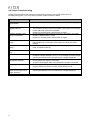
Icon
11
Description
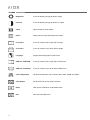
Brightness
It can be adjusting image get dark or bright.
Contrast
It can be adjusting image get distinct or vague.
Clock
Adjust frequency to fill display.
Phase
Adjust remove noise and sharpen the image.
H. Position
It can be moved to left or right side of image.
V. Position
It can be moved to up or down side of image
Language
Support other languages for OSD menu.
OSD Hor. POSITION
It can be moved to left or right side of OSD menu.
OSD Vert. POSITION
It can be moved to up or down side of OSD menu.
Color Temperature
Set favorite saturation color for 9300, 6500, 5800, sRGB, and USER.
Color Adjust
Set favorite color of red, greed, and blue.
Reset
Offer option of Reset for recall default value.
Exit
Save and exit OSD menu.