1
Operation Precautions
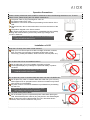
Please contact professional service staff for maintenance when the following situations occur. To avoid
electric shock, please unplug the LCD before maintenance.
The power cable or plug is damaged or warn out
Any fluid poured into the LCD.
Rainwater or uncommon substance permeating into the interior of the
LCD.
Unusual smoke, odor or abnormal noise occurs from the interior of the
LCD.
The product dropped or the frame cracked
No regular signal shown on the screen or unavailable function partially
Dealing with such situations yourself may cause high voltage, short
circuits or flashover.
* Please contact your local dealer or service center immediately
if the foresaid situations occur.
Installation of LCD
Keep the LCD away from water or heat sources!!
Keep your LCD from exposure to direct sunlight, rainwater, moisture,
dust, and away from improper circumstances like water or heat
sources (e.g. nearby the radiator, electric thermos, and hot plate, etc.).
Do not place the LCD on an unstable location!!
Do not place the LCD on an unstable, fluctuating or tilt flat.
The dropped display may endanger the personnel safety or product
functions.
* Such situations may cause short circuits, flashover
or electric shocks to the product.
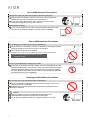
Do not place any vase or container filled with water near the LCD DISPLAY!!
Do not place any vase or container filled with water near your LCD; any
water toppled over or sprayed into the LCD due to omission may lead to
short circuits or circuit breaks.
Any fluid, moist or uncommon substance is prohibited from permeating
into the LCD.
* Dealing with such situations yourself may cause
high voltage, short circuits or flashover.
Do not wear out the power cable!!
Do not intertwine, pull or compress the power cable when placing the
LCD, otherwise the power cable or plug may be worn out and damaged.
Do not press the power cable beneath the LCD, otherwise electric
shocks, short circuits or flashover may occur.
2