1
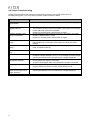
4.4 Simple Troubleshooting
Please check the failures and examine the peripheral according to the following instructions of
troubleshooting guide. If you can’t find any solution, please contact the dealer.
Failure
Troubleshooting Guide
Power fails to start up (signal ~
light disabled)
Check whether both ends of the power connector are properly plugged.
The message “No Input
Signal” DISPLAY
~
~
Disabled operation of the
Mouse or Keyboard
~
~
~
~
Check whether the signal cable is properly connected.
The minimum current is 4A to boot system. If the system is not booting.
Please check the current of the adapter.
Please turn off main power, and turn back on again.
Check whether the signal cable is loosened or improperly connected.
Check the windows driver is right.
Please turn off main power, and turn back on again.
Twinkle dots or stripes on the ~
screen
Lowered color or image
quality
~
Incorrect screen position and ~
size
Incorrect image or color
~
~
Check if there any interference source, e.g. automobile, train,
high-voltage wire or neon light, influencing on the audio and video
facilities.
Check whether every image configuration, e.g. Brightness, Contrast or
Color, is adjusted correctly.
Check whether the screen position and size are adjusted correctly.
Outward connected
loudspeaker disabled
~
~
~
Check whether the signal cable is loosened or improperly connected.
Change the image resolution on PC, if PC is working, for correct image;
output signal deviation of PC will influence the images displayed.
Check if the connect cable is unplugged.
Check whether the “MUTE” mode is on.
Check the audio signal cable of the peripheral is properly connected.
Power signal light twinkles
~
~
Check whether the signal cable is loosened.
Confirm whether the screen is under “Power-Saving” mode.
Input images and signals
failed; the message “Out of
range” DISPLAY
~
Change the image resolution on PC, if PC is working, for correct image;
output signal deviation of PC will influence the images displayed.
15