1
4
AcuteFinder - User manual
·
·
·
·
·
You can print the list as formatted web page via browser
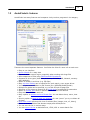
AcuteFinder has many settings, to suit your taste
AcuteFinder is easy and straightforward to use
Includes a tool to calculate or verify checksum for any file
A tool to find empty files and folders
For detailed info on the latest additions, modifications and fixes, see the revision history
at: www.acutefinder.com/history.htm
Give AcuteFinder a try, and you will be amazed by all those unnecessary duplicate files
that reside on your computer!
1.3
Duplicates defined
What exactly, are duplicate files? Simply put, this phrase refers to identical files that exist
in 2 or more copies on the disk. Since the files are the same, only the user can determine
which copy is the "original" that should be retained when deleting some or all of the extra
copies.
For example, if two instances of a file are found, one of them is the original, the other a
copy. When either of them is deleted, then only one instance remains (and is therefore
removed from the list of duplicates in AcuteFinder).
Even though this definition is disputable, then the use of "duplicate file finder" and
"duplicate files" has become a defacto standard on the Internet. In this user manual, we
will therefore use this word, along with synonyms like "identical", "extra copies", and
"multiple instances".
Finally, the word duplicate is defined in the following way, according to the Free
Dictionary:
du·pli·cate
adj.
1. Identically copied from an original.
2. Existing or growing in two corresponding parts; double.
3. Denoting a manner of play in cards in which partnerships or teams play the same
deals and compare scores at the end: duplicate bridge.
n.
1. An identical copy; a facsimile.
2. One that corresponds exactly to another, especially an original.
3. Games A card game in which partnerships or teams play the same deals and
compare scores at the end.
1.4
Why so many duplicates?
It's amazing how many extra copies of files can be found on the average computer. A real
mess actually! The reasons are many; often you make a backup copy, just in case, before
making serious changes, but forget to delete it afterwards. Often, the same file resides in
© 2004-2009, Hugmot ehf, Iceland. All rights reserved