1
Introduction
1.2
3
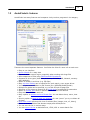
AcuteFinder's features
AcuteFinder has many features and compares nicely to other programs in its category.
These are the most important features. Just follow the links for more info on each one:
·
·
·
·
·
·
·
·
·
·
·
·
·
·
·
·
·
·
Easy to use interface
Search Wizard for a easy start
Fast and reliable search engine, especially when working with huge files
Safe comparison of files using CRC32 and MD5 checksums
Supports all drive types (hard disks, diskettes, CD-ROM, DVD, Network, memorydisk, WebDAV)
Option to search in archives (e.g. ZIP-files)
Many top-level folders can be specified for each search, even across drives
You can enter search folders in UNC format (like \\SERVER\SHARE\Folder)
Multiple file masks can be specified, e.g. to find all kind of image files
Selection of file groups to search for by quick-pick of predefined file extensions
Option to protect files found in specific search folders from deletion
Easy selection of files to work on
Many options to operate on list of found files. You can delete them, move, view
etc.
Security option to keep at least one instance of a set (even if you try to delete all
of them)
Built-in file viewer allows quick view of selected files (images, text, rft, binary)
Option to remove folders that become empty after delete/move
You can sort the list in various ways
You can export the list to delimited text, HTML, XML or create batch files
© 2004-2009, Hugmot ehf, Iceland. All rights reserved