1
User’s Guide
NPD4893-03 EN
User’s Guide
Copyright and Trademarks
Copyright and Trademarks
Copyright and Trademarks
No part of this publication may be reproduced, stored in a retrieval system, or transmitted in any form or by any
means, electronic, mechanical, photocopying, recording, or otherwise, without the prior written permission of Seiko
Epson Corporation. No patent liability is assumed with respect to the use of the information contained herein. Neither
is any liability assumed for damages resulting from the use of the information herein. The information contained
herein is designed only for use with this Epson product. Epson is not responsible for any use of this information as
applied to other products.
Neither Seiko Epson Corporation nor its affiliates shall be liable to the purchaser of this product or third parties for
damages, losses, costs, or expenses incurred by the purchaser or third parties as a result of accident, misuse, or abuse of
this product or unauthorized modifications, repairs, or alterations to this product, or (excluding the U.S.) failure to
strictly comply with Seiko Epson Corporation’s operating and maintenance instructions.
Seiko Epson Corporation and its affiliates shall not be liable for any damages or problems arising from the use of any
options or any consumable products other than those designated as Original Epson Products or Epson Approved
Products by Seiko Epson Corporation.
Seiko Epson Corporation shall not be held liable for any damage resulting from electromagnetic interference that
occurs from the use of any interface cables other than those designated as Epson Approved Products by Seiko Epson
Corporation.
®
EPSON is a registered trademark, and EPSON EXCEED YOUR VISION or EXCEED YOUR VISION is a trademark
of Seiko Epson Corporation.
SDXC Logo is a trademark of SD-3C, LLC.
Memory Stick Duo, Memory Stick PRO Duo, Memory Stick PRO-HG Duo, Memory Stick Micro, and MagicGate
Memory Stick Duo are trademarks of Sony Corporation.
®
Intel is a registered trademark of Intel Corporation.
®
PowerPC is a registered trademark of International Business Machines Corporation.
Epson Scan software is based in part on the work of the Independent JPEG Group.
libtiff
Copyright © 1988-1997 Sam Leffler
Copyright © 1991-1997 Silicon Graphics, Inc.
2
User’s Guide
Copyright and Trademarks
Permission to use, copy, modify, distribute, and sell this software and its documentation for any purpose is
hereby granted without fee, provided that (i) the above copyright notices and this permission notice
appear in all copies of the software and related documentation, and (ii) the names of Sam Leffler and
Silicon Graphics may not be used in any advertising or publicity relating to the software without the
specific, prior written permission of Sam Leffler and Silicon Graphics.
THE SOFTWARE IS PROVIDED "AS-IS" AND WITHOUT WARRANTY OF ANY KIND, EXPRESS,
IMPLIED OR OTHERWISE, INCLUDING WITHOUT LIMITATION, ANY WARRANTY OF
MERCHANTABILITY OR FITNESS FOR A PARTICULAR PURPOSE.
IN NO EVENT SHALL SAM LEFFLER OR SILICON GRAPHICS BE LIABLE FOR ANY SPECIAL,
INCIDENTAL, INDIRECT OR CONSEQUENTIAL DAMAGES OF ANY KIND, OR ANY DAMAGES
WHATSOEVER RESULTING FROM LOSS OF USE, DATA OR PROFITS, WHETHER OR NOT
ADVISED OF THE POSSIBILITY OF DAMAGE, AND ON ANY THEORY OF LIABILITY, ARISING
OUT OF OR IN CONNECTION WITH THE USE OR PERFORMANCE OF THIS SOFTWARE.
®
®
®
Microsoft , Windows , and Windows Vista are registered trademarks of Microsoft Corporation.
Apple, Macintosh, Mac OS, and OS X are trademarks of Apple Inc., registered in the U.S. and other countries.
AirPrint is a trademark of Apple Inc.
Google Cloud Print
™ is a registered trademark of Google Inc.
Adobe, Adobe Reader, Acrobat, and Photoshop are trademarks of Adobe systems Incorporated, which may be
registered in certain jurisdictions.
General Notice: Other product names used herein are for identification purposes only and may be trademarks of their
respective owners. Epson disclaims any and all rights in those marks.
© 2013 Seiko Epson Corporation. All rights reserved.
The contents of this manual and the specifications of this product are subject to change without notice.
3
User’s Guide
Contents
Contents
Loading Paper into the Paper Cassette. . . . . . . . .
Loading Envelopes into the Paper Cassette. . . . . .
Loading Paper and Envelopes into the Rear Paper
Feed Slot. . . . . . . . . . . . . . . . . . . . . . . . . . . . . . .
Placing Originals. . . . . . . . . . . . . . . . . . . . . . . . .
Automatic Document Feeder (ADF). . . . . . . .
Scanner glass. . . . . . . . . . . . . . . . . . . . . . . . .
Inserting a Memory Card. . . . . . . . . . . . . . . . . .
Copyright and Trademarks
Copyright and Trademarks. . . . . . . . . . . . . . . . . . . 2
Introduction
Where to Find Information. . . . . . . . . . . . . . . . . . . 8
Available Features. . . . . . . . . . . . . . . . . . . . . . . . . . 8
Caution, Important and Note. . . . . . . . . . . . . . . . . 9
Operating System Versions. . . . . . . . . . . . . . . . . . . 9
Using Epson Connect Service. . . . . . . . . . . . . . . . 10
. 33
. 36
. 39
. 42
. 42
. 44
. 44
Copying
Copying Documents. . . . . . . . . . . . . . . . . . . . . . . 47
Basic copying. . . . . . . . . . . . . . . . . . . . . . . . . . 47
Copy Mode Menu List. . . . . . . . . . . . . . . . . . . . . . 47
Important Instructions
Safety Instructions. . . . . . . . . . . . . . . . . . . . . . .
Product Advisories and Warnings. . . . . . . . . . . .
Setting up/using the product. . . . . . . . . . . . . .
Using the product with a wireless connection
...................................
Using memory cards. . . . . . . . . . . . . . . . . . . .
Using the LCD screen. . . . . . . . . . . . . . . . . . .
Handling ink cartridges. . . . . . . . . . . . . . . . . .
Restrictions on Copying. . . . . . . . . . . . . . . . . . .
Protecting Your Personal Information. . . . . . . . .
Printing
. 11
. 12
. 12
Printing from the Control Panel. . . . . . . . . . . . .
Printing a JPEG file. . . . . . . . . . . . . . . . . . . . .
Printing a TIFF file. . . . . . . . . . . . . . . . . . . . .
Printing from Your Computer. . . . . . . . . . . . . . .
Printer Driver and Status Monitor. . . . . . . . . .
Basic Operations. . . . . . . . . . . . . . . . . . . . . . . . .
Basic printing. . . . . . . . . . . . . . . . . . . . . . . . .
Canceling printing. . . . . . . . . . . . . . . . . . . . .
Other Options. . . . . . . . . . . . . . . . . . . . . . . . . .
Printing photos the easy way. . . . . . . . . . . . . .
Product presets (For Windows Only). . . . . . . .
2-sided printing. . . . . . . . . . . . . . . . . . . . . . .
Fit to page printing. . . . . . . . . . . . . . . . . . . . .
Pages per Sheet printing. . . . . . . . . . . . . . . . .
Anti-Copy Pattern printing (for Windows
Only). . . . . . . . . . . . . . . . . . . . . . . . . . . . . . .
Watermark printing (For Windows Only). . . .
Header/Footer printing (For Windows Only)
...................................
Administrator Settings for Printer Driver (for
Windows Only). . . . . . . . . . . . . . . . . . . . . . . . .
. 13
. 14
. 14
. 14
. 14
. 15
Getting to Know Your Product
Product Parts. . . . . . . . . . . . . . . . . . . . . . . . . . .
WF-7610 Series/WF-7620 Series. . . . . . . . . . .
WF-3620 Series/WF-3640 Series. . . . . . . . . . .
Guide to the Control Panel. . . . . . . . . . . . . . . . .
Status icons. . . . . . . . . . . . . . . . . . . . . . . . . . .
Icons for each mode. . . . . . . . . . . . . . . . . . . .
Status Menu. . . . . . . . . . . . . . . . . . . . . . . . . .
Icons on the Software Keyboard for the LCD
Screen. . . . . . . . . . . . . . . . . . . . . . . . . . . . . .
. 16
. 16
. 19
. 21
. 23
. 24
. 25
. 25
Paper and Media Handling
Introduction to Using, Loading, and Storing
Media. . . . . . . . . . . . . . . . . . . . . . . . . . . . . . . . .
Storing paper. . . . . . . . . . . . . . . . . . . . . . . . .
Selecting Paper. . . . . . . . . . . . . . . . . . . . . . . . . .
Paper type settings on the LCD screen. . . . . . .
Paper type settings from the printer driver. . . .
. 48
. 48
. 49
. 49
. 49
. 51
. 51
. 55
. 57
. 57
. 58
. 58
. 60
. 61
. 62
. 63
. 64
. 65
Scanning
Scanning from the Control Panel. . . . . . . . . . . . .
Scanning to a memory device. . . . . . . . . . . . .
Scanning to a folder. . . . . . . . . . . . . . . . . . . .
Scanning to an email. . . . . . . . . . . . . . . . . . . .
Scanning to a computer. . . . . . . . . . . . . . . . . .
Scan mode menu list. . . . . . . . . . . . . . . . . . . .
. 27
. 27
. 27
. 31
. 32
4
. 67
. 67
. 68
. 68
. 69
. 70
User’s Guide
Contents
Scanning from Your Computer. . . . . . . . . . . . . .
Scanning in Office Mode. . . . . . . . . . . . . . . . .
Scanning in Professional Mode. . . . . . . . . . . .
Image Adjustment Features. . . . . . . . . . . . . . .
Previewing and Adjusting the Scan Area. . . . .
Software Information. . . . . . . . . . . . . . . . . . . . .
Starting Epson Scan Driver. . . . . . . . . . . . . . .
Starting Other Scanning Software. . . . . . . . . .
. 70
. 70
. 72
. 74
. 77
. 79
. 79
. 79
Status Menu. . . . . . . . . . . . . . . . . . . . . . . . . . . . 117
Ink Cartridge and Consumable
Information
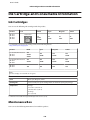
Ink Cartridges. . . . . . . . . . . . . . . . . . . . . . . . . . . 118
Maintenance Box . . . . . . . . . . . . . . . . . . . . . . . . 118
Replacing Ink Cartridges
Faxing
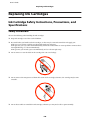
Ink Cartridge Safety Instructions, Precautions,
and Specifications. . . . . . . . . . . . . . . . . . . . . . . . 120
Safety instructions. . . . . . . . . . . . . . . . . . . . . . 120
Precautions on ink cartridge replacement. . . . . 121
Ink Cartridge Specifications. . . . . . . . . . . . . . . 122
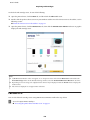
Checking the Ink Cartridge Status. . . . . . . . . . . . 122
For Windows. . . . . . . . . . . . . . . . . . . . . . . . . 122
For Mac OS X. . . . . . . . . . . . . . . . . . . . . . . . . 123
Using the control panel. . . . . . . . . . . . . . . . . . 124
Temporary Printing with Black Ink When Color
Ink Cartridges are Expended. . . . . . . . . . . . . . . . 125
For Windows. . . . . . . . . . . . . . . . . . . . . . . . . 125
For Mac OS X. . . . . . . . . . . . . . . . . . . . . . . . . 127
Conserving Black Ink When the Cartridge Is Low
(For Windows Only). . . . . . . . . . . . . . . . . . . . . . 128
Replacing an ink cartridge. . . . . . . . . . . . . . . . . . 129
Connecting to a Phone Line. . . . . . . . . . . . . . . . . . 81
Compatible telephone lines and phone cables
. . . . . . . . . . . . . . . . . . . . . . . . . . . . . . . . . . . . 81
Connecting the product to the phone line. . . . . . 81
Connecting a phone device. . . . . . . . . . . . . . . . 82
Setting Up for Faxing. . . . . . . . . . . . . . . . . . . . . . 83
Basic settings. . . . . . . . . . . . . . . . . . . . . . . . . . 83
Advanced settings. . . . . . . . . . . . . . . . . . . . . . . 87
Sending Faxes. . . . . . . . . . . . . . . . . . . . . . . . . . . . 88
Basic operations. . . . . . . . . . . . . . . . . . . . . . . . 88
Other options. . . . . . . . . . . . . . . . . . . . . . . . . . 90
Receiving Faxes. . . . . . . . . . . . . . . . . . . . . . . . . . . 94
Setting up the receive mode. . . . . . . . . . . . . . . . 94
Outputting received faxes. . . . . . . . . . . . . . . . . 95
Viewing received faxes on the LCD screen. . . . . 97
Receiving a fax by polling. . . . . . . . . . . . . . . . . 98
Receiving a fax manually. . . . . . . . . . . . . . . . . . 98
Saving received faxes on a computer. . . . . . . . . 99
Checking Fax Job Status and History. . . . . . . . . . . 99
Using the status menu. . . . . . . . . . . . . . . . . . . . 99
Printing a fax report. . . . . . . . . . . . . . . . . . . . 100
Fax Mode Menu List. . . . . . . . . . . . . . . . . . . . . . 101
Maintaining Your Product and
Software
Checking the Print Head Nozzles. . . . . . . . . . . . . 133
Using the Nozzle Check utility for Windows
. . . . . . . . . . . . . . . . . . . . . . . . . . . . . . . . . . . 133
Using the Nozzle Check utility for Mac OS X
. . . . . . . . . . . . . . . . . . . . . . . . . . . . . . . . . . . 133
Using the control panel. . . . . . . . . . . . . . . . . . 134
Cleaning the Print Head. . . . . . . . . . . . . . . . . . . 134
Using the Head Cleaning utility for Windows
. . . . . . . . . . . . . . . . . . . . . . . . . . . . . . . . . . . 135
Using the Head Cleaning utility for Mac OS X
. . . . . . . . . . . . . . . . . . . . . . . . . . . . . . . . . . . 135
Using the control panel. . . . . . . . . . . . . . . . . . 136
Aligning the Print Head. . . . . . . . . . . . . . . . . . . . 136
Using the Print Head Alignment utility for
Windows. . . . . . . . . . . . . . . . . . . . . . . . . . . . 136
Using the Print Head Alignment utility for
Mac OS X. . . . . . . . . . . . . . . . . . . . . . . . . . . . 137
Using the control panel. . . . . . . . . . . . . . . . . . 137
Making Network Service Settings. . . . . . . . . . . . . 138
Sharing the Product for Printing. . . . . . . . . . . . . 139
Making Contact List Settings
Creating a Contact. . . . . . . . . . . . . . . . . . . . . . . 102
Creating a Group. . . . . . . . . . . . . . . . . . . . . . . . 103
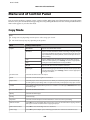
Menu List of Control Panel
Copy Mode. . . . . . . . . . . . . . . . . . . . . . . . . . . . . 105
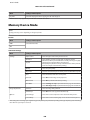
Memory Device Mode. . . . . . . . . . . . . . . . . . . . . 106
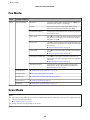
Fax Mode. . . . . . . . . . . . . . . . . . . . . . . . . . . . . . 107
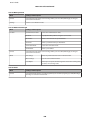
Scan Mode. . . . . . . . . . . . . . . . . . . . . . . . . . . . . 107
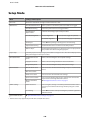
Setup Mode. . . . . . . . . . . . . . . . . . . . . . . . . . . . . 110
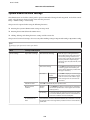
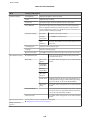
System Administration Settings. . . . . . . . . . . . 111
Contacts. . . . . . . . . . . . . . . . . . . . . . . . . . . . . . . 116
Presets. . . . . . . . . . . . . . . . . . . . . . . . . . . . . . . . 116
5
User’s Guide
Contents
Cleaning the Product. . . . . . . . . . . . . . . . . . . . . . 139
Cleaning the exterior of the product. . . . . . . . . 139
Cleaning the interior of the product. . . . . . . . . 140
Replacing Maintenance Box. . . . . . . . . . . . . . . . . 141
Checking the maintenance box status. . . . . . . . 141
Precautions on the maintenance box. . . . . . . . 141
Replacing a maintenance box. . . . . . . . . . . . . . 141
Transporting the Product. . . . . . . . . . . . . . . . . . 143
Checking and Installing Your Software. . . . . . . . . 145
Checking the software installed on your
computer. . . . . . . . . . . . . . . . . . . . . . . . . . . . 145
Installing the software. . . . . . . . . . . . . . . . . . . 146
Uninstalling Your Software. . . . . . . . . . . . . . . . . 146
For Windows. . . . . . . . . . . . . . . . . . . . . . . . . 146
For Mac OS X. . . . . . . . . . . . . . . . . . . . . . . . . 147
Blurry or smeared print. . . . . . . . . . . . . . . . . . 174
Miscellaneous Printout Problems. . . . . . . . . . . . . 175
Incorrect or garbled characters. . . . . . . . . . . . . 175
Incorrect margins. . . . . . . . . . . . . . . . . . . . . . 176
Printout has a slight slant. . . . . . . . . . . . . . . . . 176
Size or position of copied image is incorrect. . . 176
Inverted image. . . . . . . . . . . . . . . . . . . . . . . . 177
Blank pages print. . . . . . . . . . . . . . . . . . . . . . 177
Printed side is smeared or scuffed. . . . . . . . . . 177
Printing is too slow. . . . . . . . . . . . . . . . . . . . . 177
Paper Does Not Feed Correctly. . . . . . . . . . . . . . 178
Paper does not feed. . . . . . . . . . . . . . . . . . . . . 178
Multiple pages feed. . . . . . . . . . . . . . . . . . . . . 178
Paper is improperly loaded. . . . . . . . . . . . . . . 179
Paper is not ejected fully or is wrinkled. . . . . . . 179
The Product Does Not Print. . . . . . . . . . . . . . . . 179
All lights are off. . . . . . . . . . . . . . . . . . . . . . . . 179
The control panel or lights are on. . . . . . . . . . . 179
An ink error is indicated after you replace the
cartridge. . . . . . . . . . . . . . . . . . . . . . . . . . . . . 180
Other Problem. . . . . . . . . . . . . . . . . . . . . . . . . . 181
Printing plain papers quietly. . . . . . . . . . . . . . 181
The memory card is not recognized. . . . . . . . . 181
Rear paper feed slot is removed (Only for
WF-7610 Series/WF-7620 Series). . . . . . . . . . . 182
Transferring Data Using an External
Storage Device
Precautions on Storage Devices. . . . . . . . . . . . . . 149
Copying Files Between a Storage Device and Your
Computer. . . . . . . . . . . . . . . . . . . . . . . . . . . . . . 149
Copying files to your computer. . . . . . . . . . . . 149
Saving files to a storage device. . . . . . . . . . . . . 150
Error Indicators
Troubleshooting for Scanning
Error Messages on the Control Panel. . . . . . . . . . 152
Error Code on the Status Menu. . . . . . . . . . . . . . 153
Problems Indicated by Messages on the LCD
Screen or Status Light. . . . . . . . . . . . . . . . . . . . . 183
Problems When Starting a Scan. . . . . . . . . . . . . . 183
How to unblock Epson Event Manager. . . . . . . 183
Using the Automatic Document Feeder (ADF)
. . . . . . . . . . . . . . . . . . . . . . . . . . . . . . . . . . . 184
Using scanning software other than Epson
Scan driver. . . . . . . . . . . . . . . . . . . . . . . . . . . 184
Problems When Feeding Paper. . . . . . . . . . . . . . 185
The paper gets dirty. . . . . . . . . . . . . . . . . . . . . 185
Multiple sheets of paper are fed. . . . . . . . . . . . 185
The paper jams in the Automatic Document
Feeder (ADF) . . . . . . . . . . . . . . . . . . . . . . . . . 185
Problems With Scanning Time. . . . . . . . . . . . . . 185
Problems With Scanned Images. . . . . . . . . . . . . . 185
Scan quality is unsatisfactory. . . . . . . . . . . . . . 185
The scanning area or direction is
unsatisfactory. . . . . . . . . . . . . . . . . . . . . . . . . 186
Other Problems. . . . . . . . . . . . . . . . . . . . . . . . . . 188
Scanning quietly. . . . . . . . . . . . . . . . . . . . . . . 188
Problems Remain After Trying All Solutions. . . . 188
Troubleshooting for Printing/Copying
Diagnosing the Problem. . . . . . . . . . . . . . . . . . . 156
Checking product status. . . . . . . . . . . . . . . . . 157
Paper Jams. . . . . . . . . . . . . . . . . . . . . . . . . . . . . 159
Removing jammed paper from the rear cover
. . . . . . . . . . . . . . . . . . . . . . . . . . . . . . . . . . . 160
Removing jammed paper from inside the
product. . . . . . . . . . . . . . . . . . . . . . . . . . . . . . 165
Removing jammed paper from the paper
cassette. . . . . . . . . . . . . . . . . . . . . . . . . . . . . . 167
Removing jammed paper from the Automatic
Document Feeder (ADF). . . . . . . . . . . . . . . . . 169
Preventing paper jams. . . . . . . . . . . . . . . . . . . 171
Reprinting after a paper jam (for Windows
only). . . . . . . . . . . . . . . . . . . . . . . . . . . . . . . . 171
Print Quality Help. . . . . . . . . . . . . . . . . . . . . . . . 172
Horizontal banding. . . . . . . . . . . . . . . . . . . . . 173
Vertical banding or misalignment. . . . . . . . . . 173
Incorrect or missing colors. . . . . . . . . . . . . . . 174
6
User’s Guide
Contents
Troubleshooting for Faxing
Cannot send and receive fax. . . . . . . . . . . . . . . . . 189
“No dial tone detected.” error occurs. . . . . . . . 189
Memory full error occurs. . . . . . . . . . . . . . . . . 190
Quality problems. . . . . . . . . . . . . . . . . . . . . . . . 190
In sent faxes. . . . . . . . . . . . . . . . . . . . . . . . . . 190
In received faxes. . . . . . . . . . . . . . . . . . . . . . . 190
Other problems. . . . . . . . . . . . . . . . . . . . . . . . . . 190
Answering machine cannot answer voice calls
. . . . . . . . . . . . . . . . . . . . . . . . . . . . . . . . . . . 190
The time and date of sent or received fax jobs is
incorrect. . . . . . . . . . . . . . . . . . . . . . . . . . . . . 191
Cannot store received faxes in an external
storage device. . . . . . . . . . . . . . . . . . . . . . . . . 191
Faxes are sent at the wrong size. . . . . . . . . . . . 191
Product Information
System Requirements. . . . . . . . . . . . . . . . . . . . . 192
For Windows. . . . . . . . . . . . . . . . . . . . . . . . . 192
For Mac OS X. . . . . . . . . . . . . . . . . . . . . . . . . 192
Technical Specifications. . . . . . . . . . . . . . . . . . . . 192
Printer specifications. . . . . . . . . . . . . . . . . . . . 192
Scanner specifications. . . . . . . . . . . . . . . . . . . 195
Automatic Document Feeder (ADF)
specifications. . . . . . . . . . . . . . . . . . . . . . . . . 195
Fax specifications. . . . . . . . . . . . . . . . . . . . . . 196
Network interface specification. . . . . . . . . . . . 196
Memory card. . . . . . . . . . . . . . . . . . . . . . . . . 197
Mechanical. . . . . . . . . . . . . . . . . . . . . . . . . . . 198
Electrical. . . . . . . . . . . . . . . . . . . . . . . . . . . . . 199
Environmental. . . . . . . . . . . . . . . . . . . . . . . . 200
Standards and approvals. . . . . . . . . . . . . . . . . 201
Interface. . . . . . . . . . . . . . . . . . . . . . . . . . . . . 202
External USB device. . . . . . . . . . . . . . . . . . . . 202
Where To Get Help
Technical Support Web Site. . . . . . . . . . . . . . . . . 203
Contacting Epson Support. . . . . . . . . . . . . . . . . . 203
Before Contacting Epson. . . . . . . . . . . . . . . . . 203
Help for Users in Europe. . . . . . . . . . . . . . . . . 204
Help for Users in Australia. . . . . . . . . . . . . . . 204
Help for Users in Hong Kong. . . . . . . . . . . . . . 204
Index
7
User’s Guide
Introduction
Introduction
Where to Find Information
The latest version of the following manuals are available on the Epson support website.
http://www.epson.eu/Support (Europe)
http://support.epson.net/ (outside Europe)
❏ Start Here (paper):
Provides you with an introduction to the product and services.
❏ Basic Guide (paper):
Provides you with basic information when you are using the product without a computer. This manual may not be
included depending on model and region.
❏ Important Safety Instructions (paper):
Provides you with instructions to ensure the safe use of this product. This manual may not be included depending
on model and region.
❏ User’s Guide (PDF):
Provides you with detailed operating, safety, and troubleshooting instructions. See this guide when using this
product with a computer, or when using advanced features such as 2 sided copying.
❏ Network Guide (PDF):
Provides instructions on network settings for your computer, smartphone or product, and solving problems.
❏ Administrator’s Guide (PDF):
Provides the system administrator with information on security management and product settings.
Available Features
Check what is available for your product.
WF-7610
WF-7620
WF-7621
WF-3620
WF-3621
WF-3640
Print
✓
✓
✓
✓
✓
✓
Copy
✓
✓
✓
✓
✓
✓
Fax
✓
✓
✓
✓
✓
✓
✓
✓
✓
✓
✓
✓
Scan to a computer
Scan to a memory
device
8
User’s Guide
Introduction
WF-7610
WF-7620
WF-7621
WF-3620
WF-3621
WF-3640
✓
✓
✓
Australia and
New Zealand
only
✓
Australia and
New Zealand
only
LDAP*
✓
✓
✓
-
-
-
Paper cassette 2
-
✓
✓
-
-
✓
Scan to a network
folder
Scan to an email
Forward fax to a
network folder
Forward fax to an
email
* For more details, see the online Administrator’s Guide.
Caution, Important and Note
Caution, Important, and Note in this manual are indicated as below and have the following meaning.
!Caution
must be followed carefully to avoid bodily injury.
Important
c must
be observed to avoid damage to your equipment.
Note
contain useful tips and restrictions on product operation.
Operating System Versions
In this manual, the following abbreviations are used.
❏ Windows 8 refers to Windows 8, Windows 8 Pro, Windows 8 Enterprise.
❏ Windows 7 refers to Windows 7 Home Basic, Windows 7 Home Premium, Windows 7 Professional, and
Windows 7 Ultimate.
❏ Windows Vista refers to Windows Vista Home Basic Edition, Windows Vista Home Premium Edition, Windows
Vista Business Edition, Windows Vista Enterprise Edition, and Windows Vista Ultimate Edition.
❏ Windows XP refers to Windows XP Home Edition, Windows XP Professional x64 Edition, and Windows XP
Professional.
❏ Windows Server 2012 refers to Windows Server 2012 Essentials Edition, Server 2012 standard Edition.
❏ Windows Server 2008 refers to Windows Server 2008 Standard Edition, Windows Server 2008 Enterprise Edition,
Windows Server 2008 x64 Standard Edition, and Windows Server 2008 x64 Enterprise Edition.
9
User’s Guide
Introduction
❏ Windows Server 2008 R2 refers to Windows Server 2008 R2 Standard Edition and Windows Server 2008 R2
Enterprise Edition.
❏ Windows Server 2003 refers to Windows Server 2003 Standard Edition and Windows Server 2003 Enterprise
Edition, Windows Server 2003 x64 Standard Edition and Windows Server 2003 x64 Enterprise Edition.
❏ Mac OS X refers to Mac OS X 10.5.8, 10.6.x, 10.7.x, 10.8.x.
Using Epson Connect Service
Using Epson Connect and other companies’ services, you can easily print directly from your smartphone, tablet PC or
laptop, anytime and practically anywhere even across the globe! For more information about the printing and other
services, visit the following URL;
https://www.epsonconnect.com/ (Epson Connect portal site)
http://www.epsonconnect.eu (Europe only)
Note:
You can make network service settings using a Web browser on your computer, smartphone, tablet PC, or laptop that is
connected to the same network as the product.
& “Making Network Service Settings” on page 138
10
User’s Guide
Important Instructions
Important Instructions
Safety Instructions
Read and follow these instructions to ensure safe use of this product. Make sure you keep this guide for future
reference. Also, be sure to follow all warnings and instructions marked on the product.
❏ Use only the power cord supplied with the product and do not use the cord with any other equipment. Use of other
cords with this product or the use of the supplied power cord with other equipment may result in fire or electric
shock.
❏ Be sure your AC power cord meets the relevant local safety standard.
❏ Never disassemble, modify, or attempt to repair the power cord, plug, printer unit, scanner unit, or options by
yourself, except as specifically explained in the product’s guides.
❏ Unplug the product and refer servicing to qualified service personnel under the following conditions:
The power cord or plug is damaged; liquid has entered the product; the product has been dropped or the casing
damaged; the product does not operate normally or exhibits a distinct change in performance. Do not adjust
controls that are not covered by the operating instructions.
❏ Place the product near a wall outlet where the plug can be easily unplugged.
❏ Do not place or store the product outdoors, near excessive dirt or dust, water, heat sources, or in locations subject
to shocks, vibrations, high temperature or humidity.
❏ Take care not to spill liquid on the product and not to handle the product with wet hands.
❏ Keep this product at least 22 cm away from cardiac pacemakers. Radio waves from this product may adversely
affect the operation of cardiac pacemakers.
❏ If the LCD screen is damaged, contact your dealer. If the liquid crystal solution gets on your hands, wash them
thoroughly with soap and water. If the liquid crystal solution gets into your eyes, flush them immediately with
water. If discomfort or vision problems remain after a thorough flushing, see a doctor immediately.
❏ Avoid using a telephone during an electrical storm. There may be a remote risk of electric shock from lightning.
❏ Do not use a telephone to report a gas leak in the vicinity of the leak.
11
User’s Guide
Important Instructions
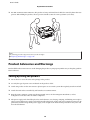
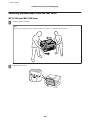
❏ For WF-7610 Series/WF-7620 Series: The product is heavy and should not be lifted or carried by fewer than two
persons. When lifting the product, the two persons should assume the correct positions (see below).
Note:
The following provides safety instructions for ink cartridges.
& “Replacing Ink Cartridges” on page 120
Product Advisories and Warnings
Read and follow these instructions to avoid damaging the product or your property. Make sure you keep this guide for
future reference.
Setting up/using the product
❏ Do not block or cover the vents and openings in the product.
❏ Use only the type of power source indicated on the product’s label.
❏ Avoid using outlets on the same circuit as photocopiers or air control systems that regularly switch on and off.
❏ Avoid electrical outlets controlled by wall switches or automatic timers.
❏ Keep the entire computer system away from potential sources of electromagnetic interference, such as
loudspeakers or the base units of cordless telephones.
❏ The power-supply cords should be placed to avoid abrasions, cuts, fraying, crimping, and kinking. Do not place
objects on top of the power-supply cords and do not allow the power-supply cords to be stepped on or run over. Be
particularly careful to keep all the power-supply cords straight at the ends and the points where they enter and
leave the transformer.
12
User’s Guide
Important Instructions
❏ If you use an extension cord with the product, make sure that the total ampere rating of the devices plugged into
the extension cord does not exceed the cord’s ampere rating. Also, make sure that the total ampere rating of all
devices plugged into the wall outlet does not exceed the wall outlet’s ampere rating.
❏ If you plan to use the product in Germany, the building installation must be protected by a 10 or 16 amp circuit
breaker to provide adequate short-circuit protection and over-current protection for the product.
❏ When connecting the product to a computer or other device with a cable, ensure the correct orientation of the
connectors. Each connector has only one correct orientation. Inserting a connector in the wrong orientation may
damage both devices connected by the cable.
❏ Place the product on a flat, stable surface that extends beyond the base of the product in all directions. The product
will not operate properly if it is tilted at an angle.
❏ When storing or transporting the product, avoid tilting it, placing it vertically, or turning it upside down;
otherwise ink may leak.
❏ Allow spaces behind the product for the cables, and space above the product so that you can fully raise the
document cover.
❏ Leave enough space in front of the product for the paper to be fully ejected.
❏ Avoid places subject to rapid changes in temperature and humidity. Also, keep the product away from direct
sunlight, strong light, or heat sources.
❏ Do not insert objects through the slots in the product.
❏ Do not put your hand inside the product or touch the ink cartridges during printing.
❏ Do not touch the white flat cable inside the product.
❏ Do not use aerosol products that contain flammable gases inside or around the product. Doing so may cause
fire.
❏ Do not move the ink cartridge holder by hand; otherwise, you may damage the product.
❏ Always turn the product off using the P button. Do not unplug the product or turn off the power at the outlet until
the LCD screen has turned off completely.
❏ Before transporting the product, make sure that the print head is in the home (far right) position and the ink
cartridges are in place.
❏ Be careful not to trap your fingers when closing the scanner unit.
❏ If you are not going to use the product for a long period, be sure to unplug the power cord from the electrical
outlet.
❏ Do not press too hard on the scanner glass when placing the originals.
Using the product with a wireless connection
❏ Do not use this product inside medical facilities or near medical equipment. Radio waves from this product may
adversely affect the operation of electrical medical equipment.
13
User’s Guide
Important Instructions
❏ Do not use this product near automatically controlled devices such as automatic doors or fire alarms. Radio waves
from this product may adversely affect these devices, and could lead to accidents due to malfunction.
Using memory cards
❏ Do not remove a memory card or turn off the product while the memory card light is flashing.
❏ The methods for using memory cards vary according to card type. Be sure to refer to the documentation packaged
with your memory card for details.
❏ Use only memory cards compatible with the product.
& “Memory card” on page 197
Using the LCD screen
❏ The LCD screen may contain a few small bright or dark spots, and because of its features it may have an uneven
brightness. These are normal and do not indicate that it is damaged in any way.
❏ Only use a dry, soft cloth to clean the LCD screen or touchscreen. Do not use liquid or chemical cleaners.
❏ The exterior cover of the LCD screen could break if it receives a heavy impact. Contact your dealer if the panel
surface chips or cracks, and do not touch or attempt to remove the broken pieces.
❏ Press the touchscreen gently with your finger. Do not press force or operate with your nails.
❏ Do not operate by a sharp edge thing such as a ball point pen, sharp pencil, stylus pen and so on.
❏ Condensation inside the panel due to abrupt changes in temperature or humidity may cause performance to
deteriorate.
Handling ink cartridges
We will provide ink-related safety instructions and product advice/warnings in the linked section (before “Replacing
Ink Cartridges” section).
& “Replacing Ink Cartridges” on page 120
Restrictions on Copying
Observe the following restrictions in order to ensure the responsible and legal use of the product.
Copying of the following items is prohibited by law:
❏ Bank bills, coins, government-issued marketable securities, government bond securities, and municipal securities
❏ Unused postage stamps, pre-stamped postcards, and other official postal items bearing valid postage
❏ Government-issued revenue stamps, and securities issued according to legal procedure
Exercise caution when copying the following items:
14
User’s Guide
Important Instructions
❏ Private marketable securities (stock certificates, negotiable notes, checks, etc.), monthly passes, concession
tickets, etc.
❏ Passports, driver’s licenses, warrants of fitness, road passes, food stamps, tickets, etc.
Note:
Copying these items may also be prohibited by law.
Responsible use of copyrighted materials:
❏ Products can be misused by improperly copying copyrighted materials. Unless acting on the advice of a
knowledgeable attorney, be responsible and respectful by obtaining the permission of the copyright holder before
copying published material.
Protecting Your Personal Information
This product allows you to store names and telephone numbers in its memory even when the power is turned off.
Use the following menu to erase the memory if you give the product to someone else or dispose of it.
Setup > System Administration > Restore Default Settings > Clear All Data and Settings
15
User’s Guide
Getting to Know Your Product
Getting to Know Your Product
Note:
The illustrations in this manual are from a similar product model. Although they may differ from your actual product, the
method of operation is the same.
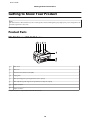
Product Parts
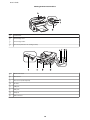
WF-7610 Series/WF-7620 Series
a.
ADF cover
b.
ADF lever
c.
Automatic Document Feeder (ADF)
d.
Edge guide
e.
ADF input tray (place your originals here to be copied)
f.
ADF output tray (your originals are ejected here as they are copied)
g.
Paper cassette 1
h.
Paper cassette 2 *
* Paper cassette 2 is only available for the WF-7620 Series.
16
User’s Guide
Getting to Know Your Product
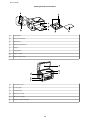
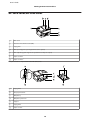
a.
Edge guides
b.
Rear paper feed slot
c.
Output tray
d.
Output tray extension
e.
Stopper
f.
Edge guides
g.
Paper cassette
h.
Paper cassette cover
a.
Document cover
b.
Scanner glass
c.
Control panel
d.
Memory card slot
e.
Memory card light
f.
External interface USB port
17
User’s Guide
Getting to Know Your Product
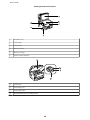
a.
Scanner unit
b.
Ink cartridge cover
c.
Ink cartridge holder
d.
Print head (under the ink cartridge holder)
a.
Maintenance box
b.
Rear cover 1
c.
Rear cover 2 (Auto Duplexer)
d.
AC inlet
e.
LINE port
f.
EXT. port
g.
LAN port
h.
USB connector
18
User’s Guide
Getting to Know Your Product
WF-3620 Series/WF-3640 Series
a.
ADF cover
b.
Automatic Document Feeder (ADF)
c.
Edge guide
d.
ADF input tray (place your originals here to be copied)
e.
ADF output tray (your originals are ejected here as they are copied)
f.
Paper cassette 1
g.
Paper cassette 2 *
* Paper cassette 2 is only available for the WF-3640 Series.
a.
Edge guides
b.
Rear paper feed slot
c.
Output tray
d.
Output tray extension
e.
Stopper
f.
Edge guides
g.
Paper cassette
19
User’s Guide
Getting to Know Your Product
a.
Document cover
b.
Scanner glass
c.
Control panel
d.
Memory card slot
e.
Memory card light
f.
External interface USB port
a.
Scanner unit
b.
Ink cartridge cover
c.
Ink cartridge holder
d.
Print head (under the ink cartridge holder)
20
User’s Guide
Getting to Know Your Product
a.
Maintenance box
b.
Rear cover (Auto Duplexer)
c.
AC inlet
d.
LINE port
e.
EXT. port
f.
LAN port
g.
USB connector
Guide to the Control Panel
Note:
❏ Control panel design varies depending on location.
❏
Although the control panel design and what displayed on the LCD screen such as menu names and option names may
differ from your actual product, the method of operation is the same.
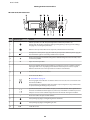
WF-7610 Series/WF-7620 Series
21
User’s Guide
Getting to Know Your Product
WF-3620 Series/WF-3640 Series
Buttons/Lights
Function
a
Turns the product on or off. The power light turns on when the product is on.
Flashes when the product is printing/copying/scanning/faxing, replacing an ink cartridge,
charging ink, or cleaning the print head.
b
Returns to the top menu. When on the top menu, switches between the modes.
*1
c
Resets your settings to user default settings. If user default settings have not been made, resets
to the factory default.
d
e
f
Interrupts the current print or copy job and allows you to perform a different print or copy job.
Press this button again to restart the job that has been paused.
y
Stops the current operation.
-
LCD screen displays menus. If your product has a touch panel, you can scroll the screen by
swiping the LCD screen. Try swiping a little harder if the touch panel is slow to respond.
Returns to the Home screen if no operations are made for a few minutes.
g
Cancels/returns to the previous menu.
Shows the Status Menu.
& “Status Menu” on page 25
The orange light on the left turns on or flashes when an error occurs. You can check the error
from the Status Menu.
h
The blue light on the right flashes while the product is processing data. It stays on when there
are print/scan/fax jobs waiting to be processed.
i
j
,
Specifies the date/time or the number of copies, as well as fax numbers. Enters alphanumeric
characters and switches between uppercase, lowercase, and numbers each time it is pressed.
It may be easier to use the software keypad to enter text instead of using these buttons.
c
Clears the number of copies and fax number.
0-9
k
Starts printing/copying/scanning/faxing in black and white.
l
Starts printing/copying/scanning/faxing in color.
m
u, d *2
Scrolls the screen.
22
User’s Guide
Getting to Know Your Product
Buttons/Lights
n
*2
Function
Shows a list of the preset settings you registered.
*1This button is only available for the WF-7610 Series/WF-7620 Series.
*2These buttons are only available for the WF-3620 Series.
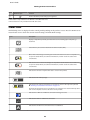
Status icons
The following icons are displayed on the control panel depending on the product’s status. Press the Wi-Fi icon or
network status icon to check the current network settings and make Wi-Fi settings.
Icons
Description
Displays a help which provides you instructions such as loading paper and placing a
document.
A document is placed on the Automatic Document Feeder (ADF).
One or more ink cartridges are running low on ink or the maintenance box is nearly full. Press
to open the Status Menu, select Printer Information, and then check the status of the
consumables.
Indicates that one or more ink cartridges are expended or the maintenance box is full. Press
to open the Status Menu, select Printer Information, and then check the status of the
consumables.
Indicates that unread or unprinted fax data is stored in the product.
Indicates the fax memory usage.
Indicates the fax memory is full. Delete received faxes you have already read or printed.
& “Checking received faxes in the Inbox” on page 100
If you have made settings to save received faxes on a computer or an external memory device,
turn on the computer or connect the device to the product.
Indicates that a Wi-Fi or an Ethernet connection is being processed.
Indicates that there is no Ethernet connection.
Indicates that an Ethernet connection has been established.
23
User’s Guide
Getting to Know Your Product
Icons
Description
Indicates that there is no Wi-Fi connection.
Indicates that a Wi-Fi network error has occurred or the product is searching for a connection.
Indicates that a Wi-Fi connection has been established. The number of bars indicates the
connection's signal strength.
Indicates that an Ad Hoc connection has been established.
Indicates that a Wi-Fi Direct mode connection has been established.
Indicates that Simple AP mode connection has been established.
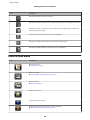
Icons for each mode
Icons
Description
Enters Copy mode.
& “Copying” on page 47
Enters Scan mode.
& “Scanning from the Control Panel” on page 67
Enters Fax mode.
& “Faxing” on page 81
*1
Opens Presets screen.
Enters Memory Device mode.
*2
Shows the registered contact list for scanning and faxing.
& “Making Contact List Settings” on page 102
24
User’s Guide
Getting to Know Your Product
Icons
Description
Shows the status of Epson Connect service.
& “Using Epson Connect Service” on page 10
Opens Eco Mode settings screen.
& “System Administration Settings” on page 111
Enters Setup mode.
& “Setup Mode” on page 110
*1This icon is only available for the WF-7610 Series/WF-7620 Series/WF-3640 Series.
*2This icon is only available for the WF-7610 Series/WF-7620 Series.
Status Menu
The Status Menu displays the current status of the product and jobs. Press
on the control panel.
Function
Description
Printer Information
Displays the status of the consumables and any errors that have occurred in the product. To
resolve an error, select the error from the list to display the error message.
Job Monitor
Displays a list of ongoing jobs and jobs waiting to be processed.
Job History
Displays the job history. If a job fails, an error code is shown in the history. You can check the
error code and the solution for the error in the following section.
& “Error Code on the Status Menu” on page 153
Job Storage
Select Inbox to display the received faxes stored in the product’s memory.
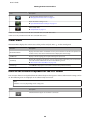
Icons on the Software Keyboard for the LCD Screen
You can enter characters and symbols from the software keyboard to register a contact, make network settings, and so
on. The following icons are displayed on the software keyboard screen.
Note:
Available icons vary depending on the setting item.
Icons
Description
Switches between upper case and lower case letters.
25
User’s Guide
Getting to Know Your Product
Icons
Description
Switches the character type.
123#: Allows you to enter numbers and symbols.
ABC: Allows you to enter the alphabet.
ÁÄÂ: Allows you to enter special characters such as umlauts and accents.
Changes the keyboard layout.
Enters a space.
Deletes the character to the left.
Confirms the entered characters.
26
User’s Guide
Paper and Media Handling
Paper and Media Handling
Introduction to Using, Loading, and Storing Media
You can achieve good results with most types of plain paper. However, coated papers provide superior prints because
they absorb less ink.
Epson provides special papers that are formulated for the ink used in Epson ink jet products, and recommends these
papers to ensure high-quality results.
When loading special paper distributed by Epson, read the instruction sheets packed with the paper first and keep the
following points in mind.
Note:
❏ Load the paper into the paper cassette printable side down. The printable side is usually whiter or glossier. See the
instruction sheets packed with the paper for more information. Some types of paper have cut corners to help identify the
correct loading direction.
❏
If the paper is curled, flatten it or curl it slightly in the opposite direction before loading. Printing on curled paper may
cause ink to smear on your prints.
Storing paper
Return unused paper to the original package as soon as you finish printing. When handling special media, Epson
recommends storing your prints in a resealable plastic bag. Keep unused paper and prints away from high
temperature, humidity, and direct sunlight.
Selecting Paper
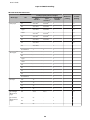
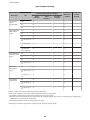
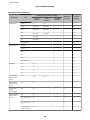
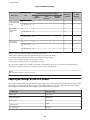
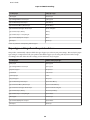
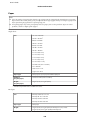
The following table shows supported paper types. The loading capacity, paper source, and availability of borderless
printing vary by paper as shown below.
27
User’s Guide
Paper and Media Handling
WF-7610 Series/WF-7620 Series
Loading capacity (sheets or height)
Media Type
Size
paper
cassette 1
paper
cassette 2*1
Borderless
printing
rear paper
feed slot
2-sided
printing
A3
27.5 mm*3
27.5 mm*3
1
-
✓
B4
27.5 mm*3
27.5 mm*3
1
-
✓
Legal
27.5 mm*3
27.5 mm*3
1
-
✓
Letter
27.5 mm*3
27.5 mm*3
1
-
✓
A4
27.5 mm*3
27.5 mm*3
1
-
✓
B5
27.5 mm*3
27.5 mm*3
1
-
✓
A5
27.5 mm*3
-
1
-
✓
A6
27.5 mm*3
-
1
-
-
User defined
1
1
1
-
✓
A3
-
-
1
-
-
B4
-
-
1
-
-
Legal
-
-
1
-
-
Letter
-
-
1
-
-
A4
-
-
1
-
-
B5
-
-
1
-
-
A5
-
-
1
-
-
A6
-
-
1
-
-
User defined
-
-
1
-
-
#10
10
-
1
-
-
DL
10
-
1
-
-
C6
10
-
1
-
-
C4
10
-
1
-
-
Epson Bright
White Ink Jet
Paper
A4
200*3
200*3
1
-
✓
Epson Photo
Quality Ink Jet
Paper
A3+
80
-
1
-
-
A3
80
-
1
-
-
A4
80
-
1
-
-
Plain paper *2
Thick paper*4
Envelope
28
User’s Guide
Paper and Media Handling
Loading capacity (sheets or height)
Media Type
Epson Matte
Paper Heavyweight
Epson Premium
Glossy Photo
Paper
Epson Premium
Semigloss Photo
Paper
Epson Ultra
Glossy Photo
Paper
Epson Photo
Paper, Glossy
Size
paper
cassette 1
paper
cassette 2*1
rear paper
feed slot
Borderless
printing
2-sided
printing
A3+
20
-
1
✓
-
A3
20
-
1
✓
-
A4
20
-
1
✓
-
A3+
20
-
1
✓
-
A3
20
-
1
✓
-
A4
20
-
1
✓
-
10 × 15 cm (4 × 6
in.)
20
-
1
✓
-
13 × 18 cm (5 × 7
in.)
20
-
1
✓
-
16:9 wide size
(102 × 181 mm)
20
-
1
✓
-
A3+
20
-
1
✓
-
A3
20
-
1
✓
-
A4
20
-
1
✓
-
10 × 15 cm (4 × 6
in.)
20
-
1
✓
-
A4
20
-
1
✓
-
10 × 15 cm (4 × 6
in.)
20
-
1
✓
-
13 × 18 cm (5 × 7
in.)
20
-
1
✓
-
A4
20
-
1
✓
-
10 × 15 cm (4 × 6
in.)
20
-
1
✓
-
13 × 18 cm (5 × 7
in.)
20
-
1
✓
-
*1Paper cassette 2 may not be available depending on the product.
*2Plain paper is defined as paper with a weight of 64 g/m2 (17 lb) to 90 g/m2 (24 lb).
This includes preprinted paper, letterhead, colored paper, and recycled paper.
Make sure you are using long-grain paper. If you are not sure what type of paper you are using, consult the paper packaging or the
manufacturer to check the paper specifications.
*3The loading capacity for manual 2-sided printing is 30 sheets.
*4Thick paper is defined as paper with a weight of 91 g/m2 (25 lb) to 256 g/m2 (68 lb).
29
User’s Guide
Paper and Media Handling
WF-3620 Series/WF-3640 Series
Loading capacity (sheets or height)
Media Type
Size
paper
cassette 1
paper
cassette 2*1
Borderless
printing
rear paper
feed slot
2-sided
printing
Legal
30*3
30*3
1
-
✓*5
Letter
27.5 mm*4
27.5 mm*4
1
-
✓
A4
27.5 mm*4
27.5 mm*4
1
-
✓
B5
27.5 mm*4
27.5 mm*4
1
-
✓
A5
27.5 mm*4
-
1
-
✓*5
A6
27.5 mm*4
-
-
-
-
User defined
1
1
1
-
✓
Legal
-
-
1
-
-
Letter
-
-
1
-
-
A4
-
-
1
-
-
B5
-
-
1
-
-
A5
-
-
1
-
-
User defined
-
-
1
-
-
#10
10
-
1
-
-
DL
10
-
1
-
-
C6
10
-
-
-
-
C4
-
-
1
-
-
Epson Bright
White Ink Jet
Paper
A4
200*4
200*4
1
-
✓
Epson Photo
Quality Ink Jet
Paper
A4
80
-
1
-
-
Epson Matte
Paper Heavyweight
A4
20
-
1
✓
-
Epson Premium
Glossy Photo
Paper
A4
20
-
1
✓
-
10 × 15 cm (4 × 6
in.)
20
-
-
✓
-
13 × 18 cm (5 × 7
in.)
20
-
-
✓
-
16:9 wide size
(102 × 181 mm)
20
-
-
✓
-
Plain Paper*2
Thick paper*6
Envelope
30
User’s Guide
Paper and Media Handling
Loading capacity (sheets or height)
Media Type
Epson Premium
Semigloss Photo
Paper
Epson Ultra
Glossy Photo
Paper
Epson Photo
Paper, Glossy
Size
paper
cassette 2*1
paper
cassette 1
rear paper
feed slot
Borderless
printing
2-sided
printing
A4
20
-
1
✓
-
10 × 15 cm (4 × 6
in.)
20
-
-
✓
-
A4
20
-
1
✓
-
10 × 15 cm (4 × 6
in.)
20
-
-
✓
-
13 × 18 cm (5 × 7
in.)
20
-
-
✓
-
A4
20
-
1
✓
-
10 × 15 cm (4 × 6
in.)
20
-
-
✓
-
13 × 18 cm (5 × 7
in.)
20
-
-
✓
-
*1Paper cassette 2 may not be available depending on the product.
*2Plain paper is defined as paper with a weight of 64 g/m2 (17 lb) to 90 g/m2 (24 lb).
This includes preprinted paper, letterhead, colored paper, and recycled paper.
*3The loading capacity for manual 2-sided printing is 1 sheet.
*4The loading capacity for manual 2-sided printing is 30 sheets.
*5Legal and A5 size paper are not available for automatic 2-sided printing. These sizes are for manual 2-sided printing only.
*6Thick paper is defined as paper with a weight of 91 g/m2 (25 lb) to 256 g/m2 (68 lb).
Note:
The availability of paper varies by location.
Paper type settings on the LCD screen
The product automatically adjusts itself for the type of paper you select in your print settings. That is why the paper
type setting is so important. It tells your product what kind of paper you are using and adjusts the ink coverage
accordingly. The table below lists the settings you should choose for your paper.
For this paper
LCD paper type
Plain paper*1
plain papers
Preprinted paper *1
Preprinted
Letterhead*1
Letterhead
Colored paper*1
Color
Recycled paper*1
Recycled
31
User’s Guide
Paper and Media Handling
For this paper
LCD paper type
Thick paper
Thick-Paper
Epson Bright White Ink Jet Paper*1
plain papers
Epson Ultra Glossy Photo Paper
Ultra Glossy
Epson Premium Glossy Photo Paper
Prem. Glossy
Epson Premium Semigloss Photo Paper
Prem. Semigloss
Epson Photo Paper, Glossy
Glossy
Epson Matte Paper – Heavyweight
Matte
Epson Photo Quality Ink Jet Paper
Matte
Envelopes
Envelope
*1You can perform 2-sided printing with this paper.
Paper type settings from the printer driver
The product automatically adjusts itself for the type of paper you select in your print settings. That is why the paper
type setting is so important. It tells your product what kind of paper you are using and adjusts the ink coverage
accordingly. The table below lists the settings you should choose for your paper.
For this paper
Printer driver paper type
Plain paper
plain papers
Epson Bright White Ink Jet Paper
plain papers
Preprinted paper
Preprinted
Letterhead
Letterhead
Colored paper
Color
Recycled paper
Recycled
Epson Ultra Glossy Photo Paper
Epson Ultra Glossy
Epson Premium Glossy Photo Paper
Epson Premium Glossy
Epson Premium Semigloss Photo Paper
Epson Premium Semigloss
Epson Photo Paper, Glossy
Photo Paper Glossy
Epson Matte Paper – Heavyweight
Epson Matte
Thick paper
Thick-Paper
Epson Photo Quality Ink Jet Paper
Epson Matte
Envelopes
Envelope
32
User’s Guide
Paper and Media Handling
Note:
The availability of special media varies by location. For the latest information on media available in your area, contact
Epson support.
& “Technical Support Web Site” on page 203
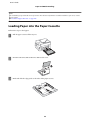
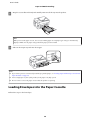
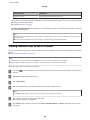
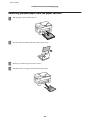
Loading Paper into the Paper Cassette
Follow these steps to load paper:
A
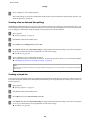
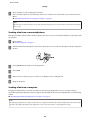
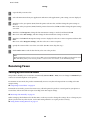
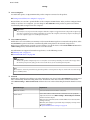
Pull the paper cassette all the way out.
B
For WF-7610 Series/WF-7620 Series: Remove the cover.
C
Pinch and slide the edge guides to the sides of the paper cassette.
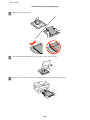
33
User’s Guide
Paper and Media Handling
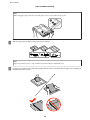
Note:
When using paper larger than A4, extend the paper cassette to the symbol on the cassette.
D
Slide the edge guide to adjust to the paper size you will use.
Note:
Paper larger than Legal size is only available for the WF-7610 Series/WF-7620 Series.
E
Load paper toward the edge guide with printable side face down, and check that the paper is not sticking out
from the end of the cassette.
34
User’s Guide
Paper and Media Handling
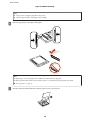
Note:
❏ Paper cassette 2 supports paper B5 or larger only.
❏
F
Fan and align the edges of the paper before loading.
Slide the edge guides to the edges of the paper.
Note:
For plain paper, do not load paper above the H arrow mark inside the edge guide.
For Epson special media, make sure the number of sheets is less than the limit specified for the media.
& “Selecting Paper” on page 27
G
For WF-7610 Series/WF-7620 Series: Put the paper cassette cover back on.
35
User’s Guide
Paper and Media Handling
H
Keep the cassette flat and slowly and carefully reinsert it all the way into the product.
Note:
When you insert the paper cassette, the screen for making paper size and paper type settings is automatically
displayed. Make sure the paper settings match the paper you have loaded.
I
Slide out the output tray and raise the stopper.
Note:
❏ If you want to print on commercially available pre-punched paper, see “Loading Paper and Envelopes into the Rear
Paper Feed Slot” on page 39.
❏
Leave enough space in front of the product for the paper to be fully ejected.
❏
Do not remove or insert the paper cassette while the product is operating.
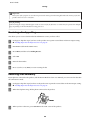
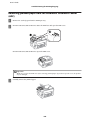
Loading Envelopes into the Paper Cassette
Follow these steps to load envelopes:
36
User’s Guide
Paper and Media Handling
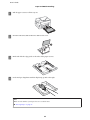
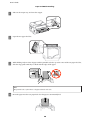
A
Pull the paper cassette 1 all the way out.
B
For WF-7610 Series/WF-7620 Series: Remove the cover.
C
Pinch and slide the edge guides to the sides of the paper cassette.
D
Load envelopes lengthwise with the flap facing up and to the right.
Note:
Make sure the number of envelopes does not exceed the limit.
& “Selecting Paper” on page 27
37
User’s Guide
Paper and Media Handling
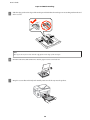
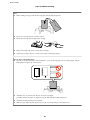
E
Slide the edge guides to the edges of the envelopes and check that the envelopes are not sticking out from the end
of the cassette.
Note:
Even if you do not feel a click, slide the edge guides to the edges of the envelopes.
F
For WF-7610 Series/WF-7620 Series: Put the paper cassette cover back on.
G
Keep the cassette flat and slowly and carefully reinsert it all the way into the product.
38
User’s Guide
Paper and Media Handling
Note:
When you insert the paper cassette, the screen for making paper size and paper type settings is automatically
displayed. Make sure the paper settings match the paper you have loaded.
H
Slide out the output tray and raise the stopper.
Note:
❏ The thickness of envelopes and their ability to fold vary widely. If the total thickness of the stack of envelopes
exceeds 10mm, press down on the envelopes to flatten them before loading. If print quality declines when a stack
of envelopes is loaded, load one envelope at a time.
❏
Do not use envelopes that are curled or folded.
❏
Flatten the envelope and the flaps before loading.
❏
Flatten the leading edge of the envelope before loading.
❏
Avoid using envelopes that are too thin, as they may curl during printing.
❏
Align the edges of the envelopes before loading.
Loading Paper and Envelopes into the Rear Paper Feed
Slot
Follow the steps below to load paper and envelopes into the rear paper feed slot:
Note:
❏ Send your job before loading paper into the rear paper feed slot.
❏
Load paper in the rear paper feed slot when the product is not operating.
39
User’s Guide
Paper and Media Handling
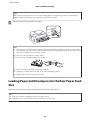
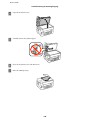
A
Slide out the output tray, and raise the stopper.
B
Open the rear paper feed slot.
C
While holding only one sheet of paper with the printable side face-up at the center of the rear paper feed slot,
slide the edge guides until they are flush with the edges of the paper.
Note:
The printable side is often whiter or brighter than the other side.
D
Insert the paper into the rear paper feed slot. The paper is automatically fed.
40
User’s Guide
Paper and Media Handling
Note:
❏ When loading envelopes, load the short edge first with the flap facing down.
❏
Do not use envelopes that are curled or folded.
❏
Flatten the envelope and the flaps before loading.
❏
Flatten the leading edge of the envelope before loading.
❏
Avoid using envelopes that are too thin, as they may curl during printing.
Note for paper with binding holes:
❏ You can use pre-punched paper with binding holes on one of the long edges. Do not load the paper with the
binding holes along the top or the bottom.
❏
Available sizes are A3*, B4*, A4, B5, A5, A6*, Letter and Legal.
(* A3, B4, and A6 size paper are supported only for WF-7610 Series/WF-7620 Series.)
❏
Automatic 2-sided printing is not available.
❏
Make sure you adjust the print position of your file to avoid printing over the binder holes.
41
User’s Guide
Paper and Media Handling
Placing Originals
Automatic Document Feeder (ADF)
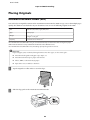
You can load your original documents in the Automatic Document Feeder (ADF) to copy, scan, or fax multiple pages
quickly. The ADF can scan both sides of your documents. You can use the following originals in the ADF.
Size
B5, A5*1, A4, Letter, Legal*1, B4*2, A3*2
Type
Plain paper
Weight
64 g/m2 to 95 g/m2
Capacity
35 sheets or 3.5 mm or less*3
*1For the WF-3620 Series/WF-3640 Series, you cannot automatically scan both sides of A5 and Legal size paper.
*2B4 and A3 documents are only available for the WF-7610 Series/WF-7620 Series.
*3For the WF-3620 Series/WF-3640 Series, the loading capacity of Legal size is 10 sheets.
Important:
c To
prevent paper jams, avoid the following documents. For these types, use the scanner glass.
❏
Documents held together with paper clips, staples, etc.
❏
Documents that have tape or paper stuck to them.
❏
Photos, OHPs, or thermal transfer paper.
❏
Paper that is torn, wrinkled, or has holes.
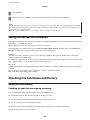
A
Tap the originals on a flat surface to even the edges.
B
Slide the edge guide on the Automatic Document Feeder.
42
User’s Guide
Paper and Media Handling
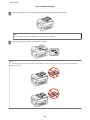
C
Insert the originals face-up and short edge first into the Automatic Document Feeder.
Note:
Do not load documents above the H arrow mark inside the edge guide.
D
Slide the edge guide until it is flush with the originals.
Note:
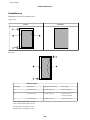
For 2-up Copy layout, place the original as shown. Make sure the orientation of the original matches the Document
Orientation settings.
43
User’s Guide
Paper and Media Handling
Scanner glass
A
Open the document cover and place your original face-down on the scanner glass.
B
Slide the original to the corner.
Note:
See the following sections if any problems occur with the scanning area or the scanning direction when using EPSON
Scan.
& “The edges of your original are not scanned” on page 186
& “Multiple documents are scanned into a single file” on page 187
C
Close the cover gently.
Note:
When there is a document in the Automatic Document Feeder (ADF) and on the scanner glass, priority is given to the
document in the Automatic Document Feeder (ADF).
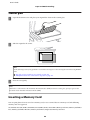
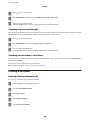
Inserting a Memory Card
You can print photos that are stored on a memory card, or save scanned data on a memory card. The following
memory cards are supported.
SD, miniSD, microSD, SDHC, miniSDHC, microSDHC, SDXC, microSDXC, Memory Stick Duo, Memory Stick PRO
Duo, Memory Stick PRO-HG Duo, Memory Stick Micro, MagicGate Memory Stick Duo
44
User’s Guide
Paper and Media Handling
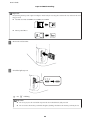
Important:
c The
following memory cards require an adapter. Attach it before inserting the card into the slot, otherwise the card
may get stuck.
❏
miniSD, microSD, miniSDHC, microSDHC, microSDXC
❏
Memory Stick Micro
A
Insert one card at a time.
B
Check the light stays on.
= on,
= flashing
c ❏Important:
Do not try to force the card all the way into the slot. It should not be fully inserted.
❏
Do not remove the memory card while the light is flashing. The data in the memory card may be lost.
45
User’s Guide
Paper and Media Handling
Note:
If the Memory Device Interface settings are set to Disable, the memory card is not recognized.
46
User’s Guide
Copying
Copying
Copying Documents
Basic copying
Follow the steps below to copy documents.
A
Load paper in the paper cassette.
& “Loading Paper into the Paper Cassette” on page 33
Note:
To copy on a single sheet of thick paper or paper with binding holes, load the paper into the rear paper feed slot after
sending the job in step 7. Make sure to change the Paper Source setting to Rear Paper Feed Slot.
& “Loading Paper and Envelopes into the Rear Paper Feed Slot” on page 39
B
Place original.
& “Placing Originals” on page 42
C
Enter Copy mode from the Home menu.
D
Enter the number of copies by using the numeric keypad on the control panel.
E
Select Layout, and then select the appropriate layout such as 2-up copying.
F
Make the necessary copy settings. Select Settings to make more detailed settings.
Note:
❏ Press Preview to preview the copy results before you start copying.
❏
You can save your copy settings as a preset.
& “Presets” on page 116
G
Press one of the x buttons to set the color mode, and then start copying.
Copy Mode Menu List
Refer to the section below for the Copy mode menu list.
& “Copy Mode” on page 105
47
User’s Guide
Printing
Printing
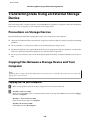
Printing from the Control Panel
Follow the steps below to print from the control panel without using a computer. You can print data from a memory
card or an external USB device.
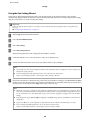
Printing a JPEG file
A
Load paper.
& “Loading Paper into the Paper Cassette” on page 33
& “Loading Paper and Envelopes into the Rear Paper Feed Slot” on page 39
B
Insert a memory device.
& “Inserting a Memory Card” on page 44
C
Select Memory Device from the Home menu.
D
Select JPEG.
Note:
❏ If you have more than 999 images on your memory device, images are automatically divided into groups and
the group selection screen is displayed. Select the group that contains the image you want to print. Images are
sorted by the date they were taken.
❏
To select another group, select the menu as shown below.
Memory Device > JPEG > Options > Select Group.
E
Select the image you want to print.
F
Enter the number of prints by using the numeric keypad on the control panel.
G
Press Settings to make print settings or press Adjustments to make color adjustment settings.
Note:
❏ For more information on detailed settings, see the Memory Device mode menu list.
& “Memory Device Mode” on page 106
❏
H
To select more images, press
and then repeat steps 5 to 6 or swipe horizontally to change the image.
Press one of the x buttons to set the color mode, and then start printing.
48
User’s Guide
Printing
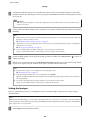
Printing a TIFF file
A
Load paper.
& “Loading Paper into the Paper Cassette” on page 33
& “Loading Paper and Envelopes into the Rear Paper Feed Slot” on page 39
B
Insert a memory device.
& “Inserting a Memory Card” on page 44
C
Select Memory Device from the Home menu.
D
Select TIFF.
E
Select the file you want to print.
F
Check the file information, and then press Proceed.
G
Enter the number of prints by using the numeric keypad on the control panel.
H
Press Settings to make the print settings.
Note:
For detailed settings items, refer to the Memory Device mode menu list.
& “Memory Device Mode” on page 106
I
Press Proceed, then confirm the print settings.
J
Press one of the x buttons to set the color mode, and then start printing.
Printing from Your Computer
Printer Driver and Status Monitor
The printer driver lets you choose from a wide variety of settings to get the best printing results. The status monitor and
the printer utilities help you check the product and keep it in top operating condition.
49
User’s Guide
Printing
Note for Windows users:
❏ Your printer driver automatically finds and installs the latest version of the printer driver from Epson’s Web site. Click
the Software Update button in your printer driver’s Maintenance window, and then follow the on-screen instructions.
If the button does not appear in the Maintenance window, point at All Programs or Programs in the Windows Start
menu, and check in the EPSON folder.*
* For Windows 8:
If the button does not appear in the Maintenance window, right-click on the Start screen, or swipe from the bottom or
top edge of the Start screen and select All apps, then select Software Update from EPSON category.
❏
If you want to change the language of the driver, select the language you want to use from the Language setting in your
printer driver’s Maintenance window. Depending on the location, this function may not be available.
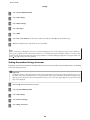
Accessing the printer driver for Windows
You can access the printer driver from most Windows applications, the desktop or the taskbar.
To make settings that apply only to the application you are using, access the printer driver from that application.
To make settings that apply to all of your Windows applications, access the printer driver from the desktop or the
taskbar.
Refer to the following sections to access the printer driver.
Note:
Screen shots of the printer driver windows in this User’s Guide are from Windows 7.
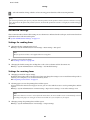
From Windows applications
A
Click Print or Print Setup on the File menu.
B
In the window that appears, click Printer, Setup, Options, Preferences, or Properties. (Depending on your
application, you may need to click one or a combination of these buttons.)
From the desktop
❏ Windows 8 and Server 2012
Select Desktop, Settings charm, and Control Panel. Then select Devices and Printers from the Hardware and
Sound category. Right-click on the product, or press and hold the product and select Printing preferences.
❏ Windows 7 and Server 2008 R2:
Click the start button, select Devices and Printers. Then right-click the product and select Printing
preferences.
❏ Windows Vista and Server 2008:
Click the start button, select Control Panel, and then select Printer from the Hardware and Sound category.
Then select the product and then click Select printing preferences.
❏ Windows XP and Server 2003:
Click Start, Control Panel, (Printers and Other Hardware,) then Printers and Faxes. Select the product, then
click Printing Preferences on the File menu.
50
User’s Guide
Printing
From the shortcut icon on the taskbar
Right-click the product icon on the taskbar, then select Printer Settings.
To add a shortcut icon to the Windows taskbar, first access the printer driver from the desktop as described above.
Next, click the Maintenance tab, and then the Monitoring Preferences button. In the Monitoring Preferences
window, select the Register the shortcut icon to the task bar check box.
Getting information through online help
In the printer driver window, try one of the following procedures.
❏ Right-click the item, then click Help.
❏ Click the
button at the top right of the window, then click the item (for Windows XP only).
Accessing the printer driver for Mac OS X
The table below describes how to access the printer driver dialog.
Dialog Box
How to Access It
Page Setup
Click Page Setup on the File menu of your application.
Note:
Depending on your application, the Page Setup menu may not appear in the File menu.
Print
Click Print on the File menu of your application.
Epson Printer
Utility 4
For Mac OS X 10.8 or 10.7, click System Preferences on the Apple menu and then click Print &
Scan. Select your product from the Printers list box, click Options & Supplies, Utility, and
then click Open Printer Utility.
For Mac OS X 10.6, click System Preferences on the Apple menu and then click Print & Fax.
Select your product from the Printers list box, click Options & Supplies, Utility, and then click
Open Printer Utility.
For Mac OS X 10.5, click System Preferences on the Apple menu and then click Print & Fax.
Select your product from the Printers list box, click Open Print Queue and then click Utility
button.
Basic Operations
Basic printing
Follow the steps below to print from your computer.
If you cannot change some of the printer driver settings, they may have been locked by the administrator. Contact your
administrator or a power user for assistance.
51
User’s Guide
Printing
Note:
❏ The screen shots in this manual may vary depending on the model.
❏
Before you print, load paper properly.
& “Loading Paper into the Paper Cassette” on page 33
& “Loading Envelopes into the Paper Cassette” on page 36
& “Loading Paper and Envelopes into the Rear Paper Feed Slot” on page 39
❏
Refer to the section below for the printable area.
& “Printable area” on page 194
❏
After completing the settings, print one test copy and examine the results before printing an entire job.
Basic product settings for Windows
A
Open the file you want to print.
B
Access the printer settings.
& “Accessing the printer driver for Windows” on page 50
C
Click the Main tab.
D
Select the appropriate Paper Source setting.
E
Select the appropriate Document Size setting. You can also define a custom paper size. For details, see the online
help.
52
User’s Guide
Printing
F
Check Borderless to print borderless photos.
& “Selecting Paper” on page 27
If you want to control the amount of the image that extends beyond the edges of the paper, click the Settings
button, select Auto Expand as the Method of Enlargement, and then adjust the Amount of Enlargement
slider.
G
Select Portrait (tall) or Landscape (wide) to change the orientation of your print.
Note:
Select Landscape when printing on envelopes.
H
Select the appropriate Paper Type setting.
& “Paper type settings from the printer driver” on page 32
Note:
Print quality is automatically adjusted for the selected Paper Type.
I
Select the appropriate Quality setting.
Note:
If you are printing high-density data on plain paper, letterhead, or preprinted paper, select Standard-Vivid to make
your printout vivid.
J
Click OK to close the printer settings window.
Note:
To make changes to advanced settings, refer to the relevant section.
K
Print your file.
Basic product settings for Mac OS X
Note:
❏ Screen shots of the printer driver windows in this manual are from Mac OS X 10.7.
❏
A
When printing envelopes, use the application to rotate the data 180 degrees.
Open the file you want to print.
53
User’s Guide
Printing
B
Access the Print dialog box.
& “Accessing the printer driver for Mac OS X” on page 51
Note:
If the simplified dialog box is displayed, click the Show Details button (for Mac OS X 10.8 or 10.7) or the d button
(for Mac OS X 10.6 or 10.5.8) to extend this dialog box.
C
Select the product you are using as the Printer setting.
Note:
Depending on your application, you may not be able to select some of the items in this dialog box. If so, click Page
Setup on the File menu of your application, and then make suitable settings.
D
Select the appropriate Paper Size setting.
Note:
Select XXX ( Borderless) as the Paper Size if you want to print borderless photos.
& “Selecting Paper” on page 27
E
Select the appropriate Orientation setting.
Note:
Select landscape orientation when printing envelopes.
54
User’s Guide
Printing
F
Select Print Settings from the pop-up menu.
G
Select the appropriate Paper Source setting.
H
Select the appropriate Media Type setting.
& “Paper type settings from the printer driver” on page 32
I
Select the appropriate Print Quality setting.
Note:
If you are printing high-density data on plain paper, letterhead, or preprinted paper, select Standard-Vivid to make
your printout vivid.
J
Select the appropriate Expansion setting during borderless printing to control the amount of the image that
extends beyond the edges of the paper.
K
Click Print to start printing.
Canceling printing
If you need to cancel printing, follow the instructions in the appropriate section below.
Using the product button
Press y to cancel a print job in progress.
55
User’s Guide
Printing
Using the product’s status menu
You can cancel a print job in progress on the product’s Status Menu.
A
Press
B
Select Job Monitor, then Print Job. Ongoing jobs and jobs that are standing by are shown in the list.
C
Select the job that you want to cancel.
D
Press Cancel.
to display the Status Menu.
For Windows
Note:
You cannot cancel a print job that has been completely sent to the product. In this case, cancel the print job by using the
product.
A
Access the EPSON Status Monitor 3.
& “For Windows” on page 157
B
Click the Print Queue button. The Windows Spooler appears.
C
Right-click on the job you want to cancel and then select Cancel.
For Mac OS X
Follow the steps below to cancel a print job.
Note:
If you have sent a print job from a Mac OS X 10.6 or 10.5.8 through the network, you may not be able to cancel printing from
the computer. Press y on the product’s control panel to cancel a print job. To solve this problem, see the online Network
Guide.
A
Click your product icon in the Dock.
B
In the Document Name list, select the document which is printing.
56
User’s Guide
Printing
C
Click the Delete button to cancel the print job.
For Mac OS X 10.8:
Click the button to cancel the print job.
Other Options
Printing photos the easy way
Epson Easy Photo Print lets you lay out and print digital images on various types of paper. The step-by-step
instructions in the window let you preview the printed images and get the effects you want without having to make any
difficult settings.
Using the Quick Print function, you can perform one-click printing with the settings you make.
57
User’s Guide
Printing
Starting Epson Easy Photo Print
Note:
You can download Epson Easy Photo Print from the following Epson website.
http://support.epson.net/
http://www.epson.eu/Support (Europe)
For Windows
❏ Double-click the Epson Easy Photo Print icon on the desktop.
❏ For Windows 8:
Enter "Epson Easy Photo Print" at the search charm, and select the software.
For Windows 7 and Vista:
Click the start button, point to All Programs, click Epson Software, and then click Easy Photo Print.
For Windows XP:
Click Start, point to All Programs, point to Epson Software, then click Easy Photo Print.
For Mac OS X
Double-click the Applications folder on your Mac OS X hard drive, then double-click in turn on the Epson Software
and Easy Photo Print folders and finally double-click the Easy Photo Print icon.
Product presets (For Windows Only)
Printer driver presets make printing a snap. You can also create presets of your own.
Product settings for Windows
A
Access the printer settings.
& “Accessing the printer driver for Windows” on page 50
B
Select a Printing Presets in the Main tab. Product settings are automatically set to the values displayed in the
pop-up window.
2-sided printing
Use the printer driver to print on both sides of the paper.
58
User’s Guide
Printing
Note:
❏ This feature may not be available at some settings.
❏
The loading capacity differs during 2-sided printing.
& “Selecting Paper” on page 27
❏
Only use papers that are suitable for 2-sided printing. Otherwise, the printout quality may deteriorate.
& “Selecting Paper” on page 27
❏
Manual 2-sided printing may not be available when the product is accessed over a network or is used as a shared
printer.
❏
If the ink runs low during automatic 2-sided printing, the product stops printing and the ink needs to be replaced. When
ink replacement is complete, the product starts printing again, but there may be some missing parts in your print. If this
happens, print again the page that has missing parts.
❏
Depending on the paper and the amount of ink used to print text and images, ink may bleed through to the other side of
the paper.
❏
The surface of the paper may be smeared during 2-sided printing.
Note for Windows:
❏ Four types of 2-sided printing are available: automatic standard, automatic folded booklet, manual standard and
manual folded booklet.
❏
Manual 2-sided printing is available only when EPSON Status Monitor 3 is enabled. To enable the status monitor,
access the printer driver and click the Maintenance tab followed by the Extended Settings button. In the Extended
Settings window, check the Enable EPSON Status Monitor 3 check box.
❏
When automatic 2-sided printing is performed, printing may be slow depending on the combination of options selected
for Select Document Type in the Print Density Adjustment window and for Quality in the Main window.
Note for Mac OS X:
❏ Mac OS X supports automatic standard 2-sided printing only.
❏
When automatic 2-sided printing is performed, printing may be slow depending on the Document Type setting in
Two-sided Printing Settings
Product settings for Windows
A
Access the printer settings.
& “Accessing the printer driver for Windows” on page 50
B
Select the appropriate 2-Sided Printing setting.
Note:
Depending on the driver version, the 2-Sided Printing setting may become available when you select the check box.
When using automatic printing, make sure the Auto check box is checked.
C
Click Settings, and make the appropriate settings.
Note:
If you want to print a folded booklet, select Booklet.
59
User’s Guide
Printing
D
Check the other settings and print.
Note:
❏ When printing automatically, and if you are printing high-density data such as photos or graphs, we
recommend making the settings in the Print Density Adjustment window.
❏
The actual binding margin may be different from the specified settings depending on your application.
Experiment with a few sheets to examine actual results before printing the entire job.
❏
Manual 2-sided printing allows you to print the even-numbered pages first. When you print odd-numbered
pages, a blank sheet of paper is output at the end of the print job.
❏
When you are printing manually, make sure that the ink is completely dry before reloading the paper.
Product settings for Mac OS X
A
Access the Print dialog box.
& “Accessing the printer driver for Mac OS X” on page 51
B
Make the appropriate settings in the Two-sided Printing Settings pane.
C
Check the other settings and print.
Note:
If you are printing high-density data such as photos or graphs, we recommend adjusting Print Density and Increased
Ink Drying Time settings manually.
Fit to page printing
Lets you automatically enlarge or reduce the size of your document to fit the paper size selected in the printer driver.
Note:
This feature may not be available at some settings.
60
User’s Guide
Printing
Product settings for Windows
A
Access the printer settings.
& “Accessing the printer driver for Windows” on page 50
B
Select Reduce/Enlarge Document and Fit to Page in the More Options tab, and then select the size of the paper
you are using from Output Paper.
Note:
If you want to print a reduced image with centering, select Center.
C
Check the other settings and print.
Product settings for Mac OS X
A
Access the Print dialog box.
& “Accessing the printer driver for Mac OS X” on page 51
B
Choose Scale to fit paper size for Destination Paper Size in the Paper Handling pane and select the desired
paper size from the pop-up menu.
C
Check the other settings and print.
Pages per Sheet printing
Lets you use the printer driver to print two or four pages on a single sheet of paper.
Note:
This feature may not be available at some settings.
61
User’s Guide
Printing
Product settings for Windows
A
Access the printer settings.
& “Accessing the printer driver for Windows” on page 50
B
Select 2-Up or 4-Up as Multi-Page in the Main tab.
C
Click Page Order, and make the appropriate settings.
D
Check the other settings and print.
Product settings for Mac OS X
A
Access the Print dialog box.
& “Accessing the printer driver for Mac OS X” on page 51
B
Select the desired number of Pages per Sheet and the Layout Direction (page order) in the Layout pane.
C
Check the other settings and print.
Anti-Copy Pattern printing (for Windows Only)
This function allows you to print a document as a copy-protected document. When you try to copy a copy-protected
document, the string that you added as the anti-copy pattern is printed several times on the document.
Note:
This feature may not be available at some settings.
A
Access the printer settings.
& “Accessing the printer driver for Windows” on page 50
62
User’s Guide
Printing
B
Click Watermark Features on the More Options tab, and then select an Anti-Copy Pattern from the Anti-Copy
Pattern list.
Note:
❏ This feature is available only with the following settings selected.
Paper Type: plain papers
Quality: Standard
Auto 2-Sided Printing: Off
Borderless: Off
Color Correction: Automatic
Short Grain Paper: Off
❏
C
If you want to create your own watermark, click Add/Delete. For more details about each setting, see the online
help.
Click Settings, and make the appropriate settings.
Note:
Anti-Copy Pattern are printed in monochrome only.
D
Click OK to return to the More Options window.
E
Click OK to close the printer settings window and print.
Watermark printing (For Windows Only)
This function allows you to print a text-based or image-based watermark on your document.
Note:
This feature may not be available at some settings.
A
Access the printer settings.
& “Accessing the printer driver for Windows” on page 50
63
User’s Guide
Printing
B
Click Watermark Features on the More Options tab, and then select a watermark from the Watermark list.
Note:
❏ If you want to create your own watermark, click Add/Delete. For more details about each setting, see the online
help.
❏
Saved watermarks can only be used with the printer driver in which you saved the settings. Even if multiple
printer names are set for a printer driver, the settings are only available for the printer name in which you saved
the settings.
❏
When sharing the printer on a network, you cannot create a user defined watermark as a client.
C
Click Settings, and then make the appropriate settings.
D
Click OK to return to the More Options window.
E
Click OK to close the printer settings window and print.
Header/Footer printing (For Windows Only)
This function allows you to print user name, computer name, date, time, or collate number, at the top or bottom of
each page in a document.
A
Access the printer settings.
& “Accessing the printer driver for Windows” on page 50
B
Click Watermark Features on the More Options tab, select Header/Footer, and then click Settings.
C
Select the necessary items from the drop-down list in the Header Footer Settings window.
Note:
If you select Collate Number, the number of copies is printed.
64
User’s Guide
Printing
D
Click OK to return to the More Options window.
E
Click OK to close the printer settings window and print.
Administrator Settings for Printer Driver (for Windows
Only)
Administrators can lock the following printer driver settings for each user to prevent unintended changes of the
settings.
❏ Anti-Copy Pattern
❏ Watermark
❏ Header/Footer
❏ Color
❏ 2-sided printing
❏ Multi-Page
Note:
You need to logon as an administrator in Windows.
A
Windows 8 and Server 2012:
Select Desktop, Settings, charm, Control Panel, and then select Devices and Printers from the Hardware and
Sound category.
Windows 7 and Server 2008 R2:
Click the start button, and then select Devices and Printers.
Windows Vista and Server 2008:
Click the start button, select Control Panel, and then select Printer from the Hardware and Sound category.
Windows XP and Server 2003:
Click Start, select Control Panel, and then select Printers and Faxes from the Printers and Other Hardware
category.
B
Windows 8, 7, Server 2008, and Server 2012:
Right-click on the product, or press and hold the product, select Printer properties, Optional Settings, and
then select the Driver Settings button.
Windows Vista and Server 2008:
Right-click the icon for your product, click Optional Settings, and then click the Driver Settings button.
Windows XP and Server 2003:
Right-click the icon for your product, click Optional Settings, and then click the Driver Settings button.
65
User’s Guide
Printing
C
Make the appropriate settings. For more details about each setting, see the online help.
D
Click OK.
66
User’s Guide
Scanning
Scanning
Scanning from the Control Panel
You can scan documents and send the scanned image from the product to a connected computer, a memory device, a
network folder, and send the scanned image by attaching to an email.
Note:
❏ Depending on the product, Scan to Network Folder/FTP and Scan to Email functions may not be supported.
& “Available Features” on page 8
❏
You can save your scan settings as a preset.
& “Presets” on page 116
Scanning to a memory device
A
Insert a memory card or an external USB device.
B
Place original.
& “Placing Originals” on page 42
C
Enter Scan mode from the Home menu.
D
Select Memory Device.
E
Press Format, and then select the file format you want to use to save scanned data to the memory device.
F
Press Settings, and then make the appropriate scan settings.
& “Inserting a Memory Card” on page 44
Note:
When PDF is selected as the file format, security settings become available allowing you to create a password
protected PDF. Select PDF Settings.
G
Press one of the x buttons to set the color mode, and then start scanning.
Your scanned image is saved.
67
User’s Guide
Scanning
Scanning to a folder
The Scan to Network Folder/FTP function allows you to save scanned images to a folder on a server. You can specify a
saved folder by entering a folder path directly, but it may be easier if you register a saved folder and configure the folder
settings in Contacts first before you use this function.
& “Making Contact List Settings” on page 102
A
Place original.
& “Placing Originals” on page 42
B
Enter Scan mode from the Home menu.
C
Select Network Folder/FTP.
D
Press Contacts to display a list of registered folders.
Note:
You can also specify the folder by entering the folder path directly. After step 3, press the Enter Location field. Select
Communication Mode, enter the folder path using the numeric keypad and other buttons on the control panel, and
then configure the folder settings.
E
Press the check box on the list to select the folder, and then press Proceed.
F
Press Menu. Make the appropriate scan settings.
G
Press one of the x buttons to set the color mode, and then start scanning.
Your scanned image is saved.
Scanning to an email
The Scan to Email function allows you to send scanned image files by email directly from the product through a
preconfigured email server.
Note:
Before using this function, make sure you have configured the Email Server Settings and that the Date/Time and Time
Difference in Date/Time Settings have been set correctly. Otherwise, time stamps on your emails may not be displayed
correctly on the recipient's computer.
A
Place original.
& “Placing Originals” on page 42
B
Enter Scan mode from the Home menu.
C
Select Email.
68
User’s Guide
Scanning
D
If you want to specify email addresses directly, press the Enter Email Address field, and then enter an email
address.
E
If you want to specify email addresses from Contacts, press Contacts to display the list, and then select a contact
by pressing the check box on the list. Then press Proceed.
Note:
You can send an email up to 10 individual email addresses and group.
F
Press Format and select the file format.
G
Press Menu.
H
Select Email Settings. You can specify a name for the scanned image file in Filename Prefix and specify the
subject of the email to which you want to attach the scanned file in Subject.
Note:
A predetermined message, “Attached Scan Data”, is automatically entered as the body of the email.
I
Select Basic Settings. Make the appropriate scan settings.
Note:
❏ You can specify the maximum size for files that can be attached to an email in Attached File Max Size. Select a
larger size if you often send large files.
❏
J
When PDF is selected as the file format, security settings become available allowing you to create a password
protected PDF. Select PDF Settings.
Press one of the x buttons to set the color mode, and then start scanning.
Your scanned image is sent by email.
Scanning to a computer
Note:
Make sure you have installed the Epson Event Manager before using this function.
& “Installing the software” on page 146
A
Place original.
& “Placing Originals” on page 42
B
Enter Scan mode from the Home menu.
C
Select Computer or Computer (WSD).
69
User’s Guide
Scanning
D
Select a computer.
Note:
When you select Computer, go to the next step. When you select Computer(WSD), go to the step 7.
E
Press Format and select the file format to save the scanned image.
F
Make the appropriate scan settings.
G
Press one of the x buttons, and then start scanning.
Your scanned image is saved.
Scan mode menu list
Refer to the section below for the Scan mode menu list.
& “Scan Mode” on page 107
Scanning from Your Computer
Scanning in Office Mode
Office Mode lets you quickly scan text documents without previewing your image.
Note:
❏ If you install Epson Scan in Windows Server 2012, Server 2008 and Server 2003, you must have been done install to
Desktop Experience.
❏
See the Help for more details on Epson Scan.
A
Place your original(s).
& “Placing Originals” on page 42
B
Start Epson Scan.
& “Starting Epson Scan Driver” on page 79
70
User’s Guide
Scanning
C
Select Office Mode from the Mode list.
D
Select the Document Source setting.
E
Select the size of your original as the Size setting.
F
Select the Image Type setting.
G
Select an appropriate resolution for your original(s) as the Resolution setting.
H
Click Scan.
I
In the File Save Settings window, select the Type setting and then click OK.
Note:
❏ If the Show this dialog box before next scan check box is cleared, Epson Scan starts scanning immediately
without displaying the File Save Settings window.
❏
You can create a password protected PDF file. Select the Security tab in PDF Plug-in Settings. See the Help for
more details on Epson Scan.
❏
When you select Skip Blank Page, any blank pages in the document are not scanned.
71
User’s Guide
Scanning
Your scanned image is saved.
Scanning in Professional Mode
Professional Mode gives you total control of your scanning settings and lets you check the changes you have made in a
preview image. This mode is recommended for advanced users.
Note:
❏ If you want to install Epson Scan on Windows Server 2012, Server 2008, or Server 2003, you have to install Desktop
Experience first.
❏
See the Help for more details on Epson Scan.
A
Place your original(s).
& “Placing Originals” on page 42
B
Start Epson Scan.
& “Starting Epson Scan Driver” on page 79
72
User’s Guide
Scanning
C
Select Professional Mode from the Mode list.
D
Select the Document Source setting.
E
Select Photo or Document as the Auto Exposure Type setting.
F
Select the Image Type setting.
73
User’s Guide
Scanning
G
Select an appropriate resolution for your original(s) as the Resolution setting.
H
Click Preview to preview your image(s). The Preview window opens and displays your image(s).
& “Previewing and Adjusting the Scan Area” on page 77
Note for the Automatic Document Feeder (ADF):
❏ The ADF loads your first document page, and then Epson Scan prescans it and displays it in the Preview
window. The ADF then ejects your first page.
Place your first document page on top of the rest of the pages, and then load the entire document into the ADF.
❏
The document page ejected by the ADF has not been scanned yet. Reload the entire document into the ADF.
I
Select the size of the scanned image(s) as the Target Size setting if necessary. You can scan your images at their
original size, or you can reduce or enlarge their size by selecting Target Size.
J
Adjust the image quality if necessary.
& “Image Adjustment Features” on page 74
K
Click Scan.
L
In the File Save Settings window, select the Type setting and then click OK.
Note:
❏ If the Show this dialog box before next scan check box is cleared, Epson Scan starts scanning immediately
without displaying the File Save Settings window.
❏
You can create a password protected PDF file. Select the Security tab in PDF Plug-in Settings. See the Help for
more details on Epson Scan.
Your scanned image is saved.
Image Adjustment Features
Epson Scan offers a variety of settings for improving color, sharpness, contrast, and other aspects affecting image
quality.
See the Help for more details on Epson Scan.
74
User’s Guide
Scanning
Histogram Adjustment
Provides a graphical interface for adjusting highlight, shadow, and gamma levels
individually.
Tone Correction
Provides a graphical interface for adjusting tone levels individually.
Image Adjustment
Adjusts brightness and contrast and the balance of red, green, and blue colors in the
overall image.
Color Palette
Provides a graphical interface for adjusting mid-tone levels, such as skin tones, without
affecting the highlight and shadow areas of the image.
Unsharp Mask
Sharpens the edges of image areas for an overall clearer image.
75
User’s Guide
Scanning
Descreening
Removes rippled patterns (known as moiré) that can appear in subtly shaded image areas
such as skin tones.
Color Restoration
Restores the colors in faded photos automatically.
Backlight Correction
Removes shadows from photos that have too much background light.
Dust Removal
Removes dust marks from your originals automatically.
Text Enhancement
Enhances text recognition when scanning text documents.
Auto Area Segmentation
Makes Black&White images clearer and text recognition more accurate by separating the
text from the graphics.
76
User’s Guide
Scanning
Color Enhance
Enhance a certain color. You can select from red, blue, or green.
Previewing and Adjusting the Scan Area
Selecting a preview mode
Once you have selected your basic settings and resolution, you can preview your image and select or adjust the image
area in a Preview window. There are two types of preview.
❏ Normal preview displays your previewed image(s) in their entirety. You can select the scan area and make any
image quality adjustments manually.
❏ Thumbnail preview displays your previewed image(s) as thumbnail(s). Epson Scan automatically locates the
edges of your scan area, applies automatic exposure settings to the image(s), and rotates the image(s) if necessary.
Note:
❏ Some of the settings that you change after previewing an image are reset if you change the preview mode.
❏
Depending on your document type and the Epson Scan mode you are using, you may not be able to change the preview
type.
❏
If you preview image(s) without the Preview dialog displayed, image(s) are displayed in the default preview mode. If you
preview with the Preview dialog displayed, image(s) are displayed in the preview mode that was displayed just before
previewing.
❏
To resize the Preview window, click and drag the corner of the Preview window.
❏
See the Help for more details on Epson Scan.
Creating a marquee
A marquee is a moving dotted line that appears on the edges of your preview image to indicate the scan area.
Do one of the following to draw a marquee.
77
User’s Guide
Scanning
❏ To draw the marquee manually, position the pointer in the area where you want to place the corner of your
marquee and click. Drag the cross-hairs over the image to the opposite corner of the desired scan area.
❏ To draw the marquee automatically, click the
auto locate icon. You can only use this icon when you are
viewing a normal preview and you only have one document on the scanner glass.
❏ To draw the marquee at a specified size, type in a new width and height in the Document Size setting.
❏ For best results and image exposure, make sure all sides of the marquee are located inside the preview image. Do
not include any areas around the preview image in the marquee.
Adjusting a marquee
You can move the marquee and adjust its size. If you are viewing a normal preview, you can create multiple marquees
(up to 50) on each image to scan different image areas as separate scan files.
To move the marquee, position your cursor inside the marquee. The pointer becomes a hand. Click
and drag the marquee to the desired location.
To resize the marquee, position your cursor over the edge or corner of the marquee.
The pointer becomes a straight or angled double-arrow. Click and drag the edge or corner to the
desired size.
To create additional marquees of the same size, click this icon.
To delete a marquee, click inside the marquee and click this icon.
To activate all marquees, click this icon.
Note:
❏ To restrict the movement of the marquee to vertical or horizontal only, hold down the Shift key as you move the
marquee.
❏
To restrict the size of the marquee to the current proportions, hold down the Shift key as you resize the marquee.
❏
If you draw multiple marquees, make sure you click All in the Preview window before you scan. Otherwise, only the area
inside the last marquee you drew will be scanned.
78
User’s Guide
Scanning
Software Information
Starting Epson Scan Driver
This software lets you control all aspects of scanning. You can use this as a standalone scanning program or use it with
another TWAIN-compliant scanning program.
How to start
❏ Windows 8 and Server 2012:
Select the EPSON Scan icon on the desktop.
Or, select EPSON Scan from the Start screen.
❏ Windows 7, Vista, XP, Server 2008 and Server 2003:
Double-click the EPSON Scan icon on the desktop.
Or, select the start button icon or Start > All Programs or Programs > EPSON > EPSON Scan > EPSON
Scan.
❏ Mac OS X:
Select Applications > Epson Software > EPSON Scan.
How to access the help
Click the Help button on the Epson Scan driver.
Starting Other Scanning Software
Note:
Some scanning software may not be included in some countries.
Epson Event Manager
Epson Event Manager allows you to assign any of the product's buttons to open a scanning program. You can also save
frequently used scanning settings, which can speed up your scanning projects.
You can download this software from the following Epson website.
http://support.epson.net/
http://www.epson.eu/Support (Europe)
How to start
❏ Windows 8:
Right-click on the Start screen, or swipe from the bottom or top edge on the Start screen, and select All apps >
Epson Software > Event Manager.
❏ Windows 7, Vista and XP:
Select the start button or Start > All Programs or Programs> Epson Software > Event Manager.
❏ Mac OS X:
Select Applications > Epson Software, and then double-click the Event Manager icon.
79
User’s Guide
Scanning
How to access the help
❏ Windows:
Click the
icon in the upper right corner of the screen.
❏ Mac OS X:
Click menu > Help > Epson Event Manager Help.
Presto! PageManager
This software lets you scan, manage, and share your photos or documents.
Note:
The Presto! PageManager software CD may be supplied with your product.
How to start
❏ Windows 8:
Right-click on the Start screen, or swipe from the bottom or top edge on the Start screen, and select All apps >
Epson Software > Presto! PageManager.
Windows 7, Vista and XP:
Select the start button or Start > All Programs or Programs > Presto! PageManager folder > Presto!
PageManager.
❏ Mac OS X:
Select Application > Presto! PageManager, and then double-click the Presto! PageManager icon.
80
User’s Guide
Faxing
Faxing
Connecting to a Phone Line
Compatible telephone lines and phone cables
Phone line
This product’s fax features are designed to work over standard analogue telephone lines (PSTN = Public Switched
Telephone Network) and PBX (Private Branch Exchange) telephone systems. (Depending on the environment, some
PBX telephone systems may not be supported.) Epson cannot guarantee compatibility with all digital phone
environments, especially under the following conditions.
❏ When using VoIP
❏ When using fiber-optic digital services
❏ When adapters such as terminal adapters, VoIP adapters, splitters, or DSL router are connected between the
telephone wall jack and the product.
Phone cable
Use a phone cable with the following interface specification.
❏ RJ-11 Phone Line
❏ RJ-11 Telephone set connection
Depending on the area, a phone cable may be included with the product. If so, use that cable. You may need to connect
the phone cable to an adapter provided for your country or region.
Connecting the product to the phone line
Standard phone line (PSTN) or PBX
Connect a phone cable from the telephone wall jack or PBX port to the LINE port on the back of the product.
81
User’s Guide
Faxing
c ❏Important:
If you have a PBX console in the room, connect from the console to the LINE port.
❏
Do not remove the cap from the EXT port of the product when you are not connecting your phone.
DSL or ISDN
Connect a phone cable from your DSL modem, terminal adapter, or ISDN router to the LINE port on the back of the
product. For more information, consult the documentation that came with your modem, adapter, or router.
Important:
c When
connecting to a DSL line, you may need to use a separate DSL filter. When using a DSL filter, connect a phone
cable from the DSL filter to the product’s LINE port.
Connecting a phone device
After you connect the product to the phone line, follow the procedure below to connect your telephone or answering
machine.
Single phone line
A
Remove the cap from the EXT port on the product.
82
User’s Guide
Faxing
B
Connect a second phone cable to your telephone or answering machine and to the EXT port.
c ❏Important:
When sharing a single phone line with the phone and the product, make sure you connect the phone to the
product’s EXT port. Otherwise, the phone and product may not work properly.
❏
When connecting an answering machine, you may need to change the product’s Rings to Answer setting.
& “Setting the number of rings to answer” on page 86
Two phone lines (example of ISDN)
Connect a second phone cable to your telephone or answering machine and to the port on the terminal adapter or
ISDN router.
Setting Up for Faxing
Basic settings
This section describes the minimum settings required for using the fax features.
Note:
The Lock Setting function in the Admin Settings menu allows an administrator to password protect the settings from being
changed.
& “System Administration Settings” on page 111
83
User’s Guide
Faxing
Using the Fax Setting Wizard
The product’s Fax Setting Wizard menu guides you through setting up the basic fax features. The wizard is
automatically displayed when the product is turned on for the first time. If you have already configured the settings,
skip this section unless you need to change the settings.
Important:
c Before
starting the wizard, make sure you have connected the product and your phone device to the phone line
correctly.
& “Connecting to a Phone Line” on page 81
A
Enter Setup mode from the Home menu.
B
Select System Administration.
C
Select Fax Settings.
D
Select Fax Setting Wizard.
E
On the Fax Header screen, enter the sender’s name (up to 40 characters).
F
On the Your Phone Number screen, enter your phone number (up to 20 digits).
The Fax Setting Wizard screen is displayed. Press Start to continue.
Note:
❏ You should enter your name and phone number in the fax header before sending faxes so that recipients can
identify the origin of the fax.
❏
G
You can change the header information later. Access the menu as shown below.
Setup > System Administration > Fax Settings > Basic Settings > Header
If you have subscribed to a distinctive ring service from your telephone company, select Proceed in the DRD
Setting screen. Select the ring pattern to be used for incoming faxes (or select On), and then go to Step 10. If you
do not need to set this option, select Skip, and then go to the next step.
Note:
❏ Distinctive ring services, offered by many telephone companies (the service name differs by company), allows
you to have several phone numbers on one phone line. Each number is assigned a different ring pattern. You can
use one number for voice calls and another for fax calls. Select the ring pattern assigned to fax calls in DRD
Setting.
❏
Depending on the region, On and Off are displayed as the DRD Setting options. Select On to use the distinctive
ring feature.
❏
If you select On or one of the ring patterns other than All, Receive Mode is automatically set to Auto.
❏
You can change the DRD Setting later. Access the menu as shown below.
Setup > System Administration > Fax Settings > Receive Settings > DRD
84
User’s Guide
Faxing
H
On the Receive Mode Setting screen, select Yes if you have connected an external telephone or answering
machine to the product, and then go to the next step. If you select No, Receive Mode is automatically set to Auto.
Go to Step 10.
Important:
c When
no external telephone is connected to the product, Receive Mode must be set to Auto; otherwise you
cannot receive faxes.
I
On the next Receive Mode Setting screen, select Yes to receive faxes automatically. Select No to receive faxes
manually.
Note:
❏ When you have connected an external answering machine and select to receive faxes automatically, make sure
the Rings to Answer setting is correct.
& “Setting the number of rings to answer” on page 86
❏
If you select to receive faxes manually, you need to answer every call and operate the product’s control panel or
your phone to receive faxes.
& “Receiving a fax manually” on page 98
❏
You can change the Receive Mode setting later. Access the menu as shown below.
Setup > System Administration > Fax Settings > Receive Settings > Receive Mode
J
On the Confirm Settings screen, check the settings you made, and then select Proceed. Press
change the settings.
K
Follow the on-screen instructions to run Check Fax Connection and print a report of the check result. If there
are any errors reported, try the solutions on the report, and then run the check again.
to correct or
Note:
❏ If the Select Line Type screen is displayed, see the following section.
& “Setting the line type” on page 85
❏
If the Select Dial Tone Detection screen is displayed, select Disable.
However, disabling the dial tone detection function may drop the first digit of a fax number and send the fax to
the wrong number.
❏
To run the check again after closing the wizard, access the menu as shown below.
Setup > System Administration > Fax Settings > Check Fax Connection
Setting the line type
If you are connecting the product to a PBX phone system or terminal adapter, change the Line Type setting as
described below.
Note:
PBX (Private Branch Exchange) is used in office environments where an external access code such as “9”must be dialed to
call an outside line. The default Line Type setting is PSTN (Public Switched Telephone Network), which is a standard phone
line, similar to the one in your home.
A
Enter Setup mode from the Home menu.
85
User’s Guide
Faxing
B
Select System Administration.
C
Select Fax Settings.
D
Select Basic Settings.
E
Select Line Type.
F
Select PBX.
G
Select Use or Do Not Use on the Access Code screen. If you select Use, go to the next step.
H
Enter an external access code in the Access Code field.
Note:
When connecting to a PBX phone system, we recommend making the access code setting first. After you have made the
setting, enter (hash) instead of the actual external access code when entering an outside fax number or storing it in the
contact list. The product automatically replaces the with the set code when dialing. Compared to entering an actual code,
using may help avoid connection problems.
Setting the number of rings to answer
If you have connected an external answering machine and selected to receive faxes automatically, make sure the Rings
to Answer setting is correct.
Important:
c The
Rings to Answer setting indicates the number of rings that must occur before the product automatically receives a
fax. If the connected answering machine is set to pick up on the fourth ring, you should set the product to pick up on the
fifth ring or later. Otherwise the answering machine cannot receive voice calls. Depending on the region, this setting
may not be displayed.
A
Enter Setup mode from the Home menu.
B
Select System Administration.
C
Select Fax Settings.
D
Select Receive Settings.
E
Select Rings to Answer.
86
User’s Guide
Faxing
F
Select the number of rings, which is at least one ring greater than that of the answering machine.
Note:
The answering machine picks up every call faster than the product, but the product can detect fax tones and start receiving
faxes. If you answer the phone and you hear a fax tone, check that the product has started receiving the fax, and then hang up
the phone.
Advanced settings
This section introduces advanced fax settings. Access the menus as indicated under each topic. See the menu list for an
explanation about each menu and option.
& “System Administration Settings” on page 111
Settings for sending faxes
❏ Changing the fax communication speed.
& Setup > System Administration > Fax Settings > Basic Settings > Fax Speed
Note:
The fax speed selected here is also applied when receiving faxes.
❏ Creating a contact list for faxing.
& “Creating a Contact” on page 102
❏ Changing the default settings for sending faxes such as the resolution and the document size.
& Setup > System Administration > Fax Settings > User Default Settings
Settings for receiving faxes
❏ Changing received fax output settings.
By default, the product prints every fax received. You can change the settings to save received faxes in the product’s
memory, on a computer, or to an external memory device.
& “Outputting received faxes” on page 95
❏ Selecting paper cassettes for printing faxes and fax reports.
If your product has more than one paper cassette, you can select which cassette to use for printing faxes and fax
reports.
& Setup > System Administration > Printer Settings > Paper Source Settings > Auto Select Settings > Fax
Note:
When more than one cassette is selected from the menu above, the most suitable cassette is automatically selected
according to the paper size setting for each cassette and the size of received faxes or fax reports.
❏ Changing settings for printing faxes and fax reports.
& Setup > System Administration > Fax Settings > Output Settings
87
User’s Guide
Faxing
Installing FAX Utility for faxing from a computer
Epson FAX Utility allows you to send a fax from a computer and save received faxes in a specified folder. Follow the
procedure below to install FAX Utility. PC-FAX Driver is installed at the same time. This is necessary for sending
faxes.
Important:
c Install
the printer driver before installing FAX Utility.
Windows
Insert the software disc that came with your product, and then click setup.exe in the following folder.
\Apps\FaxUtility\setup.exe
Important:
c Select
the same port used for the printer driver.
Mac OS X
Download FAX Utility from the following Epson website.
http://support.epson.net/setupnavi/
After installing FAX Utility, follow the procedure below to add the fax driver.
A
Select Apple - System Preference - Print & Fax to display the printer list.
B
Click the + add button.
C
Click Default when the add printer screen is displayed.
D
When the PC-FAX Driver is displayed in the list, select it and then click Add.
Note:
❏ It may take a while before the PC-FAX Driver is displayed.
❏
E
The PC-FAX Driver name starts with “FAX” followed by the product name and connection method in
parentheses such as (USB).
Select Quit System Preferences from the System Preferences menu.
Sending Faxes
Basic operations
Follow the steps below to send a monochrome (B&W) or color fax. When sending a monochrome fax, the scanned
document is temporarily stored in the product’s memory and you can preview it on the LCD screen before sending.
88
User’s Guide
Faxing
Note:
The product can accept up to 50 monochrome fax jobs. You can check or cancel the reserved fax job using Status Menu.
& “Checking fax jobs that are ongoing or waiting” on page 99
A
Place original. You can send up to 100 pages in one transmission.
& “Placing Originals” on page 42
B
Enter Fax mode from the Home menu.
Note:
To fax a double-sided document, place your document in the ADF. Press Menu, select Fax Send Settings, ADF
2-Sided, and then On. You cannot fax double-sided documents in color.
C
Specify the fax recipients using one or a combination of the following methods. You can send a monochrome
fax to up to 200 recipients (WF-7610 Series/WF-7620) or 100 recipients (WF-3620 Series/WF-3640 Series).
Manually entering a fax number
Press the Enter a Fax Number field and enter the fax number (up to 64
digits). Press the fax number field again to add another fax number.
Selecting from the contact list
Press Contacts to display the contact list screen. Select one or more
recipients from the list by selecting the check boxes (press the boxes again
to deselect). Press the Search box to search for recipients by name, index
name, or entry number. After selecting recipients, press Proceed.
Selecting from the sent fax history
Press History to display the sent fax history. Select a recipient from the list,
press Menu on the Details screen, and then select Send to this number.
Note:
❏ To delete entered recipients, press the “fax number entry” field and select the recipient you want to delete from
the destination list. Then press Delete from the List.
D
❏
When the Direct Dialing Restrictions option in Security Settings is enabled, you can only select fax recipients
from the contact list or the sent fax history. You cannot manually enter a fax number.
❏
You cannot send a color fax to more than one recipient at a time.
❏
If your phone system is PBX and you need an external access code such as “9” to get an outside line, enter the
access code at the beginning of the fax number. If the access code has been set in the Line Type setting, enter
(hash) instead of the actual access code.
& “Setting the line type” on page 85
Press Menu, and then select Fax Send Settings to change the fax transmission settings, such as the resolution, if
necessary.
See the menu list for an explanation of each of the settings.
& “Fax Mode” on page 107
Note:
You can save your fax settings as a preset. For more information, see the following section.
& “Presets” on page 116
89
User’s Guide
Faxing
E
Go to Step 6 if you do not want to preview before sending. To preview the fax (monochrome fax only), press
Preview on the fax top screen.
The product starts scanning the documents and displays the scanned image on the LCD screen. To start sending
the fax, go to Step 6.
Note:
❏ You cannot preview images when the Direct Send option from the Fax Send Settings menu is enabled.
F
❏
When the preview screen is left untouched for 20 seconds, the fax is sent automatically.
❏
When you want to rescan the document, press Retry on the preview screen. Reset the document or change the
send settings as necessary, and then repeat this step.
Press x (Color) or x (B&W) to start sending the fax.
To cancel sending the fax, press y. You can also cancel the job, or check the job status/result on the Job Monitor
or Job History screen.
For more details on checking the job status/result, see the following section.
& “Using the status menu” on page 99
Note:
If the Save Failure Data option is enabled, faxes that failed to be sent are stored. You can resend these stored faxes
from the Status Menu screen.
& Setup > System Administration > Fax Settings > Send Settings > Save Failure Data
Other options
Using handy fax features
This section describes how to use other handy fax features to improve your productivity.
Note:
The Lock Setting function in the Admin Settings menu allows an administrator to password protect the settings from being
changed.
& “System Administration Settings” on page 111
❏ Sending a large volume of monochrome documents (Direct Send)
When sending a monochrome fax, the scanned document is temporarily stored in the product’s memory. If a large
volume of documents is scanned, the product may run out of memory and stop scanning halfway. You can prevent
this by using the Direct Send option from the Fax Send Settings menu. The product starts scanning after the
connection is made and then scans and sends simultaneously without saving the scanned image to its memory.
Even when the memory is already full, you can send a monochrome fax using this option.
Note that you cannot use this option when sending faxes to more than one recipient.
❏ Prioritizing urgent faxes (Priority Send)
When you want to send an urgent fax, and there are already multiple faxes waiting to be sent, you can send the
urgent fax as soon as an ongoing fax job is finished. To do this, enable Priority Send in the Fax Send Settings menu
90
User’s Guide
Faxing
before you press x (Color) or x (B&W).
Note that a fax job sent from a computer is given priority over Priority Send fax jobs.
❏ Saving on connection times and fees by using batch operations (Batch Send)
When the Batch Send option is enabled (disabled by default), the product checks all of the faxes waiting to be sent
in its memory, and then groups faxes for the same recipient together to send them as a batch. Up to 5 files and/or
up to 100 pages in total can be sent using the batch operation. Access the menu as shown below.
& Setup > System Administration > Fax Settings > Send Settings > Batch Send
Note:
❏ This function only works when the recipient information is identical. If the same recipient is found in two fax
jobs, but one of the jobs contains another recipient, the product does not group them together.
❏
Even if the recipient information matches, scheduled faxes are not grouped together unless the time to send the
fax matches.
❏
This function is not applied to faxes sent from a computer, or faxes sent with the Priority Send or Direct Send
option enabled.
❏ Sending different-sized documents using the ADF (Continuous Scan from ADF)
If you place different-sized documents in the ADF at the same time, they may not be sent at their original sizes. To
send different-sized documents using the ADF, first enable Continuous Scan from ADF option from the Fax Send
Settings menu. The product will then ask you if you want to scan another page each time you finish scanning
documents in the ADF before starting transmission. Using this feature, you can sort and scan documents by size.
This is also useful when faxing a large volume of documents, which cannot be loaded in the ADF at the same
time.
❏ Using the On Hook function (WF-7610 Series/WF-7620 Series only)
The On Hook function allows you to hear tones and voices from the product’s internal speaker while leaving the
connected phone on the hook. Press On Hook on the fax top screen, and then enter the fax number on the control
panel. You can use this feature when you want to get a specific document from an on demand fax service by
following the service’s audio guidance.
Sending a fax at a specified time
You can set to send a fax at a specified time. You cannot send color faxes when using this function.
Note:
Make sure the product’s date and time setting is correct.
& Setup > System Administration > Common Settings > Date/Time Settings
A
Follow Steps 1 to 4 in “Basic operations” on page 88.
B
On the fax top screen, press Menu, and then select Send Fax Later.
C
Select On, and then enter the time you want to send the fax. When you have finished, press OK.
91
User’s Guide
Faxing
D
Press x (B&W) to start scanning the fax.
The scanned image is sent at the specified time. If the product is powered off at the specified time, the fax is sent
when the product is turned on.
Sending a fax on demand (fax polling)
The Polling Send function allows you to store one scanned document (up to 100 pages in monochrome) to be sent
automatically upon request from another fax machine. Your customers or business partners can receive the document
just by calling your fax number using the polling receive function on their fax machines.
A
Place original.
& “Placing Originals” on page 42
B
Enter Fax mode from the Home menu.
C
Press Menu, select Polling Send, and then On.
D
Press Menu, and then select Fax Send Settings to change the fax transmission settings, such as the resolution, if
necessary. See the menu list for an explanation of each of the settings.
& “Fax Mode” on page 107
E
Press x (B&W) to start scanning the document.
The scanned document is stored until you delete it. To delete the stored document, access it from Status Menu.
& “Checking fax jobs that are ongoing or waiting” on page 99
Note:
Because only one document can be stored, you will be asked if you want to overwrite when one document has already
been stored.
Sending a stored fax
You can store one scanned document (up to 100 pages in monochrome) in the product’s memory so that you can send
it to anyone at anytime. This feature is handy for documents that you are frequently asked to send by your customers or
business partners.
A
Place original.
& “Placing Originals” on page 42
B
Enter Fax mode from the Home menu.
C
Press Menu, and select Store Fax Data, then On.
D
Press Menu, and then select Fax Send Settings to change the fax transmission settings, such as the resolution, if
necessary. See the menu list for an explanation of each of the settings.
& “Fax Mode” on page 107
92
User’s Guide
Faxing
E
Press x (B&W) to start scanning the document.
The scanned document is stored until you delete it. To send the stored document, access it from the Status
Menu.
& “Checking fax jobs that are ongoing or waiting” on page 99
Note:
Because only one document can be stored, you will be asked if you want to overwrite when one document has already
been stored.
Sending a fax from a connected phone
If the phone number and fax number of the recipient is the same, you can send a fax after talking over the phone with
the recipient.
A
Place original.
& “Placing Originals” on page 42
B
Dial the number from the phone connected to the product. You can talk over the phone with the recipient if
needed.
C
Press Start Fax on the LCD screen of the product.
D
Select Send.
E
When you hear a fax tone, press x (Color) or x (B&W) to start sending the fax.
F
Hang up the phone.
Sending a fax from a computer
Using Epson FAX Utility, you can fax documents created using an application such as a word processing or
spreadsheet application directly from your computer. For information on how to install FAX Utility, see the following
section.
& “Installing FAX Utility for faxing from a computer” on page 88
Note:
The following explanation uses Microsoft Word as an example for Windows OS, and Text Edit for Mac OS X. The actual
operations may differ depending on the application you use. For more details, see the application’s help.
93
User’s Guide
Faxing
A
Open the file you want to fax.
B
Select the Print menu from your application’s File menu. The application’s print setting screen is displayed.
C
Windows: Select your printer (FAX) from the printer selection box, and then change the print settings as
needed.
Mac OS X: Select your printer (FAX) from the printer selection box, click d, and then change the print settings
as needed.
D
Windows: Click Properties, change the fax transmission settings as needed, and then click OK.
Mac OS X: Select Fax Settings, and then change the fax transmission settings as needed.
E
Windows: Click OK. The Recipient Settings screen is displayed. Select one or more recipients and then click
Next.
Mac OS X: Select Recipient Settings, and then select one or more recipients.
F
Specify the content of the cover sheet as needed. (For Mac OS X, skip this step.)
G
Click Send or Fax to send the fax. The fax job is sent to the product.
Note:
Windows FAX Utility allows you to save up to 1000 contacts (PC-FAX Phone Book). In addition, both Windows and
Mac FAX Utility allow you to edit the product’s contact list. For more details, see the FAX Utility Help.
Receiving Faxes
Setting up the receive mode
The product is initially set to receive faxes automatically (Receive Mode - Auto). You can change it to Manual if you
connect an external telephone to the product.
In automatic receive mode, the product automatically receives every fax and outputs them according to the Fax
Output setting.
& “Outputting received faxes” on page 95
In manual receive mode, you need to answer every call and operate the product’s control panel or your phone to
receive faxes. The received fax is output according to the Fax Output settings.
& “Receiving a fax manually” on page 98
When setting up the fax features for the first time, or when you need to change the settings due to a change in your
phone system or for any other reason, use the Fax Setting Wizard to set up the product correctly.
& “Using the Fax Setting Wizard” on page 84
94
User’s Guide
Faxing
Outputting received faxes
The product is initially set to print every fax received. You can change the settings to save received faxes in the
product’s memory, on a computer, or in an external memory device, which allows you to view them first and print only
when needed. You can also make settings to forward received faxes automatically. Follow the instructions below to
change the settings.
Note:
The Lock Setting function in the Admin Settings menu allows an administrator to password protect the settings from being
changed.
& “System Administration Settings” on page 111
A
Enter Setup mode from the Home menu.
B
Select System Administration.
C
Select Fax Settings.
D
Select Output Settings.
E
Select Fax Output.
F
Check the current settings displayed on the LCD screen, and press Settings to change the settings.
G
Select one, all, or combination of the options referring to the following explanations.
❏ Save to Inbox
Select to save received faxes in the product’s memory. If you only select this option, received faxes are not
automatically printed. You can view the faxes on the LCD screen and print if needed.
& “Viewing received faxes on the LCD screen” on page 97
Important:
c Delete
faxes after you print or view them to prevent the memory from becoming full. When the memory is full,
the product cannot receive or send faxes.
95
User’s Guide
Faxing
❏ Save to Computer
To enable this option, use Epson FAX Utility on the computer connected to the product.
& “Saving received faxes on a computer” on page 99
Received faxes are saved in a specified folder on the computer in PDF format. After you have configured FAX
Utility to save faxes on a computer, you can change to Yes and Print on the product to print received faxes
automatically while saving them on the computer.
Important:
c Received
faxes are only saved on the computer while the computer is logged in. Because the product temporarily
saves the received faxes in its memory until they are saved on the computer, the memory may become full if you
leave the computer off for an extended period of time.
❏ Save to Memory Device
Enable this to save received faxes in a memory card or external USB storage device connected to the product. Select
Yes and Print to print received faxes automatically while saving them to the external storage device.
Before you use this function, you need to create a folder to save in the device. Select Create Folder to Save in the
Other Settings menu, and then follow the on-screen instruction.
For information on supported external storage devices, see the following section.
& “Memory card” on page 197
& “External USB device” on page 202
Important:
c Because
the product temporarily saves received faxes in its memory until they are saved to the storage device,
the memory may become full if you do not insert the device for an extended period of time.
Note:
Received faxes cannot be printed directly from the product’s control panel as they are saved in the external storage
device in PDF format.
❏ Forward
Enable this to forward received faxes to up to five destinations you selected. Select Yes and Print to print received
faxes automatically while forwarding them to the destinations. Note that color faxes cannot be forwarded.
Select Other Settings > Where to Forward, and then select one or more forwarding destinations from the contact
list.
Destination type
Explanation
Other fax machine
Select fax number entries from the contact list.
Email address*
Select email address entries from the contact list. You can specify the
subject of the email. Select Other Settings > Email Subject to Forward,
and then enter the subject.
Make sure you set the Date/Time and Time Difference in the Date/Time
Settings correctly.
Otherwise, time stamps on your emails may not display correctly on the
recipient’s computer.
& “System Administration Settings” on page 111
96
User’s Guide
Faxing
Destination type
Explanation
Folder on a server*
Select folder entries from the contact list.
* Depending on the product, the forwarding faxes to email and to folder functions may not be supported. See the
following section for more details.
& “Available Features” on page 8
The Forward Failure Options menu allows you to select whether to print or save the fax in the product’s memory
(Inbox) if forwarding fails.
Note:
The product automatically prints a report when a forwarding error occurs. You can change the settings from the
following menu.
& Setup > System Administration > Fax Settings > Output Settings > Forwarding Report
Viewing received faxes on the LCD screen
To save received faxes in the product’s memory and view them on the LCD screen, you need to enable the Save to Inbox
option.
& “Outputting received faxes” on page 95
Note:
An administrator can password protect the Inbox to restrict users from viewing the received faxes.
& Setup > System Administration > Fax Settings > Security Settings > Inbox Password Settings
Follow the steps below to view the received faxes.
A
Check the
memory.
B
Enter Fax mode from the Home menu.
C
Select Open Inbox.
D
Enter the administrator password if the Inbox has been password protected.
icon on the Home screen. It stays on if there are any unread or unprinted faxes in the product’s
Note:
Press Menu on the Inbox screen if you want to delete or print all data in a batch.
E
Select the fax you want to view from the Inbox list.
The contents of the fax are displayed.
F
Press Menu on the preview screen and select Print, Print then Delete, or Delete, and follow the on-screen
instruction.
97
User’s Guide
Faxing
Important:
c Delete
faxes after you print or view them to prevent the memory from becoming full. When the memory is full, the
product cannot receive or send faxes.
Note for printing:
If the incoming fax is larger than the paper in the cassette used for fax function, it is reduced to fit or printed on multiple
pages, depending on the Auto Reduction setting you select.
Receiving a fax by polling
This allows you to receive a fax from the fax information service you have called.
A
Load paper. Skip this step if you have set the product not to print received faxes in the Fax Output setting.
& “Loading Paper into the Paper Cassette” on page 33
B
Enter Fax mode from the Home menu.
C
Press Menu, and then select Polling Receive.
D
Select On.
E
Enter the fax number.
F
Press x (Color) or x (B&W) to start receiving the fax.
Receiving a fax manually
If your phone is connected to the product, and the Receive Mode has been set to Manual, you can receive fax data after
the connection is made.
A
Load paper. Skip this step if you have set the product not to print the received faxes in the Fax Output setting.
& “Loading Paper into the Paper Cassette” on page 33
B
When the telephone rings, lift the phone connected to the product.
C
When you hear a fax tone, press Start Fax on the LCD screen of the product.
98
User’s Guide
Faxing
D
Select Receive.
E
Press x (Color) or x (B&W) to receive the fax, and then put the phone back on the hook.
Note:
The Remote Receive function allows you to start receiving faxes using your phone instead of operating the product. Enable
this function and set a Start Code. If you are in another room with a cordless handset, you can start receiving the fax just by
entering the code using the handset.
& Setup > System Administration > Fax Settings > Receive Settings > Remote Receive
Saving received faxes on a computer
Using Epson FAX Utility, you can save received faxes on a computer in PDF format. For information on how to install
FAX Utility, see the following section.
& “Installing FAX Utility for faxing from a computer” on page 88
Start FAX Utility as described below and select Received Fax Output Settings (For Mac OS X, select Fax Receive
Monitor) to change the setting. For more details, see the FAX Utility Help.
Windows:
Click the start button (Windows 7 and Vista) or click Start (Windows XP), point to All Programs, select Epson
Software, and then click FAX Utility.
For Windows 8, right-click on the Start screen, or swipe from the bottom or top edge on the Start screen, and select All
apps > Epson Software > FAX Utility. (Server OS is not supported.)
Mac OS X:
Click System Preference, click Print & Fax or Print & Scan, and then select FAX (your printer) from Printer. Then click
as follows;
Mac OS X 10.6.x, 10.7.x, 10.8.x: Option & Supplies - Utility - Open Printer Utility
Mac OS X 10.5.8: Open Print Queue - Utility
Checking Fax Job Status and History
Using the status menu
Checking fax jobs that are ongoing or waiting
You can perform the following operations from the Job Monitor menu.
❏ Check and cancel fax jobs that are ongoing or waiting to be sent.
❏ Send or delete a scanned document using the Store Fax Data function.
❏ Delete a scanned document for polling services.
❏ Resend or delete faxes that failed to be sent if you have enabled the Save Failure Data option.
Follow the steps below to access the menu.
99
User’s Guide
Faxing
A
Press
B
Select Job Monitor, and then select Communication Job or Print Job.
C
Select a target job from the list.
A detailed information screen is displayed showing the available actions.
on the control panel.
Checking sent/received fax jobs
You can check the history of sent or received fax jobs. You can also reprint received faxes. When the limit is reached,
the oldest history entry is deleted first. Follow the steps below to access the menu.
A
Press
B
Select Job History, and then select Receive Job or Send Job.
C
Select a target job from the list.
A detailed information screen is displayed showing the available actions.
on the control panel.
Checking received faxes in the Inbox
You can view received faxes saved in the product’s memory (Inbox). Press
and then select Inbox.
You can also access the Inbox from the Fax mode.
& “Viewing received faxes on the LCD screen” on page 97
Printing a fax report
Printing a fax log automatically
You can set to print fax log report automatically.
A
Enter Setup mode from the Home menu.
B
Select System Administration.
C
Select Fax Settings.
D
Select Output Settings.
E
Select Fax Log Auto Print.
100
on the control panel, select Job Storage,
User’s Guide
Faxing
F
Select one of the two options for automatic printing.
❏ Off
The report is not printed automatically.
❏ On(Every 30)
The report is automatically printed every time 30 sent/received fax jobs are completed.
❏ On(Time)
You can specify when to print the report automatically.
Printing a fax report manually
You can print a variety of fax report when you want.
A
Enter Fax mode from the Home menu.
B
Press Menu, select Fax Report, and then select one of the following items you want to print.
❏ Fax Settings List
Prints the current fax communication settings.
❏ Fax Log
Displays or prints a history of sent and received fax jobs.
❏ Last Transmission
Prints a report for the previous fax that was sent or received through polling.
❏ Stored Fax Documents
Prints a list of the fax jobs currently stored in the product’s memory.
❏ Protocol Trace
Prints a detailed report for the previous fax that was sent or received.
Fax Mode Menu List
For more information on the Fax mode menu list, see the following section.
& “Fax Mode” on page 107
101
User’s Guide
Making Contact List Settings
Making Contact List Settings
Creating a Contact
You can register frequently used fax numbers, email addresses, and network folders in the contact list. This function
allows you to select destination(s) quickly when faxing and scanning.
Note:
You can register destinations using an LDAP server. For details, see the online Administrator's Guide.
A
Open the contacts list from the Home menu, Scan mode, or Fax mode.
Note for the WF-3620 Series/WF-3640 Series:
You can access Contacts from Scan mode or Fax mode.
B
Press Menu.
C
Select Add Entry.
D
Select the function you want to use to register a contact.
Note:
This screen is displayed when you open the contact list from the Home menu.
E
Select the entry number that you want to register.
Note:
You can register the following number of entries including individual entries and group entries.
WF-7610 Series/WF-7620 Series: Up to 200 entries
WF-3620/WF-3640 Series: Up to 100 entries
F
Enter a name to identify the entry in Name. You can enter up to 30 characters.
G
Enter a word to identify the entry in Index Word. You can enter up to 30 characters. This index word can be
useful when searching for an entry from the contact list.
102
User’s Guide
Making Contact List Settings
H
Enter the other settings according to the function you selected.
Note for fax numbers:
❏ You must enter a fax number. You can enter up to 64 digits.
I
❏
If your phone system is PBX and you need an external access code such as "9" to get an outside line, enter the
access code at the beginning of the fax number. If the access code has been set in the Line Type setting, enter
(hash) instead of the actual access code.
❏
To pause the product for a few seconds when dialing, enter a hyphen.
Press Save to finish registering.
Note:
To delete or edit an existing entry, press the name section of the target entry on the contact list screen, and then select
Delete or Edit.
Creating a Group
By adding contacts to a group list, you can send a fax or a scanned image by email to multiple destinations at the same
time.
A
Open the contacts list from the Home menu, Scan mode, or Fax mode.
Note for the WF-3620 Series/WF-3640 Series:
You can access Contacts from Scan mode or Fax mode.
B
Press Menu.
C
Select Add Group.
D
Select the function you want to use to register the group entry.
Note:
This screen is displayed when you open the contact list from the Home menu.
E
Select the entry number that you want to register.
Note:
You can register the following number of entries including individual entries and group entries.
WF-7610 Series/WF-7620 Series: Up to 200 entries
WF-3620/WF-3640 Series: Up to 100 entries
F
Enter a name to identify the group entry in Name. You can enter up to 30 characters.
103
User’s Guide
Making Contact List Settings
G
Enter a word to identify the entry in Index Word. You can enter up to 30 characters. This index word can be
useful when searching for an entry from the contact list.
H
Press Proceed.
I
Select an entry that you want to register in the group list.
J
Press Save to finish registering.
Note:
To delete or edit an existing entry, press the name section of the target entry on the contact list screen, and then select
Delete or Edit.
104
User’s Guide
Menu List of Control Panel
Menu List of Control Panel
You can use this product as a printer, copier, scanner, and fax. When using one of these functions, except the printer
function, select your desired function by pressing the corresponding Mode button on the control panel. Each mode’s
main screen appears as you select the mode.
Copy Mode
Note:
❏ Setting items vary depending on the Layout or other settings you selected.
❏
The menu hierarchy may vary depending on the product.
Menu
Settings and Description
Layout
With Border
Copies a document with a border.
Borderless
Copies a document without a border. Your image is slightly enlarged
and cropped to fill the sheet of paper. Print quality may decline in the
top and bottom areas of the printout, or the area may be smeared
when printing.
2-up
4-up
Copies multiple page documents onto one sheet. After selecting
either one of the options, press Settings and select an appropriate
setting in Document Orientation and Layout Order.
ID Card
Copies both sides of an ID card at the same time.
Split Pages*
Copies two facing pages of a book on separate sheets of paper. After
selecting this function, press Settings, and then select an appropriate
setting in Scan Order.
Document Size
Select the document size to be copied.
Zoom
Select the amount of enlargement or reduction.
Paper Source
Select the paper source that you want to use. When you select Auto, paper is fed automatically
according to the paper settings that are required each time you load paper in the paper cassette.
2-Sided
Select double-sided layout. When you select 1>2-Sided or 2>1-Sided, press Advanced and select
the binding edge.
Document Orientation
Select the document orientation.
Quality
Select the document type.
Density
Set the density.
Expansion
Select the amount of expansion when Borderless is selected as the Layout setting.
Remove Shadow
Select On to erase the shadows that appear in the center of a document when copying a book or
that appear around a document when copying thick paper.
Remove Punch Holes
Select On to erase the binding holes on a document.
Collate Copy
Select On to print multiple copies of multi-page document in order and sort them into sets.
105
User’s Guide
Menu List of Control Panel
Menu
Settings and Description
Dry Time
Select the drying time when copying on both sides of paper.
* This function is only supported by the WF-7610 Series/WF-7620 Series.
Memory Device Mode
Note:
Setting item may varies depending on the print format.
Format
Menu
Settings and Description
JPEG
Select the file format.
TIFF
Advanced Settings
Menu
Settings and Description
Settings
Paper Source
Select the paper source that you want to use.
Borderless
Layout
Select whether to print an image with or without a border
(Borderless). When you select Borderless or On, your image is slightly
enlarged and cropped to fill the sheet of paper.
Print quality may decline in the top and bottom areas of the printout,
or the area may be smeared when printing.
Quality
Select the print quality.
Expansion
Select the amount of expansion when you selected Borderless layout.
Date
Select the format of the date on the prints.
Fit Frame
Select On to fit the image to the paper size.
Bidirectional
Select On to perform bidirectional printing.
Print Order
Select Last Page on Top to print from the last page of a document.
Select First Page on Top to print from the first page of a document.
Fix Photo
Select the image fixing method.
Fix Red-Eye*
Select On to fix a red-eye photo automatically.
Select Images
Select this to select all photos on the external memory device.
Select Group
Select this to select another group on the external memory device.
Image Adjustments
Options
* This setting does not change your original image. It only affects your printout. Depending on the type of photo, parts of the image
other than the eyes may be corrected.
106
User’s Guide
Menu List of Control Panel
Fax Mode
Menu
Settings and Options
Menu
Fax Send Settings
Resolution
Select the resolution of the outgoing fax. Select Photo for
documents that contains a lot of images.
Density
Select the density of the outgoing fax. When sending
text-based monochrome documents, select Auto.
Document Size (Glass)
Select the size and orientation of the document you placed
on the scanner glass.
ADF 2-Sided
Select On to scan both sides of the documents placed in the
ADF. The Direct Send option and color faxing are disabled
when this is set to On.
Direct Send
Select On to let the product send a monochrome fax as soon
as the connection is made without saving the scanned image
in its memory.
& “Using handy fax features” on page 90
Priority Send
Select On to send your fax before the other faxes waiting to
be sent.
& “Using handy fax features” on page 90
Continuous Scan from ADF
Select On to let the product ask you if you want to scan
another page each time scanning the documents in the ADF
is finished.
& “Using handy fax features” on page 90
Transmission Report
Select whether or not to print a report each time after
sending a fax is finished. By default, the product prints a
report only when an error occurs.
Send Fax Later
& “Sending a fax at a specified time” on page 91
Polling Receive
& “Receiving a fax by polling” on page 98
Polling Send
& “Sending a fax on demand (fax polling)” on page 92
Store Fax Data
& “Sending a stored fax” on page 92
Fax Report
& “Printing a fax report manually” on page 101
Scan Mode
Note:
❏ Depending on the product, the Scan to Network Folder/FTP and Scan to Email functions may not be supported. See the
following section for more details.
& “Available Features” on page 8
❏
Setting item may varies depending on the menu.
107
User’s Guide
Menu List of Control Panel
Scan to Memory Device
Menu
Settings and Description
Format
Select the file format for the scanned image. When you select TIFF (Multi Page), the image is
scanned in monochrome.
Settings
See the Scan to Email menu list.
Scan to Network Folder/FTP
Menu
Settings and Description
Location
Communication Mode
Select the communication mode.
Location
Specify the folder path for saving the scanned data.
User Name
Enter a user name for the specified folder.
Password
Enter a password for the specified folder.
Connection Mode
Select the connection mode.
Port Number
Enter a port number.
Format
Select the file format for the scanned image. When you select TIFF (Multi Page), the image is
scanned in monochrome.
Menu
File Settings
Enter the prefix for the file name in Filename Prefix.
Basic Settings
See the Scan to Email menu list.
Scan Report
Prints up to 30 reports of folder logs that contain the scanning date,
location, and scanning result.
Scan to Email
Menu
Settings and Description
Format
Select the file format for the scanned image. When you select TIFF (Single Page) or TIFF (Multi Page),
the image is scanned in monochrome.
108
User’s Guide
Menu List of Control Panel
Menu
Settings and Description
Menu
Email Settings
Basic Settings
Subject
Enter the subject for the email to which you
want to attach the scanned file.
Filename Prefix
Enter the prefix for the file name.
Resolution
Select the scanning resolution.
Scan Area
Select the scan area.
2-Sided
Select On when you want to scan a
double-sided document.
Document Type
Select the document type.
Density
Select the density.
Document Orientation
Select the document orientation.
Compression Ratio
Select the compression ratio of scanned data.
PDF Settings
Make settings for password protected PDFs.
Document Open Password creates a PDF that
requires a password to open.
Permissions Password creates a PDF that
requires a password when printing or editing
the PDF.
Attached File Max Size
Scan Report
Select the maximum size of the attached file.
Select a larger size if you often send large files.
Prints up to 250 reports of email logs that contain the scanning date, address, and scanning result.
Scan to Computer
Menu
Settings and Description
Format
Select the file format for the scanned image. Select Email to attach the scanned data to an email on
the computer.
2-Sided
Select On when you want to scan a double-sided document.
Scan Area*
Select the scan area.
* This function is only supported by the WF-7610 Series/WF-7620 Series.
Scan to Computer (WSD)
Available for computers running Windows 8/7/Vista.
Scan to Cloud
For instructions on using Scan to Cloud, visit the Epson Connect portal site.
& “Using Epson Connect Service” on page 10
109
User’s Guide
Menu List of Control Panel
Setup Mode
Menu
Settings and Description
Ink Levels
Checks the status of ink cartridges and the maintenance box.
Maintenance
Print Head Nozzle Check
Prints a pattern to check if the print head nozzles are clogged.
Print Head Cleaning
Cleans the print head to clear clogged nozzles.
Ink Cartridge(s)
Replacement
Starts the ink cartridge replacement procedure.
Print Head Alignment
Vertical Alignment
Corrects vertical gaps in a printout.
Horizontal Alignment
Corrects horizontal gaps in a printout.
Thick Paper
Select On when printing on thick paper to avoid smearing.
Paper Guide Cleaning
Perform this function to clean the inside of the product.
Remove Paper*
Perform this function if there are still some torn pieces of paper inside
the product even after clearing the paper jam.
Paper Setup
Select the paper size and paper type you loaded in each paper source. This menu is displayed each
time you load paper in the paper cassette.
Print Status Sheet
Configuration Status
Sheet
Prints a sheet showing the current printer settings.
Supply Status Sheet
Prints a sheet showing information about consumables.
Usage History Sheet
Prints a sheet showing the history of the printer’s usage.
Wi-Fi/Network Status
You can see the current network settings and print a network status
sheet.
Network Status
Wi-Fi Direct Status
Email Server Status
You can see the current email server settings.
Epson Connect Status
You can check whether your printer is registered or connected to
Epson Connect or Google Cloud Print service.
& “Using Epson Connect Service” on page 10
Google Cloud Print
Status
Admin Settings
System Administration
Admin Password
You can register, change or reset the password to lock the control
panel to prevent unintended changes made by using the control
panel.
Lock Setting
Select On to lock the control panel using the password registered in
Admin Password.
& “System Administration Settings” on page 111
* This function is only supported by the WF-7610 Series/WF-7620 Series.
110
User’s Guide
Menu List of Control Panel
System Administration Settings
The administrator can lock the control panel to prevent unintended changes from being made. To lock the control
panel, select the menus shown as below, then enter the password.
Setup > Admin Settings > Lock Setting
The password is required when using the following functions.
❏ Entering the System Administration settings in Setup mode
❏ Entering the Eco Mode from the Home menu.
❏ Adding, deleting, and editing the Preset settings and the contact list
The password set in Lock Setting is also necessary when making settings in Epson WebConfig or EpsonNet Config.
Note:
If you forget your password, contact your dealer.
Menu
Settings and Description
Printer Settings
Paper Source Settings
A4/Letter Auto Switching
Make the paper settings for A4 and
Letter. When A4 or Letter size paper is
selected for printing and there is no
paper source set for the selected paper
size, the printout is output using an
alternate paper size (Letter for A4, or A4
for Letter).
Auto Select Settings
Select On to feed from the paper source
containing paper that matches your
paper settings. (Only for products with
two paper cassettes.)
Error Notice
Select On to display an error message
when the paper size and type settings
made for each cassette and the copy/
print settings made in each mode do
not match.
Paper Size
Notice
Paper Type
Notice
Auto Error Solver
Select On to automatically clear product errors.
Memory Device
Interface
Memory
Device
Select Disable to disable a memory device. If Disable is
selected, the product does not recognize the inserted
memory device.
File Sharing
Select which type of computer you want to give write
access to the memory device. You can select a USB-connected or a network-connected computer.
PC Connection via
USB
Select whether to enable or disable the USB interface. If Disable is selected,
the computer does not recognize the product even if it is connected using
a USB cable.
111
User’s Guide
Menu List of Control Panel
Menu
Settings and Description
Common Settings
LCD Brightness
Adjusts the brightness of the LCD panel.
Sound
Adjust the sound settings.
Sleep Timer
Specify the length of the time until the LCD panel turns black.
Power Off Timer
Specify the length of the time until the power turns off automatically.
You can adjust the time before power management is applied. Any increase will affect the product's energy efficiency. Please consider the environment before making any change.
Date/Time Settings
Wi-Fi/Network Settings
Date/Time
Enter the current date and time.
Daylight
Saving Time
Select On to set summer time.
Time
Difference
Enter the time difference between UTC and the current
time zone.
Country/Region
Select the current country/region.
Language
Select the display language.
Operation Time Out
Select On to return to the Home menu after three minutes of inactivity.
Wi-Fi/Network Status
Wi-Fi Setup
You can see the current network settings and print a
networks status sheet.
Wi-Fi Setup
Wizard
For details on the setting items, see the online Network
Guide.
Push Button
Setup (WPS)
PIN Code
Setup (WPS)
Wi-Fi Auto
Connect
Epson Connect Services
Disable Wi-Fi
Network problems may be resolved by disabling or initializing the Wi-Fi settings, and then making the settings
again. For details, see the online Network Guide.
Wi-Fi Direct
Setup
For details on the setting items, see the online Network
Guide.
Connection Check
You can check the network connection status, and print
the report. If there is any problem with the connection,
the report helps you find the solution.
Advanced Setup
For details on the setting items, see the online Network
Guide.
For instructions on use, see the Epson Connect guide.
& “Using Epson Connect Service” on page 10
Google Cloud Print
Services
112
User’s Guide
Menu List of Control Panel
Menu
Settings and Description
Copy Settings
Scan Settings
Make the User Default Settings. The settings made in this menu are displayed as the default settings
in each mode. For details on the settings items, see the menu list for each mode.
& “Copy Mode” on page 105
& “Scan Mode” on page 107
Fax Settings
User Default Settings
You can change the default settings for sending a fax. For more information on the menus, see the following section.
& “Fax Mode” on page 107
Send Settings
Auto
Rotation*
Select On to rotate scanned documents 90 degrees
when an A4 or Letter size document has been loaded
long edge first into the ADF so that the document is sent
at A4 or Letter size.
If this option is disabled, the document is sent at A3 size.
If the recipient's fax machine does not support A3 size,
the document is automatically reduced in size.
This setting is not applied to color faxes and monochrome faxes sent using the Direct Send function.
Batch Send
Select On to sort faxes waiting to be sent in the memory
by recipient, and then send them as a batch.
& “Using handy fax features” on page 90
Save Failure
Data
Select On to save faxes that failed to be sent in the
product’s memory. You can resend the faxes from Status
Menu.
& “Using the status menu” on page 99
Receive
Mode
& “Setting up the receive mode” on page 94
DRD
See Step 7 in the following section.
& “Using the Fax Setting Wizard” on page 84
Rings to
Answer
& “Setting the number of rings to answer” on page 86
Remote
Receive
See the Note in the following section.
& “Receiving a fax manually” on page 98
Receive Settings
113
User’s Guide
Menu List of Control Panel
Menu
Settings and Description
Output Settings
Fax Output
& “Outputting received faxes” on page 95
Auto
Reduction
Select whether large received faxes are reduced in size
to fit on the paper size in the selected paper cassette, or
printed at their original size on multiple sheets.
Auto
Rotation
Select On to rotate a landscape-oriented incoming fax
(A5, B5, or A4 size) so that it is printed on the correct
paper size if you have loaded the following paper sizes in
the paper cassettes.
For products with one cassette: A5
For products with two cassettes: A4 and A5, B4 and B5*,
or A3 and A4*
*These combinations are only available for the WF-7620
Series.
Collation
Stack
Select On to print received faxes from the last page
(print in descending order) so that the printed documents are stacked in the correct page order. When the
product is running low on memory, this option may not
be available.
Print
Suspend
Time
Select a time period to stop automatic printing of faxes
or reports during that time. Received faxes are saved in
the product’s memory. Make sure there is enough free
memory before using this function.
Forwarding
Report
Select whether to print a report each time after a received fax is forwarded. By default, the product only
prints a report when an error occurs.
Attach Image
to Report
Select On(Large Image) or On(Small Image) to print
the Transmission Report with an image of the first page
of the document. Images of color faxes or monochrome
faxes sent using the Direct Send option are not printed.
Fax Log Auto
Print
& “Printing a fax log automatically” on page 100
Report
Format
Select a format for fax reports other than Protocol Trace.
Select Detail to print with error codes.
114
User’s Guide
Menu List of Control Panel
Menu
Settings and Description
Basic Settings
Security Settings
Fax Speed
Indicates the speed at which you transmit and receive
faxes.
ECM
Indicates whether or not to use Error Correction Mode to
automatically correct fax data sent/received with errors
due to the line or any other problems. Color faxes cannot
be sent/received when ECM is off.
Dial Tone
Detection
When this is set to On, the product starts dialing after it
detects a dial tone. It may not be able to detect a dial
tone when a PBX (Private Branch Exchange) or a TA
(Terminal Adapter) is connected. In such case, first
change the Line Type setting to PBX. If it does not work,
set this option to Off. However, doing so may drop the
first digit of a fax number and send the fax to the wrong
number.
Dial Mode
Indicates the type of phone system to which you have
connected the product. Depending on the region, this
setting may not be displayed. When this is set to Pulse,
you can temporarily switch the dialing mode from pulse
to tone by pressing ("T" is entered) while entering a
number on the Fax top screen.
Line Type
& “Setting the line type” on page 85
Header
See Step 5 and 6 of the following section.
& “Using the Fax Setting Wizard” on page 84
Direct Dialing
Restrictions
Select On to disable the manual entry of recipient’s fax
numbers allowing the operator to select recipients only
from the Contacts List or sent history. Select Enter
Twice to require the operator to enter the fax number
twice to prevent a mistake.
Confirm
Address List
Select On to display a recipient confirmation screen before the transmission is started.
Inbox
Password
Settings
Select to password protect the Inbox to restrict users
from viewing received faxes. To change the password,
select Change. To delete the password and cancel password protection, select Reset.
Backup Data
Auto Clear
Select On to automatically erase sent or received faxes
that are stored in the product's non-volatile memory.
Clear Backup
Data
Completely erases sent or received faxes that are stored
in the product's non-volatile memory. If you give the
product to someone else or dispose of it, run this function in advance.
Check Fax Connection
Checks the status of your fax connection. See Step 11 in
the following section.
& “Using the Fax Setting Wizard” on page 84
Fax Setting Wizard
& “Using the Fax Setting Wizard” on page 84
115
User’s Guide
Menu List of Control Panel
Menu
Settings and Description
Universal Print Settings
These settings are available when printing data without the printer driver.
Top Offset
Adjusts the top or left margin.
Left Offset
Top Offset in Back
Adjusts the top or left margin for the back of the page
when performing double-sided printing.
Left Offset in Back
Eco Mode
Check Paper Width
Select On to check the paper width before printing. This
prevents printing beyond the edges of the paper when
the paper size settings are wrong, but may reduce the
printing speed.
Dry Time
Select the drying time when performing double-sided
printing.
Skip Blank Page
Select On to skip blank pages automatically.
On
Off
Configure
Restore Default
Settings
You can adjust the time before power management is applied. Any increase will affect the product’s energy efficiency. Please consider the environment before making any change. Select On to enable all of the following Eco Mode functions.
Sleep Timer
Specify the length of the time until the LCD panel turns
black.
LCD
Brightness
Adjusts the brightness of the LCD panel.
2-Sided
(Copy)
Select On to make double-sided copying the default
setting.
Resets the selected settings to their defaults.
* This function is only supported by the WF-7610 Series/WF-7620 Series.
Contacts
& “Making Contact List Settings” on page 102
Presets
You can save frequently used copy, scan, and fax settings as a preset. Destination information selected from the contact
list, such as email addresses, network folders, and fax numbers, is also included in the preset.
Follow the steps below to create a preset.
Press Presets on the Home screen (for the WF-3620 Series, press ), select Add New, and then select a function. The
top screen of the selected function is displayed. Make your preferred settings, and then press Save (for the WF-3620
Series, press ). Enter a name to identify the preset, and then press Save.
116
User’s Guide
Menu List of Control Panel
Note:
You can also create presets in each function mode by pressing Preset on the top screen of the selected function (for the
WF-3620 Series, press
).
To call up the preset, press Presets on the Home screen (for the WF-3620 Series, press
you want to use from the preset list.
Status Menu
& “Status Menu” on page 25
117
), and then select the preset
User’s Guide
Ink Cartridge and Consumable Information
Ink Cartridge and Consumable Information
Ink Cartridges
You can use the following ink cartridges with this product:
Product
WF-7610
WF-7620
WF-3620
WF-3640
Icon
Black
Cyan
Magenta
Yellow
27
27XL
27XXL
27
27XL
27
27XL
27
27XL
Alarm Clock
* For information on Epson’s ink cartridge yields, visit the following website.
http://www.epson.eu/pageyield
Product
Black
Cyan
Magenta
Yellow
For Australia/New Zealand
WF-7610
WF-7620
252
252XL
254XL
252
252XL
252
252XL
252
252XL
For Australia/New Zealand
WF-3620
WF-3640
252
252XL
252
252XL
252
252XL
252
252XL
WF-7621
WF-3621
188
188
188
188
Note:
Not all cartridges are available in all regions.
Color
Black, Cyan, Magenta, Yellow
Cartridge life
For best results, use up ink cartridge within six months of opening the package.
Temperature
Storage:
-20 to 40 °C (-4 to 104 °F)
1 month at 40 °C (104 °F)
Freezing:*
-12 °C (10.4 °F)
* Ink thaws and is usable after approximately 3 hours at 25 °C (77 °F).
Maintenance Box
Your can use the following maintenance box with this product.
118
User’s Guide
Ink Cartridge and Consumable Information
Part number
Maintenance Box
T6711
119
User’s Guide
Replacing Ink Cartridges
Replacing Ink Cartridges
Ink Cartridge Safety Instructions, Precautions, and
Specifications
Safety instructions
Observe the following when handling the ink cartridges:
❏ Keep ink cartridges out of the reach of children.
❏ Be careful when you handle used ink cartridges, as there may be some ink around the ink supply port.
If ink gets on your skin, wash the area thoroughly with soap and water.
If ink gets into your eyes, flush them immediately with water. If discomfort or vision problems continue after a
thorough flushing, see a doctor immediately.
If ink gets into your mouth, spit it out immediately and see a doctor right away.
❏ Do not remove or tear the label on the cartridge; this can cause leakage.
❏ Do not remove the transparent seal from the bottom of the cartridge; otherwise, the cartridge may become
unusable.
❏ Do not disassemble or remodel the ink cartridge, otherwise you may not be able to print normally.
120
User’s Guide
Replacing Ink Cartridges
❏ Do not touch the green chip or the small window on the side of the cartridge. Doing so may prevent normal
operation and printing.
❏ Do not leave the product with the ink cartridges removed or do not turn off the product during cartridge
replacement. Otherwise, ink remaining in the print head nozzles will dry out and you may not be able to print.
Precautions on ink cartridge replacement
Read all of the instructions in this section before replacing the ink cartridges.
❏ Epson recommends the use of genuine Epson ink cartridges. Epson cannot guarantee the quality or reliability of
non-genuine ink. The use of non-genuine ink may cause damage that is not covered by Epson’s warranties, and
under certain circumstances, may cause erratic product behavior. Information about non-genuine ink levels may
not be displayed.
❏ Gently shake all ink cartridges four or five times before opening the package.
❏ Do not shake ink cartridges too vigorously; otherwise ink may leak from the cartridge.
❏ This product uses ink cartridges equipped with an IC chip that monitors information such as the amount of
remaining ink for each cartridge. This means that even if the cartridge is removed from the product before it is
expended, you can still use the cartridge after reinserting it back into the product. However, when reinserting a
cartridge, some ink may be consumed to guarantee product performance.
❏ To maintain optimum print head performance, some ink is consumed from some cartridges not only during
printing but also during maintenance operations such as ink cartridge replacement and print head cleaning.
❏ If you need to remove an ink cartridge temporarily, be sure to protect the ink supply area from dirt and dust. Store
the ink cartridge in the same environment as the product. When storing the cartridge, be sure that its label
identifying the color of the ink cartridge is facing upward. Do not store ink cartridges upside down.
❏ The ink supply port is equipped with a valve designed to contain the release of excess ink; there is no need to supply
your own covers or plugs. However, careful handling is recommended. Do not touch the supply port of the ink
cartridge or its surrounding area.
❏ For maximum ink efficiency, only remove an ink cartridge when you are ready to replace it. Ink cartridges with
low ink status may not be used when reinserted.
❏ Do not open the ink cartridge package until you are ready to install it in the product. The cartridge is vacuum
packed to maintain its reliability. If you leave a cartridge unpacked for a long time before using it, normal printing
may not be possible.
❏ Install all ink cartridges; otherwise, you cannot print.
121
User’s Guide
Replacing Ink Cartridges
❏ When color ink is expended and black ink still remains, you can continue printing temporarily with black ink
only. For more information refer to “Temporary Printing with Black Ink When Color Ink Cartridges are
Expended” on page 125.
❏ If an ink cartridge is running low, prepare a new ink cartridge.
❏ Be careful not to break the hooks on the side of the ink cartridge when you remove it from the package.
❏ You must remove the yellow tape from the cartridge before installing it; otherwise, print quality may decline or
you may not be able to print.
❏ After bringing an ink cartridge inside from a cold storage site, allow it to warm up at room temperature for at least
three hours before using it.
❏ Store ink cartridges in a cool, dark place.
❏ Store ink cartridges with their labels facing upward. Do not store cartridges upside down.
❏ You cannot use the cartridges that came with your product for the replacement.
Ink Cartridge Specifications
❏ Epson recommends using the ink cartridge before the date printed on the package.
❏ The ink cartridges packaged with your product are partly used during initial setup. In order to produce high
quality printouts, the print head in your product will be fully charged with ink. This one-off process consumes a
quantity of ink and therefore these cartridges may print fewer pages compared to subsequent ink cartridges.
❏ Quoted yields may vary depending on the images that you are printing, the paper type that you are using, the
frequency of your prints and environmental conditions such as temperature.
❏ To ensure you receive premium print quality and to help protect your print head, a variable ink safety reserve
remains in the cartridge when your product indicates to replace the cartridge. The yields quoted for you do not
include this reserve.
❏ Although the ink cartridges may contain recycled materials, this does not affect product function or performance.
❏ When printing in monochrome or grayscale, color inks instead of black ink may be used depending on the paper
type or print quality settings. This is because a mixture of color inks is used to create black.
Checking the Ink Cartridge Status
For Windows
Note:
When an ink cartridge is running low, the Low Ink Reminder screen automatically appears. You can also check the ink
cartridge status from this screen. If you do not want to display this screen, first access the printer driver and then click the
Maintenance tab, and then Monitoring Preferences. On the Monitoring Preferences screen, clear the See Low Ink
Reminder alerts check box.
122
User’s Guide
Replacing Ink Cartridges
To check the ink cartridge status, do one of the following:
❏ Open the printer driver, click the Main tab, and then click the Ink Levels button.
❏ Double-click the product shortcut icon on your Windows taskbar. To add a shortcut icon to the taskbar, see the
following section:
& “From the shortcut icon on the taskbar” on page 51
❏ Open the printer driver, click the Maintenance tab, then click the EPSON Status Monitor 3 button. A graphic
displays the ink cartridge status.
Note:
❏ If EPSON Status Monitor 3 does not appear, access the printer driver and click the Maintenance tab and then the
Extended Settings button. In the Extended Settings window, check the Enable EPSON Status Monitor 3 check box.
❏
Depending on current settings, the simplified status monitor may be displayed. Click the Details button to display the
window above.
❏
The ink levels displayed are an approximate indication.
For Mac OS X
You can check the ink cartridge status using EPSON Status Monitor. Follow the steps below.
A
Access the Epson Printer Utility 4.
& “Accessing the printer driver for Mac OS X” on page 51
123
User’s Guide
Replacing Ink Cartridges
B
Click the EPSON Status Monitor icon. The EPSON Status Monitor appears.
Note:
❏ The graphic displays the ink cartridge status when EPSON Status Monitor was first opened. To update the ink cartridge
status, click Update.
❏
The ink levels displayed are an approximate indication.
Using the control panel
A
Press on the control panel.
B
Select Printer Information.
Note:
❏ The ink levels displayed are an approximate indication.
❏
The status icon on the right of the LCD screen indicates the status of the maintenance box.
124
User’s Guide
Replacing Ink Cartridges
Temporary Printing with Black Ink When Color Ink
Cartridges are Expended
When color ink is expended and black ink still remains, you can continue printing for a short time using only black ink.
However, you should replace the expended ink cartridge(s) as soon as possible. See the following section to continue
printing temporarily with black ink.
Note:
The actual amount of time will vary depending on the usage conditions, images printed, print settings, and frequency of
use.
For Windows
Note for Windows:
This function is available only when EPSON Status Monitor 3 is enabled. To enable the status monitor, access the printer
driver and click the Maintenance tab followed by the Extended Settings button. In the Extended Settings window, check the
Enable EPSON Status Monitor 3 check box.
Follow the steps below to continue printing temporarily with black ink.
125
User’s Guide
Replacing Ink Cartridges
A
When EPSON Status Monitor 3 tells you to cancel your print job, click Cancel or Cancel Print to cancel your
print job.
Note:
If the error stating that a color ink cartridge is expended originates with another computer on the network, you may
need to cancel the print job at the product.
B
Load plain paper or envelope.
C
Access the printer settings.
& “Accessing the printer driver for Windows” on page 50
D
Click the Main tab, and make suitable settings.
E
Select plain papers or Envelope as the Paper Type setting.
F
Select the Grayscale as the Color setting.
G
Click OK to close the printer settings window.
126
User’s Guide
Replacing Ink Cartridges
H
Print your file.
I
EPSON Status Monitor 3 is displayed on your computer screen again. Click Print in Black to print with black
ink.
For Mac OS X
Follow the steps below to continue printing temporarily with black ink.
A
If printing can not be resumed, click the product icon in the Dock. If an error message is displayed prompting
you to cancel the print job, click Delete and follow the steps below to reprint the document with black ink.
Note:
If the error stating that a color ink cartridge is expended originates with another computer on the network, you may
need to cancel the print job at the product.
For Mac OS X 10.8:
Click the button, and if an error message appears, click OK. Follow the steps bellow to reprint the document
with black ink.
127
User’s Guide
Replacing Ink Cartridges
B
Open System Preferences, click Print & Scan (Mac OS X 10.8 or 10.7) or Print & Fax (Mac OS X 10.6 or 10.5),
and select the product from the Printers list. Next, click Options & Supplies and then Driver.
C
Select On for Permit temporary black printing.
D
Load plain paper or envelope.
E
Access the Print dialog box.
& “Accessing the printer driver for Mac OS X” on page 51
F
Click the Show Details button (for Mac OS X 10.7) or the d button (for Mac OS X 10.6 or 10.5) to extend this
dialog box.
G
Select the product you are using as the Printer setting, and then make suitable settings.
H
Select Print Settings from the pop-up menu.
I
Select plain papers or Envelope as the Media Type setting.
J
Select the Grayscale check box.
K
Click Print to close the Print dialog box.
Conserving Black Ink When the Cartridge Is Low (For
Windows Only)
Note for Windows:
This function is available only when EPSON Status Monitor 3 is enabled. To enable the status monitor, access the printer
driver and click the Maintenance tab followed by the Extended Settings button. In the Extended Settings window, check the
Enable EPSON Status Monitor 3 check box.
128
User’s Guide
Replacing Ink Cartridges
The window below appears when black ink runs low and there is more color ink than black ink. It appears only when
plain papers is selected as the paper type, and Standard is selected as the Quality.
The window gives you the option to either continue using black ink normally or conserve black ink by using a mixture
of color inks to create black.
❏ Click the Yes button to use a mixture of color inks to create black. You will see the same window the next time you
print a similar job.
❏ Click the No button to continue using the remaining black ink for the job you are printing. You will see the same
window the next time you print a similar job, and again have the option to conserve black ink.
❏ Click Disable this feature to continue using the remaining black ink.
Replacing an ink cartridge
A
Open the scanner unit.
The ink cartridge holder moves to the ink cartridge replacement position. When you replace an ink cartridge
before it is expended, select the menu as shown below.
Setup > Maintenance > Ink Cartridge(s) Replacement
129
User’s Guide
Replacing Ink Cartridges
c ❏Important:
Do not move the ink cartridge holder by hand; otherwise, you may damage the product.
❏
Do not lift up the scanner unit when the document cover is open.
B
Open the ink cartridge cover.
C
Pinch and remove the ink cartridge.
Note:
❏ The illustration shows replacement of the black ink cartridge. Replace the cartridge appropriate to your
situation.
❏
Removed ink cartridges may have ink around the ink supply port, so be careful not to get any ink on the
surrounding area when removing the cartridges.
130
User’s Guide
Replacing Ink Cartridges
D
Gently shake new replacement cartridges four or five times and remove the replacement ink cartridge from its
package.
Note:
❏ Be careful not to break the hooks on the side of the ink cartridge when you remove it from the package.
❏
E
Do not touch the green chip or the small window on the side of the cartridge. Doing so may prevent normal
operation and printing.
Remove only the yellow tape.
131
User’s Guide
Replacing Ink Cartridges
c ❏Important:
You must remove the yellow tape from the cartridge before installing it; otherwise, print quality may
decline or you may not be able to print.
❏
If you have installed an ink cartridge without removing the yellow tape, take the cartridge out of the
product, remove the yellow tape, and then reinstall it.
❏
Do not remove the transparent seal from the bottom of the cartridge; otherwise, the cartridge may become
unusable.
❏
Do not remove or tear the label on the cartridge; otherwise, ink will leak.
F
Insert the cartridge and press it until it clicks.
G
Close the ink cartridge cover.
Press Check on the control panel of the product to check if the cartridges are installed correctly.
H
Close the scanner unit slowly. Ink charging starts.
Note:
❏ The power light continues to flash while the product is charging ink. Do not turn off the product during ink
charging. If the ink charging is incomplete, you may not be able to print.
❏
If you had to replace an ink cartridge during copying, to ensure copy quality after ink charging is finished, cancel
the job that is copying and start again from placing the originals.
Ink cartridge replacement is complete. The product will return to its previous status.
132
User’s Guide
Maintaining Your Product and Software
Maintaining Your Product and Software
Checking the Print Head Nozzles
If you find that the printout is unexpectedly faint or that dots are missing, you may be able to identify the problem by
checking the print head nozzles.
You can check the print head nozzles from your computer by using the Nozzle Check utility or from the product by
using the buttons.
Using the Nozzle Check utility for Windows
Follow the steps below to use the Nozzle Check utility.
A
Make sure that no warnings or errors are indicated in the control panel.
B
Make sure that A4-size paper is loaded in the paper cassette.
C
Right-click the product icon on the taskbar, then select Nozzle Check.
D
Follow the on-screen instructions.
If the product icon does not appear, refer to the following section to add the icon.
& “From the shortcut icon on the taskbar” on page 51
Using the Nozzle Check utility for Mac OS X
Follow the steps below to use the Nozzle Check utility.
A
Make sure that no warnings or errors are indicated in the control panel.
B
Make sure that A4-size paper is loaded in the paper cassette.
C
Access the Epson Printer Utility 4.
& “Accessing the printer driver for Mac OS X” on page 51
D
Click the Nozzle Check icon.
E
Follow the on-screen instructions.
133
User’s Guide
Maintaining Your Product and Software
Using the control panel
Follow the steps below to check the print head nozzles using the product control panel.
A
Make sure that no warnings or errors are indicated in the control panel.
B
Make sure that A4-size paper is loaded in the paper cassette.
C
Enter Setup mode from the Home menu.
D
Select Maintenance.
E
Select Print Head Nozzle Check, and then follow the instructions on the LCD screen to print a nozzle check
pattern.
F
Below are two sample nozzle check patterns.
Compare the quality of the printed check page with the sample shown below. If there are no print quality
problems, such as gaps or missing segments in the test lines, the print head is fine.
If any segment of the printed lines is missing, as shown below, this could mean a clogged ink nozzle or a
misaligned print head.
& “Cleaning the Print Head” on page 134
& “Aligning the Print Head” on page 136
Cleaning the Print Head
If you find that the printout is unexpectedly faint or that dots are missing, you may be able to solve these problems by
cleaning the print head, which ensures that the nozzles are delivering ink properly.
You can clean the print head from your computer using the Head Cleaning utility in the printer driver or from the
product by using the buttons.
134
User’s Guide
Maintaining Your Product and Software
Important:
c Do
not turn off the product during head cleaning. If the head cleaning is incomplete, you may not be able to print.
Note:
❏ Do not open the scanner unit during head cleaning.
❏
Perform the nozzle check first to identify any defective color(s); this will allow you to select the appropriate color(s) for
the head cleaning function. Black ink may be used when printing color images.
& “Checking the Print Head Nozzles” on page 133
❏
Because print head cleaning uses some ink from some cartridges, clean the print head only if quality declines; for
example, if the printout is blurry or the color is incorrect or missing.
❏
When ink is low you may not be able to clean the print head. When ink is expended you cannot clean the print head.
Replace the appropriate ink cartridge first.
❏
If print quality does not improve, make sure you selected the appropriate color according to the nozzle check result.
❏
If print quality has not improved after repeating this procedure about four times, leave the product on and wait for at
least six hours. Then run the nozzle check again and repeat the head cleaning if necessary. If print quality has still not
improved, contact Epson support.
❏
To maintain print quality, we recommend printing a few pages on a regular basis.
Using the Head Cleaning utility for Windows
Follow the steps below to clean the print head using the Head Cleaning utility.
A
Make sure that no warnings or errors are indicated in the control panel.
B
Right-click the product icon on the taskbar, then select Head Cleaning.
C
Follow the on-screen instructions.
If the product icon does not appear, refer to the following section to add the icon.
& “From the shortcut icon on the taskbar” on page 51
Using the Head Cleaning utility for Mac OS X
Follow the steps below to clean the print head using the Head Cleaning utility.
A
Make sure that no warnings or errors are indicated in the control panel.
B
Access the Epson Printer Utility 4.
& “Accessing the printer driver for Mac OS X” on page 51
C
Click the Head Cleaning icon.
D
Follow the on-screen instructions.
135
User’s Guide
Maintaining Your Product and Software
Using the control panel
Follow the steps below to clean the print head using the product control panel.
A
Make sure that no warnings or errors are indicated in the control panel.
B
Enter Setup mode from the Home menu.
C
Select Maintenance.
D
Select Print Head Cleaning.
E
Follow the instructions on the LCD screen to continue.
F
Select the color you want to clean, and follow the instructions on the LCD screen to start cleaning.
Note:
Select the color that shows a defect in the nozzle check result.
Aligning the Print Head
If you notice a misalignment of vertical lines or horizontal banding, you may be able to solve this problem by using the
Print Head Alignment utility in your printer driver or by using the product buttons.
Refer to the appropriate section below.
Note:
Do not cancel printing while printing a test pattern with the Print Head Alignment utility.
Using the Print Head Alignment utility for Windows
Follow the steps below to align the print head using the Print Head Alignment utility.
A
Make sure that no warnings or errors are indicated in the control panel.
B
Make sure A4-size paper is loaded in the paper cassette 1.
C
Right-click the product icon on the taskbar, then select Print Head Alignment.
If the product icon does not appear, refer to the following section to add the icon.
& “From the shortcut icon on the taskbar” on page 51
136
User’s Guide
Maintaining Your Product and Software
D
Follow the on-screen instructions to align the print head.
Using the Print Head Alignment utility for Mac OS X
Follow the steps below to align the print head using the Print Head Alignment utility.
A
Make sure that no warnings or errors are indicated in the control panel.
B
Make sure A4-size paper is loaded in the paper cassette 1.
C
Access the Epson Printer Utility 4.
& “Accessing the printer driver for Mac OS X” on page 51
D
Click the Print Head Alignment icon.
E
Follow the on-screen instructions to align the print head.
Using the control panel
Follow the steps below to align the print head using the product control panel.
A
Make sure that no warnings or errors are indicated in the control panel.
B
Make sure that A4-size paper is loaded in the paper cassette 1.
C
Enter Setup mode from the Home menu.
D
Select Maintenance.
E
Select Print Head Alignment.
F
Select Vertical Alignment or Horizontal Alignment, and then follow the on-screen instructions to print an
alignment pattern.
Note:
If your printouts look blurry or vertical ruled lines appear misaligned, select Vertical Alignment. If you see horizontal
banding at regular intervals, select Horizontal Alignment.
137
User’s Guide
Maintaining Your Product and Software
G
When you selected Vertical Alignment, find the most solid pattern in each of #1 to #6 groups, then enter the
pattern number.
When you selected Horizontal Alignment, find the least separated and overlapped pattern.
H
Finish aligning the print head.
Making Network Service Settings
You can make network service settings such as Epson Connect, AirPrint, or Google Cloud Print using a Web browser
on your computer, smartphone, tablet PC, or laptop that is connected to the same network as the product.
Enter the product’s IP address in the address bar of the Web browser and search for the product.
<Example>
[IPv4] http://192.168.11.46
[IPv6] http://[fe80::226:abff:feff:37cd]/
Note:
You can check your product’s IP address on the product’s control panel or by printing a network status sheet.
Setup > System Administration > Wi-Fi/Network Settings > Wi-Fi/Network Status
When the product is found successfully, the product’s web page is displayed. Select the menu you want.
The web page also allows you to check the product’s status and update the product’s firmware.
138
User’s Guide
Maintaining Your Product and Software
Sharing the Product for Printing
You can setup the printer so that other computers on the network can share it.
The computer connected directly to the printer acts as a server. Other computers on the network access the server and
share the printer.
For more details, see the computer’s help.
If you want to use the printer over a network, see the Network Guide.
Cleaning the Product
Cleaning the exterior of the product
To keep your product in optimum condition, clean it thoroughly several times a year by using the following
instructions.
Important:
c Never
use alcohol or thinner to clean the product. These chemicals can damage the product.
Note:
Close the rear paper feed slot after you use the product to protect the product from dust.
❏ Use a soft, dry, clean cloth to clean the touchscreen. Do not use liquid or chemical cleaners.
❏ Use a soft, dry, clean cloth to clean the surface of the scanner glass.
If straight lines appear in the printout or the scanned data, clean the small scanner glass on the left carefully.
❏ If the glass surface is stained with grease or some other hard-to-remove material, use a small amount of glass
cleaner and a soft cloth to remove it. Wipe off all remaining liquid.
❏ Do not press the surface of the scanner glass with any force.
❏ Be careful not to scratch or damage the surface of the scanner glass, and do not use a hard or abrasive brush to clean
it. A damaged glass surface can decrease the scan quality.
139
User’s Guide
Maintaining Your Product and Software
❏ Open the ADF cover and use a soft, dry, clean cloth to clean the roller and the interior of the ADF.
Cleaning the interior of the product
If your printouts are stained with ink, follow the steps below to clean the roller inside the product.
!Caution:
Be careful not to touch the parts inside the product.
c ❏Important:
Be careful to keep water away from the electronic components.
❏
Do not spray the inside of the product with lubricants.
❏
Unsuitable oils can damage the mechanism. Contact your dealer or a qualified service person if lubrication is
needed.
A
Make sure that no warnings or errors are indicated in the control panel.
B
Load several sheets of A3-size plain paper (WF-7610 Series/WF-7620 Series) or A4-size plain paper (WF-3620
Series/WF-3640 Series) in the paper cassette 1.
& “Loading Paper into the Paper Cassette” on page 33
C
Enter Setup mode from the Home menu.
D
Select Maintenance, Paper Guide Cleaning, and then follow the instructions on the control panel.
Note for the product with paper cassette 2:
If the stain does not clears, load paper in paper cassette 2, then try step 3 to 4.
140
User’s Guide
Maintaining Your Product and Software
Replacing Maintenance Box
Checking the maintenance box status
The maintenance box status is shown in the same screen of the ink cartridge status. You can check the status from the
printer software or the control panel.
& “Checking the Ink Cartridge Status” on page 122
Precautions on the maintenance box
Read all of the instructions in this section before replacing the maintenance box.
❏ Epson recommends the use of a genuine Epson maintenance box. The use of a non-genuine maintenance box may
cause damage that is not covered by Epson’s warranties, and under certain circumstances, may cause erratic
printer behavior. Epson cannot guarantee the quality or reliability of a non-genuine maintenance box.
❏ Do not dismantle the maintenance box.
❏ Do not touch the green chip on the side of the maintenance box.
❏ Keep out of reach of children, and do not drink the ink.
❏ Do not tilt the used maintenance box until it is placed in the plastic bag provided.
❏ Do not reuse a maintenance box which has been removed and left detached for a long period.
❏ Keep the maintenance box away from direct sunlight.
❏ In some print cycles a very small amount of surplus ink may be collected in the maintenance box. To prevent ink
leakage from the maintenance box, the product is designed to stop printing when the absorbing capacity of the
maintenance box has reached its limit. Whether and how often this is required will vary according to the number
of pages you print, the type of material that you print and the number of cleaning cycles that the product performs.
Replace the maintenance box when your are promoted to do so. The Epson Status Monitor, your LCD, or lights on
the control panel will advise you when this part needs replacing. The need for replacement of the pad does not
mean that your product has ceased to operate in accordance with its specifications. The Epson warranty does not
cover the cost of this replacement. It is a user-serviceable part.
Replacing a maintenance box
To replace the maintenance box, follow the steps below.
A
Confirm that the product is not draining the ink.
B
Remove the replacement maintenance box from the package.
Note:
Do not touch the green chip on the side of the box. Doing so may prevent normal operation.
141
User’s Guide
Maintaining Your Product and Software
C
For WF-7610 Series/WF-7620 Series: Open the rear cover 1.
For WF-3620 Series/WF-3640 Series: Pull out the rear cover.
D
Put your hand on the handle of the maintenance box, and then pull the box outward.
Note:
If ink gets on your hands, wash them thoroughly with soap and water. If ink gets into your eyes, flush them
immediately with water.
E
Put the used maintenance box in the plastic bag provided with the replacement box, and dispose of it properly.
142
User’s Guide
Maintaining Your Product and Software
Note:
Do not tilt the used maintenance box until after it is sealed in the plastic bag.
F
Insert the maintenance box into place as far as it will go.
G
For WF-7610 Series/WF-7620 Series: Close the rear cover 1.
For WF-3620 Series/WF-3640 Series: Reattach the rear cover.
Maintenance box replacement is complete.
Transporting the Product
If you move the product some distance, you need to prepare it for transportation in its original box or one of a similar
size.
c ❏Important:
When storing or transporting the product, avoid tilting it, placing it vertically, or turning it upside down;
otherwise ink may leak.
❏
Leave the ink cartridges installed. Removing the cartridges can dry out the print head and may prevent the product
from printing.
A
Make sure the product is off.
B
Open the scanner unit.
143
User’s Guide
Maintaining Your Product and Software
C
Make sure the print head is in the home position on the right.
D
Secure the ink cartridge holder to the case with tape as shown.
E
Close the scanner unit slowly.
F
Unplug its power code and disconnect all other cables from the product.
G
Remove all paper from the rear paper feed slot.
H
Close the rear paper feed slot and the output tray.
I
Remove all paper from the paper cassette and re-insert the cassette into the product.
J
Repack the product in its box, using the protective materials that came with it.
Note:
Keep the product level during transport.
144
User’s Guide
Maintaining Your Product and Software
Checking and Installing Your Software
Checking the software installed on your computer
To use the functions described in this User’s Guide, you need to install the following software.
❏ Epson Driver and Utilities
❏ Epson Easy Photo Print
❏ Epson Event Manager
❏ Epson FAX Utility
Follow the steps below to check that the software is installed on your computer.
For Windows
A
Windows 8 and Server 2012: Select Desktop, Settings charm, and Control Panel.
Windows 7, Vista, and Server 2008: Click the start button and select Control Panel.
Windows XP and Server 2003: Click Start and select Control Panel.
B
Windows 8, Windows 7, Vista, Server 2012 and Server 2008: Select Uninstall a program from the Programs
category.
Windows XP: Double-click the Add or Remove Programs icon.
Windows Server 2003: Click the Add or Remove Programs icon.
C
Check the list of currently installed programs.
For Mac OS X
A
Double-click Macintosh HD.
B
Double-click the Epson Software folder in the Applications folder and check the contents.
Note:
❏ The Applications folder contains software provided by third parties.
❏
To check that the printer driver is installed, click System Preferences on the Apple menu and then click Print & Scan
(for Mac OS X 10.8 or 10.7) or Print & Fax (for Mac OS X 10.6 or 10.5.8). Then locate your product in the Printers list
box.
145
User’s Guide
Maintaining Your Product and Software
Installing the software
You can download the latest software applications from the following Epson website.
http://support.epson.net/
http://www.epson.eu/Support (Europe)
Uninstalling Your Software
You may need to uninstall and then reinstall your software to solve certain problems or if you upgrade your operating
system.
See the following section for information on determining what applications are installed.
& “Checking the software installed on your computer” on page 145
For Windows
Note:
❏ For Windows 8, 7, Vista, Server 2012 and Server 2008, you need an administrator account and password if you log on as
a standard user.
❏
For Windows XP and Server 2003, you must log on to a Computer Administrator account.
A
Turn off the product.
B
Disconnect the product’s interface cable from your computer.
C
Do one of the following.
Windows 8 and server 2012: Select Desktop, Settings charm, and Control Panel.
Windows 7, Vista, and Server 2008: Click the start button and select Control Panel.
Windows XP and Server 2003: Click Start and select Control Panel.
D
Do one of the following.
Windows 8, Windows 7, Vista, Server 2012 and Server 2008: Select Uninstall a program from the Programs
category.
Windows XP: Double-click the Add or Remove Programs icon.
Windows Server 2003: Click the Add or Remove Programs icon.
E
Select the software you want to uninstall such as your product’s driver and the application from the list
displayed.
146
User’s Guide
Maintaining Your Product and Software
F
Do one of the following.
Windows 8, Windows 7, Server 2012 and Server 2008: Select Uninstall/Change or Uninstall.
Windows Vista: Click Uninstall/Change or Uninstall, and then click Continue in the User Account Control
window.
Windows XP and Server 2003: Click Change/Remove or Remove.
Note:
If you chose to uninstall your product’s printer driver in step 5, select the icon for your product and then click
OK.
G
When the confirmation window appears, click Yes or Next.
H
Follow the on-screen instructions.
In some cases, a message may appear to prompt you to restart your computer. If so, make sure I want to restart my
computer now is selected and click Finish.
For Mac OS X
Note:
❏ To uninstall your software you need to download the Uninstaller.
Access the site at:
http://www.epson.com
Next, select the support section of your local Epson Web site.
❏
To uninstall applications, you must log on to a Computer Administrator account.
You cannot uninstall programs if you log on as a limited account user.
❏
Depending on the application, the Installer may be separated from the Uninstaller.
A
Quit all running applications.
B
Double-click the Uninstaller icon in your Mac OS X hard drive.
C
Select the check boxes for the software you want to uninstall, such as the printer driver and the application, from
the list displayed.
D
Click Uninstall.
E
Follow the on-screen instructions.
If you cannot find the software you want to uninstall in the Uninstaller window, double-click the Applications folder
in your Mac OS X hard drive, select the application you want to uninstall, and then drag it to the Trash icon.
147
User’s Guide
Maintaining Your Product and Software
Note:
If you uninstall the printer driver and the name of your product remains in the Print & Scan (for Mac OS X 10.8 or 10.7) or
Print & Fax (for Mac OS X 10.6 or 10.5.8) window, select the name of your product and click the - remove button.
148
User’s Guide
Transferring Data Using an External Storage Device
Transferring Data Using an External Storage
Device
You can use the product’s memory card slots or external USB port to copy files to a computer connected to the product.
You can also use it to copy files on your computer to the storage device.
Precautions on Storage Devices
Keep the following in mind when copying files between your storage device and computer:
❏ Check the documentation that came with your storage device and any adapter you may be using for any handling
guidelines.
❏ Do not copy files to a storage device while you are printing from your storage device.
❏ The product display does not update information about your storage device after you copy files to it or delete files
from it. To update the information displayed, eject and reload the storage device.
❏ Do not eject your memory card or turn off the printer while the memory card light is flashing or you may lose
data.
Copying Files Between a Storage Device and Your
Computer
Note:
If Memory Device setting in the System Administration settings has been set to Disable, the product does not recognize the
storage device if it is inserted.
Copying files to your computer
A
Make sure the product is turned on and a storage device is inserted or connected.
B
Windows 8 and Server 2012:
Right-click on the Start screen, or swipe from the bottom or top edge of the Start screen and select All apps,
then select Computer.
Windows 7, Vista, and Server 2008:
Click the start button and select Computer.
Windows XP and Server 2003:
Click Start and select My Computer.
149
User’s Guide
Transferring Data Using an External Storage Device
Mac OS X:
The removable disk icon (
C
) appears on your desktop automatically.
Double-click the removable disk icon, then select the folder in which your files are saved.
Note:
If you have set a volume label, it is displayed as the drive name. If you have not set the volume label, “removable disk”
is displayed as the drive name on Windows XP and Server 2003.
D
Select the files you want to copy and drag them to a folder on your computer’s hard drive.
Important:
c For
Mac OS X users
When you remove the storage device, always drag the removable disk icon on your desktop into the trash before
you remove the storage device or you may lose data on the device.
Saving files to a storage device
Before inserting your memory device, make sure the write-protect switch is set to allow writing to the memory device.
Note:
❏ After copying a file to a memory device from a Macintosh computer, an older digital camera may not be able to read the
memory device.
❏
If USB is selected from the File Sharing menu, you cannot write to the memory device from a computer connected
through a network. To give write access to the network computer, change the setting to Wi-Fi/Network.
A
Make sure the product is turned on and a storage device is inserted or connected.
B
Windows 8 and Server 2012:
Right-click on the Start screen, or swipe from the bottom or top edge of the Start screen and select All apps,
then select Computer.
Windows 7, Vista, and Server 2008:
Click the start button and select Computer.
Windows XP and Server 2003:
Click Start and select My Computer.
Mac OS X:
The removable disk icon (
C
) appears on your desktop automatically.
Double-click the removable disk icon, then select the folder in which you want to save your files.
Note:
If you have set a volume label, it is displayed as the drive name. If you have not set the volume label, “removable disk”
is displayed as the drive name on Windows XP and Server 2003.
150
User’s Guide
Transferring Data Using an External Storage Device
D
Select the folder on your computer’s hard drive that contains the files you want to copy. Then select the files and
drag them to the folder on your storage device.
Important:
c For
Mac OS X users
When you remove the storage device, always drag the removable disk icon on your desktop into the trash before
you remove the storage device or you may lose data on it.
151
User’s Guide
Error Indicators
Error Indicators
Error Messages on the Control Panel
This section explains the meaning of messages displayed on the LCD screen. You can also check errors on the Status
Menu by pressing .
& “Status Menu” on page 25
Messages
Solutions
Paper Jam
& “Paper Jams” on page 159
Printer error. Turn the power off and on again. For details,
see your documentation.
Turn the product off and then back on. Make sure that no paper is
still in the product. If the error still appears, contact Epson Support.
Maintenance box is at the end of its service life.
You need to replace it.
Replace the maintenance box.
& “Replacing Maintenance Box” on page 141
A printer’s ink pad is nearing the end of its service life.
Please contact Epson Support.
Press x button to resume printing. The message will be displayed
until the ink pad* is replaced. Contact Epson or an authorized
Epson service provider to replace the ink pad before the end of its
service life. It is not a user-serviceable part.
A printer’s ink pad is at the end of its service life.
Please contact Epson Support.
Contact Epson or an authorized Epson service provider to replace
the ink pad*. It is not a user-serviceable part.
The phone line is connected to a different jack.
& “Connecting to a Phone Line” on page 81
Connect the phone line to the "LINE" jack.
The phone line is not connected.
No dial tone detected.
& ““No dial tone detected.” error occurs” on page 189
Combination of the IP address and the subnet mask is
invalid. See your documentation.
Refer the online Network Guide.
Communication error
See the solution in the following section.
& “Error Code on the Status Menu” on page 153
Authentication error
DNS error
Recovery Mode
The firmware update has failed. You will need to re-attempt the
firmware update. Ready a USB cable and visit your local Epson
website for further instructions.
& “Where To Get Help” on page 203
* In some print cycles a very small amount of surplus ink may be collected in the ink pad. To prevent ink leakage from the pad, the
product is designed to stop printing when the pad has reached its limit. Whether and how often this is required will vary according
to the number of pages you print using the borderless print option. The need for replacement of the pad does not mean that your
product has ceased to operate in accordance with its specifications. The product will advise you when the pad requires replacing
and this can only be performed by an authorized Epson Service provider. The Epson warranty does not cover the cost of this
replacement.
152
User’s Guide
Error Indicators
Error Code on the Status Menu
If a job does not complete successfully, check the error code displayed on the history of the each job. You can check the
error code by pressing , and then select Job History. Refer to the following table to find the problem and its solution.
Code
Problem
Solution
001
The product was turned off by a power failure.
-
109
The received fax was already deleted.
-
110
The job was printed on one side only because the
paper loaded does not support double sided
printing.
-
201
The memory is full.
Send multiple pages separately.
Sending a monochrome fax to one recipient is available using
Direct Send.
& “Using handy fax features” on page 90
Print unprinted received fax data from Job Monitor in the Status
Menu.
202
The line was disconnected by the recipient
machine.
Wait for a moment, and then try again.
203
The product cannot detect the dial tone.
Check the phone line is connected correctly.
& “Connecting to a Phone Line” on page 81
Find more solutions in the following section.
& ““No dial tone detected.” error occurs” on page 189
204
The recipient machine is busy.
205
The recipient machine does not answer.
206
The phone cable is incorrectly connected to the
LINE and EXT port of the product.
207
The product is not connected to the phone line.
208
The fax could not be sent to some of the specified
recipients.
Wait for a moment, and then try again.
Connect the product to the phone line correctly.
& “Connecting to a Phone Line” on page 81
Print a Fax Log from Fax Report to check which recipients failed
to receive the fax.
& “Printing a fax report” on page 100
When Save Failure Data is set to On, you can resend a fax from Job
Monitor in Status Menu.
301
401
There is not enough storage space available to
save the data in the external memory device.
Increase the storage space.
When scanning, reduce the number of documents or change the
following settings to reduce the size of the scanned data.
- Select a lower resolution.
- Select a higher Compression Ratio.
& “Scan Mode” on page 107
302
The external memory device is write-protected.
Disable write protection on the external memory device.
402
153
User’s Guide
Error Indicators
Code
Problem
Solution
303
No folder has been created to save the scanned
data.
Insert another external memory device.
304
The external memory device has been removed.
Reinsert the external device.
An error occurred while saving the data to the
external memory device.
-
A DNS error has occurred.
Check the product’s DNS settings from the control panel. Select
the menu as shown below.
Setup > System Administration > Wi-Fi/Network Settings >
Advanced Setup > DNS Server
404
305
405
311
321
411
421
312
Check the DNS settings for the server, the computer, or the
access point.
An authentication error has occurred.
Check the product’s Email Server settings. Select the menu
shown as below to run the connection check.
Setup > System Administration > Wi-Fi/Network Settings >
Advanced Setup > Email Server > Connection Check
A communication error has occurred.
Check the product’s Email Server settings. Select the menu
shown as below to run the connection check.
Setup > System Administration > Wi-Fi/Network Settings >
Advanced Setup > Email Server > Connection Check
412
313
413
Make sure the product is connected to the network correctly. For
details, see the Network Guide.
314
The data size exceeds the maximum size for
attached files.
When scanning, increase the Attached File Max Size setting or
change the following settings to reduce the size of the scanned
data.
- Select a lower resolution.
- Select a higher Compression Ratio.
306
The memory is full.
Wait until other ongoing jobs are finished.
An authentication error has occurred.
Check that the entered folder path, the user name, and the
password are correct.
A communication error has occurred.
Make sure the product is connected to the network correctly. For
details, see the Network Guide.
315
322
422
323
423
Check the Location settings.
A file with the same name may exist in the specified file. Make
sure the file is not opened and the file is not a read-only file.
324
A file with the same name already exists in the
specified folder.
Delete the file with the same name or change the File Name
Prefix in File Settings.
325
There is not enough storage space available to
save the data in the specified folder.
Increase the storage space.
The memory is full.
Wait until other ongoing jobs are finished.
425
327
When scanning to a folder, reduce the number of documents or
change the following settings to reduce the size of the scanned
data.
- Select a lower resolution.
- Select a higher Compression Ratio.
154
User’s Guide
Error Indicators
Code
Problem
Solution
328
The destination was wrong or the destination did
not exist.
Check the entered folder path, the user name, and the password
is correct.
331
A communication error occurred while acquiring
the destination list.
Make sure the product is connected to the network correctly. For
details, see the Network Guide.
332
There is not enough storage space available to
save the scanned data in the destination storage.
Reduce the number of documents.
333
The destination could not be found because the
destination information has been changed
before sending the scanned data.
Select the destination again.
334
An error occurred while sending the scanned
data.
-
341
A communication error has occurred.
Make sure the product is connected to the computer or network
correctly. For details, see the Network Guide.
428
When you are using Scan to Computer, make sure you have
installed Epson Event Manager.
& “Installing the software” on page 146
155
User’s Guide
Troubleshooting for Printing/Copying
Troubleshooting for Printing/Copying
Diagnosing the Problem
Troubleshooting product problems is best handled in two steps: first diagnose the problem, then apply likely solutions
until the problem is fixed.
The information that you need to diagnose and solve most common problems is provided by online problem solving,
the control panel, or the status monitor. Refer to the appropriate section below.
If you have a specific problem relating to print quality, a printing problem not related to print quality, or a paper
feeding problem, or if the product does not print at all, refer to the appropriate section.
To solve a problem, you may need to cancel printing.
& “Canceling printing” on page 55
156
User’s Guide
Troubleshooting for Printing/Copying
Checking product status
If a problem occurs while printing, an error message will appear in the status monitor window.
When you need to replace an ink cartridge or a maintenance box, click the How To button on the window, and the
status monitor will lead you step-by-step through the cartridge or the maintenance box replacement procedure.
For Windows
There are two ways to access EPSON Status Monitor 3:
❏ Double-click the product shortcut icon on your Windows taskbar. To add a shortcut icon to the taskbar, see the
following section:
& “From the shortcut icon on the taskbar” on page 51
❏ Open the printer driver, click the Maintenance tab, then click the EPSON Status Monitor 3 button.
When you access EPSON Status Monitor 3, the following window appears:
Note:
❏ If EPSON Status Monitor 3 does not appear, access the printer driver and click the Maintenance tab and then the
Extended Settings button. In the Extended Settings window, check the Enable EPSON Status Monitor 3 check box.
❏
Depending on current settings, the simplified status monitor may be displayed. Click the Details button to display the
window above.
EPSON Status Monitor 3 provides the following information:
157
User’s Guide
Troubleshooting for Printing/Copying
❏ Current Status:
If the ink is low/expended or the maintenance box is nearly full/full, the How to button appears in the EPSON
Status Monitor 3 window. Clicking How to displays ink cartridge or maintenance box replacement instructions.
❏ Ink Levels:
EPSON Status Monitor 3 provides a graphic display of the ink cartridge status.
❏ Information:
You can view information about the installed ink cartridges by clicking Information.
❏ Maintenance Box Service Life:
EPSON Status Monitor 3 provides a graphic display of the maintenance box status.
❏ Technical Support:
Click Technical Support to access the Epson technical support website.
❏ Print Queue:
You can view Windows Spooler by clicking Print Queue.
For Mac OS X
Follow these steps to access EPSON Status Monitor.
A
Access the Epson Printer Utility 4.
& “Accessing the printer driver for Mac OS X” on page 51
B
Click the EPSON Status Monitor icon. The EPSON Status Monitor appears.
158
User’s Guide
Troubleshooting for Printing/Copying
You can also use this utility to check the ink cartridge status before printing. EPSON Status Monitor displays the ink
cartridge status at the time it was opened. To update the ink cartridge status, click Update.
When ink is low/expended or the maintenance box is nearly full/full, a How to button appears. Click How to, and
EPSON Status Monitor will lead you step by step through the ink cartridge or maintenance box replacement
procedure.
Paper Jams
!Caution:
Never touch the buttons on the control panel while your hand is inside the product.
Note:
❏ Cancel the print job if prompted by a message from the LCD screen or the printer driver.
❏
After you have removed the jammed paper, press the button indicated in the LCD screen.
159
User’s Guide
Troubleshooting for Printing/Copying
Removing jammed paper from the rear cover
WF-7610 Series/WF-7620 Series
A
Turn the product around.
Note:
If you need to change the position of the product, two people are required to lift the product.
B
Open the rear cover 1.
160
User’s Guide
Troubleshooting for Printing/Copying
C
Remove the jammed paper.
D
Pull out the rear cover 2.
E
Carefully remove the jammed paper.
161
User’s Guide
Troubleshooting for Printing/Copying
F
Carefully remove the jammed paper.
G
Open the rear cover 2.
162
User’s Guide
Troubleshooting for Printing/Copying
H
Carefully remove the jammed paper.
I
Reattach the rear cover 2.
J
Close the rear cover 1.
WF-3620 Series/WF-3640 Series
A
Pull out the rear cover.
163
User’s Guide
Troubleshooting for Printing/Copying
B
Carefully remove the jammed paper.
C
Carefully remove the jammed paper.
D
Open the rear cover.
164
User’s Guide
Troubleshooting for Printing/Copying
E
Carefully remove the jammed paper.
F
Reattach the rear cover.
Removing jammed paper from inside the product
A
Carefully remove the jammed paper.
B
Open the scanner unit.
165
User’s Guide
Troubleshooting for Printing/Copying
Important:
c Do
not lift up the scanner unit when the document cover is open.
C
Remove all of the paper inside, including any torn pieces.
Important:
c Do
not touch the flat white cable connected to the cartridge holder.
D
Close the scanner unit slowly.
Note for WF-7610 Series/WF-7620 Series:
If there are still some torn pieces of paper inside the product even after clearing the paper jam, follow the steps below to
remove them.
Setup > Maintenance > Remove Paper
166
User’s Guide
Troubleshooting for Printing/Copying
Removing jammed paper from the paper cassette
A
Pull the paper cassette all the way out.
B
For WF-7610 Series/WF-7620 Series: Remove the cover.
C
Remove the jammed paper from the cassette.
D
Carefully remove any paper jammed inside the product.
167
User’s Guide
Troubleshooting for Printing/Copying
E
Align the edges of the paper.
F
For WF-7610 Series/7620 Series: Put the paper cassette cover back on.
G
Keep the cassette flat and slowly and carefully reinsert it all the way into the product.
168
User’s Guide
Troubleshooting for Printing/Copying
Removing jammed paper from the Automatic Document Feeder
(ADF)
A
Remove the stack of paper from the ADF input tray.
B
For WF-7610 Series/WF-7620 Series: Raise the ADF lever and open the ADF cover.
For WF-3620 Series/WF-3640 Series: Open the ADF cover.
Important:
c Make
sure you open the ADF cover before removing jammed paper. If you do not open the cover, the product
may be damaged.
C
Carefully remove the jammed paper.
169
User’s Guide
Troubleshooting for Printing/Copying
D
Open the document cover.
E
Carefully remove the jammed paper.
F
Close the document cover and ADF cover.
G
Raise the ADF input tray.
170
User’s Guide
Troubleshooting for Printing/Copying
H
Carefully remove the jammed paper.
I
Return the ADF input tray to its original position.
Preventing paper jams
If your paper jams frequently, check the following.
❏ The paper is smooth, not curled or wrinkled.
❏ You are using high-quality paper.
❏ The printable side of the paper is face down in the paper cassette.
❏ The printable side of the paper is face up in the rear paper feed slot.
❏ The paper stack was fanned before loading.
❏ For plain paper, do not load paper above the line just under the H arrow mark inside the edge guide.
For Epson special media, make sure the number of sheets is less than the limit specified for the media.
& “Selecting Paper” on page 27
❏ The edge guides are snug against the edges of the paper.
❏ The product is on a flat, stable surface that extends beyond the base in all directions. The product will not operate
properly if it is tilted.
Reprinting after a paper jam (for Windows only)
After you cancel the print job because of a paper jam, you can reprint it without reprinting pages that have already been
printed.
A
Solve the paper jam.
& “Paper Jams” on page 159
B
Access the printer settings.
& “Accessing the printer driver for Windows” on page 50
C
Select the Print Preview check box in the Main window of your printer driver.
171
User’s Guide
Troubleshooting for Printing/Copying
D
Make the settings that you want to use to print.
E
Click OK to close the printer settings window, and then print your file. Print Preview window opens.
F
Select a page that has already been printed in the page list box on the left side, and then select Remove Page from
the Print Options menu. Repeat this step for all the pages that have already been printed.
G
Click Print on the Print Preview window.
Print Quality Help
If you are having print quality problems, then compare it with the illustrations below. Click the caption under the
illustration that best resembles your prints.
Good sample
Good sample
& “Horizontal banding” on page 173
& “Vertical banding or misalignment” on
page 173
& “Horizontal banding” on page 173
& “Vertical banding or misalignment” on
page 173
172
User’s Guide
Troubleshooting for Printing/Copying
& “Incorrect or missing colors” on page 174
& “Blurry or smeared print” on page 174
Horizontal banding
❏ Make sure the printable side (the whiter or glossier side) of the paper is face up in the rear paper feed slot.
❏ Make sure the printable side (the whiter or glossier side) of the paper is face down in the paper cassette.
❏ Run the Nozzle Check utility and then clean any print heads which produced a defective nozzle check result.
& “Checking the Print Head Nozzles” on page 133
If the problem does not improve, run the Print Head Alignment utility.
& “Aligning the Print Head” on page 136
❏ For best results, use up ink cartridge within six months of opening the package.
❏ Try to use genuine Epson ink cartridges.
❏ Make sure the paper type selected in the LCD menu or printer driver is appropriate for the type of paper loaded in
the product.
& “Selecting Paper” on page 27
❏ If a moire (cross-hatch) pattern appears on your copy, change the Zoom setting in the LCD menu or shift the
position of your original.
❏ If there is problem with copy quality, clean the surface of the scanner glass.
& “Cleaning the exterior of the product” on page 139
Vertical banding or misalignment
❏ Make sure the printable side (the whiter or glossier side) of the paper is face up in the rear paper feed slot.
❏ Make sure the printable side (the whiter or glossier side) of the paper is face down in the paper cassette.
❏ Run the Nozzle Check utility and then clean any print heads which produced a defective nozzle check result.
& “Checking the Print Head Nozzles” on page 133
❏ Run the Print Head Alignment utility.
& “Aligning the Print Head” on page 136
173
User’s Guide
Troubleshooting for Printing/Copying
❏ For Windows, clear the High Speed check box from the More Options window in your printer driver. See the
online help for details.
For Mac OS X, select Off from the High Speed Printing. To display the High Speed Printing, click through the
following menus: System Preferences, Print & Scan (for Mac OS X 10.8 or 10.7) or Print & Fax (for Mac OS X
10.6 or 10.5.8), your product (in the Printers list box), Options & Supplies, and then Driver.
❏ Make sure the paper type selected in the LCD menu or printer driver is appropriate for the type of paper loaded in
the product.
& “Selecting Paper” on page 27
❏ For Windows, if you have selected Standard-Vivid as Quality in your printer driver's Main tab, change it to
Standard.
For Mac OS X, if you have selected Normal-Vivid as Print Quality in your printer driver's Print Settings from the
pop-up menu, change it to Normal.
❏ If there is problem with copy quality, clean the surface of the scanner glass.
& “Cleaning the exterior of the product” on page 139
Incorrect or missing colors
❏ For Windows, clear the Grayscale setting in the Main window in your printer driver.
For Mac OS X, clear the Grayscale setting in Print Settings in the Print dialog box in your printer driver.
❏ Adjust the color settings in your application or in your printer driver settings.
For Windows, check the More Options window.
For Mac OS X, check the Color Options dialog box from the Print dialog box.
❏ Run the Nozzle Check utility and then clean any print heads which produced a defective nozzle check result.
& “Checking the Print Head Nozzles” on page 133
❏ If you have just replaced an ink cartridge, make sure the date on the box. If you have not used the product for a long
time, Epson recommends replacing the ink cartridges.
& “Replacing an ink cartridge” on page 129
❏ Try to use genuine Epson ink cartridges and paper recommended by Epson.
Blurry or smeared print
❏ Try to use genuine Epson ink cartridges and paper recommended by Epson.
❏ Make sure the product is on a flat, stable surface that extends beyond the base in all directions. The product will not
operate properly if it is tilted.
❏ Make sure your paper is not damaged, dirty, or too old.
❏ Make sure your paper is dry and the printable side (the whiter or glossier side) is face up in the rear paper feed
slot.
❏ Make sure your paper is dry and the printable side (the whiter or glossier side) is face down in the paper cassette.
❏ If the paper is curled toward the printable side, flatten it or curl it slightly in the opposite direction.
174
User’s Guide
Troubleshooting for Printing/Copying
❏ Make sure the paper type selected in the LCD menu or printer driver is appropriate for the type of paper loaded in
the product.
& “Selecting Paper” on page 27
❏ Remove each sheet from the output tray as it is printed.
❏ Do not touch or allow anything to come into contact with the printed side of paper with a shiny finish. To handle
your prints, follow the instructions of the paper.
❏ Run the Nozzle Check utility and then clean any print heads which produced a defective nozzle check result.
& “Checking the Print Head Nozzles” on page 133
❏ Run the Print Head Alignment utility.
& “Aligning the Print Head” on page 136
❏ From the product’s control panel, select the menu as shown below.
Setup > Maintenance > Thick Paper > On
For Windows, select Thick paper and envelopes from Extended Settings in your printer driver’s Maintenance
tab.
For Mac OS X 10.5.8, select On from the Thick paper and envelopes. To display the Thick Paper and Envelopes,
click through the following menus: System Preferences, Print & Scan (for Mac OS X 10.8 or 10.7) or Print & Fax
(for Mac OS X 10.6 or 10.5.8), your product (in the Printers list box, Options & Supplies, and then Driver.
❏ For Windows, if your printouts are still smeared when using Thick Paper and Envelopes, follow the instructions
below.
Select Short Grain Paper from Extended Settings in your printer driver’s Maintenance tab. This setting is not
available when Borderless or Anti-Copy Pattern are selected.
This function is only available for WF-7610 Series/WF-7620 Series.
❏ If you are printing high-density data on plain paper using automatic 2-sided printing, lower the Print Density and
choose a longer Increase Ink Drying Time in the Print Density Adjustment window (for Windows) or in the
Two-sided Printing Settings (for Mac OS X) of your printer driver. The longer the Increase Ink Drying Time is, the
longer it takes to print.
❏ If the paper is smeared with ink after printing, clean the interior of the product.
& “Cleaning the interior of the product” on page 140
❏ If there is problem with copy quality, clean the surface of the scanner glass.
& “Cleaning the exterior of the product” on page 139
Miscellaneous Printout Problems
Incorrect or garbled characters
❏ Clear any stalled print jobs.
& “Canceling printing” on page 55
❏ Turn off the product and computer. Make sure the product’s interface cable is securely plugged in.
175
User’s Guide
Troubleshooting for Printing/Copying
❏ Uninstall the printer driver, then reinstall it.
& “Uninstalling Your Software” on page 146
❏ If you put your computer into Hibernate or Sleep mode manually while the computer is sending a print job, pages
of garbled text may be printed the next time you start your computer.
Incorrect margins
❏ Make sure that the paper is loaded into the rear paper feed slot or the paper cassette correctly.
& “Loading Paper into the Paper Cassette” on page 33
& “Loading Envelopes into the Paper Cassette” on page 36
& “Loading Paper and Envelopes into the Rear Paper Feed Slot” on page 39
❏ Check the margin settings in your application. Make sure that the margins are within the printable area of the
page.
& “Printable area” on page 194
❏ Make sure the printer driver settings are appropriate for the paper size you are using.
For Windows, check the Main window.
For Mac OS X, check the Page Setup dialog box or Print dialog box.
❏ If margins still appear even when printing using the borderless setting, try one of the following.
For Windows, click Extended Settings button on the printer driver’s Maintenance window, and then select
Remove white borders.
For Mac OS X, select On from the Remove white borders. To display the Remove white borders, click through the
following menus: System Preferences, Print & Scan (for Mac OS X 10.7) or Print & Fax (for Mac OS X 10.6 or
10.5), your printer (in the Printers list box), Options & Supplies, and then Driver.
❏ Uninstall the printer driver, then reinstall it.
& “Uninstalling Your Software” on page 146
Printout has a slight slant
❏ Make sure that the paper is loaded into the rear paper feed slot or the paper cassette correctly.
& “Loading Paper into the Paper Cassette” on page 33
& “Loading Envelopes into the Paper Cassette” on page 36
& “Loading Paper and Envelopes into the Rear Paper Feed Slot” on page 39
❏ If Draft is selected in Quality in the Main window in your printer driver (for Windows), or in Print Quality in Print
Settings (for Mac OS X), select another setting.
Size or position of copied image is incorrect
❏ Make sure the paper size, layout, document orientation, document size, and zoom setting selected in the control
panel matches the paper used.
❏ When you are using the scanner glass, make sure you have not placed the product in direct sunlight or near a light
source. The scanner glass may not detect the document correctly near a strong light.
❏ If the edges of the copy are cropped off, move the original slightly away from the corner.
176
User’s Guide
Troubleshooting for Printing/Copying
❏ Clean the scanner glass.
& “Cleaning the exterior of the product” on page 139
Inverted image
❏ For Windows, clear the Mirror Image check box from the More Options window of your printer driver, or turn
off the Mirror Image setting in your application.
For Mac OS X, clear the Mirror Image check box in Print Settings in the Print dialog box of your printer driver, or
turn off the Mirror Image setting in your application.
❏ Uninstall the printer driver, then reinstall it.
& “Uninstalling Your Software” on page 146
Blank pages print
❏ Make sure the printer driver settings are appropriate for the paper size you are using.
For Windows, check the Main window.
For Mac OS X, check the Page Setup dialog box or Print dialog box.
❏ For Windows, check the Skip Blank Page setting by clicking the Extended Settings button on the Maintenance
window of the printer driver.
For Mac OS X, select On from the Skip Blank Page. To display the Skip Blank Page, click through the following
menus: System Preferences, Print & Scan (for Mac OS X 10.8 or 10.7) or Print & Fax (for Mac OS X 10.6 or
10.5.8), your product (in the Printers list box), Options & Supplies, and then Driver.
❏ Uninstall the printer driver, then reinstall it.
& “Uninstalling Your Software” on page 146
Printed side is smeared or scuffed
❏ If the paper is curled toward the printable side, flatten it or curl it slightly in the opposite direction.
❏ Clean the interior of the product by using the Paper Guide Cleaning function.
& “Cleaning the interior of the product” on page 140
❏ Uninstall the printer driver, then reinstall it.
& “Uninstalling Your Software” on page 146
Printing is too slow
❏ Make sure the paper type selected in the LCD menu or printer driver is appropriate for the type of paper loaded in
the product.
& “Selecting Paper” on page 27
❏ Choose a lower print quality in the printer driver's Main window (Windows), or in the Print Settings dialog box
from the printer driver's Print dialog box (Mac OS X).
& “Accessing the printer driver for Windows” on page 50
& “Accessing the printer driver for Mac OS X” on page 51
177
User’s Guide
Troubleshooting for Printing/Copying
❏ When Increase Ink Drying Time settings is changed, the print speed may decline. Choose a shorter time for
Increase Ink Drying Time in the Print Density Adjustment window (for Windows) or in the Two-sided Printing
Settings (for Mac OS X) of your printer driver.
❏ Close any unnecessary applications.
❏ If you print continuously for an extended period, the printing may be extremely slow. This is to slow down the
printing speed and prevent the product mechanism from overheating and being damaged. If this happens, you
can continue to print, but we recommend stopping and leaving the product idle for at least 30 minutes with the
power on. (The product does not recover with the power off.) After you restart, the product will print at normal
speed.
❏ Uninstall the printer driver, then reinstall it.
& “Uninstalling Your Software” on page 146
If you try all of the methods above and cannot solve the problem, see the following.
Paper Does Not Feed Correctly
Paper does not feed
Remove the stack of paper and make sure of the following:
❏ You have inserted the paper cassette all the way into the product.
❏ The paper is not curled or creased.
❏ The paper is not too old. See the instructions that came with the paper for more information.
❏ For plain paper, do not load paper above the line just under the H arrow mark inside the edge guide.
For Epson special media, make sure the number of sheets is less than the limit specified for the media.
& “Selecting Paper” on page 27
❏ Paper is not jammed inside the product. If it is, remove the jammed paper.
& “Paper Jams” on page 159
❏ The ink cartridges are not expended. If a cartridge is expended, replace it.
& “Replacing an ink cartridge” on page 129
❏ You have followed any special loading instructions that came with your paper.
Multiple pages feed
❏ For plain paper, do not load paper above the line just under the H arrow mark inside the edge guide.
For Epson special media, make sure the number of sheets is less than the limit specified for the media.
& “Selecting Paper” on page 27
❏ Make sure the edge guides are snug against the edges of the paper.
❏ Make sure the paper is not curled or folded. If so, flatten it or curl it slightly toward the opposite side before
loading.
178
User’s Guide
Troubleshooting for Printing/Copying
❏ Remove the stack of paper and make sure that the paper is not too thin.
& “Paper” on page 193
❏ Fan the edges of the stack to separate the sheets, then reload the paper.
Paper is improperly loaded
If you have loaded the paper too far into the product, the product cannot feed the paper correctly. Turn the product off
and gently remove the paper. Then turn the product on and reload the paper correctly.
Paper is not ejected fully or is wrinkled
❏ If the paper does not eject fully, press the button indicated on the control panel to eject the paper. If the paper is
jammed inside the product, remove it by referring to the following section.
& “Paper Jams” on page 159
❏ If the paper is wrinkled when it comes out, it may be damp or too thin. Load a new stack of paper.
Note:
Store any unused paper in its original packaging in a dry area.
The Product Does Not Print
All lights are off
❏ Press the P button to make sure the product is on.
❏ Make sure that the power cord is securely plugged in.
❏ Make sure that your outlet works and is not controlled by a wall switch or timer.
The control panel or lights are on
❏ Turn off the product and computer. Make sure the product’s interface cable is securely plugged in.
❏ If you are using the USB interface, make sure your cable meets the USB or Hi-Speed USB standards.
❏ If you are connecting the product to your computer via a USB hub, connect the product to the first-tier hub from
your computer. If the printer driver is still not recognized on your computer, try to directly connect the product to
your computer without the USB hub.
❏ If you are connecting the product to your computer via a USB hub, make sure the USB hub device is recognized by
your computer.
❏ If you are trying to print a large image, your computer may not have enough memory. Try reducing the resolution
of your image or printing the image at a smaller size. You may need to install more memory in your computer.
179
User’s Guide
Troubleshooting for Printing/Copying
❏ Users of Windows can clear any stalled print jobs from the Windows Spooler.
& “Canceling printing” on page 55
❏ Uninstall the printer driver, then reinstall it.
& “Uninstalling Your Software” on page 146
An ink error is indicated after you replace the cartridge
A
Open the scanner unit.
Important:
c Do
not lift up the scanner unit when the document cover is open.
B
Make sure the ink cartridge holder is at the ink cartridge replacement position.
Note:
If the ink cartridge holder is at the far right position, select the menu as shown below.
Setup > Maintenance > Ink Cartridge(s) Replacement
180
User’s Guide
Troubleshooting for Printing/Copying
C
Open the ink cartridge cover. Remove and reinsert the ink cartridge and then continue with the ink cartridge
installation.
D
Close the ink cartridge cover firmly.
E
Close the scanner unit slowly.
Other Problem
Printing plain papers quietly
When plain paper is selected for the paper type in the printer driver, try choosing Quiet Mode for quieter operations.
This will reduce the print speed.
For Windows, select On as Quiet Mode in the Main tab of your printer driver.
For Mac OS X, select On from the Quiet Mode. To display the Quiet Mode, click through the following menus: System
Preferences, Print & Scan (for Mac OS X 10.8 or 10.7) or Print & Fax (for Mac OS X 10.6 or 10.5), your product (in the
Printers list box), Options & Supplies, and then Driver.
The memory card is not recognized
The memory card may not be recognized depending on the Memory Device Interface settings. Select the menu as
shown below.
Setup > System Administration > Memory Device Interface > Memory Device > Enable
181
User’s Guide
Troubleshooting for Printing/Copying
Rear paper feed slot is removed (Only for WF-7610 Series/WF-7620
Series)
When the rear paper feed slot is removed, reattach it by holding vertically shown as below.
182
User’s Guide
Troubleshooting for Scanning
Troubleshooting for Scanning
Problems Indicated by Messages on the LCD Screen or
Status Light
❏ Make sure the product is connected to your computer properly.
❏ Turn off the product and turn it on again. If the problem is not solved, the product may be malfunctioning, or the
light source in the scanner unit may need to be replaced. Contact your dealer.
❏ Make sure the scanning software is fully installed.
For more details about reinstalling, visit your local Epson Web site.
& “Where To Get Help” on page 203
Problems When Starting a Scan
❏ Check the status light and make sure the product is ready to scan.
❏ Make sure your cables are securely connected to the product and a working electrical outlet.
If necessary, test your product’s AC adapter by plugging in another electrical device and turning it on.
❏ Turn off the product and computer, and then check the interface cable connection between them to make sure it is
secure.
❏ Make sure you select the correct product if a scanner list appears when starting to scan.
❏ Connect the product directly to the computer’s external USB port or through one USB hub only. The product may
not work properly when connected to the computer through more than one USB hub. If the problem persists, try
connecting the product directly to the computer.
❏ If more than one product is connected to your computer, it may not work. Connect only the product you want to
use, and then try scanning again.
❏ If the scanning software does not work properly, uninstall the software first and then reinstall it.
& “Uninstalling Your Software” on page 146
For more details about reinstall, visit your local Epson Web site for further instructions.
& “Where To Get Help” on page 203
❏ If you have clicked the Keep Blocking button in the Windows Security Alert window during or after installation of
the Epson Software, unblock Epson Event Manager.
& “How to unblock Epson Event Manager” on page 183
How to unblock Epson Event Manager
A
Click Start or the start button, and then point to Control Panel.
For Windows 8: Select Desktop, Settings charm, and Control Panel.
183
User’s Guide
Troubleshooting for Scanning
B
Do one of the following.
❏ Windows 8 and 7:
Select System and Security.
❏ Windows Vista:
Select Security.
❏ Windows XP:
Select Security Center.
C
Do one of the following.
❏ Windows 8, 7 and Vista:
Select Allow a program through Windows Firewall.
❏ Windows XP:
Select Windows Firewall.
D
Do one of the following.
❏ Windows 8 and 7:
Confirm that the check box for EEventManager Application is selected in the Allowed programs and
features list.
❏ Windows Vista:
Click the Exceptions tab, and then confirm that the check box for EEventManager Application is selected
in the Program or port list.
❏ Windows XP:
Click the Exceptions tab, and then confirm that the check box for EEventManager Application is selected
in the Programs and Services list.
E
Click OK.
Using the Automatic Document Feeder (ADF)
❏ If the document cover or ADF cover is open, close it and try scanning again.
❏ Make sure your cables are securely connected to the product and a working electrical outlet.
Using scanning software other than Epson Scan driver
❏ If you are using any TWAIN-compliant programs, make sure that the correct product is selected as the Scanner or
Source setting.
❏ If you cannot scan using any TWAIN-compliant scanning programs, uninstall the TWAIN-compliant scanning
program and then reinstall it.
& “Uninstalling Your Software” on page 146
184
User’s Guide
Troubleshooting for Scanning
Problems When Feeding Paper
The paper gets dirty
You may need to clean the product.
& “Cleaning the Product” on page 139
Multiple sheets of paper are fed
❏ If you load unsupported paper, the product may feed more than one sheet of paper at a time.
& “Automatic Document Feeder (ADF) specifications” on page 195
❏ You may need to clean the product.
& “Cleaning the Product” on page 139
The paper jams in the Automatic Document Feeder (ADF)
Remove the jammed paper inside the ADF.
& “Removing jammed paper from the Automatic Document Feeder (ADF)” on page 169
Problems With Scanning Time
❏ Scanning at a high resolution takes a long time.
❏ When Quiet Mode is selected, scanning may take longer.
Select Quiet Mode from the pull-down list on the Epson Scan Configuration Setting screen.
Problems With Scanned Images
Scan quality is unsatisfactory
Scan quality can be improved by changing the current settings or adjusting the scanned image.
& “Image Adjustment Features” on page 74
An image on the back of your original appears in your scanned image
If your original is printed on thin paper, images on the back may be visible to the product and appear in your scanned
image. Try scanning the original with a piece of black paper placed on the back of it. Also make sure that you select Text
Enhancement in Office Mode.
Characters are blurred
❏ In Office Mode, select the Text Enhancement check box.
185
User’s Guide
Troubleshooting for Scanning
❏ Adjust the Threshold setting.
Office Mode:
Select Black&White as the Image Type setting, and then try adjusting the Threshold setting.
Professional Mode:
Select Black&White from the Image type. Make the appropriate Image Option setting and then try adjusting the
Threshold setting.
❏ Increase the resolution setting.
Characters are not recognized correctly when converted into editable text
(OCR)
Place the document so that it is straight on the scanner glass. If the document is skewed, it may not be recognized
correctly.
Ripple patterns appear in your scanned image
A ripple or cross-hatch pattern (known as moiré) may appear in a scanned image of a printed document.
❏ When you are using the scanner glass, displace your original document.
❏ Select the Descreening as the image quality setting.
❏ Try changing the Resolution setting.
Uneven color, smears, dots, or straight lines appear in your image
You may need to clean the interior of the product.
& “Cleaning the Product” on page 139
The scanning area or direction is unsatisfactory
The edges of your original are not scanned
❏ If you are scanning using the button or using normal preview in Professional Mode, move the document or photo
6mm(0.2inch) away from the horizontal and vertical edges of the scanner glass to avoid.
❏ If you are scanning using the button or using normal preview, move the document or photo about 3 mm (0.12
inch) away from the horizontal and vertical edges of the scanner glass to avoid cropping.
186
User’s Guide
Troubleshooting for Scanning
Multiple documents are scanned into a single file
Position documents at least 20 mm (0.8 inch) apart from each other on the scanner glass.
Cannot scan the area you want
❏ Depending on the documents, you may not be able to scan the area you want. Use normal preview and create
marquees on the area you want to scan.
❏ When you are using the scanner glass, make sure you have not placed the product in direct sunlight or near a light
source. The scanner glass may not detect the document correctly near a strong light.
❏ When you are scanning from the control panel, check the Scan Area settings.
❏ When you are setting resolution is large, scanning area may be restricted. Lower the resolution or adjust the
scanning area on the preview window.
Cannot scan in the direction you want
Click Configuration, select the Preview tab, and then clear the Auto Photo Orientation check box. Then, place your
documents correctly.
187
User’s Guide
Troubleshooting for Scanning
Other Problems
Scanning quietly
You can select Quiet Mode to reduce the noise while scanning; however, scanning may take longer. Select Quiet Mode
from the pull-down list on the Configuration EPSON Scan setting screen.
Problems Remain After Trying All Solutions
If you have tried all the solutions and have not solved the problem, initialize the Epson Scan settings.
Click Configuration, select the Other tab, and then click Reset All.
188
User’s Guide
Troubleshooting for Faxing
Troubleshooting for Faxing
Cannot send and receive fax
❏ Make sure the phone cable is connected correctly.
& “Connecting to a Phone Line” on page 81
❏ Run the Check Fax Connection to identify the cause of the problem.
& Setup > System Administration > Fax Settings > Check Fax Connection
❏ Check the error code displayed for the failed fax job, and then see the following section for the solution.
& “Error Code on the Status Menu” on page 153
❏ If the product is not connected to a phone and you want to receive faxes automatically, make sure you set Receive
Mode to Auto.
& “Setting up the receive mode” on page 94
❏ If you connected the product to a DSL phone line, you must install a DSL filter on the line otherwise you cannot
fax. Contact your DSL provider for the necessary filter.
❏ Transmission speed may be the cause of the problem. Lower the Fax Speed setting.
& “System Administration Settings” on page 111
If sending a fax to a specific recipient in the Contacts list often fails, set a lower fax speed for that recipient.
& “Creating a Contact” on page 102
❏ Make sure that ECM is turned on. Color faxes cannot be sent and received when ECM is off.
& “System Administration Settings” on page 111
❏ If a fax failed to send because the recipient machine did not respond, ask the recipient if the fax machine is
operating.
If you still cannot send the fax, the cause may be the time taken for the recipient machine to pick up the call. After
dialing, the product waits for 50 seconds for the recipient machine to respond, and if the machine does not
respond, it cancels the transmission. To solve this problem, add pauses after the fax number by entering a hyphen
(-). One hyphen causes the product to pause for three seconds.
“No dial tone detected.” error occurs
If you are connecting the product to a PBX (Private Branch Exchange) phone line or a Terminal Adapter, change the
Line Type setting to PBX.
& “Setting the line type” on page 85
If you still cannot send a fax, change the Dial Tone Detection setting to Off. However, doing so may drop the first digit
of a fax number and send the fax to the wrong number.
& Setup > System Administration > Fax Settings > Basic Settings > Dial Tone Detection
189
User’s Guide
Troubleshooting for Faxing
Memory full error occurs
❏ If your product is set to save received faxes in the Inbox, delete received faxes you have already seen or print the
fax.
❏ If your product is set to save received faxes on a computer or an external storage device, turn on the computer or
connect the device to save the faxes to the computer or device.
❏ If an error occurs because of a paper jam or expended ink cartridges when receiving a fax, clear the error and ask
the sender to send the fax again.
❏ Even if the memory is full, you can send a monochrome fax to a single recipient by enabling the Direct Send
option.
❏ Send your documents in several batches.
Quality problems
In sent faxes
❏ Clean the scanner glass and Automatic Document Feeder (ADF).
& “Cleaning the exterior of the product” on page 139
❏ If the fax you sent was faint or not clear, change the Resolution or Density in the fax settings menu.
& “Fax Mode” on page 107
❏ If you are not sure about the capabilities of the recipient fax machine, enable the Direct Send feature or select Fine
as the Resolution setting before sending the fax. If you select Super Fine or Ultra Fine as the Resolution setting for
a monochrome fax, and send the fax without using the Direct Send function, the product may automatically lower
the resolution.
In received faxes
❏ Make sure that ECM is turned on.
& “System Administration Settings” on page 111
❏ You can print the fax again from the Status Menu.
& “Checking sent/received fax jobs” on page 100
Other problems
Answering machine cannot answer voice calls
When the Receive Mode is set to Auto, and an answering machine is connected to the same phone line as this product,
set the number of rings to answer for receiving faxes to a higher number than the number of rings for the answering
machine.
& “Setting the number of rings to answer” on page 86
190
User’s Guide
Troubleshooting for Faxing
The time and date of sent or received fax jobs is incorrect
If the time stamps on fax jobs are incorrect, or a scheduled fax is not sent at the specified time, the product’s clock may
be running fast/slow, it may have been reset by a power failure, or the product may have been turned off for an
extended period of time. Set the correct time.
& Setup > System Administration > Common Settings > Date/Time Settings
Cannot store received faxes in an external storage device
The external storage device may be running out of memory, be write protected, or may not have the folder to save. To
create a folder to save received faxes in the device, see the following section.
& “Outputting received faxes” on page 95
You cannot save received faxes when Memory Device Interface has been disabled.
& Setup > System Administration > Printer Settings > Memory Device Interface
Faxes are sent at the wrong size
❏ When you are using the scanner glass, make sure you have not placed the product in direct sunlight or near a light
source. The scanner glass may not detect the document correctly near a strong light.
❏ When scanning your document on the scanner glass for faxing, you need to select the document size.
& “Fax Mode” on page 107
191
User’s Guide
Product Information
Product Information
System Requirements
For Windows
System
PC Interface
Windows 8 (32-bit, 64-bit), Windows 7 (32-bit, 64-bit), Vista (32-bit, 64-bit), XP SP1
or higher(32-bit), or XP Professional x64 Edition, Server 2012, Server 2008 R2,
Server 2008, and Server 2003
Hi-Speed USB
For Mac OS X
System
PC Interface
Mac OS X 10.5.8, 10.6.x, 10.7.x, 10.8.x
Hi-Speed USB
Note:
The UNIX File System (UFS) for Mac OS X is not supported.
Technical Specifications
Note:
Specifications are subject to change without notice.
Printer specifications
Paper path
Paper cassette 1 and 2 *, front entry
Rear paper feed slot, top entry
Capacity
27.5 mm for paper cassette 1 and 2 *
0.3 mm for rear paper feed slot
* Paper cassette 2 is only supported for WF-7620 Series/WF-3640 Series.
192
User’s Guide
Product Information
Paper
Note:
❏ Since the quality of any particular brand or type of paper may be changed by the manufacturer at any time,
Epson cannot attest to the quality of any non-Epson brand or type of paper. Always test samples of paper stock
before purchasing large quantities or printing large jobs.
❏
Poor quality paper may reduce print quality and cause paper jams or other problems. If you encounter
problems, switch to a higher grade of paper.
Single sheets:
Size
A3+ 329 × 483 mm*
A3 297 × 420 mm*
B4 257 × 364 mm*
A4 210 × 297 mm
B5 182 × 257 mm
A5 148 × 210 mm
A6 105 × 148 mm
10 × 15 cm (4 × 6 in.)
13 × 18 cm (5 × 7 in.)
9 × 13 cm (3.5 × 5 in.)
13 × 20 cm (5 × 8 in.)
20 × 25 cm (8 × 10 in.)
16:9 wide size (102 × 181 mm)
100 × 148 mm
Letter 8 1/2 × 11 in.
Legal 8 1/2 × 14 in.
Paper types
Plain paper or special paper distributed by Epson
Thickness
(for plain paper)
0.08 to 0.11 mm (0.003 to 0.004 in.)
Weight
(for plain paper)
64 g/m2 (17 lb) to 90 g/m2 (24 lb)
* Available only for WF-7610 Series/WF-7620 Series.
Envelopes:
Size
Envelope #10 4 1/8 × 9 1/2 in.
Envelope DL 110 × 220 mm
Envelope C4 229 × 324 mm
Envelope C6 114 × 162 mm
Paper types
Plain paper
Weight
75 g/m2 (20 lb) to 90 g/m2 (24 lb) for Envelope #10, DL, and C6
80 g/m2 (21 lb) to 100 g/m2 (26 lb) for Envelope C4
193
User’s Guide
Product Information
Printable area
Highlighted portions show printable area.
Single sheets:
Normal
Borderless
Envelopes:
Minimum margin
Media type
Single sheets
Envelopes (#10/DL/C6)
Envelop (C4)
A
3.0 mm (0.12 in.)
3.0 mm (0.12 in.)*1
3.0 mm (0.12 in.)*1
B
3.0 mm (0.12 in.)
5.0 mm (0.20 in.)
5.0 mm (0.20 in.)*3
10.0 mm (0.40 in.)*4
C
3.0 mm (0.12 in.)
3.0 mm (0.12 in.)*2
*1The recommended margin is 21 mm.
*2The recommended margin is 50 mm.
*3For WF-7610 Series/WF-7620 Series
*4For WF-3620 Series/WF-3640 Series
194
3.0 mm (0.12 in.)*2
User’s Guide
Product Information
Note:
Depending on the type of paper, print quality may decline in the top and bottom areas of the print, or the area may be
smeared.
Scanner specifications
Scanner type
Flatbed color
Photoelectric device
CIS
Effective pixels
10200 × 14040 pixels at 1200 dpi
Scanning area may be restricted if resolution setting is large.
Document size
(WF-7610 Series/WF-7620
Series)
297 × 431.8mm (11.7 × 17inches) A3 or US B (11 × 17inches)
Document size
(WF-3620 Series/WF-3640
Series)
216 × 297 mm (8.5 × 11.7 inches) A4 or Letter
Scanning resolution
1200 dpi (main scan)
2400 dpi (sub scan)
Output resolution
50 to 4800, 7200, and 9600 dpi
(50 to 4800 dpi in 1 dpi increments)
Image data
16 bits per pixel per color internal
8 bits per pixel per color external (maximum)
Light source
LED
Automatic Document Feeder (ADF) specifications
Paper input
Face-up loading
Paper output
Face-down ejection
Paper size*1
B5, A5, A4, Letter, Legal, B4 *2, A3 *2
Paper types
Plain paper
Paper weight
64 to 95 g/m2
Paper capacity
Total thickness of 3.5 mm, up to about 35 sheets*3*4
*1For the WF-3620 Series/WF-3640 Series, you cannot automatically scan both sides of A5 and Legal size paper.
*2A3 and B4 documents are only available for the WF-7610 Series/WF-7620 Series.
*3For WF-3620 Series/WF-3640 Series, the loading capacity of Legal size is 10 sheets.
*4Paper with a weight of 75g/m2.
195
User’s Guide
Product Information
Fax specifications
Fax type
Walk-up black and white and color fax capability (ITU-T Super Group 3)
Supported lines
Standard analogue telephone lines, PBX (Private Branch Exchange) telephone systems
Speed
Up to 33.6 kbps
Resolution
Monochrome
Standard: 203 × 98 dpi
Fine: 203 × 196 dpi
Photo: 203 × 196 dpi
Super Fine: 203 × 392 dpi
Ultra Fine: 406 × 392 dpi
Color
Fine: 200 × 200 dpi
Photo: 200 × 200 dpi
Speed dial numbers
WF-7610 Series/WF-7620 Series: 200
WF-3620 Series/WF-3640 Series: 100
Page memory
WF-7610 Series/WF-7620 Series: up to 550 pages
WF-3620 Series/WF-3640 Series: up to 180 pages
(Based on ITU-T No.1 chart)
Redial*
2 times (with 1 minute interval)
Interface
RJ-11 Phone Line
RJ-11 Telephone set connection
* The specifications may differ by country or region.
Network interface specification
Wi-Fi
Standard:
IEEE 802.11b/g/n*1
Security:
WEP (64/128bit)
WPA-PSK (AES) *2
Frequency Band:
2.4 GHz
Communication Mode:
Infrastructure
Ad hoc
Wi-Fi Direct*3
Ethernet
Standard:
IEEE802.3i/u, IEEE802.3az*4
Communication Mode:
Ethernet 100BASE-TX/10BASE-T
196
User’s Guide
Product Information
Security Protocol
SSL / TLS
HTTPS Server/Client
IPPS
*1Complies with either IEEE 802.11b/g/n or IEEE 802.11b/g depending on location of purchase.
*2Complies with WPA2 with support for WPA/WPA2 Personal.
*3You can use the product in a Wi-Fi Direct and Simple AP mode even if you connect it to an Ethernet network.
*4The connected device should comply with IEEE802.3az.
Memory card
Compatible memory
cards
Memory Stick Duo
Memory Stick PRO Duo
Memory Stick PRO-HG Duo
Memory Stick Micro*
MagicGate Memory Stick Duo
SDXC
SDHC
SD
miniSDHC*
miniSD*
microSDXC*
microSDHC*
microSD*
Media format DCF
DCF (Design rule for Camera File system) version 1.0 or 2.0 compliant.
All card types standard version compliant.
Voltage Requirements
3.3 v
* Adapter required.
Photo data specifications
File format
JPEG with the Exif Version 2.3 standard
The following TIFF 6.0 compliant images:
- RGB full color images (not compressed)
- Binary images (not compressed or CCITT encoded)
Image size
80 × 80 pixels to 10200 × 10200 pixels
File size
Up to 2 GB
Number of files
JPEG: Up to 9990
TIFF: Up to 999
197
User’s Guide
Product Information
Mechanical
WF-7610 Series
Dimensions
Storage
Width: 567 mm (22.3 inches)
Depth: 486 mm (19.1 inches)
Height: 340 mm (13.4 inches)
Printing*
Width: 567 mm (22.3 inches)
Depth: 817 mm (32.2 inches)
Height: 340 mm (13.4 inches)
Weight
Approx. 18.5 kg (40.8 lb) without the ink cartridges and the power cord.
* With the output tray extension extended.
WF-7620 Series
Dimensions
Storage
Width: 567 mm (22.3 inches)
Depth: 486 mm (19.1 inches)
Height: 418 mm (16.5 inches)
Printing*
Width: 567 mm (22.3 inches)
Depth: 817 mm (32.2 inches)
Height: 418 mm (16.5 inches)
Weight
Approx. 21.7 kg (47.8 lb) without the ink cartridges and the power cord.
* With the output tray extension extended.
WF-3620 Series
Dimensions
Storage
Width: 449 mm (17.7 inches)
Depth: 417 mm (16.4 inches)
Height: 243 mm (9.6 inches)
Printing*
Width: 449 mm (17.7 inches)
Depth: 560 mm (22.0 inches)
Height: 243 mm (9.6 inches)
Weight
Approx. 9.7 kg (21.4 lb) without the ink cartridges and the power cord.
* With the output tray extension extended.
WF-3640 Series
198
User’s Guide
Product Information
Dimensions
Storage
Width: 449 mm (17.7 inches)
Depth: 427 mm (16.8 inches)
Height: 308 mm (12.1 inches)
Printing*
Width: 449 mm (17.7 inches)
Depth: 563 mm (22.2 inches)
Height: 308 mm (12.1 inches)
Weight
Approx. 11.5 kg (25.4 lb) without the ink cartridges and the power cord.
* With the output tray extension extended.
Electrical
WF-7610 Series
100-240 V Model
Input voltage range
90 to 264 V
Rated frequency range
50 to 60 Hz
Input frequency range
49.5 to 60.5 Hz
Rated current
1.0 to 0.6 A
Power consumption
(with USB connection)
Standalone copying
Approx. 19 W (ISO/IEC24712)
Ready mode
Approx. 8.5 W
Sleep mode
Approx. 1.7W
Power off
Approx. 0.3 W
WF-7620 Series
100-240 V Model
Input voltage range
90 to 264 V
Rated frequency range
50 to 60 Hz
Input frequency range
49.5 to 60.5 Hz
Rated current
1.0 to 0.6 A
Power consumption
(with USB connection)
Standalone copying
Approx. 19 W (ISO/IEC24712)
Ready mode
Approx. 8.5W
Sleep mode
Approx. 1.7 W
Power off
Approx. 0.3 W
199
User’s Guide
Product Information
Note:
Check the label on the back of the product for its voltage.
WF-3620 Series
100-240 V Model
Input voltage range
90 to 264 V
Rated frequency range
50 to 60 Hz
Input frequency range
49.5 to 60.5 Hz
Rated current
0.8 to 0.4 A
Power consumption
(with USB connection)
Standalone copying
Approx. 17 W (ISO/IEC24712)
Ready mode
Approx. 7.3 W
Sleep mode
Approx. 1.6 W
Power off
Approx. 0.4 W
WF-3640 Series
100-240 V Model
Input voltage range
90 to 264 V
Rated frequency range
50 to 60 Hz
Input frequency range
49.5 to 60.5 Hz
Rated current
0.8 to 0.4 A
Power consumption
(with USB connection)
Standalone copying
Approx. 18 W (ISO/IEC24712)
Ready mode
Approx. 7.8 W
Sleep mode
Approx. 1.6 W
Power off
Approx. 0.4 W
Environmental
Temperature
Operation:
10 to 35 °C (50 to 95 °F)
Storage:
-20 to 40 °C (-4 to 104 °F)
1 month at 40 °C (104 °F)
200
User’s Guide
Product Information
Humidity
Operation:*
20 to 80% RH
Storage:*
5 to 85% RH
* Without condensation
Standards and approvals
U.S. model:
Safety
UL60950-1
CAN/CSA-C22.2 No.60950-1
EMC
FCC Part 15 Subpart B Class B
CAN/CSA-CEI/IEC CISPR 22 Class B
This equipment contains the following wireless module.
Manufacture: Askey Computer Corporation
Type: WLU6117-D69 (RoHS)
This product conforms to Part 15 of the FCC Rules and RSS-210 of the IC Rules. Epson cannot accept responsibility for
any failure to satisfy the protection requirements resulting from a non-recommended modification of the product.
Operation is subject to the following two conditions: (1) this device may not cause harmful interference, and (2) this
device must accept any interference received, including interference that may cause undesired operation of the device.
To prevent radio interference to the licensed service, this device is intended to be operated indoors and away from
windows to provide maximum shielding. Equipment (or its transmit antenna) that is installed outdoors is subject to
licensing.
European model:
Low voltage directive 2006/95/
EC
EN60950-1
EMC directive 2004/108/EC
EN55022 Class B
EN61000-3-2
EN61000-3-3
EN55024
R&TTE directive 1999/5/EC
EN300 328
EN301 489-1
EN301 489-17
TBR21
EN60950-1
For European users:
We, Seiko Epson Corporation, hereby declare that the equipment Models, C441C, C481D, and C481E are in
compliance with the essential requirements and other relevant provisions of Directive 1999/5/EC.
For use only in Ireland, UK, Austria, Germany, Liechtenstein, Switzerland, France, Belgium, Luxemburg,
Netherlands, Italy, Portugal, Spain, Denmark, Finland, Norway, Sweden, Iceland, Cyprus, Greece, Slovenia, Malta,
Bulgaria, Czech, Estonia, Hungary, Latvia, Lithuania, Poland, Romania, and Slovakia.
201
User’s Guide
Product Information
Epson can not accept responsibility for any failure to satisfy the protection requirements resulting a
non-recommended modification of the products.
Australian model:
EMC
AS/NZS CISPR22 Class B
Epson hereby declares that the equipment Models, C441C, C481D, and C481E, are in compliance with the essential
requirements and other relevant provisions of AS/NZS4268. Epson cannot accept responsibility for any failure to
satisfy the protection requirements resulting from a non-recommended modification of the product.
Interface
Hi-Speed USB (Device Class for computers)
Hi-Speed USB (for Mass storage class for external storage)*
* Epson cannot guarantee the operation of externally connected devices.
External USB device
Devices
The maximum capacities
MO drive*
1.3 GB
Hard disk drive*
USB Flash drive
2 TB
Formatted in FAT, FAT32, or exFAT.
* External storage devices that are powered via USB are not recommended. Use only external storage devices with independent AC
power sources.
Photo data file format
DCF (Design rule for Camera File system) version 1.0 or 2.0*
compliant.
* Photo data stored in digital cameras with built-in memory are not
supported.
JPEG with the Exif Version 2.3 standard.
TIFF 6.0 compliant images as below
- RGB full color image (non-compression)
- Binary image (non-compression or CCITT encoding)
202
User’s Guide
Where To Get Help
Where To Get Help
Technical Support Web Site
If you need further help, visit the Epson support website shown below. Select your country or region and go to the
support section of your local Epson website. The latest drivers, FAQs, manuals, or other downloadables are also
available from the site.
http://support.epson.net/
http://www.epson.eu/Support (Europe)
If your Epson product is not operating properly and you cannot solve the problem, contact Epson support services for
assistance.
Contacting Epson Support
Before Contacting Epson
If your Epson product is not operating properly and you cannot solve the problem using the troubleshooting
information in your product documentation, contact Epson support services for assistance. If Epson support for your
area is not listed below, contact the dealer where you purchased your product.
Epson support will be able to help you much more quickly if you give them the following information:
❏ Product serial number
(The serial number label is usually on the back of the product.)
❏ Product model
❏ Product software version
(Click About, Version Info, or similar button in the product software.)
❏ Brand and model of your computer
❏ Your computer operating system name and version
❏ Names and versions of the software applications you normally use with your product
Note:
Depending on the product, the dial list data for fax and/or network settings may be stored in the product’s memory. Due to
breakdown or repair of a product, data and/or settings may be lost. Epson shall not be responsible for the loss of any data, for
backing up or recovering data and/or settings even during a warranty period. We recommend that you make your own
backup data or take notes.
203
User’s Guide
Where To Get Help
Help for Users in Europe
Check your Pan-European Warranty Document for information on how to contact Epson support.
Help for Users in Australia
Epson Australia wishes to provide you with a high level of customer service. In addition to your product
documentation, we provide the following sources for obtaining information:
Internet URL http://www.epson.com.au
Access the Epson Australia World Wide Web pages. Worth taking your modem here for the occasional surf! The site
provides a download area for drivers, Epson contact points, new product information and technical support (e-mail).
Epson Helpdesk
Epson Helpdesk is provided as a final backup to make sure our clients have access to advice. Operators on the Helpdesk
can aid you in installing, configuring and operating your Epson product. Our Pre-sales Helpdesk staff can provide
literature on new Epson products and advise where the nearest dealer or service agent is located. Many types of queries
are answered here.
The Helpdesk number is:
Phone:
1300 361 054
We encourage you to have all the relevant information on hand when you ring. The more information you prepare, the
faster we can help solve the problem. This information includes your Epson product documentation, type of
computer, operating system, application programs, and any information you feel is required.
Help for Users in Hong Kong
To obtain technical support as well as other after-sales services, users are welcome to contact Epson Hong Kong
Limited.
Internet Home Page
Epson Hong Kong has established a local home page in both Chinese and English on the Internet to provide users with
the following information:
❏ Product information
❏ Answers to Frequently Asked Questions (FAQs)
❏ Latest versions of Epson product drivers
Users can access our World Wide Web home page at:
http://www.epson.com.hk
204
User’s Guide
Where To Get Help
Technical Support Hotline
You can also contact our technical staff at the following telephone and fax numbers:
Phone:
(852) 2827-8911
Fax:
(852) 2827-4383
205
User’s Guide
Index
Index
Collate Copy..................................................................................105
Collation Stack..............................................................................114
Color problems.............................................................................174
Common Settings.........................................................................112
Communication Mode.................................................................108
Compression Ratio.......................................................................109
Configuration Status Sheet..........................................................110
Configure.......................................................................................116
Confirm Address List...................................................................115
Connection Check........................................................................112
Connection Mode.........................................................................108
Contacting Epson.........................................................................203
Continuous Scan from ADF.......................................................107
Control panel...................................................................................21
Copy Settings.................................................................................113
Copying
basic..............................................................................................47
Copyright...........................................................................................2
Country/Region............................................................................112
2
2-Sided...................................................................................105, 109
2-Sided (Copy)..............................................................................116
2-sided printing...............................................................................58
2-up.................................................................................................105
2-up Copy........................................................................................43
4
4-up.................................................................................................105
A
A4/Letter Auto Switching............................................................111
ADF 2-Sided..................................................................................107
Admin Password...........................................................................110
Admin Settings..............................................................................110
Administrator settings...................................................................65
Advanced Setup............................................................................112
Aligning print head......................................................................136
Anti-Copy Pattern printing...........................................................62
Attach Image to Report................................................................114
Attached File Max Size.................................................................109
Auto Error Solver..........................................................................111
Auto Reduction.............................................................................114
Auto Rotation.......................................................................113, 114
Auto Select Settings......................................................................111
Automatic Document Feeder (ADF)...........................................42
paper jams in.............................................................................185
problems....................................................................................185
D
Date.................................................................................................106
Date/Time......................................................................................112
Date/Time Settings.......................................................................112
Daylight Saving Time...................................................................112
Density..........................................................................105, 107 , 109
Dial Mode......................................................................................115
Dial Tone Detection.....................................................................115
Direct Dialing Restrictions..........................................................115
Direct Send..............................................................................90, 107
Disable Wi-Fi................................................................................112
Document Orientation........................................................105, 109
Document Size..............................................................................105
Document Size (Glass).................................................................107
Document Type............................................................................109
Documents
printing.........................................................................................51
DRD................................................................................................113
Driver................................................................................................79
accessing for Mac OS X..............................................................51
accessing for Windows..............................................................50
uninstalling................................................................................146
Dry Time................................................................................106, 116
B
Backup Data Auto Clear..............................................................115
Banding..........................................................................................173
Basic Settings...............................................................108, 109 , 115
Batch Send...............................................................................90, 113
Bidirectional..................................................................................106
Blank pages....................................................................................177
Blurry prints..................................................................................174
Borderless..............................................................................105, 106
Buttons
control panel................................................................................21
E
C
Easy Photo Print.............................................................................57
ECM................................................................................................115
Eco Mode.......................................................................................116
Email Server Status.......................................................................110
Email Settings................................................................................109
Enlarging pages...............................................................................60
Envelopes
loading....................................................................................36, 39
printable area.............................................................................194
Epson
Easy Photo Print.........................................................................57
Canceling printing..........................................................................55
Mac OS X.....................................................................................56
Windows......................................................................................56
Check Fax Connection.................................................................115
Check Paper Width......................................................................116
Cleaning
print head...................................................................................134
Clear Backup Data........................................................................115
206
User’s Guide
Index
paper.............................................................................................27
Epson Connect................................................................................10
Epson Connect Services...............................................................112
Epson Connect Status..................................................................110
Epson Event Manager....................................................................79
Error Code.....................................................................................153
Error messages..............................................................................152
Error Notice...................................................................................111
Errors
fax................................................................................................189
print............................................................................................156
scan.............................................................................................183
Expansion..............................................................................105, 106
External USB device.....................................................................202
Inbox Password Settings..............................................................115
Incorrect characters......................................................................175
Initialize..........................................................................................188
Ink
BK printing................................................................................125
BK printing in Mac...................................................................127
BK printing in Windows.........................................................125
checking ink cartridge status in Mac OS X...........................123
checking ink cartridge status in Windows............................122
precaution..................................................................................120
saving black ink in Windows..................................................128
temporarily printing with black ink.......................................125
Ink Cartridge(s) Replacement.....................................................110
Ink cartridges
replacing when expended........................................................129
Ink Levels.......................................................................................110
Interface cables..............................................................................202
F
Fax Log Auto Print...............................................................100, 114
Fax Output...............................................................................95, 114
Fax Report.............................................................................101, 107
Fax Send Settings..........................................................................107
Fax Setting Wizard.................................................................84, 115
Fax Settings....................................................................................113
Fax Speed.......................................................................................115
File Settings....................................................................................108
File Sharing....................................................................................111
Filename Prefix.............................................................................109
Fit Frame........................................................................................106
Fit to page printing.........................................................................60
Fix Photo........................................................................................106
Fix Red-Eye....................................................................................106
Format...................................................................................108 , 109
Forwarding Report.......................................................................114
J
JPEG...............................................................................................106
L
Language........................................................................................112
Layout....................................................................................105, 106
LCD Brightness.....................................................................112, 116
Left Offset......................................................................................116
Left Offset in Back........................................................................116
Light
status lights................................................................................183
Lights
control panel................................................................................21
flashing.......................................................................................180
Line Type.................................................................................85, 115
Loading
envelopes......................................................................................36
paper................................................................................27, 33 , 39
Location.........................................................................................108
Lock Setting...................................................................................110
G
Google Cloud Print Services.......................................................112
Google Cloud Print Status...........................................................110
H
M
Head cleaning
control panel.............................................................................136
Mac OS X...................................................................................135
Windows....................................................................................135
Header............................................................................................115
Header/Footer printing..................................................................64
Help
Epson..........................................................................................203
Epson Event Manager................................................................79
Epson Scan...................................................................................79
Horizontal Alignment..................................................................110
Horizontal banding......................................................................173
Mac OS X
accessing printer settings...........................................................51
checking product status...........................................................158
Maintenance..................................................................................110
Maintenance box..........................................................................141
Managing print jobs
Windows....................................................................................157
Manual feed.....................................................................................39
Margins
problems....................................................................................176
Marquee.....................................................................................77, 78
Memory cards
data specifications.....................................................................197
inserting.......................................................................................44
supported types.........................................................................197
Memory Device.............................................................................111
Memory Device Interface............................................................111
I
Icons for each mode.......................................................................24
ID Card...........................................................................................105
Image Adjustment..........................................................................74
Image Adjustments.......................................................................106
207
User’s Guide
Index
Menu......................................................................................108, 109
Mirror image.................................................................................177
Misalignment................................................................................173
Multiple pages per sheet................................................................61
Print Order....................................................................................106
Print quality
improving..................................................................................172
Print speed
increasing...................................................................................177
Print Status Sheet..........................................................................110
Print Suspend Time......................................................................114
Printable area specifications........................................................194
Printer Settings..............................................................................111
Printing
2-sided..........................................................................................58
canceling......................................................................................55
fit to page.....................................................................................60
multiple pages per sheet.............................................................61
preset............................................................................................58
shortcut........................................................................................58
text................................................................................................51
Printing from memory card..........................................................48
Printing Photos...............................................................................48
Priority Send...........................................................................90, 107
Problems
banding......................................................................................173
blank pages................................................................................177
blurry prints..............................................................................174
contacting Epson......................................................................203
diagnosing..................................................................................156
fax................................................................................................189
incorrect characters..................................................................175
incorrect colors.........................................................................174
margins......................................................................................176
mirror image.............................................................................177
paper feeding.............................................................................178
paper jams..................................................................................159
print............................................................................................156
print speed.................................................................................177
product does not print.............................................................179
scan.............................................................................................183
smeared prints..................................................................174, 177
solving........................................................................................203
Product
checking status..........................................................................157
cleaning......................................................................................139
parts..............................................................................................16
transporting...............................................................................143
Product settings
accessing for Mac OS X..............................................................51
accessing for Windows..............................................................50
Push Button Setup (WPS)...........................................................112
N
Network Status..............................................................................110
Nozzle check..................................................................................133
control panel.............................................................................134
Mac OS X...................................................................................133
Windows....................................................................................133
O
Off...................................................................................................116
On...................................................................................................116
Operation Time Out.....................................................................112
Options...........................................................................................106
Output Settings.............................................................................114
P
Pages per sheet printing.................................................................61
Paper
Epson special paper....................................................................27
feeding problems......................................................................178
jams.............................................................................................159
loading....................................................................................33, 39
loading capacity..........................................................................27
printable area.............................................................................194
specifications.............................................................................193
wrinkling....................................................................................179
Paper Guide Cleaning..................................................................110
Paper jam.......................................................................................185
Paper Setup....................................................................................110
Paper Size Notice..........................................................................111
Paper Source..........................................................................105, 106
Paper Source Settings...................................................................111
Paper Type Notice........................................................................111
Password........................................................................................108
PBX...................................................................................................85
PC Connection via USB...............................................................111
PDF Settings..................................................................................109
Photo
software........................................................................................57
PIN Code Setup (WPS)................................................................112
Polling Receive........................................................................98, 107
Polling Send.............................................................................92, 107
Port Number.................................................................................108
Power Off Timer...........................................................................112
Presto! PageManager......................................................................80
Previewing.......................................................................................77
Print head
aligning.......................................................................................136
checking.....................................................................................133
cleaning......................................................................................134
Print Head Alignment..................................................................110
Print Head Cleaning.....................................................................110
Print Head Nozzle Check............................................................110
Q
Quality....................................................................................105, 106
R
Receive Mode..........................................................................94, 113
Receive Settings.............................................................................113
Reducing page size..........................................................................60
Remote Receive.......................................................................98, 113
Remove Paper................................................................................110
Remove Punch Holes...................................................................105
208
User’s Guide
Index
Remove Shadow............................................................................105
Replacing ink cartridges..............................................................129
Report Format...............................................................................114
Resizing pages..................................................................................60
Resolution..............................................................................107, 109
Restore Default Settings...............................................................116
Restrictions on copying..................................................................14
Rings to Answer......................................................................86, 113
T
Technical support.........................................................................203
Text
printing documents....................................................................51
Thick Paper....................................................................................110
TIFF................................................................................................106
Time Difference............................................................................112
Top Offset......................................................................................116
Top Offset in Back........................................................................116
Trademarks........................................................................................2
Transmission Report....................................................................107
Transporting product...................................................................143
S
Safety information..........................................................................11
Save Failure Data..........................................................................113
Scan
Skip Blank Page...........................................................................71
Scan Area.......................................................................................109
Scan quality problems..................................................................185
Scan Report...........................................................................108, 109
Scan Settings..................................................................................113
Scan to a folder................................................................................68
Scan to an email..............................................................................68
Scanner glass....................................................................................44
Scanning software
bundle software...........................................................................79
Security Settings............................................................................115
Select Group..................................................................................106
Select Images.................................................................................106
Send Fax Later...............................................................................107
Send Settings..................................................................................113
Service.............................................................................................203
Settings...................................................................................106, 108
Short Grain Paper.........................................................................175
Skip Blank Page.............................................................................116
Sleep Timer............................................................................112, 116
Smeared prints......................................................................174, 177
Software
uninstalling................................................................................146
Sound..............................................................................................112
Specifications
automatic document feeder....................................................195
fax................................................................................................196
mechanical.................................................................................198
memory card.............................................................................197
paper...........................................................................................193
printer.........................................................................................192
scanner.......................................................................................195
standards and approvals..........................................................201
Speed
increasing...................................................................................177
Split Pages......................................................................................105
Status icons......................................................................................23
Status lights....................................................................................183
Status Menu.....................................................................................25
Status Monitor
Mac OS X...................................................................................158
Store Fax Data.........................................................................92, 107
Subject............................................................................................109
Supply Status Sheet.......................................................................110
System Administration................................................................110
System Administration Settings.................................................111
System requirements....................................................................192
U
Universal Print Settings...............................................................116
Usage History Sheet.....................................................................110
USB
connector...................................................................................202
User Default Settings....................................................................113
User Name.....................................................................................108
V
Vertical Alignment.......................................................................110
W
Watermark printing.......................................................................63
Web service......................................................................................10
Wi-Fi Auto Connect.....................................................................112
Wi-Fi Direct Setup........................................................................112
Wi-Fi Direct Status.......................................................................110
Wi-Fi Setup....................................................................................112
Wi-Fi Setup Wizard.....................................................................112
Wi-Fi/Network Settings...............................................................112
Wi-Fi/Network Status..........................................................110, 112
Windows
accessing printer settings...........................................................50
checking product status...........................................................157
managing print jobs.................................................................157
With Border...................................................................................105
Z
Zoom..............................................................................................105
209