1
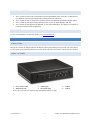
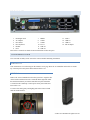
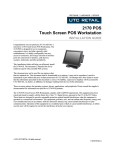
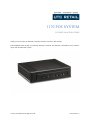
PERIPHERAL SUPPORT The 1170 POS System accepts a standard PC keyboard and standard mouse with a PS/2 or USB interface. UTC RETAIL P/N 10718020 contains both a USB keyboard and USB mouse. The 1170 POS System was designed to coordinate with the UTC RETAIL PD1200 Pole Display option. The 1170 POS System supports many different printers, such as the Epson H6000 or TM-T88. The 1170 POS System supports UTC RETAIL 15” flat panel LCD displays. The displays are available in touch screen and non-touch configurations. USER GUIDE To view or download the 1170 POS User Guide, go to www.utcretail.com INSTALLING THE 1170 POS WORKSTATION POWER CORD Plug the AC cord into AC adapter and mate the adapter’s barrel plug with the power jack in the rear of the chassis. Lay the system on the countertop and route the power cables so they does not interfere with the system’s operation. FRONT I/O PANEL 1. 2. Power switch & LED HDD activity LED 3. 4. Audio Output Microphone Input 5. 6. USB 2.0 USB 3.0 Review the 1170 POS User Guide for more information on these I/O ports. 11933017 Rev A 6 © 2015 UTC RETAIL All rights reserved