1
LCD VESA MOUNT
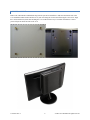
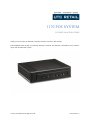
Remove the VESA bracket and hardware bag from the system box. Install the 4 studs onto the bottom side of the
1170. Install the VESA bracket onto the rear of your LCD using the 4 screws and observing the “UP” arrow. Align
the 4 studs with the 4 keyhole slots and hang the 1170 on the bracket in any of 4 rotation orientations. Connect
power and system cables and turn on the 1170.
11933017 Rev A
8
© 2015 UTC RETAIL All rights reserved