1
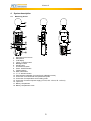
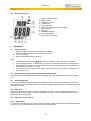
Manual 4.2 Display description 1. 2. 3. 4. 5. 6. 7. 8. 9. 10. 11. 5 5.1 Temp./Humidity reading Battery status Temperature unit Humidity unit Air velocity unit Sound level, air velocity or light reading Sound level unit Light unit MAX/MIN indication Data hold indication Auto power off indication Operation Getting started 1. Open the battery compartment and install a 9 V battery. 2. Close the battery compartment and tighten the screw. 3. Turn on the device. 4. Select the desired measuring function. Note: If the battery status indication appears on the display, you should replace the battery. You can hold the device in your hand or you can use a tripod when performing measurements. When performing sound level measurements, the best measuring distance from microphone to the sound source is about 1 – 1.5 m. If you want to use an external power supply, use the connection on the side of the device (see #15 in chapter 4.1). 5.2 Switch between temperature and humidity measurements To switch between temperature and humidity measuring, press the “TEMP/%RH” button (see chapter 4.1). 5.3 Display backlight To turn on the display backlight, press the backlight button on the device (see chapter 4.1). Press the button again, to turn the backlight back off. The display backlight automatically turns off after approx. 30 seconds of inactivity. 5.4 Data hold Press the “HOLD” button once to activate the display hold function. The hold indication should now appear and the current reading is frozen on the display. To return to the normal measuring mode, just press the “HOLD” button again. 5.5 Select the measuring unit 5.5.1 Wind speed To change the measuring unit of the wind speed, press the “UNITS” button when wind speed measuring is active. You can choose between m/s, km/h, ft/min, knots and mph. 6