1
Schroff MicroTCA System
Backplane 23005-435
21850-045/-046/-081
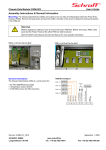
3.7.2 Mechanical DIP Switch
To access the mechanical DIP switch you have to open the case/subrack.
The mechanical DIP switch is a 6-position switch.
•
Switch 1 to 4 are used to set the carrier number (Switch 1 = Bit 0).
•
Switch 5 is used to change the I2C-address of the electronical DIP switch.
- Switch 5 ON: address = 9C
- Switch 5 OFF: address = 9E (default)
•
With switch 6 you can select between mechanical or electronic DIP switch to
set the carrier number.
- Switch 6 ON: Mechanical DIP switch
- Switch 6 OFF: Electronic DIP switch
When setting the carrier number with the mechanical DIP switch please note:
Switch ON = logic 0
Switch OFF = logic 1
The mechanical DIP switch is connected to the input of the electronic DIP switch.
When the SEL signal is a logic 0, the electronic DIP switch will select the data from the
internal EEPROM to drive the output pins, when the SEL signal is a logic 1, the
electronic DIP switch will select the signal from the mechanical DIP switch to drive on
the output pins.
www.a-tca.com / www.schroff.biz
11
R1.0, May 06, 2009