1
Standard Maintenance
SECTION 6
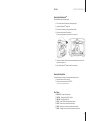
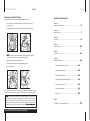
Cleaning the Skip-Away ProTM
Recommended with every cartridge change.
1 Turn off power and wait for the shutter to completely open.
2 Unplug the Skip-Away ProTM power cord.
3 Remove the front drawer by pulling on the drawer handle.
4 Remove any lint contained in the machine.
You may use compressed air, a gentle vacuum, or your hand.
P
5 Install the front drawer. Note: Push front drawer completely into machine or your
machine will not power on.
6 Plug in the Skip-Away ProTM power cord and turn on the power.
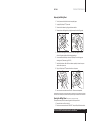
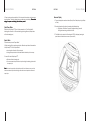
Cleaning the Drive Wheel
This may be necessary if the Disc is not turning properly during the cycle.
1 Ensure that there is no Disc in the Unit.
2 Enter the menu screen and select “CLN DRV”.*
* This process may take several minutes.
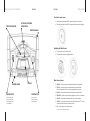
Error Codes
1
2
3
4
5
6
7
WHEEL CHG – Change the buffing wheel
CART CHG – Change the OptoClearTM cartridge
CART LOW – Cartridge is below 10%
E0001 – Shutter not closed, contact technical support
E0002 – Shutter not open, contact technical support
E0003 – Buffing motor not centered, contact technical support
E0004 – Lift wedge not in home position, contact technical support
15