1
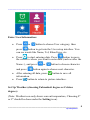
______________________________________________________ Enter User Information:
•
Press
or
button to choose User category, then
press
button to get into the User setup interface. You
can see words like Name, Tel, Blood type, etc.
•
to start entering data. Press
button to move
Press
the curser to where you want to enter data (such as after the
Name: ), and press
and press
•
•
or
button to choose character
button again to choose next character.
button to save all
After entering all data, press
information.
Press
button to return to picture interface.
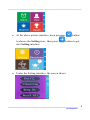
Set Up Weather (choosing Fahrenheit degree or Celsius
degree):
(Note: Weather icon only shows current temperature, Choosing Fº
or Cº should be done under the Setting icon).
___________________________________________________ 8
By Carepeutic®