1
 4. MANAGING PROJECTS IN STRETCHOUT
Stretchout allows you to manage the data (input and output) for each specific
flight that you do with the Gatewing X100. Each flight has associated with it a set
of imagery, data log files that are created by the plane while in flight and, if
applicable, a listing of ground control point coordinates.
To open Stretchout, double-click the Stretchout icon
the Windows Start menu.
on your Desktop or from
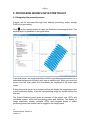
When you open Stretchout, you will see an opening screen that allows you to
manage your flights.
The flight list will show the project name, number of images, number of Ground
Control Points (GCPs), time and date of the first acquisition in a flight and
duration of the flight. Flights can be sorted according to any of the columns by
clicking the appropriate column header.
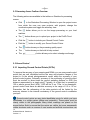
4.1 Opening Screen Toolbar: Overview The following actions are available in the toolbar on Stretchout’s opening screen:
8
Software Manual: Stretchout
Version 1.2