1
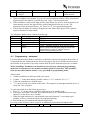
3.4 Functions
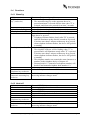
3.4.1 Stand by
0 F 0
0 F ”hold Autoanswer
key” (on device)
A
<1-9> (direct dialling)
<External switches 1-3>
B <01-50>
C <telephone number> E
D
E
Telephone key on device
F
Automatic answering key
on device
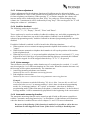
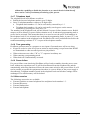
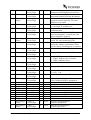
3.4.2 Hook off
<0-9>
<External switches 1-3>
A
B
C
D
E
Telephone key on device
F
Automatic answering key
on device
Entrance to Programming – plain.
Entrance to Programming – advanced.
The autoanswering key on the apparatus has to be
pressed maximum 3 seconds after the time when ”F” is
released, and it has to be pressed for at least 3 seconds.
Hook off and redial the last used telephone number.
Hook off and transmit phone book number no 1-9.
Hook off and transmit phone book number no 1-3.
Hook off and transmit phone book number no 01-50. Two
digits has to be pressed.
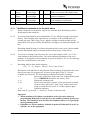
Telephone indicator flashes slowly after ”B” is pressed,
and will illuminate steady after the second no is pressed.
If it takes more than 5 minutes without any keys pressed
when telephone indicator flashes, the device will go back
to standby.
On hook dialling preparation.
The telephone indicator will be flashing when ”C” is
pressed and it will illuminate steady when ”E” is pressed.
If it takes more than 5 minutes without any keys pressed
when telephone indicator flashes, the device will go back
to standby.
The telephone number can contain the same characters as
numbers in the telephone book, ref chapter 4.2.
External switch 1-3 (instead of a telephone number) will
hook off and transmit telephone book number 1-3.
No function.
Hook off. Telephone indicator will illuminate.
Enable/disable automatic answering function. Automatic
answering indicator changes status.
Transmit DTMF 0-9.
Transmit phone book number no 1-3.
Transmit DTMF *.
Transmit DTMF #.
Generate R-key signal = hook flash.
No function.
End conversation.
Volume adjustment in steps from 1-5.
Enable/disable automatic answering function. Automatic
answering indicator changes status.
PicoPhone loudspeaking analog telephone
Page 7.