1
Cellular and Positioning Shield - User’s Guide
Page 8
4 Getting Started
This chapter contains information about how to get acquainted with the Cellular and Positioning Shield.
Please read this section first before you start using the board - it will be well spent time!
4.1
Preparations
This section walks through the preparations that must be done to get the system (i.e., Cellular and
Positioning shield) up and running.
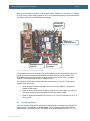
First, acquire a standard size SIM card (sometimes also called "mini SIM") and mount it in the SIM
card holder. Make sure the it supports data communication. The picture below illustrates how to mount
the SIM card.
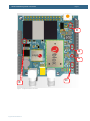
Step 1) Push metal lock in red arrow direction
Step 2) Lift up the SIM card older
Step 3) Insert SIM card (contacts down, polarizing
corner as shown in picture)
Step 4) Push back the SIM card holder and push
metal lock in green arrow direction to secure the
SIM card in correct position.
Mounted SIM card
Figure 1 – Mounting SIM Card
Copyright 2014 © Embedded Artists AB