1
VIASENSOR HS-1000 User Manual
3 The VIASENSOR HS-1000 Software
3.1
Software Setup
To install the VIASENSOR HS-1000 monitoring software onto a computer, insert the CDROM in the
computer’s CDROM drive. The installation utility should run automatically. Follow the prompts until
completion.
3.2
Software Description
The VIASENSOR HS-1000 control box has a serial port for communication with a computer. Connect
the serial cable between this serial port and a serial port on your computer. In case your computer has
no available serial port, a serial to USB adapter will work. Please note that the Com Port that your
computer assigns to the USB adapter may change each time you unplug and reconnect the USB adapter
to the computer.
If the VIASENSOR HS-1000 has the optional Analog Output in addition to the serial port, then the serial
port may not need to be used except for diagnostic functions. The monitoring software would only be
needed for changing internal parameters for data smoothing and for selection of Analog Output units of
dew point or of partial pressure of water vapor.
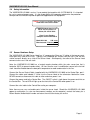
To run the VIASENSOR HS-1000 monitoring software, double click on the program icon on your
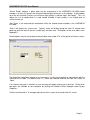
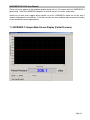
computer’s desktop. The following screen shot is the main screen of the program.
The horizontal axis is time in seconds and the vertical axis is user-selectable for dew point in degrees
Celsius, partial pressure (of water vapor) in millibars (mB), or partial pressure in kilopascals (kPa). The
data progresses across the screen much like a strip chart. The latest dew point or partial pressure data
point is displayed at the bottom of the screen in blue numerals.
Page 4