1
Axis Communications
AXIS 7000 FAX Server Integration
Rev.1.1
01-12-11
Overview
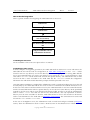
Figure 1 below shows the different components involved in an AXIS 7000 and FAX server integration. A
scanner or digital copier is connected to the network using an AXIS 7000. The AXIS 7000 can be configured
to prompt the user for a FAX number at the moment of scanning a document. The document will be
scanned and sent to an FTP server on the network as a TIFF-image file. An Information File in text format
will be sent along with the image. This Information File will include the fax number and other information
the user might have entered. The FAX server polls the directory of the FTP server for new documents to
send. After a successful scanning job the FAX server will find a TIFF image file and an accompanying
Information File including the fax number of the intended destination.
Telephone
Network
Fax
Digital Copier /
Scanner
Image +
Information file
Internet /
Intranet
AXIS 7000
FAX Server
FTP Server
Keyboard
SMTP Server
FTP Server
User enter
values
Figure 1: Components in an AXIS 7000 and FAX server integration
System Requirements
•
•
•
•
•
AXIS 7000 with a keyboard connected. Firmware 2.20 (for VSI-FAX & Zetafax) or 2.24 (for RightFax)
or later is required.
A scanner or digital copier supported by the AXIS 7000. A list of supported devices is available at
http://www.se.axis.com/techsup/scan_servers/axis_7000/index.html.
A FAX server with the following properties:
• A documented format of the Information File that includes destination fax number etc.
• TIFF, PDF, JPG or PCL as supported image format.
FTP server.
SMTP server (RightFax only)
-2-
Copyright © 2001 Axis Communications