1
Axis Communications
AXIS 7000 FAX Server Integration
Rev.1.1
01-12-11
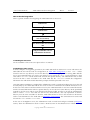
How to do the integration
This is a generic workflow for integrating the AXIS 7000 with a FAX-server.
Install FAX server
Install other servers
Create an XML DD file and store it in the
"xml" user home directory
Add a destination called "Fax"to the AXIS
7000
Configure the AXIS 7000 to retrieve the
XML DD file from the FTP server
1 Installing the FAX server
For the installation of the FAX server please refer to its manual.
2 Installing the other servers
In all the examples of integration given below, the AXIS 7000 needs an FTP server to store and retrieve the
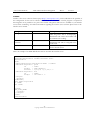
XML DD file that will be used for configuration (cf Meta Data configuration). A user “xml” will be
created. It can have any directory as its home directory but it must be appropriate for storing XML DD file
in it. It is recommended that you create a new directory to be used as the “xml” user home directory. Then
a file called “fax.xml” will be created and stored in this specific directory. The Administrator has to make
sure that the file is “read” accessible to the AXIS 7000. The file “fax.xml” contains the configuration
information that will tell the AXIS 7000 which prompts should be presented to the User.
Once this primary installation is completed the Administrator needs to install and configure the server that will
be used jointly by the AXIS 7000 and the fax server in order to communicate the scanned documents to fax.
In the case of the VSI-Fax and the Zetafax Fax servers, the AXIS 7000 needs to store the scanned documents
and the associated Information File in a specific directory on an FTP server. This directory will be periodically
scanned by the fax server and any scan document will then be polled. In order to do that the Administrator
needs to create a “scan” user. This user can have any home directory. The only requirement is that this
directory must be write accessible for both the AXIS 7000 and the fax server. The created user will then be
used in a File destination in the AXIS 7000 (cf Destination Configuration). The same FTP server can be used
for both the “xml” and the “scan” users.
In the case of the RightFax server, the Administrator needs to install and configure an SMTP (cf RightFax
section). Then the Administrator needs to create a POP3 account on this SMTP server to which the AXIS
-3-
Copyright © 2001 Axis Communications