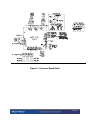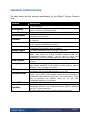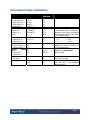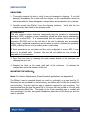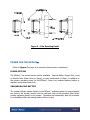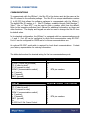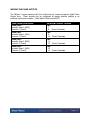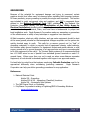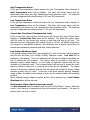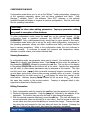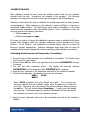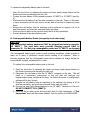
1
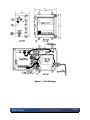
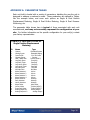
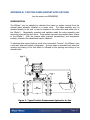
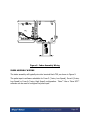
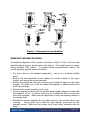
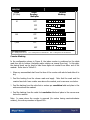
Table of Contents INTRODUCTION ....................................................................................................................................................... 1 OVERVIEW ................................................................................................................................................................. 1 RELIABILITY .............................................................................................................................................................. 1 HAZARDOUS LOCATION CLASSIFICATIONS ................................................................................................................ 2 FOUR-YEAR WARRANTY ........................................................................................................................................... 2 RETURNS ................................................................................................................................................................... 2 ENCLOSURE SECURITY .............................................................................................................................................. 2 TECHNICAL SPECIFICATIONS ............................................................................................................................ 5 TERMINAL SUMMARY ........................................................................................................................................... 6 MPPLUS SOFTWARE ADDRESSING ................................................................................................................. 7 INSTALLATION......................................................................................................................................................... 8 UNPACKING ............................................................................................................................................................... 8 MOUNTING THE MPPLUS ...................................................................................................................................... 8 POWER FOR THE MPPLUS ................................................................................................................................. 9 POWER OPTIONS ........................................................................................................................................................ 9 ONBOARD BACKUP BATTERY .................................................................................................................................... 9 INTERNAL BATTERY POWER .................................................................................................................................... 10 WIRING THE POWER INPUT ...................................................................................................................................... 11 INTERNAL CONNECTIONS ................................................................................................................................. 12 COMMUNICATIONS .................................................................................................................................................. 12 WIRING THE PULSE INPUTS...................................................................................................................................... 13 WIRING THE ANALOG INPUTS .................................................................................................................................. 13 WIRING THE PULSE OUTPUTS ............................................................................................................................. 14 GROUNDING ............................................................................................................................................................ 15 OPERATING MODES ............................................................................................................................................. 16 SLEEP/WAKE-UP MODE .......................................................................................................................................... 16 DISPLAY MODE ....................................................................................................................................................... 17 ALARM MODE ......................................................................................................................................................... 18 CONFIGURATION MODE ........................................................................................................................................... 21 CALIBRATION MODE ............................................................................................................................................... 24 MAINTENANCE ................................................................................................................................................... 27 CALIBRATION .......................................................................................................................................................... 29 SOFTWARE PACKAGES ....................................................................................................................................... 29 FIELD MANAGER, TALON DEVICE MANAGER, AND TALON SCADA.................................................................. 29 APPENDIX A: PARAMETER TABLES ............................................................................................................... 30 APPENDIX B: POSITIVE DISPLACEMENT APPLICATIONS....................................................................... 31 INTRODUCTION ........................................................................................................................................................ 31 INDEX ASSEMBLY WIRING ...................................................................................................................................... 32 MOUNTING THE MPPLUS ON THE METER ........................................................................................................... 33 REVERSING THE INDEX ROTATION .......................................................................................................................... 34 TABLE B-1: 8-DIGIT COUNTER MASKING ............................................................................................................... 35 ILLUSTRATIONS FIG. 1 – THE MPPLUS ................................................................................................................................................ 3 FIG. 2 – PROCESSOR BOARD DETAIL .............................................................................................................................. 4 FIG. 3 – POLE MOUNTING DETAIL .................................................................................................................................. 9 FIG. 4 – USING THE SCROLL SWITCH FEATURE ............................................................................................................ 17 FIG. 5 - TYPICAL POSITIVE DISPLACEMENT APPLICATION FOR GAS ............................................................................. 31 FIG. 6 - INDEX ASSEMBLY WIRING ............................................................................................................................... 32 FIG. 7 – REVERSING THE INDEX ROTATION .................................................................................................................. 34 FIG. 8 – COUNTER MASKING KIT APPLICATION ........................................................................................................... 36 INTRODUCTION OVERVIEW The MPplus Volume Corrector / Pressure Recorder is a low-cost version of Eagle’s family of products. It is an intelligent, compact, rugged, and reliable industrial microprocessor-controlled computer designed for measurement applications. It can execute multiple processes including tasks such as complex math functions, control algorithms, etc., without host intervention. Flexibility, expandability, and reliability are the major factors in the MPplus design philosophy. It is a balanced system, featuring flexible memory, I/O, power, and communications schemes. A harsh environment tolerance is also one of the MPplus strengths. The operating temperature can range from -40C to 70C (-40F to 158F), and the MPPLUS is housed in a fiberglass NEMA 4X enclosure. This allows the unit to exist where the work must be done, eliminating costly signal conditioning or expensive long sensor runs. The MPplus, normally fed with a 5-15 VDC supply, employs a low-power CMOS design. An optional 120/240 VAC unit includes an uninterruptible power supply. Should it lose power, the unit will sense the failure, automatically switch to battery power, and continue to operate at full capacity. Other supply options include solar arrays and thermoelectric generators for sites without conventional power. The optional operator interface is a single-line liquid crystal display. A scroll switch allows users to examine and/or change process data and diagnose problems at the remote site without a local host or terminal. The MPplus can calculate natural gas corrected volumes using AGA-5, AGA-7, AGA-8, and NX-19 reports, and is fully compatible with Eagle Research’s entire family of products. Eagle Research is committed to providing a complete solution for all gas flow, steam, and control applications. RELIABILITY The MPplus is ruggedly built to perform in a variety of industrial environments. Care is taken to maximize reliability by applying a urethane conformal coating to all circuit boards, utilizing a hermetically sealed display, and providing NEMA 4X packaging. Page 1 HAZARDOUS LOCATION CLASSIFICATIONS The MPplus is designed for mounting in Class I, Division 2 hazardous area locations (refer to the NFPA Electrical Code Book). Approval for Class I, Div. 1 applications is pending. FOUR-YEAR WARRANTY Eagle Research Corporation warrants the products it manufactures to be totally free from any defects in materials and workmanship under normal operation and use. Eagle Research agrees to repair or replace any instrument that is defective due to faulty workmanship or material, if returned to our factory with shipping charges prepaid, within four years of original purchase. RETURNS When a faulty product cannot be repaired in the field, contact Eagle Research Corporation for an RMA number and for return information. Packaging and shipping criteria will be established at that time. *IMPORTANT* REMOVE ANY REPLACEABLE BATTERY OR BATTERY PACK FROM ANY UNIT PRIOR TO ITS RETURN SHIPPING. DAMAGE CAUSED BY LOOSE BATTERIES WITHIN UNITS WILL NOT BE COVERED BY THE MANUFACTURER, AND MAY VOID ANY WARRANTY THE UNIT IS STILL UNDER. ENCLOSURE SECURITY Quick-release door latches that may be padlocked are standard features of the MPplus to prevent unwanted users from opening the enclosure. As an option, a magnetic doorajar switch may be installed to initiate an alarm when the unit’s door is opened. Page 2 Figure 1 – The MPplus Page 3 Figure 2 – Processor Board Detail Page 4 TECHNICAL SPECIFICATIONS The table below lists the technical specifications for the MPplus Volume Corrector Units. Features Input Power Consumption Power Monitoring Backup Battery Processor Memory Real time Clock Internal Inputs Pulse Inputs Pulse Outputs Analog Inputs RTD Inputs Communications Status LED Expansion Capability Description 5-15 VDC. Two battery inputs on MTA connectors. One solar power input on screw terminals. 5 AH battery, 2-hr charging per day @ 50 mA charge rate. 1 mA average current. Less than 100 uA sleep current Supply voltage monitoring through a/d with low supply voltage Interrupt 3.6 VDC lithium backup battery: 10 years typical backup of database and time/date during normal use Phillips P51XAS3 high performance 16-bit microcontroller running at 22.1184 MHz 512K x 8 remotely-programmable FLASH program memory 512K x 8 battery-backed RAM data memory Battery-backed, quartz crystal controlled; +/- 1 sec/day typical accuracy; programmable time scheduled interrupt capability One ambient temperature input; one supply voltage input Two pulse inputs, software programmable for Form A or C; high or low speed. Each counter is a six-digit (0-999999) hardware counter with programmable interrupt support. Can be used for simple pulse accumulation, and for more complex applications such as card readers Four multi-purpose, memory-mapped, two-wire Output lines. (50 V max DC only). Two precision strain gauge (mV) analog inputs thru MTA connectors for local pressure transducer, 12-bit resolution, analog sampling, software calibration. Each input has five MTA pins. One 12-bit resolution RTD input thru an MTA connector; 3-wire lead compensated with ground shield connection; four-pin MTA Two serial ports with RX, TX, RTS, CTS, and communication switch signals. Port 0 (RS-232 levels) typically connects to the MS connector to provide local communications via 6-pin MTA. Port 1 (CMOS levels – Future Use) for interfacing with modems, radios, etc. via 8-pin MTA. Configurable speed up to 115,200 baud. One software-controllable LED for various function indications Additional connectors provide redundant termination points to allow for configuration flexibility. One 10-position connector allows for expansion over the I2C communication bus. Optional isolated analog output modules and optional serial ports Page 5 TERMINAL SUMMARY Feature POWER INPUT PULSE INPUTS PULSE OUTPUTS Terminal Description 01 02 03 04 05 06 07 08 09 10 11 12 13 14 Customer Field Description Power Input Ground Solar Input (5-15 VDC) Pulse In 0 High+ Pulse In 0 Pulse In 0 LowPulse In 1 Pulse Out 0 N.O. Pulse Out 0 Pulse Out 1 N.O. Pulse Out 1 Pulse Out 2 N.O. Pulse Out 2 Pulse Out 3 N.O. Pulse Out 3 Page 6 MPPLUS SOFTWARE ADDRESSING Description Terminals Software Address Pulse Outputs Pulse Output #0 Pulse Output #1 Pulse Output #2 Pulse Output #3 7&8 9 & 10 11& 12 13 & 14 1.1 1.2 1.3 1.4 Power Input Battery #1 Battery #2 Solar J5 (VBAT1) J4 (VBAT2) 2 73.1 73.1 61.8 3, 4, & 5 6 Form “A” 0 1 J2 J1 0 1 Range 5 to 15 VDC Can be read in the Extended System process with address for line power and battery at location 117 and solar at location 122 in EEPROM editor Form “C” High Speed 0.1 0.001 1.1 1.001 Precision strain gauge (mV) inputs. CANNOT be used for 4-20mA or 15V signal applications. J8 J9 Port 1 Port 0 CMOS levels (Future Use) RS-232 levels J3 6 N/A 16 Range –40 to 160F Range –67 to 257F Can be read in the Extended System process Pulse Inputs Pulse Input #0 Pulse Input #1 Pressure Inputs Pressure Input #0 Pressure Input #1 RS-232 Serial Ports Internal Port External Port RTD Inputs RTD Input Box Temperature Notes Page 7 INSTALLATION UNPACKING 1. Thoroughly examine the box to verify it was not damaged in shipping. If you find damage, immediately file a claim with the shipper, as the manufacturer cannot be held responsible for items damaged in transportation and accepted by the customer. 2. Carefully unpack the MPplus from the shipping container. contains every item listed on the shipping order. Verify that the box !!! CAUTION !!! This unit contains certain electronic components that are sensitive to electrostatic discharge (ESD); therefore, proper precautions should be taken during maintenance operations to avoid ESD. It is recommended that the operator first touch the MS connector (RS-232C port) on the left side of the unit to dissipate any accumulated static charge. Additional precautions may be taken in order to minimize the possibility of ESD, including the use of a grounding wrist or ankle strap. If these precautions are not taken and the unit is subjected to severe ESD, it may revert to its default state. However, the unit will not exhibit any loss of data or degradation of performance. 3. Open the front door by releasing the quick release latches of the enclosure and swinging the door out. 4. Examine the label on the inside right wall of the enclosure. configuration and serial number of the unit. It indicates the MOUNTING THE MPPLUS Note: For Positive Displacement (Index-Mounted) applications, see Appendix B. The MPplus may be mounted directly on a wall or, optionally, on a pipe (see Fig. 3). Mounting feet are provided for wall mounting, and plates with U-bolts are provided for pole mounting. Two-inch rigid iron pipe or conduit is required for pipe mounting. It is recommended that the pipe be placed 18 to 24 inches into the ground in a 6-inch wide sackrete/concrete-filled hole. The length of the 2-inch mounting pipe or conduit will vary according to the site, but typical installations place the unit at about eye level for ease of operation. Page 8 Figure 3 – Pole Mounting Detail POWER FOR THE MPPLUS (Refer to Figure 2 on page 4 for processor board power connections.) POWER OPTIONS The MPplus has several power options available: Internal Battery Power Only; Local or Remote Solar Power Array or Supply; or some combination of these. In addition to the primary operating power for the MPplus, there is an onboard backup battery to maintain unit memory and clock. ONBOARD BACKUP BATTERY The onboard lithium backup battery in the MPplus maintains power for approximately ten years to the memory section and the real time clock of the processor board when primary operating power is not present. Operation and interactivity with the processor is not available when the backup battery alone is in use. Page 9 INTERNAL BATTERY POWER Several internal battery packs are available for supplying primary power to the unit. The two basic kinds are Alkaline (non-rechargeable) and Lead-Acid (rechargeable). Alkaline packs are typically used alone, without external power, and provide a onetime supply until drained of energy. Alkaline battery life is determined by a number of factors, such as frequency of calculations and communication, cabinet temperature, etc. Connections on the MPplus processor board are arranged such that, as one battery pack begins to lose power, a second pack may be connected before the first is removed, thus providing uninterrupted power. WARNING (see Figure 2) Do not connect the alkaline battery packs to connector J4 or J5 when there is an external power supply in use. Damage may occur. Lead-Acid batteries are rechargeable, and are typically used with a solar array or panel. With normal operating conditions, lead-acid batteries and their associated external supplies should provide long periods (up to 10 years) of unattended power to the unit. This would be more suitable for remote locations. CAUTION (see Figure 2) Do Not connect the lead-acid battery packs to connector J4 as charging will not occur. Page 10 WIRING THE POWER INPUT WARNING The operating voltage range for the MPplus™ is 5-15 VDC. recommended input voltage of 15 VDC. Do NOT exceed (Refer to Figure 2 on page 4 for processor board power connections.) If the unit is internally battery powered only, check the type of battery pack being used (it should be a non-rechargeable alkaline) and connect it as follows: Plug it into either J5 or J4 to power up the MPplus™. When it is time to replace the pack, a second pack may be plugged into the other connector before removing the first so power is not interrupted. WARNING Whenever external power is applied to the MPplus, NEVER plug the nonrechargeable alkaline pack into J4 or J5, as damage to the unit may occur. If the unit is solar powered with a local solar array feeding directly into it, follow this procedure. First - connect the internal lead-acid (rechargeable) battery pack to J5 (VBAT1). Next - connect the (+) lead of the solar array to terminal 2 (VSOLAR) and the (-) lead to terminal 1 (GND). Use the reverse procedure to power the unit down, disconnecting the solar array wires first. **Do not connect the internal lead-acid battery to J4, as charging will not occur**. If for any reason an alkaline battery pack is used in this application, DO NOT connect the solar array as damage may occur. NOTE Upon first powering up the MPplus, the optional outside display will flash, indicating an alarm condition. In this case it means ‘First Time Power’, and is no cause for concern. To clear this alarm read the paragraph on ‘Using the Scroll Switch’ in the DISPLAY MODE section. When the outside display option is present, you can now view selected parameter values using the scroll switch. The scroll switch is activated by the use of a magnet (one is shipped with units having this option). The table below shows the terminal wiring for power input. Power Input Description Power Input GND (ground) VSOLAR (solar power) MPplus Terminal Location TB1 1 2 Screw Terminals VBAT1 (MTA) VBAT2 (MTA) J5 Primary Pin1 +; Pin2 Gnd J4 Secondary Pin1 +; Pin2 Gnd Page 11 INTERNAL CONNECTIONS COMMUNICATIONS To communicate with the MPplus, the Site ID in the device must be the same as the Site ID entered in the software package. The Site ID is a unique identification number (1 to 65,535) that allows the software packages to communicate with the MPplus. The default Site ID number is 1. Site ID Changer, available through Field Manager™, Talon™ Lite, or Talon SCE™, can be used to enter a number other than the default. Refer to the respective software User’s Manual for additional information on these and other functions. The display and keypad can also be used to change the Site ID from its default value. In its standard configuration, the MPplus is equipped with two communications ports – 0 and 1. Port #0 can be configured to allow local communication using RS-232C. Port #1 can be configured for CMOS and is for future communications use. An optional RS-232C serial cable is required for local direct communications. Contact your factory representative for ordering information. The tables below show the terminal wiring for the two communications ports. PORT #0 MPplus Terminal / Pin Locations RS-232C (CMSW pin grounded) CTS 0 (clear to send) RTS 0 (request to send) CMSW 0 (communications switch) Rx 0 (receive) Tx 0 (transmit) GND 0 (ground) J9 1 2 3 4 5 6 PORT #1 CMOS (CMSW pin open) CTS 1 (clear to send) RTS 1 (request to send) CMSW 1 (communications switch) Rx 1 (receive) Tx 1 (transmit) GND 1 (ground) Vin RS-232 Port 1 Ext. Power Control MPplus Terminal / Pin Locations J8 1 2 3 4 5 MTA pin numbers 6 7 8 MTA pin numbers Page 12 WIRING THE PULSE INPUTS The standard MPplus configuration includes two pulse inputs that are software programmable for Form A or C, and high speed or low speed. These inputs can be used for meter indexes, simple pulse counters, or in more demanding applications such as card readers. The table below shows the terminal wiring for the pulse inputs. Pulse Input Description Pulse 0 +0 Pulse 0 - 0 (no connection for Form A) Pulse 1 MPplus Terminal Location TB2 3 4 Screw Terminals 5 (no connection on 5 for Form A) 6 WIRING THE ANALOG INPUTS The standard MPplus configuration includes two pressure strain gauge (mV) inputs and one RTD input with 3-wire lead compensation and ground shield connection. These are 12-bit resolution inputs with analog sampling capability. In addition, there is a box temperature and supply voltage input. All analog inputs can be software calibrated. The table below shows the terminal wiring for the analog inputs. Analog Input Description Pressure 0 Power 0 Analog Input 0 Analog Input 0 Ground 0 Shield 0 Pressure 1 Power 1 Analog Input 1 Analog Input 1 Ground 1 Shield 1 RTD 1-1 1-2A 1-2B Ground MPplus Terminal Location J2 Pin 1 Pin 2 Pin 3 MTA pin numbers Pin 4 Pin 5 J1 Pin 1 Pin 2 Pin 3 MTA pin numbers Pin 4 Pin 5 J3 Pin 1 Pin 2 Pin 3 MTA pin numbers Pin 4 Note: Inputs cannot be used for 4-20mA or 1-5V signals. Page 13 WIRING THE PULSE OUTPUTS The MPplus comes standard with four multi-purpose, memory-mapped, digital Pulse Output lines. These outputs can be configured as simple discrete outputs or as precisely timed pulse outputs. (Solid-state 100mA max AC/DC) Pulse Output Description Pulse Out 0 Normally Open 0 (NO0) Common 0 (Com0) Pulse Out 1 Normally Open 1 (NO1) Common 1 (Com1) Pulse Out 2 Normally Open 2 (NO2) Common 2 (Com2) Pulse Out 3 Normally Open 3 (NO3) Common 3 (Com3) MPplus Terminal Location TB3 7 8 Screw Terminals TB4 9 10 Screw Terminals TB5 11 12 Screw Terminals TB6 13 14 Screw Terminals Page 14 GROUNDING Because of the potential for equipment damage and injury to personnel, certain practices should, and often must, be observed when installing field computer systems. Of these practices, proper grounding is possibly the single most important. This section was included to point out general rules and practices, and NOT to supersede those defined in the National Electrical Code (NEC) published by the National Fire Protection Association (NFPA), nor the Classification of Gas Utility Areas for Electrical Installations booklet published by the American Gas Association (AGA). A sound understanding of Federal, State, and Local laws is fundamental to proper and legal installation work. Eagle Research Corporation makes no warranties or guarantees on the effectiveness or safety of any technique or suggestion here described. All field computers, electronic utility interface, and gas meter equipment should be kept at the same ground potential so that unexpected voltages anywhere on the system are quickly shunted away to earth. This calls for a common ground rod (or "bed" of grounding materials) to which is securely tied all equipment chassis, metal cabinets, and intrinsic safety ground brackets. For equipment chassis and metal cabinets, a solid copper ground wire or ground strapping of an approved size and type is recommended to tie this equipment to the rod(s). For Intrinsic Safety systems it is recommended that two #12 AWG wires be run in parallel from individual ground terminals on each I.S. ground frame. Where more than one rod is used, as when some distance separates equipment, all rods should be bonded together with copper in an approved manner. It should also be noted here that systems employing Cathodic Protection need to be approached differently when considering grounding measures. Eagle Research Corporation can help you define grounding procedures for any application. References National Electrical Code Article 250 - Grounding Articles 500 & 501 - Hazardous (Classified) Locations Article 504 - Intrinsically Safe Systems The IAEI Soares' Book on Grounding PolyPhaser Corporation’s catalog of Lightning/EMP & Grounding Solutions www.polyphaser.com Page 15 OPERATING MODES The MPplus operates in any of the following five standard modes: Sleep/Wake-up Display Alarm Configuration Calibration To access any operating mode, press the keypad key that corresponds to the mode you want: conf for configuration mode alrm for alarm mode cal for calibration mode esc to return to a previous mode from any other mode SLEEP/WAKE-UP MODE In normal operation the MPplus maintains a powered down state (sleep mode) to conserve battery life. In this state the internal display is blank while the outside display shows the first label, CV XXXXXXXX for example, where XXXXXXXX is the most recent reading prior to the next wake-up interval. The unit executes processes depending upon the user's programmed wake-up interval. Shorter intervals result in more frequent data while longer intervals provide for longer battery life. The scheduled wake-ups result in immediate power-down after performing calculations. In addition to the scheduled wake-ups for volumetric calculations, the MPPLUS can be brought up from its sleep mode by any of the following: Connecting a portable computer to the unit's serial communication port (MS connector) Pressing any key on the keypad Scrolling the external display with a magnet (see the section on DISPLAY MODE) Calling the unit via modem Once the unit is awake, it will automatically power down one minute after the operator stops interacting with it. The MPPLUS can also be forced to enter the sleep mode by pressing the ent and zero keys simultaneously. NOTE The MPplus will not go to sleep if the RS-232C serial cable is connected. Battery life, in this case, may be drastically reduced. Typically, the MPplus remains fully awake and does not enter the sleep mode if it is powered with an external power supply. In this case, the Wake-up Interval parameter is set to 0. Page 16 DISPLAY MODE In display mode, only limited parameters with assigned labels and function keys can be viewed. With the optional virtual keypad and display, the ・ and ・・arrow keys will allow you to scroll through the display parameter list. You may use the jump key to directly view any of the assigned labels; press jump then enter the label number 1-64, followed by pressing ent. You can use the function keys (F0 - F9) to view previously assigned parameters. Talon™ Lite or Talon SCE™ software can be used to assign function keys and labels to any parameter. Also, the virtual keypad may be used to assign function keys. Using the Scroll Switch On units that feature the external display, a magnet may be used to easily access information without opening the door. Just below the display window, to the right, is a routed indention in the door. When the key chain magnet, supplied with these units, is held in the proximity of this ‘dimple’, the display will vary its information. Each subsequent pass of the magnet over this dimple will produce a new parameter display. When in an alarm condition, the external display will be flashing. To clear alarms, hold the magnet against the dimple until flashing stops. Figure 4 – Using the Scroll Switch Feature Page 17 ALARM MODE The MPplus can be configured to activate an alarm when certain conditions are met or when user-defined limits are exceeded. Active alarm messages can be configured to show on the MPplus display. The unit can also automatically call a host computer running Field Manager™ and the Talon Software Suite to report the alarm. (see the section on SOFTWARE PACKAGES). A history log is kept in the unit on each alarm condition, consisting of the following: Current value Type of alarm (high, low, etc.) Setpoint value (alarm limit) Time of alarm Date of alarm Time out of alarm Date out of alarm Extreme value alarm The MPplus can be configured to monitor and alarm on any condition including, but not limited to, the following: First Time Power AC Power Failure Low Supply Volts High and Low Flow Rate High and Low Pressure High and Low Temperature Current Day Flow (Transportation Limit) Low Voltage Shutdown Box intrusion NOTE Additional hardware equipment and configuration may be required for some alarm monitoring applications. Viewing and Clearing Alarms from the External Keypad or Virtual Keypad (See the sections on ALARM MODE, & APPENDIX A: PARAMETER TABLES) To enter alarm mode, press the alrm key on the optional keypad. In alarm mode you can view and acknowledge any alarm. If alarms are active, the unit will display the first alarm message. If there are more alarms, you can view them by pressing the ・ key. Repeatedly pressing the ・ key will cycle through the active alarm list. Alarms can be locally acknowledged at the unit by pressing the ent key while a particular alarm message is displayed, or by polling with Talon™ Lite or Talon SCE™ software. Page 18 When in an alarm condition, the optional external display will be flashing. To clear alarms, hold the magnet against the dimple until flashing stops. Unless the parameter's limits are violated again, the unit will not include acknowledged alarms in its list the next time the user enters alarm mode. To exit alarm mode without acknowledging the alarm, simply press the esc key. First Time Power Alarm First Time Power alarm is defined as the re-application of power after interruption of the power source. For example, whenever the battery is disconnected and then subsequently reconnected, the unit records the First Time Power event. Low Supply Volts Alarm If the supply voltage to the unit falls below the Low Supply Volts Alarm Setpoint value, a Low Supply Volts alarm will be initiated. The alarm will remain active until the supply voltage is greater than the Low Supply Volts Alarm Reset parameter. The setpoints are user configurable with default values of 8.5 and 8.8 volts respectively for battery powered units. High Flow Rate Alarm If the flow rate should exceed the High Flow Rate Alarm Setpoint, a High Flow Rate alarm will be initiated. The alarm will remain active until the flow rate falls below the High Flow Rate Reset parameter value. The setpoints are user configurable with default values of 100000 and 99990 respectively. Low Flow Rate Alarm If the flow rate should fall below the Low Flow Rate Alarm Setpoint, a Low Flow Rate alarm will be initiated. The alarm will remain active until the flow rate rises above the Low Flow Rate Reset parameter value. The setpoints are user configurable with default values of -100 and -80 respectively. High Pressure Alarm If the gas pressure should exceed the High Pressure Alarm Setpoint, a High Pressure alarm will be initiated. The alarm will remain active until the pressure falls below the High Pressure Reset parameter value. The setpoints are user configurable with default values of 1500 and 1480 respectively. Low Pressure Alarm If the gas pressure should fall below the Low Pressure Alarm Setpoint, a Low Pressure alarm will be initiated. The alarm will remain active until the pressure rises above the Low Pressure Reset parameter value. The setpoints are user configurable with default values of -100 and -80 respectively. Page 19 High Temperature Alarm If the gas flow temperature should exceed the High Temperature Alarm Setpoint, a High Temperature alarm will be initiated. The alarm will remain active until the temperature falls below the High Temperature Reset parameter value. The setpoints are user configurable with default values of 200 and 180 respectively. Low Temperature Alarm If the gas flow temperature should fall below the Low Temperature Alarm Setpoint, a Low Temperature alarm will be initiated. The alarm will remain active until the temperature rises above the Low Temperature Reset parameter value. The setpoints are user configurable with default values of -100 and -80 respectively. Current Day Flow Alarm (Transportation Limit) If the current day's total volume should exceed the Current Day High Volume Alarm Setpoint, a Current Day Flow alarm will be initiated. The alarm will remain active until the value for the current day volume is reset the next day at roll time. The setpoints are user configurable with default values of 100000 and 99990 respectively. For transport or interruptible customers, this parameter can be used to alarm when an account has exceeded a predetermined daily volume allocation. Low Voltage Shutdown Alarm If the supply voltage should fall to approximately 6.0 volts, an interrupt will be triggered and the unit will enter Low Voltage (Critical) Shutdown mode. Low Batt will be displayed on the display. This is an indication that the supply voltage is absolutely too low to operate the unit properly. The battery must be changed at this point or adequate supply voltage applied. In this mode, all operation ceased, and the unit operates in a protective mode. The on-board battery will continue to protect the unit's memory; therefore data prior to entering this mode will be maintained. The supply voltage is monitored constantly and the unit will reset itself should the supply voltage becomes greater than 6.0 volts. If the unit is left alone without applying adequate supply voltage, the battery will continue to drain and the outside display will eventually go blank. When sufficient supply voltage is applied and the unit is powered up, a Low Voltage Shutdown alarm will be recorded. Box Intrusion Alarm (Optional door ajar switch) The Box Intrusion alarm is initiated when the door of the MPplus opens. When this occurs, a full wake-up is triggered and the unit executes its processes. The alarm is inactive when the door is closed. Page 20 CONFIGURATION MODE Configuration mode allows you to set up the MPplus™ initial configuration, change any of the operating parameter values, and set alarm conditions and limits. Field Manager™ software, Talon™ Lite software, Talon SCE™ software, or the optional handheld keypad and display is required to perform configuration. See the online help files for operating instructions. *CAUTION* Care must be taken when editing parameters. Improper parameter editing may result in corruption of the database. To enter configuration mode, press the conf key on the optional keypad. If the configuration mode is password protected, the MPPLUS will display ENTER PASSWORD? Only a valid password entry would then be given access to this mode. Configuration mode allows you to set up the unit's initial configuration, change any of the operating parameter values, set alarm conditions and limits, and assign function keys to various parameters. While in the configuration mode, the unit continues to operate normally. It continues to sample live pressure and temperature values, calculate corrected volume, and collect historical data. Viewing Parameters In configuration mode, any parameter value may be viewed. One method is to use the Jump key to directly view database items. Press Jump and then enter the address of the parameter (PPSSII) followed by pressing the ent key. The top line on the display is the address XX-XX-XX and the bottom line is the value. Function key assignments are still valid, so often-viewed parameters may be accessed in this manner. The right and left arrow keys ・・・) allow horizontal movement between processes, and the up and down arrow keys ・・・・・・・ allow moving vertically within a process. Pressing Jump followed by the right arrow key (・・will display the same item number in the next section. Likewise, pressing Jump followed by the up arrow key (・・ will display the same item number in the previous section. Jumping to assigned labels is also supported as described in Display mode. Editing Parameters 1. Enter configuration mode by pressing the conf key (use the password if required). 2. Display the desired parameter. Press the jump key, followed by the address of the parameter. The function keys can also be used to view assigned parameters. 3. With the desired parameter displayed, press the edit key. (The unit will display the current parameter value and prompt for a new value.) Use the keypad to enter the correct value and then press the ent key to execute the change. Pressing the esc key when the unit prompts for the new value will abort the change. Pressing the ent key if nothing has been typed, also leaves the parameter unchanged. Page 21 Assigning Function Keys In configuration mode, any item can be assigned to a function key as follows: 1. Enter configuration mode by pressing the conf key (use the password, if required). 2. Display the desired parameter. Press & release the jump key, followed by the address of the parameter. 3. Assign a function key to the parameter. Press & release the jump key, then the edit key, and then the function key you wish to assign to the current item [F0 F9]. Audit Trail The MPplus maintains an electronic audit trail file that records all parameter changes and calibrations performed on the unit. Each entry is identified with the date and time the event occurred. The contents of this file cannot be changed, providing a secure, non-editable audit trail. In the standard MPplus configuration, the audit trail is disabled. You can enable audit trail logging by editing address 010313 to 300 at the keypad or by using Talon™ Lite or Talon SCE™ software. The maximum memory allowed for audit trail is (300 records * 24 = 7,200). NOTE Once the audit trail is enabled (a value greater than “0”), the user cannot disable it without a full unit initialization. Reloading the database will not disable the audit trail. Once enabled, the MPplus maintains the audit trail file with a maximum of 300 records. You can upload the information from the unit to a portable or host computer using Talon™ Lite or Talon SCE™ software. When the audit trail is full, Audit Trail Full will appear if editing is attempted and the unit will not allow any changes. The audit trail must first be uploaded and reset by Talon™ Lite or Talon SCE™ software. Memory (History Logging) The MPplus has a minimum of 512K x 8 Z-RAM for database, audit trail, and history logging, and 512K x 8 Flash memory allowing easy upgrade of run-time code. With the large memory capacity, a minimum of 32,000 historical inputs with time and date stamp can be stored. The non-editable history file provides the user with time related data logged in any variation of selectable intervals; minute, daily, weekly, and monthly. An event-driven history mode allows the logging of data when an event occurs (e.g. alarms). An experienced user with Talon SCE™ software can define the type of data and collection period. Since the history data elements are stored in a block of memory, the size has to be assigned at the time the history process is created in the unit; typically when the database is downloaded at the factory. Page 22 NOTE The size of the history block cannot be changed once the history process has been created in the unit. A complete download would be required to reset the database and change the MPplus memory assignment. The memory required to store an entire history process data block is [Max pointers * (Max Record +1) *4]. Data may be collected over the telephone lines via the optional modem, or on-site through the MS connector on the side of the enclosure. Talon Device Manager or Talon SCADA software is required for collection. The collected data can then be used for: Billing information Measurement reports for utility and customer management System analysis using flow rate and pressure Support for estimating gas volume consumption in cases of meter or instrument malfunction Special Key Combinations There are a number of special key combinations that allow the user to view system information and perform certain tasks very easily. These are listed in the table below. Key Combination +/- and zero and cal and edit Description System Passwords System information (ROM version, unit S/N, calculated Checksum) Toggles keypad beeper on and off Page 23 CALIBRATION MODE Main calibration should be done using the software wizard built into the software provided with the unit. Instructions are included in the software. The following procedure is designed for use with a local external keypad or with Virtual Keypad. Calibration mode allows the user to calibrate the analog inputs such as static pressure and temperature. While operating in the calibration mode the MPplus continues to periodically update volume. The analog input value used for calculations is the value measured when calibration mode was initially entered. Once in calibration mode, the user can perform the following operations: Calibrate zero only Calibrate both zero and span Of course, the option to change the calibration reference points is available at all times. Several other features make the software calibration routine attractive and more intuitive. In the MPplus, unit calibration is software based; there is no need for laborious operator adjustments. Software calibration does away with the need for repetitive potentiometer adjustments, thereby simplifying field calibration procedures. Calibrating Static Pressure and Temperature Transmitters 1. View the value of the transmitter to be calibrated on the display. The function keys can be used for quick access. 2. Press the blue cal key. Enter your password at the optional PASSWORD? prompt, if required. 3. The unit will enter calibration mode. The display will alternate between CALIBRATING and the parameter label; PRESSURE #1 for example. 4. Apply the zero reference to the transmitter and wait for the reading to stabilize. 5. Press the blue zero key. The display now shows the following: ZERO> XX.XX NEW?> Where XX.XX represents the unit's default zero value. If the current zero reference matches the unit's default, simply press the ent key to collect the new point. Otherwise, key in the value of the current reference before pressing the ent key. The unit should display Calculating . . . briefly, and then display the new point. Pressing the esc key instead of the ent key at this point aborts the operation and returns you to the calibration prompt. 6. Apply the span (full-scale) reference to the transmitter and wait for the reading to stabilize. Page 24 7. Press the blue span key. The unit now shows: SPAN> XX.XX NEW?> As with the zero point, if the external reference matches the default span value, simply press the ent key. Otherwise, key in the current value of the external reference, then press ent. After the ent key is pressed, the display reading should immediately adjust to reflect the new calibration point. Pressing the esc key instead of ent at this point aborts the operation and returns the operator to the calibration prompt. 8. Steps 4 through 7 are required only once. They may be repeated as often as necessary while in calibration, but only the most recent point will be saved on completion of calibration. 9. To permanently store the results of the calibration press the ent key, and the unit will prompt, Enter to accept Calibration. Simply press the ent key again to save the calibration. Press the esc key to abort the calibration. (Note: Pressing esc repeatedly from anywhere within the calibration procedure will back the operator out of calibration mode). Calibrating the Optional Analog Output Board Several features make the Analog Output software calibration routine attractive and more intuitive. In the MPplus, unit calibration can be software based; there is no need for laborious operator adjustments. Software calibration does away with the need for repetitive potentiometer adjustments, thereby simplifying field calibration procedures. The keypad/display or Talon Device Manager software is necessary to perform software calibration. NOTE Pressing esc repeatedly from anywhere within the calibration procedure will back the operator out of calibration mode. 1. Display the Analog Output parameter on the display. 2. Press cal. Enter your password at the optional PASSWORD? prompt, if required. 3. The unit will enter calibration mode and the display will show the current value and mA representation of the analog output signal. For example, Eng: 48.000 mA: 11.680 Where 48.000 is the analog output reading representing 11.680 mA. The top line (Eng) will alternate between four different readouts: 48.000, UP/DN TO CHANGE, CALIBRATING, and the parameter label, while the bottom line will always show the mA value. Page 25 4. Connect a milliamp meter in series with the loop to measure the current. The field instrument that the loop is driving can also be used to read the output, if desired. 5. Pressing ・・will increment the output current to represent 0%, 25%, 50%, 75%, & 100% of the analog output parameter to check the calibration. Pressing ・・will decrement the output current. Therefore, 0% = 4mA, 25% = 8mA, 50% = 12mA, 75% = 16mA, & 100% = 20mA. 6. If adjustments are needed, press zero. The display now shows: zero: x.xxx 04.000 +y.yyy mA Where x.xxx represents the default zero value (low scale) and y.yyy is the adjustment made to 4mA for the analog output signal. The adjustment can be either positive or negative shown by + or - respectively. The top line (zero) will alternate between: x.xxx and UP/DN TO ADJUST. This is the zero-adjusted value to calibrate the analog output to 4mA. 7. Press ・ or ・ to increase or decrease the output until the meter reads 4mA or the current zero reference matches the field equipment. Press ent to collect the new point. 8. Press span. The display shows: span: x.xxx 20.000 +y.yyy mA Where x.xxx represents the default span value (full scale) and y.yyy is the adjustment made to 20mA for the analog output signal. The adjustment can be either positive or negative shown by + or - respectively. The top line (span) will alternate between: x.xxx and UP/DN TO ADJUST. This is the span-adjusted value to calibrate the analog output to 20mA. 9. Press ・ or ・ to increase or decrease the output until the meter reads 20mA or the current span reference matches the field equipment. Press ent to collect the new point. 10. Steps 5 - 9 are required only once. They may be repeated as often as necessary while in calibration, but only the most recent point will be saved on completion of calibration. 11. To permanently store the results of the calibration press ent, and the unit will prompt Enter to accept Calibration. Simply press ent again to save the calibration. Press esc to abort the calibration. Page 26 MAINTENANCE As with any device based on solid-state electronics, maintenance of the MPplus should be minimal. However, there are certain guidelines that, if followed, will minimize device failure and increase the product’s service life. Enclosure Maintenance Enclosure maintenance is a program of routine inspections to ensure the integrity of the door’s seal and the various ports in the box’s exterior. Excess moisture can ruin a field computer if allowed to accumulate within the enclosure. Although the circuit boards themselves are conformally coated to protect against humidity, the wiring interconnections and various exposed metal surfaces are susceptible to corrosion in extreme cases of interior humidity. Here are some checks you should periodically make of the enclosure: 1. Ensure that the mounting arrangement for the unit is secure and provides a stable platform for termination of the pressure tubing, conduits, etc. 2. Verify the integrity of the enclosure lid seal. Check the lid gasket for deterioration, chemical damage, tears, or compression. 3. Check for damaged cord grips and a missing or damaged MS connector (RS-232 port) cap. 4. Examine the RS-232C port itself. Ensure that the port’s mounting screws are secure and provide firm support when attaching a serial cable. Changing the Optional Internal Battery *IMPORTANT* IN THE EVENT A UNIT MUST BE RETURNED TO THE FACTORY FOR ANY REASON, REMOVE ANY REPLACEABLE BATTERY OR BATTERY PACK PRIOR TO ITS RETURN SHIPPING. DAMAGE CAUSED BY LOOSE BATTERIES WITHIN UNITS WILL NOT BE COVERED BY THE MANUFACTURER, AND MAY VOID ANY WARRANTY THE UNIT IS STILL UNDER. (See the section on POWER FOR THE MPplus) A: Disposable (Non-Rechargeable) Battery Packs The disposable (alkaline) battery packs are used in cases where there is no external power source, such as a solar array. These packs, under normal operating conditions, will eventually drop below the voltage level needed to maintain unit power. Their lifespan is determined by dozens of variables specific to each unit, and therefore difficult to predict. Page 27 To replace the disposable battery pack in the unit: 1. Open the front door by releasing the upper and lower quick-release latches on the device enclosure and swinging the door out. 2. Connect the new battery to the unused connector J4 ‘VBAT2’ or J5 ‘VBAT1’ (see Fig. 2). 3. Disconnect the old battery from the other connector in the unit. Power, in this case, is never removed from the unit, and no current data is lost due to temporary power down. 4. Remove the old battery from its mounting in the enclosure by ripping it off of its dual lock mount, and press the new pack firmly into place. 5. Press any key to wake-up the unit and verify that it is fully operational. 6. Properly dispose of the spent battery pack. B: Rechargeable Battery Packs (charged by local solar array) CAUTION The rechargeable battery pack must ONLY be plugged into battery connector J5 ‘VBAT1’. The local solar array provides charging current ONLY to connector J5. Do Not plug rechargeable packs into J4 ‘VBAT2’ as charging The rechargeable battery pack, under normal operating conditions, should provide as many as 10 years of productive service before needing to be replaced. When it becomes apparent that the rechargeable pack cannot maintain its charge during the hours without sunlight, replacement is in order. To replace the rechargeable battery pack in the unit: 1. Open the front door by releasing the upper and lower quick-release latches on the device enclosure and swinging the door out. 2. Disconnect the old battery from the J5 ‘VBAT1’ connector in the unit. This will result in a momentary power-down of the unit that will interrupt any measurements being recorded at the time. No historical records or configuration settings will be lost, though. 3. Remove the old battery from its mounting in the enclosure by ripping it off its dual lock mounting, and press the new pack firmly back into place. 4. Connect the new, fully charged battery to the J5 ‘VBAT1’ connector in the unit. DO NOT CONNECT TO J4 (VBAT2). 5. Press any key to wake-up the unit and verify that it is fully operational. A ‘first time power’ alarm will have been initiated. See the section on ALARM MODE. Page 28 CALIBRATION Calibration is a crucial element of any program of scheduled maintenance. However, because of the MPplus design, software calibration does away with the need for laborious adjustments, thereby simplifying field calibration. See the section on CALIBRATION MODE. SOFTWARE PACKAGES FIELD MANAGER™, TALON™ LITE, AND TALON SCE™ The Talon™ software system provides application solutions for Natural Gas, Water/Waster Water, Environmental Protection, Steam, and Electrical applications. Industrial/Commercial Measurement, Pressure/Temperature Monitoring, Supervisory Control, and Odorization are a few of the systems that utilize the software. Whether your concern is natural gas distribution, gas pipeline transmission or production, Talon gives you the ability to create a powerful system that meets your specific needs. Its flexible design provides the option to purchase only the modules you need, and the ability to expand your system with additional features by adding new modules in the future. Eagle Research Corporation designed the Talon™ family specifically to meet your needs, providing software modules for both central office and field operations. A separate manual on the Talon™ Suite of Software is available. Contact your sales representative. Page 29 APPENDIX A: PARAMETER TABLES Each unit built is loaded with a variety of parameters, detailing the way the unit is designed to address a customer’s needs. These parameters are defined in Tables, like the example below, and cover such options as Single & Dual Positive Displacement Metering, Single & Dual Orifice Metering, Single & Dual Pressure Monitoring, etc. The parameter table shown here is typical of those associated with each unit manufactured, and may not accurately represent the configuration at your site. For further information on the specific configuration for your unit(s), contact your factory representative. TABLE A-1: PROCESS LISTING for Single Positive Displacement Metering ID Name 1 2 3 4 5 6 7 8 9 10 11 12 13 14 15 16 17 18 19 20 21 22 23 System Analog Inputs Press Profile Counter Inputs AGA-7 Meter Run Avg Daily Press Avg Daily Temp Avg Hourly Press Avg Hourly Temp Min/Max Press Min/Max Flow Alarm Detector 1 Alarm Detector 2 Alarm Detector 3 Alarm Detector 4 Alarm Histories Daily Histories Hourly Histories Alarm Dialer UnCorr Meter Press Only Meter Analog Output #1 Analog Output #2 Type Extended System Extended Analog Ext. 3D Profile Counter Turbine (AGA-7) Sum/Avg Sum/Avg Sum/Avg Sum/Avg Min/Max Min/Max Alarm Alarm Alarm Alarm History8 History8 History8 Auto Dialer Turbine (AGA-7) Turbine (AGA-7) Analog Output Analog Output Page 30 APPENDIX B: POSITIVE DISPLACEMENT APPLICATIONS (see the section on GROUNDING) INTRODUCTION The MPplus may be adapted to calculate flow based on pulses received from the optional index assembly installed on a meter drive. The index assembly may be mounted directly to the unit, or may be located on the meter drive and wired over to the MPplus. Magnetically operated reed switches inside the index assembly send electronic pulses as the drive turns. These pulses represent uncorrected meter volume to the MPplus. With the integral static pressure transmitter(s) and temperature probe(s), accurate flow calculations may be obtained. To eliminate false counts that can result from reed switch "bounce”, the MPplus uses a set/reset, dual-reed switch configuration. An input pulse is generated only when the opening and closing of the first switch is followed by the opening and closing of the second switch. Figure 5 - Typical Positive Displacement Application for Gas Page 31 Figure 6 - Index Assembly Wiring INDEX ASSEMBLY WIRING The index assembly will typically wire into terminal block TB2, as shown in Figure 9. The pulse input is software selectable for Form-C (3-wire, Low Speed), Form-A (2-wire, Low Speed) or Form-A (2-wire, High Speed) configuration. Talon™ Lite or Talon SCE™ software can be used to configure the pulse input. Page 32 MOUNTING THE MPPLUS ON THE METER The index assembly permits installation of the MPplus on a wide variety of meters. In general, the front of the MPplus should face the front of the meter. In certain applications, the MPplus can be installed 180º from the standard position by removing all four (4) screws that attach the index base plate to the index housing. Replace the screws after you have repositioned the unit. A reversible counter assembly permits the index to be used on either clockwise (CW) or counterclockwise (CCW) rotating meters. Perform the following checks before installing the unit: 1. Check the meter drive rotation by looking down on the meter-driving dog. Note whether it rotates clockwise (CW) or counterclockwise (CCW). 2. The standard index is setup for clockwise (CW) meter drives. The rotation of the unit can be changed for counterclockwise (CCW) meter drives. See Fig. 7 Reversing the Index Rotation. 3. Determine the desired reading for the mechanical index and mask the index assembly. See Table C-1, and Fig. 8 - Counter Masking, on the following pages. 4. Align the index base plate holes with the corresponding holes in the top of the meter. Secure the unit by bolting it to the meter. Ensure that the drive dog and index wriggler are correctly aligned and not binding. 5. Plug all unused holes in the index base plate with the rubber plugs provided. Page 33 Figure 7 – Reversing the Index Rotation REVERSING THE INDEX ROTATION The default configuration of the counter is as shown in Step 1 of Fig 7; with the most significant digit at the top, and the least at the bottom. This would be used on meters having clockwise (CW) rotation. For meters having counterclockwise rotation, the counter assembly must be reversed as follows: 1. The unit is shown in its standard configuration – set up for a clockwise rotating meter. 2. Remove the two-hex/slotted screws holding the counter bracket to the upper bracket, and remove the counter assembly. 3. Remove the magnet bar from the counter by gently pulling it away from the brass wriggler. Be careful not to flex the pliable bar assembly or plastic counter body more than necessary. 4. Flip the entire counter assembly end for end. 5. Press the magnet bar firmly onto the opposite brass wriggler, aligning its notch with the wriggler’s roll pin. As before, take care not to stress the bar or counter any more than necessary. Make sure the magnet bar is firmly and squarely seated on the wriggler body. 6. Reinstall the counter assembly into the index housing in the reverse order it was removed. Being careful not to twist the upper bracket, snug down the two assembly screws. Make sure the counter turns freely before mounting onto the meter. Page 34 TABLE B-1: 8-DIGIT COUNTER MASKING Drive Index (Ft³/Rev) Reading Multiplier 10 Counter Masking DCF CCF MCF 100 CCF MCF 1,000 CCF MCF Index Reading Multiplier: DCF = Reading times ten feet CCF = reading times one hundred feet MCF = reading times one thousand feet Counter Masking In the configuration shown in Figure 8, the index counter is positioned so the digits read from top to bottom (clockwise meter rotation as viewed from top). In this case, the desired mask can be used to hide those digits not needed from either end of the readout. Refer also to Table B-1. 1. Wipe any accumulated dust from the face of the counter with alcohol and allow it to dry. 2. Peel the backing from the chosen mask and apply. Note that the mask and the counter face both have a wider area above the readout, and a narrower one below. 3. Peel the backing from the cubic feet or meters per revolution label and place in the wide area above the readout. 4. Peel the backing from the cubic foot resolution label and place in the narrow area below the readout. Note: In cases where the counter is reversed (for meters having counterclockwise rotation), the entire procedure is flipped 180º. Page 35 Figure 8 – Counter Masking Kit Application Page 36