1
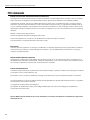
DigiWave 300 Series Digital Transceiver and Receiver
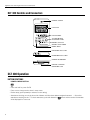
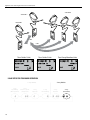
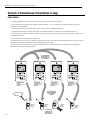
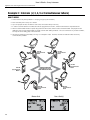
2-way setup for Intercom
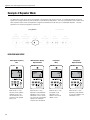
1-way Modes
1-way
Speak Only
(Main Speaker)
1-way
Receive / Speak
(Interpreter)
1
1-way
Repeater
2-way Modes
1-way
Receive Only
2-way
Intercom
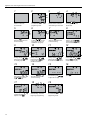
Intercom Mode Setup
2
2-way
(Tour Guide)
3
4
1-way Modes
2-way Modes
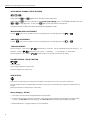
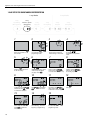
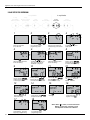
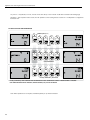
1-wayand hold POWER
1-way
Press
Press and Hold
and
The other icons will disappear
Use the
buttons
button
for 2 seconds
mode icon
to change to 2-way Tour
Speak
Only
Receive / Speak for 3 seconds
1-way to enter
1-way and the current
2-way
2-way
to turn DLT ON
will be blinking on the screen.
Guide mode.
(Main
Speaker)
(Interpreter) programming
Repeatermode. Receive Only
Intercom
(Tour
Guide)
5
6
Press the
button to
select this mode and move
to the next setting.
Use the
buttons
to select Master 1 (first unit
only). There must be only
one Master 1 per group.
7
8
Press the
button to
select this mode and move
to the next setting.
9
10
11
The GROUP icon will be
blinking. Use the
buttons then the
button
to choose group.
The Sidetone Level will be
blinking. Use the
buttons then the
button
to choose the Sidetone Level.
The TIME icon will be blinking
with the hour. Use
then the
button to
choose hour (am or pm).
The first secure code digit
will be blinking. Use
to adjust the first digit.
Push
to advance to the
next digit.
13
Press the
button to
save the time and move
to the next setting.
17
14
18
The ADDRESS icon will be
blinking. Use the
buttons then the
button
to choose address (0-1023).
12
15
The TIME icon will be blinking
along with the minutes. Use
the
buttons to
adjust the minutes.
16
Repeat steps 15 and 16
until all of the digits are
adjusted. Push
.
* Note: When
is used, it must be defined as
Master, except when repeater is used;
then Repeater must be set to Master.
The currently selected mode
will be blinking. This is the
beginning of programming.
21
Press and Hold
and
for 3 seconds to exit
programming mode.
A536