1
KTD-N0793-L
BIOS setup
Page 73
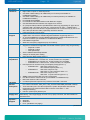
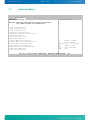
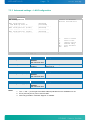
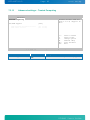
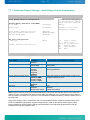
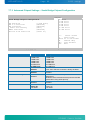
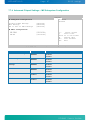
7.3.4 Advanced settings – Configure Win627DHG Super IO Chipset
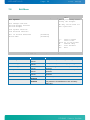
BIOS SETUP UTILITY
Advanced
Configure Win627DHG Super IO Chipset
Serial Port1 Address
Serial Port2 Address
Serial Port2 Mode
Serial Port3 Address
Serial Port4 Address
[3F8/IRQ4]
[2F8/IRQ3]
[Normal]
[Disabled]
[Disabled]
Allows BIOS to Select
Serial Port1 Base
Addresses.
<||
+F1
F10
ESC
Select Screen
Select Item
change option
General Help
Save and Exit
Exit
v02.67+ (C)Copyright 1985-2009, American Megatrends, Inc.
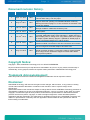
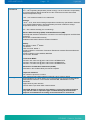
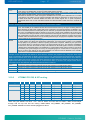
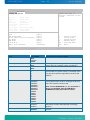
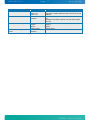
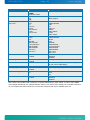
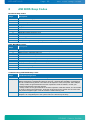
Feature
Serial Port1 Address
Serial Port2 Address
Serial Port2 Mode
If IrDA or ASK IR:
IR Duplex Mode
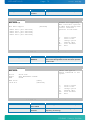
Serial Port3 Address
Serial Port3 IRQ
Serial Port4 Address
Serial Port4 IRQ
Options
Disabled
3F8/IRQ4
2F8/IRQ3
3E8/IRQ4
2E8/IRQ3
Disabled
3F8/IRQ4
2F8/IRQ3
3E8/IRQ4
2E8/IRQ3
Normal
IrDA
ASK IR
Full Duplex
Half Duplex
Disabled
3F8
2F8
3E8
2E8
IRQ3
IRQ4
IRQ10
IRQ11
Disabled
3F8
2F8
3E8
2E8
IRQ3
IRQ4
IRQ10
IRQ11
Description
Select the BASE I/O address and IRQ.
(The available options depend on the setup for the
other Serial Ports).
Select the BASE I/O address and IRQ.
(The available options depend on the setup for the
other Serial Ports).
Select Mode for Serial Port2
IrDA communication selection
Allows BIOS to select Serial Port3 Base Addresses
(The available options depend on the setup for the
other Serial Ports).
Allows BIOS to select Serial Port3 IRQ.
(The available options depend on the setup for the
other Serial Ports).
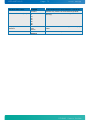
Allows BIOS to select Serial Port3 Base Addresses
(The available options depend on the setup for the
other Serial Ports).
Allows BIOS to select Serial Port3 IRQ.
(The available options depend on the setup for the
other Serial Ports).
KTGM45 Users Guide