1
KTD-N0793-L
Page 69
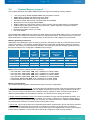
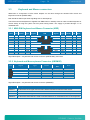
BIOS setup
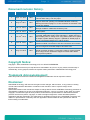
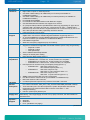
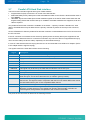
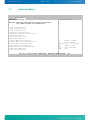
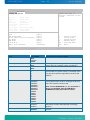
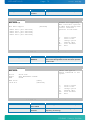
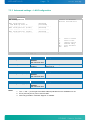
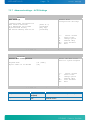
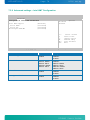
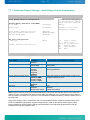
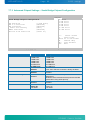
BIOS SETUP UTILITY
Advanced
Primary IDE Master
Select the type of
devices connected to the
system
Device
Vendor
Size
LBA Mode
Block Mode
PIO Mode
Async DMA
Ultra DMA
S.M.A.R.T.
:Hard Disk
:ST340014A
:40.0GB
:Supported
:16Sectors
:4
:MultiWord DMA-2
:Ultra DMA-5
:Supported
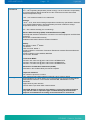
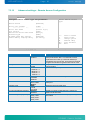
Type
LBA/Large Mode
Block (Multi-Sector Transfer)
PIO Mode
DMA Mode
S.M.A.R.T.
32Bit Data Transfer
[Auto]
[Auto]
[Auto]
[Auto]
[Auto]
[Auto]
[Enabled]
<||
+F1
F10
ESC
Select Screen
Select Item
Change Option
General Help
Save and Exit
Exit
v02.67+ (C)Copyright 1985-2009, American Megatrends, Inc.
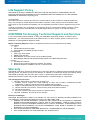
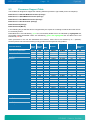
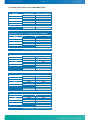
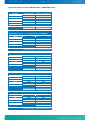
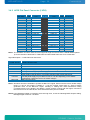
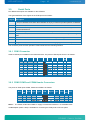
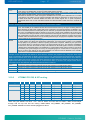
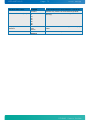
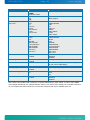
Feature
Type
LBA/Large Mode
Block (Multi-Sector Transfer)
PIO Mode
DMA Mode
S.M.A.R.T.
32Bit Data Transfer
Options
Not Installed
Auto
CD/DVD
ARMD
Disabled
Auto
Disabled
Auto
Auto
0
1
2
3
4
Auto
SWDMA0
SWDMA1
SWDMA2
MWDMA0
MWDMA1
MWDMA2
UDMA0
UDMA1
UDMA2
UDMA3
UDMA4
UDMA5
UDMA6
Auto
Disabled
Enabled
Disabled*
Enabled
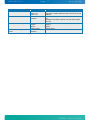
Description
Select the type of device installed
Enabling LBA causes Logical Block Addressing to be
used in place of Cylinders, Heads, and Sectors.
Select if the device should run in Block mode
Selects the method for transferring the data between
the hard disk and system memory. The Setup menu
only lists those options supported by the drive and
platform.
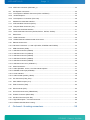
Selects the Ultra DMA mode used for
moving data to/from the drive. Autotype the drive to
select the optimum transfer mode.
Note: To use UDMA Mode 2, 3, 4, 5 and 6 with a
device, the harddisk cable used MUST be
UDMA66/100 cable (80-conductor cable).
Select if the Device should be monitoring itself (SelfMonitoring, Analysis and Reporting Technology
System)
Select if the Device should be using 32Bit data
Transfer
KTGM45 Users Guide