1
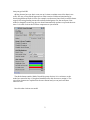
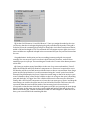
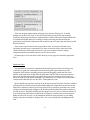
5) Set the Grid Columns to 10 and Grid Rows to 5. Once you assign the model to the view
you'll notice that the view begins displaying the grid you defined in the model. This grid is
scaled to fill out the containing RectTransform. Change the view's RectTransform so that its
width is 300 and its height is 150. This will make the cells appear square. Again, the rest of
these variables are explained in depth in the user manual and you can just leave them alone
for now.
Congradulations! At this point you have a working inventory and grid view up and
running! You can run your scene to see how it look. Obviously, however, we don't have
anything to put in it just yet. The next thing we'll need to do is create a few dummy items to
test it with.
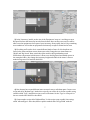
6) Create yet another empty GameObject in the root of our scene and entitile it 'Sword'.
Add a BoxCollider2D and Sprite Renderer component to it. These aren't required for use in
PGI but they will let us see and interact with the items so that we can test them. Next, drag a
sprite into the Sprite Renderer. I would recommend using the 'sword' sprite found under
Example/CompleteExample/Art/Icons/. Resize the sword image so that it fits nicely in your
scene somewhere. Next, resize the box collider so that it is as large as the sprite's bounding
area and check the 'Is Trigger' box. This collider will be used to detect mouse clicks later.
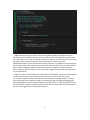
Finally, add a PGI Slot Item component to it. Leave the icon asset type as 'Sprite' and drag the
same image you used for the sprite into the Icon field of the Slot Item. Take note, this icon
represents what the item looks like inside of the inventory but it does not have to
correspond to what the item looks like in the game world. We are just using the same image
here for clarity. At this time you can also set the width and height of the item in slot cells
when stored in the grid. I would recommend a width of 2 and a height of 3. When this is all
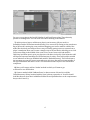
done, your scene should look something like this:
3