1
VI. COMMAND EMULATION
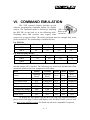
This VFD customer display provides several
software programming emulation modes for display
control. The emulation mode is defined by adjusting SW1
the DIP SW on the back as in the following table. Push up to
switch on SW2
Switching these DIP switches may require some
proper tool or special effort. The switch positions must be changed only when
power turned off. The relationship is tabulated below.
For PD2100:
Emulation Mode
Futaba
Noritake
Aedex
Epson
on
off
on
off
SW 1
on
on
off
off
SW 2
For PD2200 and PD2201:
Emulation Mode UTC (/Futaba)
on
SW 1
on
SW 2
Noritake Aedex (/ADM)
off
on
on
off
Epson
off
off
The parenthesized Futaba and ADM modes can be accessible when the
internal jumper JP3 is opened. The followings are some brief introduction of the
emulation modes as they are compared to each other:
Mode
Futaba
Noritake
Aedex ADM
Epson
Blinking
Blinking
NonCursor
N.A.
N.A.
Block
Block
displayable
Default mode
V. scroll up Overwrite
N.A.
N.A. Overwrite
User defined font
N.A.
2 characters N.A.
N.A. 2 characters
Brightness control
YES
YES
NO
NO
YES
Pass through function
YES
YES
YES
NO
YES
Leading code change
YES
YES
YES
NO
NO
Code page select
YES
YES
NO
NO
YES
Timer clock
NO
NO
NO
NO
YES
To display the Euro-dollar sign on the Euro code page supported models,
please select code page 13(Hex) and display code D5(Hex). Please visit our web
site http://www.posiflex.com.tw for details on software commands if required.
6-1