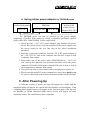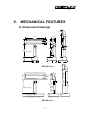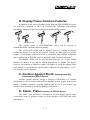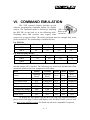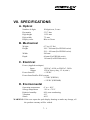
1
PD- 2100 Series 2200 USER’S MANUAL VFD CUSTOMER DISPLAY for ALPHANUMERICAL DISPLAY in 2 x 20 format Rev. : B4 SOME IMPORTANT NOTES FCC NOTICE This equipment generates, uses, and can radiate radio frequency energy and, if not installed and used in accordance with the instructions manual, may cause interference to radio communications. It has been tested and found to comply with limits for a Class A digital device pursuant to subpart J of Part 15 of FCC Rules, which are designed to provide reasonable protection against interference when operated in a commercial environment. Operation of this equipment in a residential area is likely to cause interference in which case the user at his own expense will be required to take whatever measures to correct the interference. WARRANTY LIMITS Warranty will terminate automatically when the machine is opened by any person other than the authorized technicians. The user should consult his/her dealer for the problem happened. Warranty voids if the user does not follow the instructions in application of this merchandise. The manufacturer is by no means responsible for any damage or hazard caused by improper application. ABOUT THIS MANUAL This manual assists the user to utilize the VFD customer display PD-2100 and PD2200 series. Both series provide versatile font formats and support various instruction sets. These series of products receive instructions in serial communication protocols and is capable of entering pass through mode for PD-2200 so that all instructions received pass on to next connected serial device if properly configured. The manufacturer of the PD-2100 and PD-2200 series heartily apologizes to the user for reserving the right to change or to modify this manual without notice due to the rapid and constant progress and improvement on science and technology. The user may always obtain the most up to date information through any of our web sites: http://www.posiflex.com.tw, http: //www.posiflexuk.com, http://www.posiflexusa.com. Copyright Posiflex Inc. 2005 TRADE MARKS AND SERVICE MARKS POSIFLEX is a registered trademark of Mustek Corp.. Other brand and product names are trademarks and registered trademarks and service marks of their respective owners. P/N: 19410900040 TABLE OF CONTENTS FEATURES · · · · · · · · · · · · · · · · · · · · · · · · 1 MODEL NUMBERS · · · · · · · · · · · · · · · · · · 2 CARTON CONTENTS · · · · · · · · · · · · · · · · 3 INSTALLATION · · · · · · · · · · · · · · · · · · · · 4 - 1 - 1 - 1 - 1 1 1 1 1 1 2 3 4 4 MECHANICAL FEATURES - 1 1 2 2 2 COMMAND EMULATION · · · · · · · · · · · · · 6 SPECIFICATIONS · · · · · · · · · · · · · · · · · · · 7 - 1 Signal Connection · · · · · · · · · · · · · · · · · · · · · · 4 For PD2100S/XX Series · · · · · · · · · · · · · · · · · · · 4 For PD2200B/XX Series · · · · · · · · · · · · · · · · · · 4 Power Connection & Mounting · · · · · · · · · · · · · · · ·4 Using Power Adaptor · · · · · · · · · · · · · · · · · · · 4 Using Power from PC · · · · · · · · · · · · · · · · · · · 4 Using Power from POS System · · · · · · · · · · · · · · · 4 Using printer power adaptor · · · · · · · · · · · · ·· · ··4 After Powering Up · · · · · · · · · · · · · · · · · · · · · · 4 · · · · · · · · · · · ·5 Dimension Drawings · · · · · · · · · · · · · · · · · · · · · 5 Display Frame Common Features · · · · · · · · · · · · · · · 5 Cushion Against Shock · · · · · · · · · · · · · · · · · · · · 5 Stand - Plate · · · · · · · · · · · · · · · · · · · · · · · · · 5 Optical · · · · · · · · · · · · · · · · · · · · · · · · · · · · 7 Mechanical · · · · · · · · · · · · · · · · · · · · · · · · · · 7 Electrical · · · · · · · · · · · · · · · · · · · · · · · · · · · 7 Environmental · · · · · · · · · · · · · · · · · · · · · · · · 7 i - 1 1 1 1 1 I. FEATURES • • • • • • • • • • • • • • Bright vacuum fluorescent display Two-line display with 20 characters per line Large characters for easy viewing (11.25mm by 7.2mm) Long life and trouble free operation Secure construction with bumper best for screw on operation in PD2100 series. Generous base best for freely stand alone application in PD2200 series. Two adjustable viewing angles Pole height adjustable Display frame is horizontally slidable, and 360° rotatable freely Brightness adjustable by software Simple installation Direct interface connection with computers and peripherals Standard Serial Interface for both series and with pass through capability for PD2200 series. Multiple choices for power supply source. Supported in the code pages include PC437, Katakana, PC850 Multilingual, PC860 Portuguese, PC863 Canadian French, PC865 Nordic, Russia, Albic, PC437G Greek, W1257 Baltic, W1253 Greek and PC858 the code page contains Euro dollar sign at position D5h. 1-1 II. MODEL NUMBERS Case Color PD2100S Ivory PD2100S/C Charcoal PD2100S/D Ivory PD2100S/F Charcoal PD2100S/XX Ivory PD2100S/XX/C Charcoal PD2100S/XX/D Ivory PD2100S/XX/F Charcoal PD2200B Ivory PD2200B/C Charcoal PD2200B/D Ivory PD2200B/F Charcoal Ivory PD2200B/XX Model Display Power Color Source Base Connector Pass Through Small DIN 5 pin N. A. Green Kit Blue Green Blue Adaptor (+12V AC) Green Kit DB9 F+M Blue Adaptor Yes Large Green (+12V AC)/ PD2200B/XX/C Charcoal DB9 F+M *Share from / 3 pin jack PD2200B/XX/D Ivory printer from printer Charcoal Blue adaptor PD2200B/XX/F (+24V DC) PD2201 Ivory Green PD2201/C Charcoal + 5 V DC PST 10 pin RJ Yes in connector PD2201/D Ivory Blue PD2201/F Charcoal Note: 1. For “/XX” models, “/XX” should be replaced by the country code for the power plug type of the power adaptor such as “/US” or “/UK” etc. and the power to display unit is 12V AC. For models without “/XX”, the power used is + 12 V DC from PC through a power kit. 2. In “Base”: Small is 80 x 60 x 51(mm), Large is 220 x 110 x 41 (mm) and PST means option device in PST system. 3. The “*” mark means the power source shared from the printer power adaptor by means of a cable and is applicable in version Cxa / Dxa onwards only. 2-1 III. CARTON CONTENTS 1. 2. 3. 4. Pole display, pre-assembled User’s Manual Metal stand plate with mounting screws (for PD2100S series only). One interface cable 20863012510 (CCBLA - 125A) for PD2100S series or 20863137210 (CCBLA-372) for PD2200B series 5. Power source (one of the four below): Power supply: AC power adaptor specified per country type Power kit incl. power supply cable (inside PC) 39212001000 (CCBLA141 on I/O plate) and power supply cable (to PD) 20863041100 (CCBLA-411) Combined in the signal cable mentioned above when the PD is connected to a Posiflex POS system Power cable (20863250900) to share from printer power adaptor 3-1 IV. INSTALLATION A. Signal connection 1. For PD2100S Series 1. Take off the metal plate on the Pole display base cabinet by loosening the screws. 2. Connect the DIN 5 pin plug of the cable CCBLA - 125A to the female To COM port DIN jack DIN 5 pin jack inside the base cabinet and connect the DB9 DIN plug connector of cable CCBLA 125A to serial port COM1 or COM2 of the computer. 2. For PD2200B Series Connect the DB9 female connector of the signal cable CCBLA - 372 to the COM port of PC and connect the DB9 male connector of the signal cable CCBLA – 372 to the DB9 female connector in the base of the PD. 3. For PD2201 Series Follow the pole display installation instruction of the PST series. No external power connection beyond the power arrangement in COM port of PST system is required. B. Power connection & Mounting 1. Using power from AC adaptor for /xx models Always check the specification of the power adaptor against the power socket before making any connection. Always keep the insertion of the power adaptor into the power socket 4-1 DC Jack DC Plug From Power Adaptor as the very last step of the whole installation procedure. Connect the 2.5φ/5.5φ DC plug of the AC adapter to the 2.5φ/5.5φ DC jack inside or at bottom of the base cabinet. The above drawing shows the example in PD2100 series. For PD2200 series, you may now place the base on a horizontal surface and prepare to power on. However, some mounting operations are Base cabinet applicable to PD2100 series: Stand plate 1. Put the metal plate back and fix the screws. 2. Mount the pole display stand plate to the metal plate of base cabinet with screws and mount the pole display stand plate to your Bottom view Posiflex cash drawer (CR310X or CR320X) of cash drawer or on the cashier’s dash. 3. Plug the adapter into power outlet. 2. Using power from PC for models with power kit Install the cable CCBLA-141 with I/O plate Switching Power in the power kit into the Supply Unit 4 pin Telephone hosting PC for obtaining Jack DC power as shown in the left drawing. However, it is absolutely important to turn all the power off before removing any case or connecting any cable. 4 pin Power Inside view of Followings are step-by-step CCBLA-141 connector instructions for installing example PC this cable. 1. Make sure the PC to supply power is turned off. 2. Open the case of PC according to its relevant manual. 3. Select one I/O plate position on rear window of PC to install the I/O plate of CCBLA-141. 4. Select one set of large 4 pin connector from the switching power supply unit of PC and connect the male 4 pin connector of CCBLA141 to the connector from power supply. Connect the female 4 pin I/O Plate of CCBLA-141 4-2 connector of CCBLA-141 to the I/O device of PC such as a HDD if necessary. 5. Assemble the case of PC back. Then referring to drawing below to complete the basic power and signal cabling. Note the PC should remain OFF during the connection. 9 pin D connector of CCBLA-372 COM port (9 pin serial port) 4 pin Telephone jack of CCBLA-141 Both to bottom of PD 4 pin Telephone plug of CCBLA-411 Rear side of PC 1. Connect the 4 pin telephone plug of CCBLA-411 to the 4 pin telephone jack on the I/O plate of CCBLA-141 which has been mounted as described above. 2. Insert the DC plug of CCBLA-411 into the jack at the bottom of the base of PD in the same way as the power adaptor. Let the cables come out of the bottom of PD2200 series through the opening at the back of base so that the PD can stand securely. 3. Now the user may turn on the PC (and the PD when it is PD2200 series) for application unless the user wants to use PD for pass through purpose (PD2200 series only). 3. Using power from POS system for PD2201 series This super convenient power supply method applies only to PD2201 when installed in a Posiflex PST POS system or PD2200B when connected to a Posiflex POS system after proper setting for power in COM port. The power connection is already done when the signal connection is completed. 4-3 4. Using printer power adaptor for PD2200B series Posiflex POS printer +24 V DC PD2200B +24 V DC Out +24 V DC In Posiflex POS Printer Power Adaptor (24 V DC) Power Cable The PD2200B series can also be powered by the power adaptor supporting a Posiflex POS printer by using a separately purchased specific power cable (P/N: 20863250900). Follow steps below: 1. Check that the (+24 V DC) power adaptor plug matches the power socket. But please always keep the insertion of the power adaptor into the power socket as the very last step of the whole installation procedure. 2. Insert the 3 pin power connector from the +24 V DC power adaptor to the “+24 V DC In” jack in the connector area. Be sure to hear a click to obtain a firm contact. 3. Insert either end of the power cable (20863250900) to “+24 V DC Out” jack in the connector area and insert the other end to the power connector of Posiflex POS printer if needed. Be sure to hear a click at each connection to obtain a firm contact. 4. Now place the base on a horizontal surface and prepare to power on. 5. Please note that when DC power connection is used, there must be no AC power connection at the bottom of the base cabinet on the PD2200. C. After Powering Up A firmware version as power on sign will appear for a while and the emulation mode will appear for a while after the firmware version display. Then a blinking block-shaped cursor will appear at the left-most digit of the top row for Noritake or Futaba emulation mode and no cursor will appear for other emulation modes. The installation is now completed. 4-4 V. MECHANICAL FEATURES A. Dimension Drawings 70.0 60.3 36.8 260.0 219.0 70.0 34.070.0 70.0 135.0 315.0 180.0 135.0 Stroke 180.0 (Lowest height) 51.0 51.0 2.6 (Max. height) 76.0 80.0 60.0 2.6 PD2100 Series 260.0 219.0 70.0 60.3 36.8 70.0 34.0 70.0 114.0 70.0 135.0 315.0 180.0 (Max. height) 135.0 Stroke 180.0 (Lowest height) 41.0 41.0 220.0 41.0 110.0 PD2200 Series 5-1 B. Display Frame Common Features In addition to the above drawings given, both the PD2100/PD2200 series are delicately designed to have in common the following user-friendly mechanical features for most up-to-date store management systems. Button switch The display panel of PD2100/PD2200 series can be moved or rotated/tilted both vertically and horizontally The overall pole height can be adjusted freely by pulling the button switch and match it to one of the concave cavities on inner pole at a proper height. Overall height of PD2100 series is adjustable from 309mm to 444mm and overall height of PD2200 series is adjustable from 291mm to 426mm. The display frame can be slid left-and-right-wise for a total sliding distance of 100mm. It can also be rotated horizontally for almost 360 degree, however, the rotation is limited to within 360 degree to avoid the internal cable to be broken. It can further be tilted to offer 2 different viewing angles ---14.5°, 30° from the vertical position. C. Cushion Against Shock Coming from Any Direction for PD2100 Series Another special delicate design at bottom of PD2100S is a cushion mechanism to survive an inevitable crash or damage on pole display from certain absent - minded customers, playing children and so on. It will absorb any external stress or bump to avoid any damage of the device. D. Stand - Plate Accessory for PD2100 Series The stand - plate accessory is designed to fix pole display device either on the desk with (or without) screws or at the bottom of CR3100/3200 series cash drawers. 5-2 VI. COMMAND EMULATION This VFD customer display provides several software programming emulation modes for display control. The emulation mode is defined by adjusting SW1 the DIP SW on the back as in the following table. Push up to switch on SW2 Switching these DIP switches may require some proper tool or special effort. The switch positions must be changed only when power turned off. The relationship is tabulated below. For PD2100: Emulation Mode Futaba Noritake Aedex Epson on off on off SW 1 on on off off SW 2 For PD2200 and PD2201: Emulation Mode UTC (/Futaba) on SW 1 on SW 2 Noritake Aedex (/ADM) off on on off Epson off off The parenthesized Futaba and ADM modes can be accessible when the internal jumper JP3 is opened. The followings are some brief introduction of the emulation modes as they are compared to each other: Mode Futaba Noritake Aedex ADM Epson Blinking Blinking NonCursor N.A. N.A. Block Block displayable Default mode V. scroll up Overwrite N.A. N.A. Overwrite User defined font N.A. 2 characters N.A. N.A. 2 characters Brightness control YES YES NO NO YES Pass through function YES YES YES NO YES Leading code change YES YES YES NO NO Code page select YES YES NO NO YES Timer clock NO NO NO NO YES To display the Euro-dollar sign on the Euro code page supported models, please select code page 13(Hex) and display code D5(Hex). Please visit our web site http://www.posiflex.com.tw for details on software commands if required. 6-1 VII. SPECIFICATIONS A. Optical Number of digits Dot matrix Digit height Digit width Display color 20 digits/row, 2 rows 5 X 7 dots 11.25 mm 7.2 mm Blue or Green B. Mechanical Weight Height Width Depth 0.7 kg (1.5 lbs) 309 ~ 444 mm (For PD2100 series) 291 ~ 426 mm (For PD2200 series) 260 mm 60 mm (For PD2100 series) 110 mm (For PD2200 series) C. Electrical Power (Applied to adapter) Input: 120VAC, 60 Hz or 220VAC, 50 Hz Output: 12VAC heavy duty, 1.2 A (min.) Power from PC: + 12VDC Power from Posiflex POS system: + 5VDC (PD2201) + 12VDC (PD2200B) D. Environmental Operating temperature Storage temperature Relative humidity Vibration Shock 0° to + 40°C -20° to + 70°C 90%, non-condensing 4G 40 G WARNING: If the user opens the pole display housing to make any change, all the product warranty will be voided. 7-1