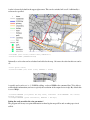
1
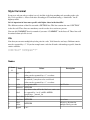
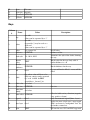
10 11 12 13 Icon File name Icon size In pixels FromScale INTEGER ToScale INTEGER Ways Column # Name Values see wiki values can be separated by a “|” see wiki an asterisk (*) may be used as a wild card values can be separated by a “|” see separate list INTEGER 1 key 2 value 3 4 color thickness 5 dash style 14; 1014; 2023 6 7 8 9 10 11 12 13 14 15 16 Border color Border thickness fill TEXT Description the fill color thickness of line determines the style of the dashes forming the way Border color for the way. Only valid if border thickness is > 0 INTEGER Border thickness for the way 0 or 1 0 = area will not be filled; 1 = area will be filled key, where value will be used as label text. entries can be separated label by ! or #. !=AND. #=PRIO special keys: _lon and _lat label color see below label size INTEGER font size label font see below family offset for label text in ydirection (negative label offset INTEGER = up, positive = down) legend 0 or 1 entry for automatic legend (0=no, 1=yes) applies for areas (closd ways). areas tagged base layer 0 or 1 with 1 are drawn as "background" first. use for landuse, natural etc. Icon TEXT Fill icon for area. SVG and PNG supported 11