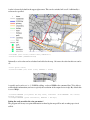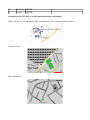
1
Style file format
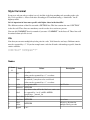
In any case only one rule per object is used. And this is the first matching rule according to the style file. So it's possible i.e. first to look after all tracktype=XY and then having a “default rule” for all highway=track.
So it is important to have more specific rule higher above in the sheet/file!
The different sections of the file start with a SECTION line: This line contains the word “SECTION” in the first cell. These lines are mandatory even if no rules for a section are present.
You can add COMMENT lines for remarks if you enter “COMMENT” in the first cell. These lines will be omitted when style file is read.
File
Note that you can enter multiple key/value pairs for a rule. Valid for nodes and ways. Different entries must be separated by a “|”. If you for example want a rule for all tracks with tracktype=grade1, then the entries would be:
column key/tag: highway|tracktype
column value:
track|grade1
Nodes
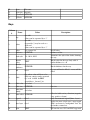
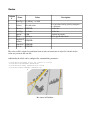
Column # 1 2 3 4 5 6 7 8 9 Name Values Description see wiki values can be separated by a “|”. see above
see wiki value an asterisk (*) may be used as a wild card
values can be separated by a “|”. see above
color see separate table the fill color thickness INTEGER key, where value will be the label text; entries can label be separated by ! or #. !=AND. #=PRIO special keys: _lon and _lat
label color see list below label size INTEGER size of text label offset in y direction for INTEGER offset multiple labels per node legend 0 or 1 key