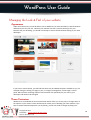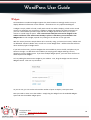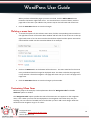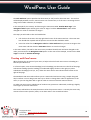
1
WordPress User Guide WordPress User Guide For WordPress 3.8 and above Copyright © 2014 iCandy Graphics & Web Design iCandy Graphics & Web Design PO Box 8745 Madison, WI 53708 608-515-1176 [email protected] www.iCandy-Graphics.com Copyright © 2014 Created By: iCandy Graphics & Web Design Version: WordPress 3.8 Page 1 1 WordPress User Guide Table of Contents WordPress User Guide.......................................................................................................................... 1 Table of Contents .......................................................................................................................... 2 Introduction .......................................................................................................................................... 4 Guide Method ................................................................................................................................... 4 Using WordPress................................................................................................................................... 5 Why WordPress? ............................................................................................................................... 5 Great Things About WordPress......................................................................................................... 5 Getting Started .................................................................................................................................. 7 Navigating Around the Administration Panel ................................................................................. 11 The Toolbar.................................................................................................................................. 12 Screen Options ............................................................................................................................ 12 Understanding the differences between your pages and your posts............................................. 13 Adding and Editing Content ............................................................................................................ 14 Creating your first post using the visual editor ........................................................................... 14 More on Posts ............................................................................................................................. 16 Formatting text using the HTML editor ....................................................................................... 18 Adding links to your posts ........................................................................................................... 18 Opening a link in a new window vs. using the current window .................................................. 20 Adding images to your posts ....................................................................................................... 21 Adding a gallery of images .......................................................................................................... 28 Adding video clips to your posts ................................................................................................. 31 Setting posting and page options ................................................................................................ 34 Post Formats................................................................................................................................ 35 Saving & publishing your post or page ........................................................................................ 35 Post Locking/Unlocking Feature for Multi User Blogs ................................................................. 38 Creating and managing your categories...................................................................................... 39 Writing Pages and Structuring Them .............................................................................................. 43 Writing Pages............................................................................................................................... 43 Publishing Content Created by Other Contributors ........................................................................ 48 Moderating Comments ................................................................................................................... 48 Managing Links................................................................................................................................ 51 Creating link categories ............................................................................................................... 52 Creating links ............................................................................................................................... 53 Administering WordPress ................................................................................................................... 56 Managing Users............................................................................................................................... 56 Adding users ................................................................................................................................ 57 Remove users .............................................................................................................................. 57 Edit the details of a user .............................................................................................................. 58 Manage the content created by a user ....................................................................................... 60 Managing Options and Settings ...................................................................................................... 61 Managing the Look & Feel of your website .................................................................................... 62 Appearance ................................................................................................................................. 62 Theme Customizer....................................................................................................................... 62 Copyright © 2014 Created By: iCandy Graphics & Web Design Version: WordPress 3.8 Page 2 2 WordPress User Guide Widgets........................................................................................................................................ 64 Editing Menus ................................................................................................................................. 66 Adding Items to a Menu .............................................................................................................. 66 Deleting a menu item .................................................................................................................. 67 Customizing Menu Items ............................................................................................................. 67 Creating multi-level menus ......................................................................................................... 68 The Menu in Action ..................................................................................................................... 71 Site Tips ............................................................................................................................................... 72 Structuring a Site ............................................................................................................................. 72 Engaging with visitors ..................................................................................................................... 72 Search Engines ................................................................................................................................ 73 Going Further...................................................................................................................................... 74 Training ........................................................................................................................................... 74 Do you need something special? .................................................................................................... 75 Beware of strangers bearing gifts ................................................................................................... 75 All Done! ............................................................................................................................................. 76 Copyright © 2014 Created By: iCandy Graphics & Web Design Version: WordPress 3.8 Page 3 3 WordPress User Guide Introduction This guide was created to help customers of iCandy Graphics & Web Design manage their WordPress websites after we have created a custom site for them. We believe in empowering our customers to take control of their websites and add useful content to their sites frequently. We don’t believe in holding customers hostage and forcing them to pay us for website maintenance for things they can do themselves. We provide training and this free guide to help you manage your website. Managing a website will take some learning, but it shouldn’t be something you dread. WordPress is a wonderful, user friendly tool, and we hope you take the opportunity to learn about its capabilities. Every website we build is totally custom and has different features and functionality. This guide serves to help with WordPress basics, but may not cover every type of content of specific situation to your website. If you need additional training or if you would like us to create a custom manual for your specific website, please contact us. We will make our best attempts to keep this guide up to date with the latest information, but please be aware that your WordPress version may be older or newer than the information in this guide. The basics will always be the same, but there might be slightly different look or wording to certain functions. The latest information can always be found at http://codex.wordpress.org. And of course, a Google search on how to do something will often yield exact instructions. This guide doesn’t cover WordPress installation – installation is well documented on wordpress.org. If you need help installing, migrating, designing or updating your WordPress installation you should get in touch with us for a quote. We may add installation information at a later date, but currently this guide is written for WordPress users. Of course, on that note, some advanced set-up and configuration guidance isn’t included either. If you want to get more advanced with WordPress, we offer one-on-one training programs or we can schedule group trainings. In the trainings, you'll be able to learn a range of WordPress skills – from beginner to advanced, and from using WP to Do-It-Yourself SEO. Guide Method This guide covers the basics in each section, trying to take a progressive approach so that each section builds on knowledge and skill acquired earlier in the guide. There are also some exercises here and there which can help you to practice your new skills. Please note that this is a guide for people learning about WordPress – it’s certainly not a complete manual. The best thing to do if you find any errors or omissions is to go to http://icandygraphics.com/contact-us and let us know through the contact page. Copyright © 2014 Created By: iCandy Graphics & Web Design Version: WordPress 3.8 Page 4 4 WordPress User Guide Using WordPress Why WordPress? WordPress (WP) has been a game changer for regular folks who want to maintain their own websites. Previously people who are not web experts had a few choices, none of which were desirable. A. Hire a professional web developer to make even the smallest changes to your site such as changing the text on your home page or updating your business hours. B. Write their site with clunky, proprietary site-builder software that was often easy to update but not scaleable or mobile. Usually these sites look pretty awful and often have advertisements at the bottom for the site builder software. C. Or they could use expensive and difficult software such as Dreamweaver, which has a steep learning curve and could require an understanding of complex languages and code such as HTML, PHP and CSS for more complicated functionality. With WordPress the idea is that anyone with a few computer skills should be able to make basic updates to their website without knowledge of code. With WordPress, a user’s focus can be on the content and SEO, while somebody else supplies the theme (design) and plugins (functionality) for you. WordPress also makes it possible to build a well-structured, search-engine-friendly website or blog. Right “out of the box” WordPress is optimized for websites much more so than other free website builders such as Weebly or Wix. Also of note is that WordPress is “open source,” which means the code that is used to power it is public information, rather than a proprietary software. This means the software is free for public use, and available for other people in the coding and design community to build on the already awesome software. Some plug-ins or themes cost money, but the base software is free and will always be free. What a boon! WordPress provides an excellent platform for building everything from simple blogs, to robust news or ecommerce platforms. The beauty of this system is that you get to spend less time fighting your website and more time on being creative with your content. Great Things About WordPress 1. 2. 3. 4. It's easy to learn It's stable It's used by millions of people around the globe It scales well Copyright © 2014 Created By: iCandy Graphics & Web Design Version: WordPress 3.8 Page 5 5 WordPress User Guide 5. It's simple, yet robust 6. Developers love working with it 7. It has a huge range of free and premium themes, which can add functionality and style to your site 8. It has a vast selection of free and premium plugins that can add new features and functionality to your site 9. If you know html, css or php you can do almost anything with a WordPress site As you learn more about WordPress you’ll learn a lot about what it can (and can’t) do. But work within its relatively few limitations and you have a powerful and flexible friend managing your website. Copyright © 2014 Created By: iCandy Graphics & Web Design Version: WordPress 3.8 Page 6 6 WordPress User Guide Getting Started Once you have completed your training with someone on the iCandy Graphics & Web Design team, you are off and running to manage your website. So the first thing to do is: Log In! If you haven’t got a login link on your site’s front page, simply add /wp-admin to the root address and you’ll arrive at the login page as above (for example www.mysite.com/wp-admin) unless you were already logged in, in which case you’ll see the dashboard. The link to log in to your site may be different if you have an ecommerce site. You should have received this information during your training with your username and password. Copyright © 2014 Created By: iCandy Graphics & Web Design Version: WordPress 3.8 Page 7 7 WordPress User Guide If you lose your details, you can click on “Lost your password?” and a new password will be generated and e-mailed to you. You’ll need to change this to something memorable but secure. Always use at least 1 number and 1 symbol in your password to prevent hacking. Enter your details, select “Remember me” to you don’t have to log in each time. Note: only do this if your computer is secure, i.e. only used by you. Then click on the Login button. Now you're logged in, you'll arrive at the Dashboard – a screen that gives a range of information about your website: You’ll notice that since the update to 3.8, the dashboard now has a clean new modern look. The typography has been improved to make the text easier to read. Vector based icons load increase the page loading speed. The new fully responsive design makes it easier to work on your website from a variety of mobile devices. You’ll notice if you adjust the size of your browser window, while in either the admin area or when actually viewing your website, the site layout will adjust to fit much more smoothly than in previous versions. Please see in the following screenshot, how the icons have changed and moved position to suit the new size. You can also now choose from these different palettes of color for your admin area rather than the previous blue or grey schemes, by going to Users and selecting Your Profile. Copyright © 2014 Created By: iCandy Graphics & Web Design Version: WordPress 3.8 Page 8 8 WordPress User Guide Previously, the dashboard showed eight modules, but this has now been simplified in my version of WordPress 3.8 to show the 4 modules shown on the previous page. These are ‘At a Glance’, ‘Activity’, ‘Quick Draft’ and WordPress News’. You can organize this information to best suit you, moving modules around and expanding or contracting them in whichever way you find appropriate. You will notice that with this new responsive design, the modules adjust their position on the screen very conveniently to fit the size of your browser window. To move a module, click and drag the title bar of the module around. To roll it up, simply click on the right hand edge of the bar where you’ll see an arrow appear. You can choose to turn modules like the Welcome guide on or off by clicking on the Screen Options drawer pull down in the top right corner. Copyright © 2014 Created By: iCandy Graphics & Web Design Version: WordPress 3.8 Page 9 9 WordPress User Guide On the left hand side, you’ll notice that there’s a large list of links such as Posts, Media, Links and so on. What you see here will depend a lot on the user level you have and what plug-ins are used on your site. QUICK EXERCISES: 1. Try moving the modules around – for example, place WordPress News at the bottom of the left hand column. What happened? 2. Extend the Quick Draft module – what do you think this is for? Try writing something there. What happened? 3. Arrange the entire page in a way you feel would be most useful to you. Experiment – you can always change this page again in the future. Copyright © 2014 Created By: iCandy Graphics & Web Design Version: WordPress 3.8 Page 10 10 WordPress User Guide Navigating Around the Administration Panel Navigation of the admin panels in WordPress is pretty straightforward, but it can feel like there are an overwhelming number of options to choose from. You’ll notice that to the left of the dashboard you have a series of links that you can quickly and easily click on – these then expand down to show you other sub pages. If you hover your mouse over a link the sub-pages show as “fly-outs” and you can move your mouse right and click to navigate to the required sub page. The quick reference on the next page reveals the range of functions, with a brief explanation alongside. Manage your Dashboard and view Theme & Plugin updates Create, Edit and Manage Posts (i.e. Blog or News articles) Manage your Media Library (i.e. images and PDFs) Manage Links * Create, Edit and Manage static Pages Moderate, Manage and Delete Blog Comments Manage the Appearance of the site (i.e. menus and widgets) Manage Plugins to extend the site’s functionality Manage Users (including yourself), reset passwords etc. Tools to assist in jobs such as exporting content Settings that control how the site functions Contract (or expand) the menu Copyright © 2014 Created By: iCandy Graphics & Web Design Version: WordPress 3.8 Page 11 11 WordPress User Guide The Toolbar At the top of your WordPress site you will see the tool bar. This is shown when you are logged into the administration area and website, you can also (optionally) turn it on for when you are viewing your website. Find this option in Users/Your Profile: The tool bar itself provides you with quick access to the administration area in the following ways: WordPress Logo: Quick links to Wordpress.org, version information, credits and official support forums Site Name: Shown here as ‘Instant WordPress’ with Quick links to the Dashboard, theme selection, appearance, widgets and other menus in the admin areas Updates: This shows plugin and theme updates that are available – clicking will take you to the updates admin page Comments: A link to the comments administration area which will indicate how many comments are awaiting approval if any + New: A dropdown to quickly add content to your site Edit Post/Page: A link to edit the current Post/Page or any other post type will appear if you’re logged in and viewing content The user section (on the right), quick links to your profile editing screen, and logout link Language: This indicates the language you are using. Screen Options One thing that many people don’t notice is the Screen Options drop down in the top right of the screen, next to the Help drop down. This is a really useful (and not to say, important!) feature, allowing you to control the amount of items you can see on a screen. When you click it, a set of options will slide down, much like this one below: Copyright © 2014 Created By: iCandy Graphics & Web Design Version: WordPress 3.8 Page 12 12 WordPress User Guide So if you ever read this guide, or see one online and think “Nope, that tool or field isn’t available to me” then remember to check if it’s been enabled in Screen Options. Similarly, if you want to simplify your administration pages, either for yourself or for someone else who is using the site, then you can choose to do so in order to only concentrate on what really matters to you. For those of you who manage WordPress sites for clients, it’s worth knowing about this as people (or WordPress changes!) hiding things and not realizing later often make up a large number of support calls made. Similarly, a lot of documentation available assumes that all of the widgets available on a page have been activated when this is often not the case. Understanding the differences between your pages and your posts Before we start working on your site, it’s important to have a clear understanding of the difference between pages and posts: Pages are usually those which have a static purpose in life. For example an about page, résumé page or contact forms. They do not usually contain information about news items, for example, which are added to the site on a regular basis. Pages are generally defined so that they are always accessible from the home page. Some people build entire sites with just Pages – this is especially the case for sites with little need for dynamic content and is very popular with small businesses who simply want an online brochure. Posts usually contain semantically and chronographically arranged information – for example, news reports, event results, and of course blog entries! The semantic structure is defined by categories and tags, making it easy for people to navigate your site. These elements will also help search engines to understand the content of your site and so improve the relevance of search results. Other Post Types in WordPress plugins and themes may add other post types which look a bit like Posts or Pages but behave in different ways – for example, a calendar plugin adds a special post type that controls the look and behaviour of events added to a calendar page. Copyright © 2014 Created By: iCandy Graphics & Web Design Version: WordPress 3.8 Page 13 13 WordPress User Guide Adding and Editing Content Rather than go on too much about the concepts above, website structure and methods, sometimes it’s better to simply get cracking, so let’s start to get some content into the site right away. You’re now going to go to Posts and add a new one. WordPress provides a number of tools – for content editing and for image management. It allows you to easily manage your content with a familiar editing interface. You don’t need to learn HTML – just the skills you’ve already acquired using word processors like Microsoft Word. Creating your first post using the visual editor You can easily enter format text using the visual editor if you're familiar with any word processing packages. Let's create a news article – just go to Posts and Add New in the left hand toolbar (if you’re writing a static Page, you go to Pages and Add New instead): Copyright © 2014 Created By: iCandy Graphics & Web Design Version: WordPress 3.8 Page 14 14 WordPress User Guide As you can see from the buttons, it’s possible to format text in a number of ways using the buttons and they’ll be familiar to any user of word processor software. You can also extend the size of the box by dragging on the bottom right of it. If you only see one row of buttons, not the two in our screenshot –you may need to press the colorful Advanced Options button (also known as the Kitchen Sink) on the far right to see them. Block Quote Link/Unlink Ordered List Text Alignment Un-ordered list (Bullet points) More Break Full-screen Editing Show advanced options (as shown here) Strike-out Italic There may be extra buttons here if you have certain plugins activated that add functionality Bold Text Style Undo/Redo Indent Left/Right Text Colour Underline Justify/align AA Text Paste Text/Paste Text from Word Help! Contains lots of useful information Custom Characters Remove Formatting Don’t forget – if you get stuck, hovering over the buttons will describe what they do, and the short cut to use them quickly from the keyboard. Essentially, what you’re working with should be familiar to you – it’s rather like using WordPad or some other similar low-end word processor. On the page you’ll also see Tags and Category options. You’ll see a full description of all these options in Setting Posting and Page Options Copyright © 2014 Created By: iCandy Graphics & Web Design Version: WordPress 3.8 Page 15 15 WordPress User Guide Text Styling Notes: When you’re writing you may have a style guide or content strategy to work with and you should follow its guidance. If this is your own site, the following will be useful to you when choosing what text styles to apply in your content: 1. Heading 1 through to Heading 6 – in most themes headings within a post or page will start at Heading 2 or 3 (H2 or H3 tags), going down to H6. The higher the value, the more important a search engine will consider it, but remember that H1 is usually reserved for the site title at the top of the page, and H2 for the post or page’s title. 2. Use Unordered or Ordered lists for lists that are relatively short, but resist the temptation to use them for lists of paragraphs – instead, use the Heading styles though you’ll need to number them yourself. 3. Use Bold, Italic and other styling in moderation. (if everything is bold then nothing looks bold). Your website theme should have most of the formatting you need for color and size. 4. Your theme may override your styling decisions – for example, enforcing alignment, what style of a quote actually looks like and so on. You should experiment and test. 5. Most themes will highlight links in a different color and with hover properties. 6. What you see in the visual editor may not always be accurate in terms of how your content will look on the site. Always look at the “front end” The above tips can also help with search engine optimisation as they give a structure to your content. More on Posts If you are an Editor or Administrator on the site, you will have a Publish button. If you’re an author you’ll only be able to save your content, but your Editor or Admin will be able to publish for you once informed. Once you press the Publish button, the post becomes available on the website. Before the post is ready, however, you can save it and keep it as a draft. WordPress has autosave functionality so you won’t lose anything if your browser crashes, and has a revision history, making it possible to see changes and revert to older versions of posts and pages. That’s for a more advanced guide, however! Copyright © 2014 Created By: iCandy Graphics & Web Design Version: WordPress 3.8 Page 16 16 WordPress User Guide Let’s make this a short article about launching the website. Place the text below into it the text box, with the title Our First News: Today we launched a new website. We'll be producing news and articles here for your enjoyment. Scroll back up and press Publish. Your article is on the website! Now create a couple of articles for testing with – one called “Interesting Plants for 2014”, and one called “WordPress Is Great”. Enter any text you like in the post box or copy and past from a Word document. One great feature of WordPress (from version 3.2) is the distraction-free writing (or Zen) mode. Click the Full-Screen Editing button and all of the widgets, menus, buttons, and interface elements fade away to allow you to compose and edit your thoughts in a completely clean environment conducive to writing, but when you move your mouse to the top of the screen your most-used shortcuts re-appear. If you’re using Firefox, Chrome or Safari as your browser, try pressing F11 to remove all browser tabs, menus etc., giving a completely clean space to write! Copyright © 2014 Created By: iCandy Graphics & Web Design Version: WordPress 3.8 Page 17 17 WordPress User Guide Formatting text using the HTML editor You can also click on the “text” HTML tab on the editor and input text in HTML – the language that describes web pages. This is for the more technically inclined and does have the advantage of making it easier for you to create more sophisticated layouts within a page. The main reason you might ever need to use the text tab is to embed a YouTube video. IMPORTANT: When using the html editor it's essential that you close all tags, or ask WordPress to do it for you by pressing the 'Close Tags' button. If you don't then your site's layout will be broken whenever that posting or page is displayed. Adding links to your posts One common thing you can do on your website is to link out to other sites. Those other sites will appreciate the links, but it also shows where you get your information from. This is useful to the reader and also a sign of an experienced and skillful blogger who cites his references. It’s also well worth linking within your own site. Of course, it takes a little extra time, but it’s worth it for the extra engagement and the ability for a reader to continue exploring your content. It is also helpful for your search engine optimization (SEO). To create a link in text, highlight the text you wish to link, and then click on the link icon in the editor: Copyright © 2014 Created By: iCandy Graphics & Web Design Version: WordPress 3.8 Page 18 18 WordPress User Guide First, select the text that you want to turn into a link Then click on the link icon Once the link icon is selected, you have a pop-up dialog: Copyright © 2014 Created By: iCandy Graphics & Web Design Version: WordPress 3.8 Page 19 19 WordPress User Guide Simply type or paste the web address you want to link to in URL, a Title to give meaning to the link and which will show on hovering over the link, and choose whether or not to open the link in a new window/tab or stay in the current window/tab. Note: it’s important that your link start with http://. Once you’re done, click Add Link and the link has been created. It’s always worth testing links in case a mistake was made. WordPress also makes it easy to create links internally within your website. Click on the Link to existing content text and use the search box to find a post or page. When you find the one you want click on it. The text you highlighted in the editor will now link to that post or page. Opening a link in a new window vs. using the current window When linking to an external site, it’s good to open links in new windows, because then it means your site remains in the browser. However, when linking to your own site (internally) do not check that box as it will be an inconvenience to the user if they have too many tabs open. Copyright © 2014 Created By: iCandy Graphics & Web Design Version: WordPress 3.8 Page 20 20 WordPress User Guide Adding images to your posts You can easily add images using the standard WordPress tools. Again, like so much of WordPress, there have been some dramatic improvements in recent versions – including the automatic sizing of images, thumbnailing and image management. If you press the Add Media button you’ll be presented with a pop-up window: You can close this window with the small X in the top-right corner. Most people won’t insert images from a URL and will use the ‘Select Files’ button or drag files into the media uploader ‘drop area’. Once you have dragged a file over the drop area the drop area will turn blue to indicate that you can ‘drop’ the file. Image Size On most servers you’ll be limited to images of between 2MB and 8MB in size, so if you have a very high resolution digital camera you might need to resize the images before uploading. Photos from digital cameras are huge and can slow your website down considerably. Don’t make your readers wait while a large photo slowly shows up on their monitor or phone! A rule of thumb: web photos should be under 1000px wide or 150KB in file size at 72 dpi. Copyright © 2014 Created By: iCandy Graphics & Web Design Version: WordPress 3.8 Page 21 21 WordPress User Guide Resizing the photo after it’s uploaded to your post doesn’t really make it smaller. WordPress just takes the large photo and resizes it while the post is loading. The solution is to resize the image/photo before uploading it. There are tools like Image Resizer for Windows, or in OSX you can view images and resize them from image Preview. If you aren’t familiar with those or any photo editing program, we recommend resizing your photos at this free website: http://picresize.com. You can change the photo to the exact pixels needed or just make it small enough to load quickly. You can upload one or many images. To upload multiple images simply select the different images while holding CTRL: Once you’ve selected the images, simply press the Open button, and you’ll see the window come back with the following showing in it. Copyright © 2014 Created By: iCandy Graphics & Web Design Version: WordPress 3.8 Page 22 22 WordPress User Guide This shows the images uploaded. If something went wrong at this stage and no images were uploaded, there may be a problem with your connection or with the server’s configuration. When a picture is selected, a blue box surrounds the image and a tick is shown in the top right corner showing it has been selected. On hovering over the tick, (it turns into a minus) which when clicked will deselect the image. You can click to select as many images as you want to insert into your post. Thumbnails of the images are shown at the bottom of the screen where you have the option to edit or clear your selection. If you press ‘Edit’ it takes just your selected images to another window where you can remove or reorder them. You can also create a new gallery with them if you wish. Copyright © 2014 Created By: iCandy Graphics & Web Design Version: WordPress 3.8 Page 23 23 WordPress User Guide When you select an image, the details for it are shown in the right column. Let’s go through the options and controls: Title – this is the title of the image, which shows on the website when the image is hovered over. Caption – the caption text for the image. (This appears to have replaced the ‘Description’ section from previous versions of WP). This text appears under the image when it is posted on the website. Alternative Text – a brief description of the image. The alt text is much more important to blind users than the title. It’s better if it is not a repeat of the title, however – that’s duplication that doesn’t go down well with search engines. Attachment Display Settings Alignment – This allows you to set how the image is aligned. Link To – This allows you to choose if you want the image to link to the Attachment Page (the default option, which shows the original image by itself), a custom URL, a media file, or none (no link). Copyright © 2014 Created By: iCandy Graphics & Web Design Version: WordPress 3.8 Page 24 24 WordPress User Guide The attachment page is the address of the original image you’ve uploaded, by default, but it also allows you to create a link to another website here – quickly and effectively. You can also press the three buttons – None, meaning the image has no link, File URL, the default, and Post URL which will show your image within the design of the site rather than as an image on its own. Size – you’ll want to choose how big the image is. If it’s not too massive, you can use the Full Size image – just make sure it fits into the space available. Otherwise, a Thumbnail, by default is a 150x150px square, and Medium is cropped to fit in a 300x300px space. The default thumbnail size can be changed under Settings | Media. Once you’ve selected your options, you press the Insert into Post button to add the image to where your cursor was when you chose to Add Images. In this example we’ve gone for a thumbnail with a caption. In the editor it now looks like this: Copyright © 2014 Created By: iCandy Graphics & Web Design Version: WordPress 3.8 Page 25 25 WordPress User Guide And if you press the preview button, you can see that on the website, it looks like: New post with an image imported into it Copyright © 2014 Created By: iCandy Graphics & Web Design Version: WordPress 3.8 Page 26 26 WordPress User Guide If you click on the picture within the visual editor you’ll see two icons appear as shown to the left, one a red circle with a line, and another a little panorama. The red circle is for deleting the image, and the panorama (which is mostly used only by advanced users) allows you to change some settings in the image. After uploading, if you forgot to add images to a post you can still press the Add Media button and then click on the Gallery tab. In there you can see all images uploaded, and insert them individually. Copyright © 2014 Created By: iCandy Graphics & Web Design Version: WordPress 3.8 Page 27 27 WordPress User Guide Adding a gallery of images One feature that came from WordPress 2.5 onwards was galleries – this allows you to present a grid of image thumbnails in a post or page which people can click on to enlarge. From WordPress 3.5, the media uploader was redesigned, and with that there have now come some big improvements in how you can select and reorder media for use in a gallery. To insert a gallery into a post, you can upload a number of images (as previously by clicking ‘Add Media’ then ‘Upload Files’) or use images already uploaded in the ‘Media Library’. Once in the media library you can click ‘Create Gallery’ on the left hand side and then select each of the images you wish to have for your post’s gallery. You may select and deselect images at will. Once you are happy with the selection, click ‘Create a new gallery’. From here, you can adjust the order by dragging and dropping in the bottom panel, insert the individual images into the post or, insert a gallery of attached images. By clicking the ‘Create a new gallery’ button, the gallery settings options now become available. (See next image). Here you can do the following: Select where the image should link to, when clicked. Select how many columns you would like for displaying the gallery images. Check the random box if you want your images to be displayed in a random order on your site. Copyright © 2014 Created By: iCandy Graphics & Web Design Version: WordPress 3.8 Page 28 28 WordPress User Guide Drag and drop images to reorder them. You can also click the ‘reverse order’ button. To insert a gallery, click on ‘Insert gallery’ and the gallery graphic will be inserted into your post: Image Gallery graphic Copyright © 2014 Created By: iCandy Graphics & Web Design Version: WordPress 3.8 Page 29 29 WordPress User Guide Now press the preview button and see how the gallery looks on the website. Copyright © 2014 Created By: iCandy Graphics & Web Design Version: WordPress 3.8 Page 30 30 WordPress User Guide How much space you have to place and size images and galleries will, to a large extent, be controlled by your custom WordPress theme and whether the page has sidebars or not. Adding video clips to your posts In WordPress 3.6, they added a built-in HTML5 media player meaning that external services are now no longer needed to play native audio and video. To add a video file from a website, you can copy and paste the URL directly into your post. Or you can use upload your own video or audio file to the Media Library. To test this facility, we’re going to embed a video called Dot that was released as a way of advertising a new mobile phone. The link is http://www.youtube.com/watch?v=olPDrqC2MGM and to post it into your WordPress site is really easy. Simply put, all you need to do is to copy (CTRL+C or CMD+C) the URL from the browser bar, and then paste it into the visual editor as so: Copyright © 2014 Created By: iCandy Graphics & Web Design Version: WordPress 3.8 Page 31 31 WordPress User Guide And now, if you look at the post, it should look something like the image on the next page. However, sometimes the video doesn’t always embed correctly and instead WordPress simply displays the URL to the video as a link. This is because of the way the clipboard can work with some browsers and operating systems whereby the source you copied from places an actual link rather than simply a string into the clipboard. If you do experience the problem then one way to work around this problem is to click on the ‘text’ HTML tab in the editor and paste the URL in there. Save as a draft and you’ll see that the video has now embedded correctly! Copyright © 2014 Created By: iCandy Graphics & Web Design Version: WordPress 3.8 Page 32 32 WordPress User Guide Other forms of video upload are beyond the current scope of this document – however, lots of help is available on WordPress’s support forums. Copyright © 2014 Created By: iCandy Graphics & Web Design Version: WordPress 3.8 Page 33 33 WordPress User Guide Setting posting and page options There is a large range of posting options that are available to you if you look around the writing area and which give you finer control over how your content is presented. The order can change according to user preferences – what’s important are the titles. Excerpt Use this to create a short introductory text (you can add HTML if you desire) about your post. This is used by some themes and plugins, as well as by your site’s RSS feed. Not often used these days, but this allows trackbacks to be sent to a specific location. You can use it to notify certain sites of your new post. Other WordPress blogs, and sites that support a protocol called XML-RPC are automatically informed if you happen to link to them. Custom fields are used by certain themes and plugins. Some will use these fields but you likely won’t ever have to touch them, others will require you to input values. Send Trackbacks Custom Fields Discussion Allow Comments on This Post Allow Trackbacks and Pingbacks on this post Comments Slug Allows you to edit the slug Allows you to set a Post Author Author Revisions If checked, allows a visitor to add comments to the posting albeit according to rules defined in Settings | Discussion This means that if someone links to the posting from another website using similar software you will be notified on the Dashboard page and the trackback may show in the comments section if authorized. Since WordPress 2.9 you can view, reply to, moderate and edit comments from the edit panel. This is the same as editing the permalink to a post/page. If your site has multiple authors, you can change them here if you have a suitable user rights – generally Editor and above although this can change on some configurations. You can revert to an old version of your post or page, and can track the changes made to a post. This option will not normally be visible when you are creating a new post/page. Roughly the same fields are available in Page writing, with some added and some removed. Some themes and plugins may return some options – such as excerpts for pages which are used by some themes. The additional options for writing pages are covered in the section Writing Pages. Copyright © 2014 Created By: iCandy Graphics & Web Design Version: WordPress 3.8 Page 34 34 WordPress User Guide Post Formats When you are creating or editing a post you have a choice of post formats. These allow posts to be displayed in different ways e.g. different designated colors. Up to 10 post formats are available. Which ones are in use (if any) depends on your custom theme. You will likely ignore this section. Saving & publishing your post or page Once you’ve written your masterpiece you’ll want to save it… and then publish it (i.e. Make it visible on the site) for the whole world to see. You may have already pushed that publish button, but we’re returning to it because there are various options that are worth learning: The Publish box above is usually at the top right of the page. By default it looks like the above. As you can see, the simplest way to publish your content is simply to press that big blue Publish button. If you’re a contributor, you’ll have found that you can’t do much in WordPress beyond contribute words, and your Publish box will actually look like this: Copyright © 2014 Created By: iCandy Graphics & Web Design Version: WordPress 3.8 Page 35 35 WordPress User Guide The following table gives a breakdown of the different functionality available here: Preview Status Publish (immediately) edit Private Public Password Protected Save Draft Publish/Submit for Review This button allows you to preview how the content will look. This shows the Status of your post, for example, whether it is visible If you want to keep the post from prying eyes you can do this. If a post is private only registered members of the site can see it. If you click on Edit the box will expand to offer you the facility to edit the date on which this page will become published. This allows you to create content in advance – handy for holidays or pre-writing and “dripping” blog content. You can also create posts that are protected with a password which you will have to distribute among readers. This can be useful where you want to give a selected few advance access to content. This saves the post or page, instead you will be working on the currently live version of the page (WordPress only has modest workflow and versioning capabilities) and the Publish button will change to say Update Post or Update Page. The moment you push this button, the content becomes visible on the site. If you’re a Contributor you will not be able to Publish but instead only submit for review. Copyright © 2014 Created By: iCandy Graphics & Web Design Version: WordPress 3.8 Page 36 36 WordPress User Guide Move To Trash This option will move the post/page to the “Trash” area but won’t delete it entirely. (The “Trash” area is a bit like the Recycle Bin in Windows in that you have to empty it in order to destroy the content.) Copyright © 2014 Created By: iCandy Graphics & Web Design Version: WordPress 3.8 Page 37 37 WordPress User Guide Post Locking/Unlocking Feature for Multi User Blogs In WordPress 3.6 they brought in a useful new feature where the user receives a message if somebody is editing the same post as you. This will save a lot of time and hassle for busy blogs! When you try to edit the post, this message box will now appear: Should you wish to take over the control of editing the post (assuming you have the user privileges) then you can select to ‘Take over’. Otherwise you can simply preview the post, or go back to the previous page. If you do select to ‘take over’, you will become able to edit the post and the other user will be unable to make any further changes. They will get the following message displayed: Copyright © 2014 Created By: iCandy Graphics & Web Design Version: WordPress 3.8 Page 38 38 WordPress User Guide Creating and managing your categories Organizing categories can be one of the greatest influences in how easy it is to navigate your site. It can also be one of the hardest things to get right, and there’s many a site owner who ends up having to re-categorize all their content later down the line. Adding a new category is always easy and straightforward and can even be done while you create a post, if you have the appropriate user level: For the categories we're going to use we need to go to Posts and then Categories in the WordPress administration area. For this site we want to create categories called ‘News’, ‘Trivia’, and ‘WordPress’. To do this, go back to your site Admin and click on Posts, and then the Categories link beneath that. You should see something like the screenshot below: Copyright © 2014 Created By: iCandy Graphics & Web Design Version: WordPress 3.8 Page 39 39 WordPress User Guide As you can see, there’s already a category called Uncategorized which comes with the standard installation of WordPress. You now need to add a series of new categories. It’s easy – simply go down to the area of the screen marked Add Category, and get started. You have the following fields to consider: Category Name Category Slug Category Parent Description This is the nice, short name of the category. Try to avoid length descriptions. One or two words are best, and easiest to read on most websites This is an advanced option – it’s automatically populated if you don’t put anything in. Until you get to more advanced techniques you can leave this field alone. It describes the permalink path to the category when the permalinks option in WordPress is set. Read the permalinks section of this document to learn more about the subject. If you’re creating a subcategory, this allows you to define which category is a parent. Optional, but can be helpful – especially if you have multiple contributors to your site. Explain concisely but clearly what the purpose of the category is. Let’s create three categories on this site – called News, Trivia, and WordPress. Your Categories screen should look like this now: If you create a category in error, you can also delete it here by hovering over the category you want to delete where you’ll see a series of links – Edit | Quick Edit | Delete | View. Be careful – there’s no undo function here! Copyright © 2014 Created By: iCandy Graphics & Web Design Version: WordPress 3.8 Page 40 40 WordPress User Guide You’ll notice you can’t delete Uncategorized – that’s because it’s the default category used if you don’t assign one to a post. You can change your default category in Settings | Writing. You also have the possibility of creating a hierarchical tree for your categories – for example, under News you could have Politics and Entertainment. In a hierarchy a post in a child category will always belong to the parent category. So someone viewing the News category in this example will see all of Politics and Entertainment as well. Now you have added your categories try going back to your existing posts under Posts | All Posts. Edit each of your three posts in turn assigning categories to each one. And wow! Suddenly your website is looking a lot more complete and full. You've now completed the basic part of how to structure your website. There are a range of tasks that you will need to do and these are covered in forthcoming sections. Depending on your user level these include setting up users, how to do more sophisticated formatting in posts, uploading images, administering the options for how the site is laid out, advanced publishing options and so on. Copyright © 2014 Created By: iCandy Graphics & Web Design Version: WordPress 3.8 Page 41 41 WordPress User Guide QUICK EXERCISES: 1. Create an article with an introduction (you can cut and paste the actual text for the purposes of this exercise) and break it up with titles for each section. 2. Make the lead sentence bold. Italicise some words for emphasis. 3. 4. Create some links to external sites. Create an image gallery using some of the images on your computer. 5. Add your favourite YouTube video to a post. Copyright © 2014 Created By: iCandy Graphics & Web Design Version: WordPress 3.8 Page 42 42 WordPress User Guide Writing Pages and Structuring Them Pages are essentially similar to Posts, but as explained in Understanding the difference between pages and posts they differ in that they contain information that is by and large static – your services, your about us page, your contact details, your terms and conditions – that kind of thing. Writing Pages Writing a page is essentially the same as writing a post, so there’s little to learn, but we’ll go through some things again. Already on your site, you will see the pages we have created for you. You can leave those pages for the moment – let us, instead, create a new ‘About’ page. Click on Pages and then Add New: If you need help with the editor and advanced options read the section Adding and Editing Content for more information. Copyright © 2014 Created By: iCandy Graphics & Web Design Version: WordPress 3.8 Page 43 43 WordPress User Guide You now just need to add a Title, put in some content and you’re building the static content. Type in the title of your page (in this case, ‘About’) and a little content about your website and why it’s there. Once you’ve completed your About page, press the Publish button to the right but while you’re writing and before you press Publish you can always click on Preview this Page to see how it’s looking. You can Save at any point without publishing, and that will create a draft of the page if it hasn’t yet been published. So, where is the link to the page you’ve just created? In the Twenty Fourteen Theme that we are using here you will see the About link on your website in the top right corner: Links to About and Sample Page(s) In some themes, you’ll be able to see a list of links to the site’s pages on the left-hand side. However, such a list may not displayed by default in the other themes although it is possible using Widgets. We’ll be covering widgets later on in this guide. If you now have another look at the list of pages on the site you will see the two pages: the ‘About’ page that you have just created, and the ‘Sample Page’. Let’s remove the Sample Page; it’s not difficult to do. Here’s our list of pages: Copyright © 2014 Created By: iCandy Graphics & Web Design Version: WordPress 3.8 Page 44 44 WordPress User Guide When you remove a page, or indeed a post, in the way this guide will show you, the page or post itself is not permanently deleted but retained in WordPress “Trash” area. A page or Post only becomes lost forever when you delete it from the “Trash” area. There are two ways you can do this: The first way is to place the mouse pointer over the page entry you want to remove (which will result in the options in the screenshot below being displayed) then click the Trash option. This method is fine for removing a single post or page at a time, but what if we wanted to remove many posts or pages quickly? To do this, select the check box next to the post(s) or page(s) you want to remove, select the Move To Trash option in the Bulk Actions drop down at the top, then press the Apply button next to it. Be sure to empty the “Trash” area if you’re sure you no longer want the pages/posts moved there. You can use the same approach for doing this as you did for the previous step. Copyright © 2014 Created By: iCandy Graphics & Web Design Version: WordPress 3.8 Page 45 45 WordPress User Guide Explanation of Page Attributes Page Parent Page Template Page Order This allows you to set a parent page that introduces a navigational hierarchy. Most themes will display subpages either in drop-down menus, on alternative pages, or indented in lists of pages. Your website's theme design may include templates – for example with contact forms. Other forms – for example application forms and similar, can be designed in this way. By assigning numbers to pages in this field, you can set the order of pages. We suggest you use increments of 10 when setting page orders. That way if you wish to insert a page between one identified as 10 and another identified as 20 you can just use the number 15, rather than finding yourself changing all the page numbers. Copyright © 2014 Created By: iCandy Graphics & Web Design Version: WordPress 3.8 Page 46 46 WordPress User Guide QUICK EXERCISES: 1. Create pages entitled ‘Another New Page’, ‘Child Page 1’, ‘Child Page 2’ and ‘Level 1’. We’ll use these pages in another exercise later on. 2. Create a subpage to the About page, called WordPress where you can say a few nice things about WordPress. Copyright © 2014 Created By: iCandy Graphics & Web Design Version: WordPress 3.8 Page 47 47 WordPress User Guide Publishing Content Created by Other Contributors If you're an Administrator or Editor you can publish the work created by Contributors. Authors can publish their own work but cannot publish the work of other users. As an Editor you'll need to be aware of drafts that are awaiting publication. Usually the contributor should inform you that they've completed a document and, when you select Posts and Edit in the administration panel you will see a list of Other's Drafts as pending: A Pending Post from a contributor awaiting approval from an Editor/Higher When you select a draft you will be taken to page where you can review the contribution, see the preview, edit it if necessary, add media and publish – just like it was your own post. You can also change the post author if you have multiple users defined who have the facility to create posts, should you require it, and any other details, including post-dating the article so it appears after an embargo, for example. Moderating Comments One of the tasks an Editor or Administrator may do, so long as the 'moderate comments' option is switched is to check that comments that have been made against posts are suitable for publication. We recommend you always opt to moderate comments as otherwise you may find problems with people using the facility to advertise their companies – 'comment spam' as it's known. You may also wish to implement some anti-spam filtering. WordPress comes with Akismet included as a plugin, which does an excellent job. If you run a personal blog it’s free, and if you run a commercial blog you can pay for various license levels. Alternatively, ‘Captcha’ plugins are available, one of which was likely installed on your website. When a user posts a comment, they will be able to see their own comment and a line telling them that their comment is awaiting moderation. By default, you will receive an e-mail to the Copyright © 2014 Created By: iCandy Graphics & Web Design Version: WordPress 3.8 Page 48 48 WordPress User Guide administrator's e-mail account advising you that a comment is waiting to be approved (this e-mail can be turned off) and you can click directly on a link within the email in order to approve the comment. Once signed in you will be asked for confirmation – click yes and the comment will now be visible to all site visitors. You can also carry out bulk moderation by going to the Comments link. If you have comments to moderate the tab will show the number of comments waiting. Click it and you'll see a list of comments awaiting moderation in the queue. Here you'll have a set of options for each comment ('Approve', ‘Reply’, ‘Quick Edit’, ‘Edit’, ‘Spam’ and 'Trash') which you can also access by placing the mouse pointer over each comment. You can also edit comments to remove unsuitable words or information, and you can delete individual comments. You can mark all comments in one block as well – that's useful when you get some spam bots that cheerfully comment a load of marketing nonsense all over your site and needs to be deleted quickly. Just press the links at the bottom of the screen. (This is one of the downsides of having commenting enabled on a WordPress blog). Once you've set all the options for each comment, press the Moderate Comments button and the changes will be saved. By hovering over the comment you can see the comment moderation options appear As you can see, the facility is designed to work with quiet and busy sites alike. As some of the internet's busiest sites run WordPress the software has been well designed for this kind of use. Copyright © 2014 Created By: iCandy Graphics & Web Design Version: WordPress 3.8 Page 49 49 WordPress User Guide QUICK EXERCISES: 1. Write a silly comment on your blog. Then delete it through comment moderation! You must be logged out to do this. 2. Add a few comments on your blog while signed out. 3. Reply to a comment on your blog (even if it’s one of your own!) to see how it looks. Copyright © 2014 Created By: iCandy Graphics & Web Design Version: WordPress 3.8 Page 50 50 WordPress User Guide Managing Links If you’re working on a fresh install of WordPress you’ll find that WordPress 3.5 and above has no Links Manager! A simple plugin (or theme option if you’re working with a developer) can add this feature back in if you need it. If, however, your install is older and you’ve upgraded, the Links Manager remains! So for completeness sake we’re keeping this in the guide for now. Many websites run a links section. With many it's simply a page or a post full of links and connections. With WordPress you can do this if you wish, but a more powerful feature is to use the proper link management tools. Then you can display your links in the site’s sidebar or, if the theme provides it, using a links page template. In the administration menu, click on Links then Edit to manage your links, and you will see the following: As you can see, the initial installation is already populated with links. As these aren't relevant to your website, you can delete them all if you wish: Simply select each link you don't want, then select Delete in the Bulk Actions drop down and click the Apply button. You’ll see also that you can filter this view – particularly useful if you manage a large number of links. Copyright © 2014 Created By: iCandy Graphics & Web Design Version: WordPress 3.8 Page 51 51 WordPress User Guide Creating link categories Before creating new links, you need first to create some suitable categories, so click on the 'Link Categories' link in the menu to do this. In here, create a link category called News, and another called WordPress so the list looks as follows: It’s also possible to create categories on the fly – just like when writing posts. This is more limited in power, but useful. You can’t delete the Blogroll category while it’s the default category. To change your default category go to Settings, then Writing and change the Default Link Category value. For now we’ll leave it at Blogroll. Copyright © 2014 Created By: iCandy Graphics & Web Design Version: WordPress 3.8 Page 52 52 WordPress User Guide Creating links Now we’ve created our Link Categories above, you can create some links quickly and easily. To create a new one, click Add New and you’ll see the following: The most commonly used items are on display first and you should create the link and categorize it accordingly. Let’s create a link to the BBC News website: Copyright © 2014 Created By: iCandy Graphics & Web Design Version: WordPress 3.8 Page 53 53 WordPress User Guide You also have a number of advanced options available to you which are in the extending boxes below – Target, Link Relationship, and Advanced. Please note the importance of using http:// before a link. Target Target is a strangely marked and named option if you’re new to the web: Copyright © 2014 Created By: iCandy Graphics & Web Design Version: WordPress 3.8 Page 54 54 WordPress User Guide The following table illustrates the different effects of each target option: _blank Will open the link in a new window – handy where you need a link to not take someone away from your website. Opens the link in the top most frame or window. This is very rarely used and should only be considered if you’ve got good reason for it – it can be incredibly annoying to visitors! Conventional behaviour – the link will open in the current window. _top _none Link relationship (XFN) Links can be related to your site – you can either create your own relationship, or use one of those attached. They’re mostly ignored and little used, however, and will make little difference to visitor experience. They can, however, help to inform search engines and directories of the relationships between websites which may help with search engine performance. Advanced In the Advanced Links options you have a range of options: Image Address RSS Address Notes Rating You can insert a link to an image here – be careful, you should prepare images with care – to the correct size and resolution, in order for them to look good. Many people who use this option tend to end up with untidy websites. If there is also an RSS feed available at the site you’re linking to, you can include it here. Some themes, widgets and plugins will use this information and show an RSS icon to match. You can keep notes about links here. This is used in some themes, widgets and plugins as a way of ordering links. Copyright © 2014 Created By: iCandy Graphics & Web Design Version: WordPress 3.8 Page 55 55 WordPress User Guide Administering WordPress This section describes the range of tasks usually carried out only by Administrators. Managing Users WordPress has the incredibly useful ability to define different levels of users. You have five levels (roles) of user: Administrator The very highest level of user – the Administrator can do anything other users can do, as well as: Change all settings Switch themes Activate & edit plugins Edit users Edit files Manage options Import Editor We recommend that the highest level that someone is assigned is Editor – even the administrator will find that the Editor level is adequate for most tasks while preventing the possibility of inadvertently making a critical change to the site. An Editor can do anything a lower level of user can do as well as: Moderate comments Manage categories Manage links Enter unfiltered html (as in html with any content at all – a potentially dangerous facility!) Edit published posts Edit other contributor's posts Edit pages Author Most people creating content through posts on the website will be Authors. An Author can do anything a lower level of user can do as well as: Upload files Publish posts Contributor A contributor really doesn't have a great deal of power. Contributors can create and edit their own posts, but they can't upload images. They can still insert images that have already been uploaded. Subscriber A subscriber can read content on the website and make comments. Although depending on your settings for your site, it's possible for non-subscribers to make comments also. Copyright © 2014 Created By: iCandy Graphics & Web Design Version: WordPress 3.8 Page 56 56 WordPress User Guide There are a number of tasks around users that you may wish to carry out: 1. 2. 3. 4. 5. Update your own details Add new users Remove users Edit the details of a user Manage the content created by a user You can manage and set up users by clicking on the Users link in the menu: Adding users It’s very simple to add a new user to WordPress, simply select Add New (as for Posts, Pages, etc.) and then fill in the user’s details, making sure you get the correct user level. You’ll also need to set a password here – make sure it’s a strong one! Remove users To remove a user select the ‘Users’ link from the Users menu in the dashboard. On this page you will see a list of users and the roles which they have. Select the check box on the left of the Username. Further down you will see the Bulk Actions Drop Down. Select delete then press apply. You will then be asked for confirmation, as well as a request as to whether to delete all the posts and links belonging to the user, or to transfer the users’ posts and links to another user. Be careful! Delete all posts and all the content by that author will be removed from your website. It's usually better, unless that user was filling your site with nonsense, to attribute their posts to another user: Copyright © 2014 Created By: iCandy Graphics & Web Design Version: WordPress 3.8 Page 57 57 WordPress User Guide Once you're satisfied with the selection, press the Confirm Deletion button. Don't forget you can do this for multiple users. Also, no undo. Be careful! Edit the details of a user You may wish to change details and settings relating to a user, in which case when you hover over a user’s details you’ll see the ‘edit’ link pop into existence. Click Edit and you should then see the Edit User screen. From here, you can see and edit the user details. Copyright © 2014 Created By: iCandy Graphics & Web Design Version: WordPress 3.8 Page 58 58 WordPress User Guide From this page you can set various options which are generally self-explanatory, such as name, whether that user is using the visual editor, what color scheme they use in the administration panels and so on. Copyright © 2014 Created By: iCandy Graphics & Web Design Version: WordPress 3.8 Page 59 59 WordPress User Guide Manage the content created by a user You will see that in the User List you have a number against each user in the Posts column. This shows the number of postings made by that user. If you click on that number you will be taken to the Posts page, showing the posts as made by that user and from there you can edit or delete posts to your heart’s content. Copyright © 2014 Created By: iCandy Graphics & Web Design Version: WordPress 3.8 Page 60 60 WordPress User Guide Managing Options and Settings The WordPress software allows you to control many settings on your website. Generally speaking, you shouldn’t change any of these settings unless you are an advanced user. Your web developer will have chosen the appropriate options. But to explore, click on Settings, and you will see seven links, within which you can change many options. General Allows you to set the title of your website, its tagline, URI (the web address) information, user membership default information and date representation. Here you can set the various options surrounding how you can write posts. It also allows you to set the size (number of lines) of the textbox in the Post editor, as well as the default category used for newly created links and posts. Writing You can also create a secret email address to which you can send new entries for your site – this can be good if you need to update the site from difficult locations or via a smartphone. This shows settings for reading the website – for example how many posts will be shown at a time on a page. You can also select a Post or Page to be displayed on the front page of the site, depending on your site’s custom theme. Reading It also sets options for syndication – this is a system that allows people to use readers to access your information remotely via RSS feeds. Discussion Media Permalinks As of version 3.5 you can also now find a ‘Search Engine Visibility’ checkbox here. Before 3.5 this was in a separate section called ‘Privacy’. Here you will set options relating to how people can make comments, for example whether the comments need authorising before showing on the site (advisable to prevent comment spam), the default comment settings for articles, and so on. Don’t change anything here unless you are an advanced user! Here you can set the default sizes for images in Posts or Pages, the path to the ‘wpcontent/uploads’ folder on the server and specify whether you want uploaded files to be organized into month and year based folders. Permalinks are a way of structuring your website so that the address to an article makes some sense to humans and search engines. So instead of www.website.com/?p=101 the permalink could read www.website.com/index.php/news-feature as defined in the post's slug (created when writing, or automatically from the title). You may need to modify a file on your system called .htaccess – if in doubt, simply ask your administrator or friendly techie to help. Permalink changes are one of the most common ways for people to make their websites inaccessible, so do be careful in here! The version of WordPress used in our screenshots, has a plugin activated called ‘Native Dashboard’, which has its own settings listed in this area too. It’s worth bearing in mind that certain plugins may add different features and/or change the appearance of your site’s back end. Copyright © 2014 Created By: iCandy Graphics & Web Design Version: WordPress 3.8 Page 61 61 WordPress User Guide Managing the Look & Feel of your website Appearance Under the Themes tab, you will be able to see In WordPress you have the ability to switch between different layouts for your site. Because your website was with a custom theme just for your business and your branding, you should not attempt to switch themes without talking to your web developer! If you have a custom theme, you will find that there may be additional options available to you, for example during the writing of a page or post, in category management, and through a control panel. Most of these are design options that have been set specifically for your site by your developer and need not be changed. Theme Customizer WordPress 3.4 introduced the Theme Customizer which offers you an easy way to change some of the options on your theme. These would only be used if you are building your own website. If you have a custom theme developed for you by iCandy, you will not need to change anything here. Copyright © 2014 Created By: iCandy Graphics & Web Design Version: WordPress 3.8 Page 62 62 WordPress User Guide The menu bar on the left side gives you options to customize your theme. The Twenty Fourteen theme, as an example, allows the following customizations: Site Title & Tagline: You can change your site title and tagline or choose if you want to display the header text at all. Colors: Allows you to change the background or header text color. Background Image: The background image can be changed and you can upload a saved image. Other themes such as ‘Twenty Eleven’ allow you to choose a header image here too. Static Front Page: Option to choose a static front page (from one of your saved pages) or choose to display your latest posts. Featured Content: Here if you have used the tag ‘featured’ or another specified tag on your posts, you can choose to display them as ‘featured posts’. You can then choose whether to display these in a grid or slider. All changes can be previewed in the browser window and once you are happy with the look click Save and Publish. More in depth customization options are explained in the sections below. Copyright © 2014 Created By: iCandy Graphics & Web Design Version: WordPress 3.8 Page 63 63 WordPress User Guide Widgets Since WordPress introduced widget support they have become increasingly used as a way to display additional information on the website – sometimes to a very sophisticated degree. A widget is simply a block of code, usually with control over what it displays, which can be moved around. For example, you can place in a sidebar a widget that displays the latest comments on your site. Some themes provide a large selection of widget spaces which allow you to place content in a wide range of spaces. Your custom theme likely has set areas for widgets in the sidebar and footer areas with content already in place. To edit these, you would look in the Widgets tab. To edit a widget, expand it by clicking on the title bar on the right side. With the Twenty Fourteen sample theme we’re currently using, you have one ‘Primary’ sidebar and an additional ‘Content’ sidebar area, as well as a ‘Footer Widget Area’. Different themes will have other numbers/types of widget areas. If you look at the screen, you have widgets that are available to you on the left, and places to put them on the right. To add them to the sidebar you simply grab a widget and drag it across, dropping it into the widget space. If you have multiple widget spaces, you have more choice as to where to place the widgets. Let’s try adding the Recent Posts widget to your sidebar. First, drag the widget into the Inactive Widgets section. Then set it up as below: As you can see, you can set the title and the number of posts to display. Now press Save. Next you need to move it into the sidebar. Simply drag the widget from the Available Widgets space and into the Sidebar widget space: Copyright © 2014 Created By: iCandy Graphics & Web Design Version: WordPress 3.8 Page 64 64 WordPress User Guide Drag Widget to Primary Sidebar Right, now you know how to use widgets we can now turn our attention to getting the Page and Category lists to show in the sidebar by dragging the “Pages” and “Categories” widgets into the Primary Widget Area. You can specify your own titles for the Pages and Categories widgets if you want and these titles will appear as headings on the site’s sidebar above the content generated by the Widget. Note: If you have the administrator rights you can install a great many widgets through plugins and themes. These can dramatically enhance the features and usability of your blog or website. However, one thing worth noting is that not all sites have “styling” for every widget to fit in every space. Be careful as some widgets will look terrible or be broken until you’ve had a web designer add suitable styling to your theme. It’s often worth checking new widgets out on a development or testing environment for aesthetics and performance. Testing things out on a live site is quick, but if you’re working on a busy or important site then it can cause problems for visitors. Copyright © 2014 Created By: iCandy Graphics & Web Design Version: WordPress 3.8 Page 65 65 WordPress User Guide Editing Menus This guide to the WordPress Menu system (introduced in WP 3.0) covers the basic tasks a user may carry out when using the built-in menu editor. In Wordpress 3.6 the menu page has been updated. At the top of the menus page there are now two tabs: ‘Edit Menus’ and ‘Manage Locations’. You may have multiple menus on your website, and you can select them here. Adding Items to a Menu In this example, we’ll add 6 pages to the menu. Note the page has to be first created before you can add it to the menu. The steps you will need to take are listed below: ● In the left-hand corner of the menu editor screen, you should see a sub-menu titled ‘Pages’ In this sub-menu, click the View All link. This will bring up a list of all the pages that are currently published on your site/blog. Select the pages you want to add to your menu by clicking the checkbox to the left of each item’s title. In this example, the ‘Home’, ‘About’, ‘Another New Page’, ‘Child Page 1’, ‘Child Page 2’, and ‘Level 1’ Pages will be used. Copyright © 2014 Created By: iCandy Graphics & Web Design Version: WordPress 3.8 Page 66 66 WordPress User Guide When you have selected the pages you want to include, click the Add to Menu button located in the bottom right-hand corner. You should now see a series of boxes, with the page titles of the items you added in the previous step on the left-hand side of each box. ● Click the Save Menu button to save the changes. Deleting a menu item To access the options for the relevant menu item, find the corresponding menu item box in the right-hand corner of the menu editor window and left-click on the arrow icon in the top right-hand corner of it. The menu item box should then expand and the options we need to edit should be visible. See the screenshot below for an example. Click on the Remove link in the bottom left-hand corner. The menu item box for the menu item you deleted should no longer be displayed. Note: This does not delete the page itself, it only removes it from the navigation. The page still exists until you “Trash” the page in the Pages area. Click the Save Menu button to save the changes you have made. Customizing Menu Items Before we jump to the example, a little explanation about the ‘Navigation Label’ and ‘Title Attribute’ options is needed. The ‘Navigation Label’ option specifies the title of the menu item as it appears on the navigation menu. This is what your users will see displayed on the navigation menu when they visit your site/blog. You can edit this if needed, but be careful that you don’t add a much longer word that would force the navigation to go on to 2 lines. Copyright © 2014 Created By: iCandy Graphics & Web Design Version: WordPress 3.8 Page 67 67 WordPress User Guide The Title Attribute’ option specifies the Alternative (or ‘Alt') text for the menu item. This is what will be displayed when a users’ mouse hovers over a menu item, or if the user is accessing the site using screen reader software, for example. In the example for this section, we’ll be using the menu item titled ‘Another New Page’. The ‘Navigation Label’ option will be given value of ‘Page 2’ and the Title Attribute’ value will be changed to a value of ‘Click here for Page 2’. The steps you will need to take are listed below: Left-click on the arrow in the top right-hand corner of the menu item box. The menu item box should then expand and the options we need to edit should be visible. Enter the values for the Navigation Label and Title Attribute that you want to assign to the menu item and then click the Save Menu button to save the changes. In the menu editor, the title for the menu item you edited should have now been changed to the value you entered for the Navigation Label option. In the case of this example, it now has the label ‘Page 2’ instead of ‘Another New Page. Creating multi-level menus When planning the structure of your menu, it helps to think of each menu item as a heading in a formal report document. In a formal report, main section headings (Level 1 headings) are the nearest to the left of the page; sub-section headings (Level 2 headings) are indented slightly further to the right; any other subordinate headings (Level 3, 4, etc.) within the same section are indented even further to the right of the page. The WordPress 3.8 menu editor allows you to create multi-level menus using a simple ‘drag and drop’ interface. You can drag menu items up or down to change their order of appearance in the menu, or you can drag them left or right in order to create a multi-level menu structure. To make one menu item a subordinate of another item, position it underneath, and drag it slightly to the right of, the main menu item. This section will build on the example menu used in the previous section. Currently the menu only consists of main menu (Level 1) items, as can been seen in the screenshot below: Copyright © 2014 Created By: iCandy Graphics & Web Design Version: WordPress 3.8 Page 68 68 WordPress User Guide So, with our report analogy in mind, the menu in this example will be re-structured as follows: 1. Home 2. About 3. Page 2 1. Child Page 1 2. Child Page 2 4. Level 1 In this example, the menu items ‘Home’, ’About, ‘Page 2’ and ‘Level 1’ will be the main menu (Level 1) items, while ‘Child Page 1’ and ‘Child Page 2’ will be sub-items, subordinate to ‘Page 2’ The steps you will need to take can be found below: Position the mouse over the menu item box for ‘Child Page 1’. While holding the left mouse button, drag it to the right then release the mouse button. Repeat the above step for ‘Child Page 2’ and make sure that ‘Child Page 1’ and ‘Child Page 2’ are both indented the same distance from the left. Your menu should now look like the one the screenshot below: Copyright © 2014 Created By: iCandy Graphics & Web Design Version: WordPress 3.8 Page 69 69 WordPress User Guide Click the Save Menu button to save the changes. Your new menu, with the structure described in the example, should now be created. Copyright © 2014 Created By: iCandy Graphics & Web Design Version: WordPress 3.8 Page 70 70 WordPress User Guide The Menu in Action OK, you should be all done making changes to the menu now. If the theme you use supports WordPress menus (in this example I’m using the Twenty Fourteen theme, which does include menu support) then you should only see the four main (Level 1) options. The two sub-menu (Level 2) items created in the example should appear in a separate sub-menu when you place your mouse cursor over the ‘Page 2’ menu item. See the screenshot below: Copyright © 2014 Created By: iCandy Graphics & Web Design Version: WordPress 3.8 Page 71 71 WordPress User Guide Site Tips Structuring a Site One of the most important things to get right with a website or blog is the structure of its content. This can make an incredible difference to usability and search engine performance – do it well and users will be able to navigate your content easily and quickly. Fortunately, with WordPress the navigation of your site will usually follow a fairly standard route. Simple Structuring Rules: 1. Categorize and tag your content so that it's clear and easy to find without resorting to the search tool. For example, if the main source of traffic to your site is interested in your stories about knitting, then a category called knitting, along with perhaps some relevant tags against posts such as ‘crochet’ and ‘machine knit’ could be the way to go. 2. Resist the temptation to clutter your website with logos, affiliate links and advertising. There’s nothing at all wrong with links and logos, but a sea of them is confusing and distracts people away from the main purpose of your site. 3. Edit your content carefully for spelling, grammar and suitable content. When you publish – whether it's within a magazine or on the internet you take a certain level of responsibility for the information you disseminate. 4. The front page of your site is important and should contain at least some information about what/who you are and what you do – this can help not only site visitors to know what it is you're doing online, but will also help search engines to find the content on your website. Engaging with visitors You can be writing the most beautiful prose in the world but if nobody knows about it then it’s only your mother who’s going to be reading. Now what you have to do is find ways to draw people to your site. 1. Comment on other blogs and other blog writers may visit your site to see what you’re about. If your comment is interesting, the blog writer’s visitors will be interested to see what else you might discuss. Blogs relevant to your discussion area are the most useful. 2. Reply to insightful comments on your blog because people like to feel they’re involved in a conversation with you, not just talking to some computer somewhere. 3. Link to other blogs when you talk about things that are connected and that way the blog authors know your linking and will also be flattered about it. This may make them more likely to write about what you write about too. 4. Use other social media because everything’s interconnected. When you blog, post a snippet on your Twitte, Facebook and LinkedIn accounts. You can do this with WordPress Copyright © 2014 Created By: iCandy Graphics & Web Design Version: WordPress 3.8 Page 72 72 WordPress User Guide plugins, or by using a service such as HootSuit. Your followers, who are clearly interested in what you say on Twitter, are likely to be interested in what’s said on your blog. Search Engines Everyone wants their website to be on the first page of Google. But what few people realize is that Search Engine Optimization (SEO) is a constantly evolving, highly complex topic, and unfortunately, there is no magic bullet. Getting high organic rankings (we’re not talking about the paid Google AdWords here) on search engines like Google, Yahoo and Bing takes either a significant investment in time or a significant investment of money, and sometimes both, depending on how competitive your particular industry is. There are dozens of factors involved in search engine ranking. For a deeper understanding of SEO, we offer one-on-one or group trainings. There are many these things you can do yourself to improve your ranking, but keep in mind these tips are just scratching the surface of what is involved. 1. Don’t write just for the search engines because when you do that, visitors are quickly aware of your attempts to stuff keywords into every sentence. 2. Link Out because quality links add quality to your own site. 3. Keywords are more important in headers and titles but in body text they quickly lose their power except when linking to other pages in your site and to other websites. For example, if you write ‘click here to read about Britney’s latest escapade’ and link that, it will perform worse than a paragraph with a link that reads “when Britney Spears fell out of a taxi”. 4. Get inward bound links / backlinks by creating great content, commenting on other blogs, engaging with other bloggers, and making an effort to be an active part of the community. 5. Don’t solicit links from other bloggers unless you are genuinely engaging with them. 6. Use optimization plugins but sparingly. It’s not unknown for performance to go down after popular plugins have been utilized. 7. Don’t engage in link-farming if you create a site that’s purely there to link to yours or your client sites then the search engines will eventually pick up on this and you could find yourself heavily penalized with a de-listing. 8. The search engines don’t like being gamed any underhand tricks used to increase your ranking could eventually lead to a de-listing. That can include inappropriate link-purchasing, spam blogging, e-mail spam, Twitter spam and so on. Be careful. 9. Make sure your passwords are strong to prevent hacking. If your site is hacked it can be really bad because many spammers try to hack WordPress sites in order to insert their own hidden links. If you have a lot of poor quality links on your site you risk losing page rank. 10. Concentrate on great content rather than working the search engines. In the end, the search engines are responding and trying to deliver what people are searching for, which is useful, relevant and interesting content. Copyright © 2014 Created By: iCandy Graphics & Web Design Version: WordPress 3.8 Page 73 73 WordPress User Guide Going Further WordPress is an incredibly powerful and flexible tool which is only just starting to be leveraged by web builders and designers. It provides easy functionality for the end-user, while also giving developers tight control over the display of information. There are a range of resources – some related to us as providers of this guide: Free (GPL Licensed Themes), information and plugins. http://wordpress.org Hosted WordPress (with some limitations and lack of control, but free and easy) http://wordpress.com bbPress – a related, fast and clean Forum application http://bbpress.org BuddyPress – a social networking tool built on top of the WordPress platform. Could you rival Facebook? http://buddypress.org/ You can also find many more resources on the net. Searching on Google will quickly reveal answers to the most commonly asked questions. If you’re running a website, there’s a lot to consider without even thinking about technicalities – you have performance, search engine optimization, future proofing and so on. Getting the best out of a website takes time, experience and sometimes just a bit of luck. Consider going to experts if your site’s underperforming – it could save you a lot of time and grief. Training As the authors of this guide, we know that sometimes you can only learn so much from a book or user guide. For your convenience, we offer one-on-one training for WordPress users for WordPress skills and search engine optimization. Contact us to learn more! Copyright © 2014 Created By: iCandy Graphics & Web Design Version: WordPress 3.8 Page 74 74 WordPress User Guide Do you need something special? If you need more from your WordPress installation, you may need some custom plugins or themes written, or you may need to integrate your site with other tools such as membership subscription systems or similar. For that you will need to approach a developer or company with suitable skills. Be careful in choosing – make sure you go to someone reputable, reliable and professional. Beware of strangers bearing gifts It is worth noting, not all websites providing free WordPress themes and plugins are honest and reputable. Of course most of them are, but the Internet is a dangerous place. People write code with malicious or greedy intent – you could install a theme which is used by somebody in order to make your server deliver spam, promote other people’s websites or similar. And if you’re not confident of looking at the code, you can’t be sure. Consequently the safest approach is to use the likes of WordPress’s own Extend library – here code is reviewed by others and rated. Anything malicious, or even just insecure, is more likely to be noticed here than elsewhere. There are no guarantees, of course – everything there is GPL and that means that if you get it from someone without any other contract in place there is not necessarily any support or warranty. Copyright © 2014 Created By: iCandy Graphics & Web Design Version: WordPress 3.8 Page 75 75 WordPress User Guide All Done! Thank you for reading this guide and for the opportunity to develop your website! We hope you and your customers love your new site. In the true spirit of WordPress, we hope we have empowered you to add content and make basic changes to your website. Copyright © 2014 Created By: iCandy Graphics & Web Design Version: WordPress 3.8 Page 76 76