1
Quick Start Guide: Music & Audio
Turn Audio Off
VOLUME buttons at each station control the audio volume for that
station however some audio will still be heard even with the volume
adjusted to minimum.
To turn Audio OFF at any station:
Press and hold the MUS button.
Red light begins to flash slowly.
To turn the Audio ON,
Press the MUS button. Red light turns off.
Radio Operation
Tune Radio
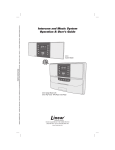
1. Press POWER button at the master station to turn the radio on.
2. Press BAND button to select AM or FM.
3. Press DOWN & UP buttons to tune the desired radio frequency.
Store Radio Stations
VMC1 saves up to ten AM and ten FM stations.
1. Press Band to select AM or FM
2. Press and release MEM button
3. Press and release the radio station channel. For locations 1 to
5, simply press that button.
4. Press and release the 5+ button and then select a button from 1
to 5 to select location 6 to 10 For example pressing 5+ and 1 will
save the station in location 6.
5. Press MEM to store the radio station in the selected location
Recall Stored Radio Station
1. Press BAND button to select AM or FM
2. To recall locations 1 through 5, press the desired location
3. To recall locations 6 through 10, press and release 5+
4. Immediate press a button from 1 to 5 corresponding to the desired
location. Pressing 1 will recall location 6, pressing 2 will recall
location 7 and so on.
5. Press ME-UP to scroll through all 10 stored locations. This scrolls
the stored locations and rolls back to number 1 when 10 is reached
Set Radio Alarm / Auto On Off
1. With the time displayed, press and hold the ALARM button.
Display changes from current time to alarm time with the minutes
blinking
5