1
RZ/A1H Group
6.9.2
Display Out Comparison Unit(DISCOM)Sample Program
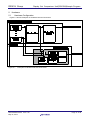
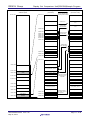
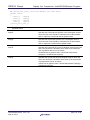
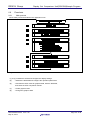
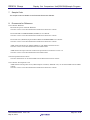
Process of detecting a CRC error through the DISCOM
CrcErrorDetection
(1)
DiscomDrv_CalcCRC
(2)
R_DISCOM_Start
(3)
WaitVsync(2)
(4)
(5)
crc_error = 0;
WaitVsync(VSYNC_WAIT_COUNT)
(6)
R_DISCOM_Stop
(7)
WaitVsync(1)
(8)
result output
End
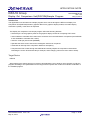
Figure 6.5
CRC Error Detection through the DISCOM
(1)
: Calculate the CRC codes for graphics data in software.
(2)
: Start the DISCOM.
(3)
: Wait two Vsync periods.
The DISCOM register settings are updated at the end of the effective period of graphics data.
Thus, wait one Vsync period until they are updated. Display out comparison starts upon detection
of the start of effective graphics data. Thus, wait another Vsync period. The total wait time is two
Vsync periods.
(4)
: Clear the DISCOM interrupt detection flag.
If the graphics data does not match, an interrupt occurs due to discrepancy detection by display out
comparison, setting this flag to 1.
(5)
: Perform the display out comparison process during the VSYN_WAIT_COUNT period.
(6)
: Stop the DISCOM.
(7)
: Wait one Vsync period.
Wait one Vsync period until the DISCOM register settings are updated.
(8)
: Output the display out comparison results.
Check the status of the DISCOM interrupt detection flag and then serially output the comparison
results.
R01AN1825EJ0100
May 27, 2014
Rev.1.00
Page 26 of 28