Transcript
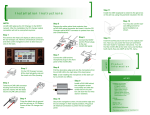
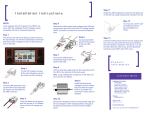
Step 11
Install the USB receptacle to extend to the glove box
or the ash tray using the grommet included in the kit.
Installation Instructions
Step 12
NOTE:
Step 5
mCAR.UMI replaces the CD Changer in the MOST
network. After the installation the CD changer optical
connection is not connected anymore.
Remove the white optical dust protector from
mCAR.UMI optical connector and insert it into the CD
Changer optical MOST connector to protect from dust
and contaminations.
Step 1
Step 6
First remove the ashtray and the CD Changer to allow
access to the head unit. Remove all electrical connectors and slide out the navigation screen to allow easy
access to the back.
Connect the MOST
and the Power plugs
to the rear
mCAR.UMI panel.
You may also use the special USB grommet for
panel installation as
shown.
Step 13
Insert the ashtray back and lock it to its original position. Now you can power the head unit and follow
the User Guide for operation instructions. You will
find the mCAR.UMI at the CDC menu and the Bluetooth hands free and A2DP at the TEL menu.
Connect the USB and the
microphone plugs to the front
panel of the mCAR.UMI.
Step 2
On the CD Changer harness
lift the lock tab gently and pull
the insert out of the housing.
Step 8
mCAR
Step 7
Product
Information
Pull the decorative edge and wire the microphone from
the mCAR.UMI to the right side of the dash panel.
Note: avoid installing the microphone in the dash cavity to prevent eco effects.
mCAR
Step 9
Step 3
Install mCAR.UMI behind
the navigation screen
horizontally and slide the
screen back to its position. Be sure that no wires
stand in between.
Take the mCAR.UMI connector
housing from the kit and plug
back the inserts with the leads
into the mCAR.UMI connector.
Step 4
Step 10
Crimp the black wire to ground
and the red wire to 12V Battery
Power off the CD changer harness.
Secure the navigation screen, the decorative edge and
the CD Changer in their original positions. Plug back
all electrical connectors to power the CD Changer
panel.
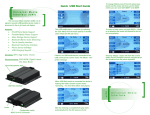
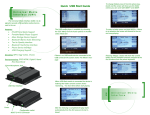
Installation Kit includes:
mCAR.UMI module
2+4 MOST Harness
MOST inline connector
Power Supply Harness
USB Extension Cable
Cigarette lighter grommet
Microphone w/ 2.5mm jack
Velcro/Adhesive Pad
FCC ID:
TQ6BTMDC751
Weight: 350g
Size: 6” x 9” x 2”
mCAR Product References
This device contains FCC ID TQ6BTMDC751