1
User Manual
411L v0.6(M02)
̀ 4CH DVR ̀
This document contains preliminary information and subject to change without notice.
2010.01.22 411L User Manual V0.6(M02)
1
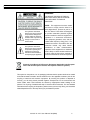
WARNING
TO REDUCE THE RISK OF FIRE OR
ELECTRIC SHOCK, DO NOT EXPOSE
THIS APPLIANCE TO RAIN OR
MOISTURE.
This symbol is intended to
alert the user to the presence
of unprotected “Dangerous
voltage" within the product's
enclosure that may be strong
enough to cause a risk of
electric shock.
This symbol is intended to
alert the user to the presence
of important operating and
maintenance (servicing)
instructions in the literature
accompanying the appliance.
NOTE: This equipment has been tested
and found to comply with the limits for a
class digital device, pursuant to part 15 of
the FCC Rules. These limits are designed
to provide reasonable protection against
harmful interference when the equipment is
operated in a commercial environment.
This equipment generates, uses, and can
radiate radio frequency energy and, if not
installed and used in accordance with the
instruction manual, may cause harmful
interference to radio communications.
Operation of this equipment in a residential
area is likely to cause harmful interference
in which case the user will be required to
correct the interference at his own expense.
Disposal of Old Electrical & Electronic Equipment (Applicable in the European
Union and other European countries with separate collection systems)
This symbol on the product or on its packaging indicates that this product shall not be treated
as household waste. Instead it shall be handed over to the applicable collection point for the
recycling of electrical and electronic equipment. By ensuring this product is disposed of
correctly, you will help prevent potential negative consequences for the environment and
human health, which could otherwise be caused by inappropriate waste handling of this
product. The recycling of materials will help to conserve natural resources. For more detailed
information about recycling of this product, please contact your local city office, your household
waste disposal service or the shop where you purchased the product.͑
2010.01.22 411L User Manual V0.6(M02)
2
Table of Contents
CHAPTER 1 PACKING DETAIL AND INSTALLATION _____________________ 5
1-1 PACKING ____________________________________________________ 5
1-2 Hard Disk Installation _________________________________________ 6
CHAPTER 2 PANEL LOCATION ________________________________________ 9
2-1 FRONT PANEL CONTROLS ____________________________________ 9
2-2 4CH REAR PANEL CONNECTORS _____________________________ 10
CHAPTER 3 LIVE, PLAYBACK AND PTZ OPERATIONS _________________ 11
3-1 LIVE Mode__________________________________________________ 11
3-2 PLAYBACK Mode____________________________________________ 14
3-3 PTZ Mode __________________________________________________ 16
CHAPTER 4 MAIN MENU SETUP ____________________________________ 18
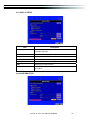
4-1 RECORD SETUP ____________________________________________ 19
4-1.1 Quality & Frame Rate Setup _____________________________ 20
4-2 EVENT SETUP ______________________________________________ 20
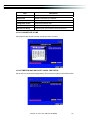
4-2.1 MOTION SETUP ________________________________________ 21
4-2.1.1 MOTION AREA SETUP______________________________ 22
4-2.2 SENSOR SETUP ________________________________________ 22
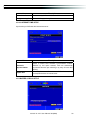
4-3 SCHEDULE SETUP __________________________________________ 23
4-3.1 Schedule Record Setup _________________________________ 24
4-3.2 Holiday Setup __________________________________________ 24
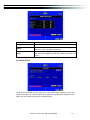
4-4 CAMERA SETUP ____________________________________________ 25
4-5 ACCOUNT SETUP ___________________________________________ 26
4-5.1 Permission Setup _______________________________________ 27
4-5.2 User Picture Setup _____________________________________ 27
4-6 NETWORKING SETUP ________________________________________ 28
4-6.1 NETWORKING SETUP ___________________________________ 28
4-6.1.1 DHCP ____________________________________________ 28
4-6.1.2 LAN ______________________________________________ 29
4-6.1.3 ADSL_____________________________________________ 29
4-6.2 HTTP Setup ____________________________________________ 30
4-6.3 DDNS Setup ___________________________________________ 30
4-6.4 Mail Setup _____________________________________________ 31
4-7 PTZ & RS485 SETUP ________________________________________ 32
4-8 SYSTEM SETUP _____________________________________________ 33
4-8.1 DISPLAY SETUP ________________________________________ 34
4-8.2 DATE/TIME SETUP ______________________________________ 34
4-8.2.1 CHANGE DATE & TIME _____________________________ 35
4-8.2.2 TIME ZONE AND DAYLIGHT SAVING TIME SETUP _____ 35
4-8.2.3 INTERNET TIME SETUP ____________________________ 36
4-8.3 BUZZER & RELAY SETUP _______________________________ 36
4-8.4 SPOT SETUP___________________________________________ 37
4-9 UTILITY SETUP _____________________________________________ 38
4-10 DIAGNOSTIC _______________________________________________ 39
CHAPTER 5 BACKUP & SEARCH ____________________________________ 40
5-1 BACKUP SETUP_____________________________________________ 40
5-2 SEARCH SETUP_____________________________________________ 41
5-2.1 EVENT SEARCH ________________________________________ 42
5-2.2 TIME SEARCH__________________________________________ 43
2010.01.22 411L User Manual V0.6(M02)
3
CHAPTER 6 Rempte Software Installation and Setup ____________________ 44
6-1 AP Software Installation and instruction _______________________ 44
6-2 How to do remote monitoring through IE ______________________ 46
6-3 AP Software Operation _______________________________________ 47
CHAPTER 7 SPECIFICAITONS_______________________________________ 48
CHAPTER 8 MOBILE APPLICATION INSTALLATION AND USAGE __________ 50
8-1 Mobile Application Installation and Operation for Symbian System 50
8-1.1 Mobile Application Installation____________________________ 50
8-1.2 Mobile Application Operation_____________________________ 51
8-1.2.1 Add New Login DVR _______________________________ 51
8-1.2.2 Logging Onto the DVR _____________________________ 51
8-1.2.3 Modify the Login Information of DVR ________________ 52
8-1.2.4 Delete the Login Information of DVR_________________ 52
8-1.3 Live Monitoring Operation _______________________________ 52
8-1.3.1 Scroll the Image ___________________________________ 53
8-1.3.2 Image Quality Setup _______________________________ 53
8-1.3.3 Channel Display ___________________________________ 53
8-1.3.4 Size of Image _____________________________________ 54
8-1.3.5 Rotate the image __________________________________ 54
8-1.3.6 Alarm ____________________________________________ 54
8-2 Mobile Application Installation and Operation for Windows Mobile Sy
stem __________________________________________________________ 55
8-2.1 Mobile Application Installation____________________________ 55
8-2.2 Mobile Application Operation_____________________________ 56
8-2.3 Operation under the LIVE monitoring. _____________________ 57
CHAPTER 9 CMS INSTALLATION AND USAGE GUIDE___________________ 58
9-1 CMS Installation _____________________________________________ 58
9-2 CMS LOGIN AND ENVIRONMENT______________________________ 61
9-3 DVRs, Groups & Events______________________________________ 62
9-3.1 View DVRЯGroup List __________________________________ 62
9-3.2 View Event Logs _______________________________________ 63
9-4 Local PC Information and Control _____________________________ 63
9-5 Main Display ________________________________________________ 64
9-5.1 Audio Control __________________________________________ 64
9-5.2 eMAP Display __________________________________________ 65
9-5.3 PTZ Control____________________________________________ 66
9-6 Operation Bar _______________________________________________ 67
9-6.1 User administration _____________________________________ 68
9-6.2 DVR Administration _____________________________________ 68
9-6.3 Group Administration ___________________________________ 69
9-6.4 eMap Administration ____________________________________ 70
9-6.5 Remote Play ___________________________________________ 71
9-6.6 HDD Playback __________________________________________ 72
9-6.7 File Playback___________________________________________ 72
9-6.8 Event Playback _________________________________________ 73
9-6.9 Snapshot Data _________________________________________ 73
9-6.10 Recording Data________________________________________ 74
APPENDIX I
I-DVR.NET REGISTRATION _____________________________ 75
APPENDIX II Remote Monitoring IE ActiveX Control Installation Instruction ___ 77
2010.01.22 411L User Manual V0.6(M02)
4
CHAPTER 1
PACKING DETAIL AND INSTALLATION
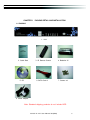
1-1 PACKING
1. DVR
2. Quick Start
5. CD
3. IR Remote Control
6. SATA Cord x1
4. Batteries x2
7. Screws x4
8. Power Adaptor
Note: Standard shipping products do not include HDD
2010.01.22 411L User Manual V0.6(M02)
5
1-2 Hard Disk Installation
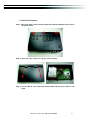
Step 1: Take off the three screws from the bottom of the DVR as indicated in red circles in
the picture below.
Step 2: Open the cover follow the way the arrows indicate.
ʳ
ʳ
ʳ
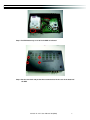
Step 3: Fix the HDD to rack mount and connect SATA and the power cable as indi
cated.
2010.01.22 411L User Manual V0.6(M02)
6
Step 4: Put DVR bottom up, screw to fix the HDD as indicated.ʳ ʳ
ʳ
ʳ
ʳ
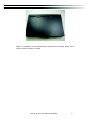
Step 5: Put the cover back and put the three screws back to fix the cover in the bottom of
the DVR.
ʳ
2010.01.22 411L User Manual V0.6(M02)
7
ʳ
ʳ
ʳ
NOTE: The initialization of new-installed HDD is required before recording, please refer to
manual “4-8UTILITY SETUP” for detail.
2010.01.22 411L User Manual V0.6(M02)
8
ʳ
CHAPTER 2 PANEL LOCATIONʳ
ʳ
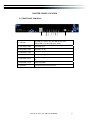
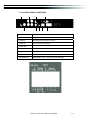
2-1 FRONT PANEL CONTROLS
ʳ
ʳ
ķ
ĸ Ĺ ĺ Ļ ļ Ľ
ľ
Top(USB2.0) is used to plug the USB memory stick
1 USB Port
̺
Bottom(USB1.1) is used to plug the mouse
2 LED Displayˀ Power
̺
DVR Power is on.
3 LED Displayʳˀ HDD
̺
Hard disk is in use.
4 LED Displayʳˀ LAN
̺
Connected to the internet.
5 LED Displayˀ LOGIN
̺
Remote user logged in.
6 LED Displayʳˀ REC
̺
DVR Recording. (or Schedule Recording and recording are
on)
7 LED Displayʳˀ PLAY
̺
DVR Playing back.
8 IR Sensor
̺
Input sensor for the remote control.
2010.01.22 411L User Manual V0.6(M02)
9
2-2 4CH REAR PANEL CONNECTORS
ķ
Ĺ
ĺ
ľ
ʳ
ʳ
ʳ
ʳ
ʳ
ĸ
Ļ
ļ
Ľ
Ŀ
ķ DC 12V
Socket for a DC 12V input.
ĸ MAIN monitor
BNC port for the main monitor.
Ĺ VIDEO IN
BNC input ports for cameras, 16 in total.ʳ
ĺ AUDIO IN
RCA input port for audio signal.
Ļ AUDIO OUT
RCA output for audio signal.
ļ NTSCЯPAL Switch
Switch between NTSC and PAL format.
Ľ LAN
Network port.
ľG VGA
VGA port.
Ŀ EXTERNAL I/O
EXTERNAL I/O port (see below for pin definition)
2010.01.22 411L User Manual V0.6(M02)
10
CHAPTER 3
LIVE, PLAYBACK AND PTZ OPERATIONS
The IR remote control and mouse operate differently under each mode; this chapter describes
the functions of them under three different modes: LIVE, PLAYBACK and PTZ.
3-1 LIVE Mode
You can monitor all the channels, listen to audio signal and have some related operations under
LIVE mode. This paragraph describes the IR remote control, mouse operation and on screen
graphical icons under LIVE mode.
Table 3-1.1 Functions of remote control under LIVE mode
Button
Description
REC
Start/Stop recording.
PLAY
Start playing back the most recently recorded segment.
LOCK
Enable/Disable the Keypad function
1,2,3,4
Select the channel to monitor in full screen
FREEZE
Turn on/off screen freeze function.
Switch to quad display.
ENTER/MODE
Switch to full screen, quad display.
MENU/
Enable/ Disable setup Menu.
BK-UP/ESC
Enable/ Disable backup menu.
SRH
Enable/ Disable search menu.
MUTE
Switch channel 1 output audio / turn off LIVE audio
STATUS
Enable/ Disable Status.
OSD
Turn on/off the screen display
Zoom/Zoom -
Enable/ Disable double screen size display. You can click on the channel
name for choosing a specific channel.
PIP/Zoom +
Turn on picture-in-picture format. Click on the channel name can switch to
other channels.
PTZ
Enable PTZ control.
AUTO
In AUTO mode, all available channels will be cycled through in full screen.
2010.01.22 411L User Manual V0.6(M02)
11
Table 3-1.2 Graphical icons that will display after right-clicking your mouse under LIVE mode.
Icon
Description
Resting the cursor on this icon will bring up the following four menu icons.
Main menu.
Search menu.
Backup menu.
PTZ mode.
Turn on/off recording.
Playback.
Resting the cursor on this icon will bring up the following five display icons.
FREEZE.
PIP, picture in picture
ZOOM, double the screen size
AUTO-sequence
LOCK, activate the key lock.
Full screen display.
Quad display.
2010.01.22 411L User Manual V0.6(M02)
12
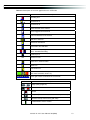
Table 3-1.3 Description of on screen graphical icons in LIVE mode
Icon
Description
Recording is on
Live Audio is on
1~4
Live Audio is off
Motion detected on the channel
Sensor triggered on the channel
Video loss detected on the channel
USB device detected
DVD burner is detected
Connected to the LAN cable.
FilmΚNormal Recording
ClockΚSchedule Recording
AUTO-seq is on
2X
2X zoom in is on
Freeze is on, screen is frozen
LOCK is on
PTZ control is on
Shows the current hard disk space has been used
(99% mean used 99%, remain 1%)
Lower right of each CH will show the current time
Icon
/
/
Description
Image quality (High/Low)
Full screen
Record
Snap shot (Photo time in accordance with computer-based)
Record and snap shot file saving path setup
Enable/Disable shortcut toolbar
2010.01.22 411L User Manual V0.6(M02)
13
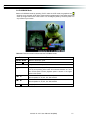
3-2 PLAYBACK Mode
Switch to PLAYBACK mode by pressing “PLAY” under the LIVE mode, the graphical icon
will show up on the upper center of the screen and the operation panel ( see below picture) will
show up at right lower corner of the screen. You can drag the panel by mouse to place it on
any location of your screen.
Table 3-2.1 Remote control functions under the PLAYBACK mode
Button
Description
ENTER / MODE
Switch to full screen, quad.
MENU /
Turn on/off PAUSE.
PLAY
Play back at normal speed.
/ SLOW
Play back at slower speed. The speed will be slowed to 1/2, 1/4, 1/8,
1/16 by each pressing of the button till the slowest limitation of 1/16 of
the normal speed. Current playback speed is shown in the upper
center of the screen.
/
Fast rewind. Each press increases the speed to the next level. There
are six speeds: 2x, 4X, 8X, 16x, 32X and 64X.
/
Fast forward. Each press increases the speed to the next level. There
are six speeds: 2x, 4X, 8X, 16x, 32X and 64X.
/
Stop playback.
2010.01.22 411L User Manual V0.6(M02)
14
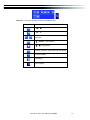
Table 3-2.2 The mouse operation under the PLAYBACK mode.
Icon
Я
Description
ψ
/
ω Fast rewind
ψ
/
ωFast forward
Play/pause
ψϧ
/ SLOWω
Δslow playback
ψϰ / Ϯωstop playback
Playback channel by channel with snap shot display
Full screen display
Quad display
Zoom-in display
2010.01.22 411L User Manual V0.6(M02)
15
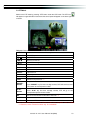
3-3 PTZ Mode
Switch to the PTZ mode by pressing “PTZ” button under the LIVE mode. The PTZ icon
will appear on upper left side of screen and the control panel will appear on the down right side
of screen.
Table 3-3.1 Remote Control functions under the PTZ mode
Description
Button
/ SLOW
Move PTZ up.
/
Move PTZ down.
/
Move PTZ to the left.
/
Move PTZ to the right.
ZOOM +
PTZ zoom-in.
ZOOM -
PTZ zoom-out.
FOCUS +
PTZ focus-in.
FOCUS -
PTZ focus-out.
IRIS +
PTZ iris-open.
IRIS -
PTZ iris-close.
TOUR
Activate PTZ pre-set tour. Ϡ
PRESET+
Number
PLAY+
Number
Setup the Preset location
Press “PRESET” key first then two-digit number; DVR will set the current
PTZ location at entered preset number.
Go to Preset location
Press “PLAY” key first then two-digit number, PTZ will go to the
correspondent preset number location.
PIP
Set current PTZ location as the start of line-scan. Ϡ
FREEZE
Activate auto line-scan. Ϡ
ZOOM
Set current PTZ location as the end of line-scan.Ϡ
Ϡʳ PTZ communication protocols from different brands aren’t compatible 100% sometime
s. Therefore, some of these functions may be unavailable.
2010.01.22 411L User Manual V0.6(M02)
16
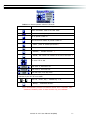
Table 3-3.2 Mouse operation under the PTZ mode
Icon
Description
Leave PTZ ModeΔback to the LIVE mode
Pre-set number N. (0~255)
Go to pre-set number N.
Set current PTZ location at pre-set number N.
ψTOURωΔpress to activate pre-set tourϠ
ψPIPωΔSet current PTZ location as the start of line-scan. Ϡ
ψFREEZEω
Δ Activate line-scan. Ϡ
ψZOOMω
ΔSet current PTZ location as the end of line-scan. Ϡ
To move PTZ in 360̓
PTZ zoom in; PTZ zoom out
PTZ focus in; PTZ focus out.
PTZ IRIS open, PTZ IRIS close.
Below functions need support from specific PTZ manufacturer.
er manual of your PTZ for more detail.
to
Please check us
AUX 1~8,ψAUTOωKey Ѐ Number keyψ1~8ω
ψBackupω, Customized functionΖ
ϠPTZ communication protocols from different brands aren’t compatible 100%
sometimes. Therefore, some of these functions may be unavailable.
2010.01.22 411L User Manual V0.6(M02)
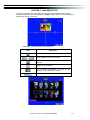
17
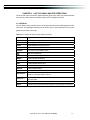
CHAPTER 4
MAIN MENU SETUP
To enter the main menu and set up DVR, log-in account and user password are required.
The default password of the administrator is “123456”. Please check the “Account Setup” for
related setup of other log-in users.
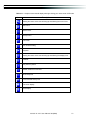
Table 4-0.1 Some definition of virtual keyboard.
Item
Description
Switch between capital and small letters.
/
Switch between numbers and letters.
Press to cancel the setup, and re-choose the login
account.
Delete the last character.
Enter to identify the password. It will enter the set
up menu, If the password is verified.
Space key
2010.01.22 411L User Manual V0.6(M02)
18
Table 4-0.2 The operation of remote control under the setting menu
Item
MENU
ESC
ENTER
Description
Switch to different options under one item
Switch to different items
Save setup and back to LIVE mode
Back to Upper level of menu without saving
Enter the menu, or display virtual keyboard
PS. The initialization of new-installed HD is required before recording, please refer to “4-9
UTILITY SETUP” for detail.
4-1 RECORD SETUP
Item
Description
Select STOP to stop recording or OVERWRITE to reuse the
HDD when HDD is full
ψStopωΚStop Recording
HDD FULL
ψOverwriteω
ΚStart to overwrite that begin from the oldest data
of HDD, and continue to record.
Quality & Frame Rate
Setup
Setup the quality and frame rate for each channel under normal
recording and event recording type.
OSD position X
Setup OSD X axis
OSD position Y
Set up OSD y axis
Recording OSD
position setup
Set up OSD axis
2010.01.22 411L User Manual V0.6(M02)
19
4-1.1 Quality & Frame Rate Setup
Item
Normal setup/
event setup
Resolution
Description
Select recording mode
Select recording resolution: NTSC:360x240, 720x240, 720x480
PAL:352X288,704X288,704X576
Record Type
You can setup quality and FPS separately for record type.
No.
Check/uncheck the box enable/disable selected channel recording
Quality
Select quality: Below Basic/ Basic/ Normal/ High/ Highest
FPS
Select recording frame rate.
Auto
Assign each channel with its maxima accessible fps
4-2 EVENT SETUP
2010.01.22 411L User Manual V0.6(M02)
20
Item
Description
Motion Setup
Enter to set up motion detection
Sensor Setup
Enter to set up sensor detection
4-2.1 MOTION SETUP
Item
Description
Motion Popup
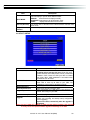
Check the box to Enable/Disable popup screen function for all
channels. When motion is detected in LIVE mode, the
detected channel image will pop up in full screen display.
1~4
You can setup independently for each channel.
Selected Channel Turn
Check the box to Enable/Disable motion detection for each
channel.
Sensitivity
Motion Area Setup
Drag the white bar or press
! to set up Sensitivity from
value 1 to 10 for each channel. The lower value you set
the higher sensitivity it will be
Enter to setup motion detection area
2010.01.22 411L User Manual V0.6(M02)
21
4-2.1.1 MOTION AREA SETUP
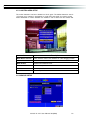
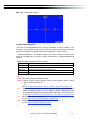
The motion detection has been divided into 16x12 grids. The default detection area is
full screen as it marked in transparent for local DVR and purple for remote access.
Areas deselected for motion detection are marked in red for both local and remote site.
Item
Description
Mask Mouse Selection
Switch between “select” and “deselect” for cursor-dragging function
All Area Detection
Select entire screen as detection area.
Mask All Area
Deselect entire detection area.
Continue
Continue setup
Exit & Save
Save setup and leave
Exit & Discard
Cancel setup and leave
4-2.2 SENSOR SETUP
2010.01.22 411L User Manual V0.6(M02)
22
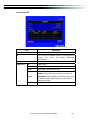
Item
Description
Sensor Popup
Check the box to Enable/Disable popup screen function for all
channels. When Sensor is detected in LIVE mode, the detected
channel image will pop up in full screen display.
All Off
Set all sensor off
All Low
Set all sensor polarity low
All High
Set all sensor polarity high
Sensor Polarity
Click or press ϰ to select between HIGH, LOW voltage for
triggering sensor detection or OFF to turn off polarity for each
channel
Low PolarityΚSensor has not been triggered. When connected,
sensor will be turned on..
High PolarityΚSensor has been triggered. When connected, sensor
status will be turned off..
Off
ΚSensor is deactivated, and will not be turned on/off.
4-3 SCHEDULE SETUP
Except from starting recording manually, you can also setup the recording time by weeks
and schedule including normal, motion detect, and sensor detect recording type.
Item
Description
Page
Each page provides 10 schedules for setup. 5 pages in total.
Holiday Setup
Enter to setup holiday, up to 50 days, other than weekends,.
View Event/
Sensor Setup
Motion/
View Normal/ Motion / Sensor Setup
2010.01.22 411L User Manual V0.6(M02)
23
4-3.1 Schedule Record Setup
Click on the time on the left side. The setup menu will be displayed. You can have
detail setup by dates, Time and event.
4-3.2 Holiday Setup
Since holidays are different by different country and region, you can setup the holiday of
your location accordingly.
2010.01.22 411L User Manual V0.6(M02)
24
4-4 CAMERA SETUP
Item
Description
1~4
You can setup independently for each channel.
Mask
Check the box to Enable/Disable mask function for LIVE mode
Sharpness
Brightness
Contrast
Chroma(U)/(V)
Drag the bar or press
! to adjust Sharpness of your camera from
value 1 to 255. The default value is 1.
Drag the bar or press
! to adjust Brightness of your camera from
value 1 to 255. The default value is 128.
Drag the bar or press
! to adjust Contrast of your camera from
value 1 to 255. The default value is 100.
Drag the bar or press
! to adjust Chroma of your camera from
value 1 to 255. The default value is 128.
Drag the bar or press
! to adjust Hue of your camera from value 1
Hue
to 255. The default value is 128. ( This function doesn’t support at
PAL system)
Name
Set up name of each channel
Volume
Audio volume for CH1 under LIVE mode and recording mode can be
adjusted.
2010.01.22 411L User Manual V0.6(M02)
25
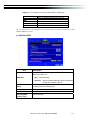
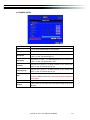
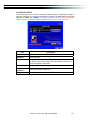
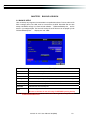
4-5 ACCOUNT SETUP
The Account Setup menu is used to provide role-based permission independently setting for
each user (maximum of 2 users) to access DVR over network. The default admin account and
password is “admin” and “123456” The default password remains the same after firmware
upgrade, however, it requires 8-digits for password length when you setup a new one
Item
Description
No.
Check to activate the user’s account.
Username
Set up username
Password
Set up password for each user. Password is 8-digits required and can
be mixed by letters and numbers with case-sensitive. Letters can be
mixed with capitals or lowercases.
Permissions
Set up Permissions for each user
Change Admin
Password
Change administrator’s password
Picture
Change user’s picture
2010.01.22 411L User Manual V0.6(M02)
26
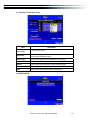
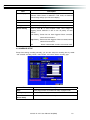
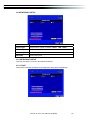
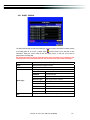
4-5.1 Permission Setup
The Account Setup is set to provide individual user (maximum of 2 users) role-based
permissions, including access to Setup menu, Network operation, PTZ function, Playback,
Utility, Backup, Password expiry date and Mask on specific channels while playing back.
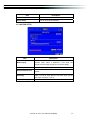
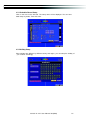
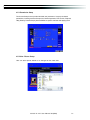
4-5.2 User Picture Setup
User can select picture wished to be changed to from hard drive.
2010.01.22 411L User Manual V0.6(M02)
27
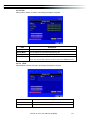
4-6 NETWORKING SETUP
Item
Description
Connect type
Setup mode for network connection: (DHCPΕLANΕADSL).
HTTP Setup
Enter to set up HTTP
DDNS Setup
Enter to set up DDNS
Mail Setup
Enter to set up mail
4-6.1 NETWORKING SETUP
There are three ways to connect to the network as followed.
4-6.1.1 DHCP
When DHCP is selected, IP address will be assigned by DHCP server automatically.
2010.01.22 411L User Manual V0.6(M02)
28
4-6.1.2 LAN
Select LAN for network connection, the following information is required.
Item
Description
IP Address
Enter IP address provided by ISP
Subnet Mask
Enter IP address of Subnet Mask provided by ISP
Gateway
Enter IP address of Gate way provided by ISP
DNS
Enter DNS address provided by ISP.
(Note: The correct DNS address must be entered for DDNS function).
4-6.1.3 ADSL
Select ADSL for network connection, the following information is required.
Item
Description
User Name
Enter user name provided by ISP
Password
Enter password provided by ISP
2010.01.22 411L User Manual V0.6(M02)
29
4-6.2
HTTP Setup
Item
Description
Enable HTTP
Server
Check to enable HTTP server. Users can remotely access into the
DVR over the network if the HTTP function is activated.
Port
Enter a valid port value from 1 up to 65000. The default value is 80.
Auto
Assign each channel with its maxima accessible fps
No.
Chanel number
Quality
Set up record quality. There are below basic, basic, normal, high,
highest
FPS
Set up record FPS
4-6.3
DDNS Setup
2010.01.22 411L User Manual V0.6(M02)
30
Item
Description
Enable DDNS
DDNS Server
Enable/disable DDNS function.
Enter the registered SMTP Server:
ez-dn̆ΕI-DVR.NETϠʳ ΕDYNDNS.ORGΕNO-IP.ORGΕ3322.ORG
SMTP Server
Enter the completed registered SMTP Server. (Including username
+ Server) If the user name is h.264 and you choose i-dvr as your
server, you should enter: h.264.i-dvr.net
User Name
Enter user name.
Password
Enter password.
Ϡʳ For more detailed I-DVR.NET operation instruction, please refer to appendix I.
4-6.4
Mail Setup
When event occurs (VLOSS, MOTION, SENSOR), email will be sent to the receiver account
automatically.
2010.01.22 411L User Manual V0.6(M02)
31
Item
Description
User Name
Check the box to enable/disable E-mal Notification function.
Enter to set up SMTP Server name.
(Varies according to the user)
Enter to set up User Name.
Password
Enter to set up Password.
Sender E-mail
Enter to set up e-mail address of receivers.
Receiver E-mail
Enter to set up e-mail addresses for up to 10 receivers individually.
Trigger Event
Enter to select events to send out E-mail notifications when below
circumstances happen: Motion, Sensor and Vloss (Video Loss).
Enable E-mail Notification
SMTP Server
4-7 PTZ & RS485 SETUP
The DVR allows users to control PTZ functions of your camera. To enable PTZ function, the 485
cable should be connected to the RS-485 port of DVR.
Item
Description
Enable PTZ
Click the box to Enable/Disable PTZ function for each channel.
Protocol
Set up the protocol of PTZ cam. The supported protocol are
PELCO-P, PELCO-D, KND, LI-LIN, SAMSUNG, LG, AVTECH.
PTZ ID
Click or press
! to set up PTZ ID. The valid ID value is from 1
to 64.
Baud Rate
Select Baud Rate for PTZ from 2400, 4800, 9600,19200
RS-485 ID
Select RS-485 ID from 1 to 64
RS-485 Baud Rate
Select RS-485 Baud Rate from 2400. 4800, 9600,19200
Keyboard
Select Keyboard. (Li-Lin)
2010.01.22 411L User Manual V0.6(M02)
32
4-8 SYSTEM SETUP
Item
Description
DVR Name
The name of DVR will be shown when users login from remote access.
DVR Location
The location of DVR will be shown when users login from remote access
Language
Click or press ϰ to select OSD language from English, Traditional
Chinese, Simplified Chinese, Japanese, Greek, Portuguese
Remote ID
Default ID is 0. When more than one DVRs are purchased, the DVRs
can’t be numbered from 1 to4. For instance, standard remote control
can’t operate DVR numbered 3. It only responds when use 1 to 4
remote control.
Display Setup
Enter to set up Display
Date/Time Setup
Enter to set up Date/Time
Device Setup
Enter to set up Buzzer & Relay
Spot Setup
Enter to set up Spot
2010.01.22 411L User Manual V0.6(M02)
33
4-8.1 DISPLAY SETUP
Item
Description
Auto-Seq Interval
Set up duration time in seconds for the interval between channels
under Auto-Seq mode.
Show OSD
Turn On / Off OSD display
Show DVR Status
Turn On / Off DVR illustration and record status display
Show Date/Time
Turn On / Off date and time display
Show Channel Name
Turn On / Off channel name display
CRT
Deflicker(only for CRT monitor)
Border Color
Set up the color of border in LIVE , PLAYBACK mode.ΰRed,
Green, Blueα
4-8.2 DATE/TIME SETUP
2010.01.22 411L User Manual V0.6(M02)
34
Item
Description
Hour Format
12HOURS/ 24HOURS
Date Format
MM-DD-YY/DD-MM-YY/YY-MM-DD
Date/Time Position
Choose the position of Time and Date display
Change Date & Time
Setup time and date of DVR
Time Zone Setup
Set up GMT and Daylight Saving Time.
Internet Time Setup
Setup automatic synchronization with internet server
4-8.2.1 CHANGE DATE & TIME
Setup date and time of DVR manually according to user’s local time.
4-8.2.2 TIME ZONE AND DAYLIGHT SAVING TIME SETUP
Set up time zone and activate Daylight Saving Time function according to user’s DVR location.
2010.01.22 411L User Manual V0.6(M02)
35
Item
Description
Select Time Zone
Enter to modify GMT from GMT- 13 to GMT+ 13
Daylight Saving Time
Turn on/ off Daylight Saving Time
4-8.2.3 INTERNET TIME SETUP
Synchronize your DVR time with internet time server.
Item
Description
Automatic
Synchronization
Check to enable DVR automatic synchronization function.
Effective by this option selected, DVR will automatically
synchronize the time upon rebooting or by every 24 hours after
booting.
Update Now
Effectively, Date and Time show on DVR will immediately
correspond with those in internet server.
4-8.3 BUZZER & RELAY SETUP
2010.01.22 411L User Manual V0.6(M02)
36
Item
Description
Key Tone
Enable/Disable keystrokes.
Buzzer
Enable/Disable buzzer operation when the alarm is triggered for
HDD Error, Video Loss, Motion and Sensor.
Relay
Enable/Disable the signal to be sent to the RELAY OUT blocks
when the alarm is triggered for HDD Error, Video Loss, Motion and
Sensor.
4-8.4 SPOT SETUP
The DVR has two modes of video output; one is main video output, the other is spot video
output. SPOT setup is for controlling the order of channels the system cycles through in SPOT
mode. User can monitor every channel in the SPOT mode.
2010.01.22 411L User Manual V0.6(M02)
37
Item
SPOT MODE
Interval (Seconds)
Skip Video Loss
Channel
Description
Channels display in spot for three different modes:
MANUAL: select channels to display manually.
SEQUENCE: Auto-sequence for all channels in order.
EVENT:
Display channels with event occurred.
The duration time in seconds for the interval between channels under
SPOT mode.
Whether to skip channels without video signal.
4-9 UTILITY SETUP
Item
Description
HDD Initialization
USB Initialization
System Recovery
Reset System Events
Copy Setup to USB
Select to enter hard disk initialization menu. Please stop
recording before entering this menu. Enter the menu,
system will show all the data (model ,volume ) of HDD that
installed in DVR. Check the HDD you’d like to initialize
then press “Start”. HDD initialization is successful when
the status shows “Succeed”
Clean up all data on USB. Enter USB initialization and
press YES to clean up all data on your USB. The
initialization is done when it’s showed “Succeed”.
Restore system default values
Reset all the recording events in DVR.
Copy configuration to a USB device. There will be a file
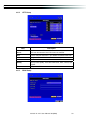
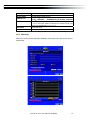
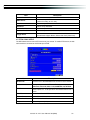
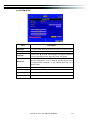
named “sdvr.config” on your USB.
Download configuration from a USB device into DVR.
Upgrade DVR through USB.
Please stop recording and backup setup configuration
before upgrading.
System will reboot automatically when the upgrade is
completed.
Notice! DO NOT TURN OFF POWER OR UNPLUG USB DEVICE DURING THE UPGRADE
as it may cause incomplete firmware upgrade and damage to the DVR.
Download Setup from USB
Upgrade
2010.01.22 411L User Manual V0.6(M02)
38
4-10 DIAGNOSTIC
Item
Description
Version
The current firmware version of DVR
IP
The connected IP address of DVR. If disconnected from
network,
the
screen
will
display”
NETWORK
DISCONNECT”.
MAC
MAC Address of DVR
HDD Status
No.
HDD number
Volume
HDD Capacity
Used
Percentage of space used on HDD.
Shows HDD status.
USING means the HDD is being used for recording now
Status
GOOD/BAD means the HDD has a known/unknown format
for the DVR. (Note: Please initialize your newly-installed
HDD before using it.)
Format
The latest format time of HDD
2010.01.22 411L User Manual V0.6(M02)
39
CHAPTER 5
BACKUP & SEARCH
5-1 BACKUP SETUP
User can backup any segment of recorded data in a specified time frame. To do so, either a CD
R/W or storage device, like USB, must be connected to the DVR. Recorded data can also
backup into NB/PC through our remote access software: ψDVRemoteDesktop.exeω and be
saved in your assigned path. The format of backup file is IRF file that can be played by both
“DVRemoteDesktop.exe”ʳ Εʳ “ifileplay.exe” and “CMS”
Item
Description
From
The start time of backup file
To
The end time of backup file
Device
Select USB, PC as the backup device
Free Space
The available space in your backup device. (not available for PC backup)
Refresh
Recalculate the available space of backup device. (not available for PC backup)
Required Space
Show the size of the backup file
Calculate
Calculate the size of backup file
Start
Start backup operation.
Be sure to calculate the size of backup file BEFORE operating backup.
Note! Do not unplug the USB device or turn off the DVR during the backup process to
avoid unrecoverable error.
2010.01.22 411L User Manual V0.6(M02)
40
5-2 SEARCH SETUP
Item
Description
Event Search
Event search menu
Time Search
Enter time search menu
2010.01.22 411L User Manual V0.6(M02)
41
5-2.1 EVENT SEARCH
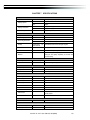
The DVR automatically records events with type, time and channel information included. If there
is recording data for an event, a yellow signal
will be shown on the left side of time
information. Rest your cursor under the line and press “enter”, or left click your mouse to
playback the recording data.
P.S. Event Records will still be generated even when hard disk is not installed or the
record function is not activated. However, the record can’t be viewed after selecting it.
Item
Page
Date/Time
Event Type
Info
Description
Switch between pages of events
Date/time when event occurred.
Event type, defined as following
Motion Detected
MOTION
SENSOR
Sensor Detected
Video Loss
Video Loss
Remote Login
user log-in over the network
Remote Logout
user log-out over the network
Power On
DVR Power on
HDD Full
HDD Space FULL
HDD Error
Detect HDD error
Reboot
DVR Reboot
The channel where event occurs or login user
2010.01.22 411L User Manual V0.6(M02)
42
5-2.2 TIME SEARCH
TIME SEARCH can search for the specific time of recording data to playback. Press “Enter” or
left click on the desired date to playback. Note that dates with recording data are marked with a
red square “ ϭ “System will start playing back according to the date you selected. Calendar
will be shown by using mouse to click on “year” and “month”.
Click “date” to display recording time of that specific date with time bar. You can change time
(hour/minute/second) or click on a specific time of time bar by mouse then press “ok”. DVR will
playback the selected recording data.
AP software:ψDVR Remote Desktopωcan allow you to remotely access and control the DVR
from PC.
2010.01.22 411L User Manual V0.6(M02)
43
CHAPTER 6
Rempte Software Installation and Setup
6-1 AP Software Installation and instruction
AP software:ψDVR Remote Desktopωcan allow you to remotely access and control the DVR
from PC.
p.s. Operation system currently supports Windows XP SP2 and above and Window
s Vista, Windows 7
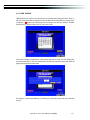
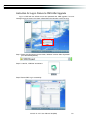
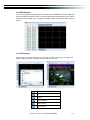
Step OneΚEnter the IP address of DVR in IE browser
Step Two: Windows as below will show up. Please enter the user name and password. Default
user name and password is admin/123456. Other related setup about user account
and password, please check “4-5 Account Setup. “
Step Three: Click on the link to start downloading the AP software.
2010.01.22 411L User Manual V0.6(M02)
44
Step Four: Run or Save our AP software.
Step Five: If you choose to run the software, Start window will be shown up. Please enter
information of login DVR: IP, Port, Username and Password, or choose “Play
Recorded File” to open backup files in your PC.
Step Six: You’ve logged into the DVR
2010.01.22 411L User Manual V0.6(M02)
45
6-2 How to do remote monitoring through IE
Step OneΚEnter the IP address of DVR in IE browser. The address appeared in this image is
only for demonstration. Actual address is depending on the setup of on-site DVR.
Step Two: Windows as below will show up. Please enter the user name and password. Default
user name and password is admin/123456. Other related setup about user account
and password, please check “4-5 Account Setup. “ The user name and password
appeared in this image is only for demonstration. Actual user name and password
depend on the setup of on-site DVR.
Step Three: Click on “Internet Explorer 6, 7, and 8”to start downloading the AP software. ( The
first option is for IE view, please refer to next chapter for more information)
p.s. There will be IE connection security issue when clicking this link for the first time.
Please refer to index II for Remote Monitoring IE ActiveX Control Installation Instruction.
2010.01.22 411L User Manual V0.6(M02)
46
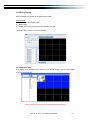
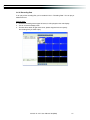
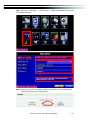
Step Four: DVR images appear.
6-3 AP Software Operation
Open the file “DVRemoteDesktop.exe”; enter the information of DVR “IP address”, “Port”
“Username” and “Password” and click “OK”. You should be able to login DVR successfully and
start to use the software. The default username and password is ψadmin/ 123456ω
“DVRemoteDesktop.exe” AP software provides some extra functions for remote users.
Please check Table 6-3.1 for minimum system requirements for “DVRemoteDesktop.exe”
operation.
Table 6-3.1 System Requirements for AP software
CPU
Intel Pentium 4 above
OS
Microsoft Windows 7ΕWindows VistaΕWindows XP SP2 above
RAM
VGA Card
Others
512M above
Needed to support DirectX9.0 (Above) Note 1
DirectX 9.0 above
Note 1:
Known VGA card that support DirectX9.0 currently:
NVIDIA: Geforce FXseries, Geforce 6series, Geforce 7series, Geforce 8series, Geforce
9series, Geforce 200series, etc.
Or
visit:http://en.wikipedia.org/wiki/Comparison_of_Nvidia_graphics_processing_units
ATI:
Radeon R300series, Radeon R400series, Radeon R500series, Radeon R600series,
Radeon R700series, Radeon HD 3xxx IGPseries, Mobility Radeonseries (9500
above), Mobility Radeon Xseries, Mobility Radeon HDseries, or FireGL Vseries etc.
Or visit: http://en.wikipedia.org/wiki/Comparison_of_ATI_graphics_processing_units
SiS: SiS 67Xseries, or SiS 77Xseries etc.
Or visit: http://www.sis.com/support/support_compare.htm
Intel: 91Xseries, 94Xseries, 96Xseries, G3Xseries, or G4Xseries, etc.
Or visit: http://en.wikipedia.org/wiki/Intel_GMA
2010.01.22 411L User Manual V0.6(M02)
47
CHAPTER 7
SPECIFICAITONS
1. VIDEO
Input Level
1.0 Vp-p±10% Composite, 75: Balanced
NTSC
Display Speed
Display Resolution
120fps
PAL
100fps
NTSC
704(H) X 480(V)
PAL
704(H) X 576(V)
Monitor Output
2Vp-p Composite, 75: Balanced
2. RECORDING
Compression Method
H.264
Recording Speed
Refer to table 7-1
Recording Resolution
NTSC
704 X 480, 704 X 240, 352 X 240
PAL
704 X 576, 704 X 288, 352 X 288
Independent
each channel
Quality
for
Below Basic/ Basic/ Normal/ High/ Highest
Schedule
Setup by “minute” as unit
Mode
Manual / Event (Motion) / Schedule
By resolution, fps and quality
Method
Setup fps and quality separately for normal and
event recording
3. SATA DEVICE
Capacity
Internal Storage
1 HDD
SATA / SATA҈ compatible
Type
4. ALARM
Sensor Input
4
Loop Out
1 Relay out
Motion Detection
Available per each camera/ Multi-detection level
5. CONNECTIONS
Video Input
4 ports
Video Output
BNC 1 port, VGA 1 port (max.1920 X 1080)
Audio Input
RCA 1 CH
Audio Output
RCA 1 CH
USB 2.0
USB memory stick, USB Touch Panel
USB 1.1
USB Mouse
Remote
Remote control
1 RS-485, 4 sensor input,
External I/O
1 Relay Output
Ethernet
1 RJ45 connector, 10/100 Mbps
6. ELECTRICAL
Power Source
DC 12V / 3A
7. ENVIRONMENTAL
Operation Temperature
5к ~ + 40к
Humidity
Less than 90%
2010.01.22 411L User Manual V0.6(M02)
48
8. PHYSICAL
Dimension
300(W) x 175(D) x 46(H) mm
Weight
1.3 KGΰnot including HDα
9. BACKUP
BACKUP
USB Stick
Video Data, Audio
Network
Video Data, Audio
10. SEARCHING & PLAYBACK
Searching Type
Event/ Time
Playback speed
120 FPS
11. MULTI-REMOTE SURVEILLANCE
Monitoring Environment
Web/AP/CMS
Max. client
Supporting multi-client (3 clients accessible)
12. OTHERS
OS
Embedded Linux
Multi Task
Pentaplex
LiveΕRecordΕPlaybackΕNetworkΕBackup
Control Device
Remote Control / Virtual Keyboard / Mouse / AP
Software
PC Viewer
Direct monitoring of DVR’s HDD on PC
Numbers of event list
10000
Table 7-1
Recording Speed
(Independent
setting for each
channel)
NTSC
PAL
Compression Method
360 x 240
120 FPS
720 x 240
60 FPS
720 x 480
30 FPS
352 x 288
100 FPS
704 x 288
50 FPS
704 x 576
25 FPS
H.264
2010.01.22 411L User Manual V0.6(M02)
49
CHAPTER 8 MOBILE APPLICATION INSTALLATION AND USAGE
You can remotely monitor all channels of DVR through your mobile device. The required mobile
application is from DVR manufacturer and it supports mobile OS for both Windows mobile 5.0
above and Symbian.
Please confirm network function of DVR has been activated before mobile connection:
Main menu Æ Network Setup Æ HTTP Setup Æ Check the “Enable HTTP Server”
8-1 Mobile Application Installation and Operation for Symbian System
Mobile Device: Nokia, SonyEricssonΞetc.
System requirement:
GPRS/ 3G must be provided from your telecom service.
Mobile device that supports GPRS/ 3G protocol and Java cldc1.0/midp 2.0 environment
ϠPlease download both” DVRH264.jar” and “DVRH264.jad” to operate the function.
Note that users with Sony Ericsson will only need to download “DVRH264.jar.”
8-1.1 Mobile Application Installation
Please follow the steps cited below to perform the mobile device surveillance function.
Step 1: The mobile application called “DVRH264.jar” need to be installed in your mobile device.
The application can be downloaded directly from the manufacturer’s website to your
mobile or; alternatively, it can be transferred to your mobile device from the CD that
packed with DVR through Bluetooth or USB cable.
Step 2: Install the application software “DVRH264.jar” in your mobile device. It might be
installed automatically after downloading; otherwise, select it from the downloading file
for installation.
2010.01.22 411L User Manual V0.6(M02)
50
8-1.2 Mobile Application Operation
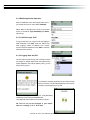
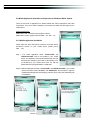
After the installation, enter the Program Files menu in
your mobile device to run a file called “DVRH264”.
Select “Menu” at the right lower corner of your mobile
screen, 4 commands, Login Add Modify and Delete,
will show up.
8-1.2.1 Add New Login DVR
To log into the DVR, you need to enter the logging-in
DVR information. Find “Add” under the “Menu” then
enter logging-in DVR’s IP address, Port number,
account name and password. Press “Add” to save this
information after entering.
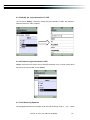
8-1.2.2 Logging Onto the DVR
Use the Login command to log onto a DVR and monitor
live images. If multiple DVRs have been added to the
mobile application, they will be listed by name, you can
select one to log onto.
A confirmation message might show up for network charge
before connection. The fee rate will depend on the telecom
company and package fee you go with.
Network connectivity will take some time. It’ll be affected by
networking environment and bandwidth flow.
Live image will show up after a successful connection.
PS. The Live can not be displayed in your mobile
when the recoding is off in local DVR.
2010.01.22 411L User Manual V0.6(M02)
51
8-1.2.3 Modify the Login Information of DVR
You can use the “Modify” command to change the login information of DVR. The dialogue is
identical to that of the “Add” command.
8-1.2.4 Delete the Login Information of DVR
“Delete” command can be used to remove the DVR information if it is no longer useful. Select
the DVR on the name list then choose “Delete”
8-1.3 Live Monitoring Operation
This paragraph describes some operation under the LIVE monitoring mode in
2010.01.22 411L User Manual V0.6(M02)
your
mobile
52
device.
8-1.3.1 Scroll the Image
You can use the keypad on your mobile device to scroll the image if it’s oversized.
Key
2
4
6
8
Action
Scroll Up
Scroll Left
Scroll Right
Scroll Down
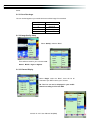
8-1.3.2 Image Quality Setup
Select “Quality” under the “Menu”
There will be 5 levels for your to choose: LowΕ
NormalΕMiddleΕHigh and Highest.
8-1.3.3 Channel Display
Select “Single” under the “Menu”, there will be all
channels of your DVR in list for you to choose.
PS. The Live can not be displayed in your mobile
when the recoding is off in local DVR.
2010.01.22 411L User Manual V0.6(M02)
53
8-1.3.4 Size of Image
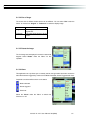
The screen size of different mobile device can be different. You can select “Size” under the
“Menu” to choose from “Original” or “Fit Screen” to resize the display image.
Item
Original
Fit Screen
Description
The image will be shown in
original size.
The image will be shown to fit the
screen.
8-1.3.5 Rotate the image
The Live image can be displayed in normal or rotate to 90
degrees. Select “Rotate” under the “Menu” for this
operation.
8-1.3.6 Alarm
This application not only allows you to remotely monitor through mobile device but receive the
alarm that has been triggered by events such as Motion Detected, Sensor Triggered and Vloss.
Graphical icons below will be shown on the status:
: Motion detected
: Sensor triggered
: Video loss
Select the “Alarm” under the “Menu” to switch this
function on or off.
2010.01.22 411L User Manual V0.6(M02)
54
8-2 Mobile Application Installation and Operation for Windows Mobile System
There are two kinds of applications for Window Mobile OS: JPEG compression and H.264
compression. The one for H.264 compression can transfer both audio and video signal to your
mobile device.
System Requirement:
Mobile device OSΚWindows mobile system 5.0 above.
Mobile device need to support internet: GPRSୋ3GୋWifiˎ etc.
8-2.1 Mobile Application Installation
Please follow the steps cited below to perform the mobile device
surveillance function on your mobile device (mobile phone,
PDA ...etc).
Step 1: The mobile application called “Jrviewer.CAB” and
“H264Pocket.CAB” need to be installed in your mobile
device. The application can be downloaded directly from the
manufacturer’s website to your mobile or; alternatively, it can
be transferred to your mobile device from the CD that
packed with DVR through Bluetooth or USB cable.
Step 2: Install the application software “Jrviewer.CAB” and “H264Pocket.CAB” in your mobile
device, two folders named ”Jrviewer” and “H264Pocket” will be created. It might be
installed automatically after downloading; otherwise, select it from the downloading file
for installation.
2010.01.22 411L User Manual V0.6(M02)
55
8-2.2 Mobile Application Operation
After the installation, enter the Program Files menu in your mobile device to run files named
“Jrviewer” and “H264Pocket”.
This application allows you to remotely logon and monitor DVR. Press “OK” to bring up the
operation menu, see below chart to further information.
Item
Function
Description
Enter DVR’s name, IP address, Port, Account user, Password
Add
Add login DVR
then press “OK”
ΘChoose the DVR that you’d like to log on , then press “OK”
Θ PS. The Live can not be displayed in your mobile
Login
Logon DVR
when the recoding is off.
ΘPS. Network connectivity will be affected by networking
environment and bandwidth flow. The fee rate will
depend on the telecom company and package fee
you go with.
Modify
Delete
Modify
DVR
Delete
DVR
Login
Login
Choose DVR, press “Modify”, and press”OK” to save change.
Choose DVR and press ”Delete” to delete the DVR info.
2010.01.22 411L User Manual V0.6(M02)
56
8-2.3 Operation under the LIVE monitoring.
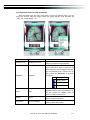
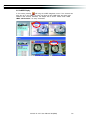
After successful logon the DVR, press “View” to bring up operation menu. You can
choose the channel, resize the image, choose the quality, and turn on/off the status bar,
alarm, full screen display….etc
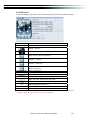
Item
Function
Channel 1~16
Display for CH 1~16
Status Bar
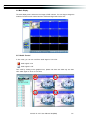
Status Bar
Description
Choose from CH1~16 to display.
(Show only supports a single partition)
Graphical icons indicated below will be shown
on the status bar if there is event such as
motion detected, sensor triggered and video
loss to be detected on any channel. You can
also uncheck the “Status Bar” to inactivate
this function.
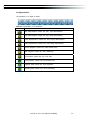
Icon Description
Motion Detect
Sensor Trigger
V-Loss
Alarm
Alarm
Sound
Sound
Full Screen
Full screen display
Alarm through your mobile device can be
triggered if there is event to be detected. You
can also uncheck the “Alarm” under the
“View” to inactivate this function.
If the channel video with sound input, turn this
option to hear the real sound.
You can choose one channel to display in full
screen by check this function.
2010.01.22 411L User Manual V0.6(M02)
57
CHAPTER 9 CMS INSTALLATION AND USAGE GUIDE
9-1 CMS Installation
System Requirement:
Pentium 4 processor or equivalent.
ϠIntel
ϠMicrosoft
ϠBesides
Windows VistaΕWindows XPΕWindows 2003 Server.
OS and other required APs, there will be 512MB remaining memory needed or above.
Ϡ512MB
memory above.(500M requested for group DVR connection and 180M for single DVR)
Ϡ20MB HD space. Recording and image capturing require extra space for storage.
ϠVGA
Card needs to support DirectX9 and function well while running it. Please refer to
p40 Note 1.
Installation:
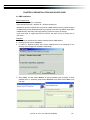
1. Connect to the manufacturer’s website and download the CMS software.
2. Decompress and execute “setup.exe”.
3. If “Visual C++ Runtime Libraries” has not been installed before in the operating PC, the
following sign will suggest an installation automatically.
4. Select “Next”, and then select “Browse” to change installation path if needed. To check
available space on hard disk, please select “Disk Cost” then please select “Next” to the
next step.
2010.01.22 411L User Manual V0.6(M02)
58
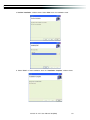
5.”Confirm Installation” window shows. Select ‘Next’ then the installation starts.
6. Select ‘Close’ to finish installation when the “Installation Complete” window shows.
2010.01.22 411L User Manual V0.6(M02)
59
Instruction for Log-in Failure to CMS After Upgrade
Log in to CMS with the default account and password after CMS upgrade. If an error
message occurs as shown in the image, please follow the instruction to solve the error.
ʳ
Step 1: Please enter file manager to enter folder, “Windows” and then folder “Systme32”
(ex:C:\Windows\System32)
Step 2: Locate file, “iCMS.dat” and delete it.
Step 3: Restart CMS. Log-in successfully.
2010.01.22 411L User Manual V0.6(M02)
60
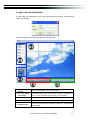
9-2 CMS LOGIN AND ENVIRONMENT
To enter CMS, the administrator’s user name and password are required. The defaults are
‘admin’ and ‘123456’.
After successful login, the following image shows on your screen:
"%
%
!%
DVRs, Groups &
Events
#%
$%
Information about DVRs, groups and events.
See “9-3 Information List” for more detail.
! PC information
and control
Information about local PC’s hard disk, volume, recording...etc.
See “9-4 PC Information and Control” for more detail.
" Main Display
Live image display area. See “9-5 Main Display” for detail.
# Display Modes
Several choices of display modes supported by CMS.
$ Operation Bar
A set of 10 operations are provided by CMS. See “ 9-6 Operation
Bar” for detail.
2010.01.22 411L User Manual V0.6(M02)
61
9-3 DVRs, Groups & Events
Icon
Description
View list of logged in DVRЯ Group.
View Logs: list all the event information of DVR
9-3.1 View DVRЯGroup List
Single left click on ‘DVR’ or ‘Group’ will
expand/collapse the entire DVRs and
groups list.
On the DVR list, double left click on a
connected DVR will show its image in
main display. See “9-6.2 DVR
Administration” for further information.
On the Group list, double left click on a
group will show live image from the
channels of the group in the main
display.
See
“9-6.3
for
Group
Administration” for further information.
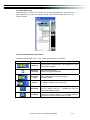
Left-clicking on a connected DVR will expand/collapse status of its all channels as below:
Icon
Description
Video Loss
Motion Detected
Sensor Triggered
2010.01.22 411L User Manual V0.6(M02)
62
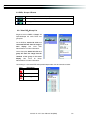
9-3.2 View Event Logs
Under this page, all the events of a DVR can be expanded/collapsed in the order of Re
mote in/Remote out, Video Loss, Motion, Sensor, Others (Power Reset, Key Lock, Key
Unlock, HD Full).
9-4 Local PC Information and Control
Located at the left lower corner of the screen, please see the chart below:
Icon
Function
Description
HDD info
Shows the ratio of available space / HDD capacity of C:\ drive
(where CMS is installed).
Recording
Directory
Setting Recording Directory.
(Default is C:\Program files\iCMS)
Recording
Cycle
Set the capacity size of the Recording space.
(minimum is 10MB)
Volume
PC volume or playback volume control bar.
Recording
Record live image to local PC storage. To view locally stored
data, use “Record” under the
operation bar. Also see
“9-6.6 recording data” for detail.
Snapshot
Take snapshot to save in local PC storage. To view all the
snapshots you’ve taken, please go to ” Snapshot” under the
operation bar. See “9-6.5 Snapshot data” for detail.
2010.01.22 411L User Manual V0.6(M02)
63
9-5 Main Display
The main display area is where the live image of DVR is shown. You can drag to change the
location of screen for each channel and turn on/off audio signal with mouse-click.
9-5.1 Audio Control
In live mode, you can turn on/off the audio signal of Ch1~Ch4:
ψ
ωAudio signal is On
ψ
ωAudio signal is Off
Turn on/off by clicking on the graphical icon, please note there can allow only one chan
nel’s audio signal to be on at one time.
2010.01.22 411L User Manual V0.6(M02)
64
9-5.2 eMAP Display
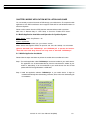
In Live mode, pressing
will bring the e-MAP drag-down menu. If the channel has
been set up to use e-MAP, the menu will show all the e-MAP titles that have been
entitled to this channel; otherwise, “No eMaps” will be shown. Please check “9-6.4
eMAP administration” for setup information.
2010.01.22 411L User Manual V0.6(M02)
65
9-5.3 PTZ Control
In the main display, right click on the channel will bring up PTZ control panel as below.
Icon
8 direction key
Description
Rotate the PTZ
ZOOM+ୖZoom in
ZOOM : Zoom out
Setup the PTZ spot as pre-set N.
FOCUS+ : Focus in
FOCUS-ୖFocus out
Move to pre-set N.
Set PTZ Preset
Goto PTZ Preset
PTZ Sensitivity
Setup 16 pre-set N.
Move to specific pre-set N.
Activate auto pre-set tourϠ
Setup PTZ sensitivityϠ
Setup the “start” and “end” of liner scan.Ϡ
Activate the liner scan cruise.Ϡ
B
C
S
Adjust the Brightness (Down is +)
Adjust the Contrast (Down is +)
Adjust the Sharpness (Down is +)
ϠPTZ communication protocols from different brands aren’t compatible 100% sometimes.
Therefore, some of these functions may be unavailable.
2010.01.22 411L User Manual V0.6(M02)
66
9-6 Operation Bar
10 Operations to be listed as below:
Table 9-6.1 description of 10 operations:
Icon
Description
User Administration. Please see “9-6.1 User administration”
DVR Administration. Please see “9-6.2 DVR Administration”
Group Administration. Please see “9-6.3 Group Administration”
eMap Administration. Please see “9-6.4 eMap Administration”.
Remote Playback. Please see “9-6.5 Remote Play”.
HDD Playback. Please see “9-6.6 HDD Play”
File Playback. Please see “9-6.7 File Play”
Event Playback. Please see “9-6.8 Event Play”
Snapshot Data. Please see “9-6.9 Snapshot”
Recording Data. Please see “9-6.10 Recording”
2010.01.22 411L User Manual V0.6(M02)
67
9-6.1 User administration
Before the CMS can be used on a PC, user accounts should be added with proper authority.
Each user should also be assigned a password and optionally a description. If a user does not
have certain authority assigned, he/she will not be able to operate the corresponding function
on the Operation Bar. The default is none of the authority is assigned. The administrator should
assign proper authority to each user. These user accounts can be deleted or edited later on.
Select “OK” to save the setup.
Icon
Description
Add a user account. The default authority is with none permission.
Language
systray
Delete a user account.
Switch display language
If the turn on this feature, when the program reduced, it will be based in the sys
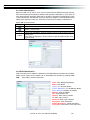
tem tray icon.
(This feature is switched on / off, the need to re-open the CMS until after the pr
ogram in force)
9-6.2 DVR Administration
DVR connections can be added to or deleted from the CMS and their information can be edited.
DVR’s channel names can be entered here or downloaded from the DVR by pressing ‘From
DVR’. Select “OK” to save the information.
Name: DVR Name(Unrepeatable)
Model: DVR Model
Generic: For General Models
Generic MainStream: For DualStream Model
DUAL SDVR: For MPEG4 2U Models
Address: DVR IP Address
Port: DVR Network Port
Channel: DVR Camera Number
ID: DVR Login Account
Password: DVR Login Password
Description: Other Description
Camera Description: Carera Description
From DVR: Load Camera name from DVR
2010.01.22 411L User Manual V0.6(M02)
68
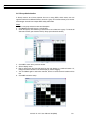
9-6.3 Group Administration
A ‘Group’ means a set of video channels from one or many DVRs, which means, user can
organize channels from different DVRs to be set in a group. This function allows you to monitor
and manager channels from multiple DVRs easily and flexible.ʳ
Steps:
1. Add a new group and set its name and description.
2. Click ‘Select’ which will bring up a new window.
3. Check the specific channels that you’d like them to be included in the group. To include all
channels of a DVR, just check the DVR.(1 Group up to select 36 camera)
4. Click “OK” to return to the previous window.
5. Select a display mode.
6. Drag a channel from the lower left panel into the main display to a preferred location. Or,
change the channel location in the main display by mouse dragging.
7. You can ‘Select’ again to add other channels, but the un-saved channel locations will be
lost.
8. Click “OK” to save the setup.
2010.01.22 411L User Manual V0.6(M02)
69
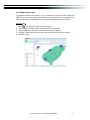
9-6.4 eMap Administration
If geographical locations are relevant, or if it is desired to use a picture as the background,
eMap can be used for the purpose. With eMap, the background picture can be picked by the
user and channels from multiple DVRs can be placed and dragged around on the picture.
Steps to follow:
1.
2.
3.
4.
5.
Click
and a path for the picture will be prompted.
Select a picture, click OK and the picture will show in the right panel.
Drag channels in the left lower corner onto the picture to any position.
To delete a channel already on the picture, right click the channel and click ‘Remove’.
Click OK to save.
2010.01.22 411L User Manual V0.6(M02)
70
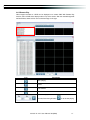
9-6.5 Remote Play
Video images recorded on a DVR can be displayed on a remote CMS. With Remote Play
function, select a DVR and a display mode on top of the screen. After the recorded segments
are listed below, double click on one to show its image on the right.!
Icon
Description
Start playing.
Pause.
Fast forward.
Fast rewind.!
Select the clip you want to watch the number of minutes and
seconds,Press the right button
2010.01.22 411L User Manual V0.6(M02)
is set to start playing
71
9-6.6 HDD Playback
You can directly play the recording data in the HDD that’s uninstalled from DVR by CMS. See
the picture below, the left part of screen is recording data in list that’s separated by hour and the
right part is main display. You can change the display modes and play files fast forward or
rewind.
9-6.7 File Playback
You can play the recorded .irf files by “File Play” in CMS. It allows you to change the
display mode, forward or rewind the file and drag the time bar.
!!!!
Icon
Description
Start Playback.
Pause.
Stop playback.
Fast forward.
Fast rewind.
2010.01.22 411L User Manual V0.6(M02)
72
9-6.8 Event Playback
Event recordings on the DVR can be played back in CMS.
Steps to follow:
1. Select a DVR and a display mode.
2. Select a date.
3. Double click an event and play back the images on the right.
Use buttons at the bottom to control the playback.
9-6.9 Snapshot Data
It can display all the snapshots you’ve taken in line in “Snapshot Data”. You can review, delete
or save as other files here.
*Capture images of the date and time will follow the PC-time display
2010.01.22 411L User Manual V0.6(M02)
73
9-6.10 Recording Data
It can play all the recording files you’ve recorded in line in “Recording Data”. You can play or
delete them here.
Steps to follow:
1. Choose the recording time at upper left corner, it will be played on the main display.
2. You can choose the display mode.
3. Time bar will be shown at right lower corner, please drag the time bar to specify
the recording time you’d like to play.
2010.01.22 411L User Manual V0.6(M02)
74
APPENDIX I
I-DVR.NET REGISTRATION
DDNS Registration on I-DVR.NET
In the package of each DVR, you will find a sticker shows account information including
username and password that allows users to login I-DVR.NET for registration.
To register DDNS on I-DVR.NET, please follow the steps as shown.
Step 1. Please open IE browser and then enter “ http://i-DVR.NET/logon.asp ” in IE browser bar.
Next, “Control Panel Logo” dialog will appear. Enter the username and password
provided by the sticker and then press, “Logon.”
Step 2. After login successfully, enter name at “host” in “Add New Record” dialog. For example,
“icatchddns” is the host name, and then the address will be “icatchddns.idvr.net.” Select
“Standard” type and enter an IP address of the DVR. Input known IP address if any, or
press the “Add New” button if none.
Please enter any name by your choice at Column, “host.domain”
For example, “hostname”
Therefore, IE address will be “hostname.i-dvr.net”
System will automatically show the current computer IP.
If the DVR IP is known, you can type it in the column.
If not, you can press “insert” button.
Step 3. The “Host Manager” dialog will show “insert succeed” when user setup successfully.
The “host.domain” column will show up the setup just entered.
Next, enter the DVR the same time setting the DDNS client machine information
If DDNS set up at DVR side successfully, the website will update the IP information in
one minute. The IP column will be renewed to the corresponding IP address by
pressing “F5: refresh” button.
“host.domain” is named by your choice.
“icatchddns.idvr.net” is what the main
server generates
If DVR IP has any changes, there are updates
Here at the same time. Press, “F5: Refresh”
And then IP column will update automatically
to it’s real IP Address.
2010.01.22 411L User Manual V0.6(M02)
75
Step 4. Enter DVR ШMain Menu Ш Network Setup Ш DDNS. Activate DDNS functions and
input related information.
DDNS work properly when this option selected.
This part of the information required and the
same within the i-dvr.net
ʳ
Step 5.Back to the i-dvr.net, on this page by pressing "F5: Refresh", IP will be automatically
updated into the DVR of the real IP location.
2010.01.22 411L User Manual V0.6(M02)
76
ʳ
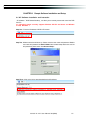
APPENDIX II Remote Monitoring IE ActiveX Control Installation Instruction
When using IE for remote monitoring for the first time, IE ActiveX Control is needed to be
downloaded.
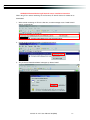
1. When remote monitoring on IE for the first time, an alert message occurs “Install ActiveX
control” on the tool bar.
2. Click at this alert message and select “Install ActiveX Control”
3. “Do you want to install this software” alert pops up. Select “Install”
2010.01.22 411L User Manual V0.6(M02)
77
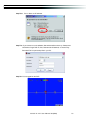
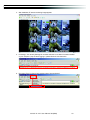
4. After installation, IE remote monitoring image appears.
5. If message, “Your security Settings do not allow web sites to use ActiveX controls installed
on your computer.” pops on when logging in, please follow the next instruction.
6. First select “Tools” on the tool bar and then select “Internet Options”
2010.01.22 411L User Manual V0.6(M02)
78
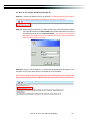
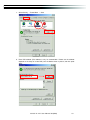
7. Select Security ШTrusted Sitesʳ Шʳ Sites
8. Enter DVR address (This address is only for demonstration. Please use the address
depends on the setup of on-site DVR.) into the blanks shown in picture, and then press
“add.”
2010.01.22 411L User Manual V0.6(M02)
79
9. Newly added website will appear at the trusted web sites list. Press close.
10. Go back to IE window, press refresh button or F5.
2010.01.22 411L User Manual V0.6(M02)
80