1
MED ASSOCIATES INC.
O P E N FI E L D A C T I V I T Y H AR D W AR E
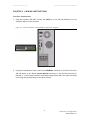
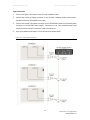
Figure 2.2 – Connect INTERFACE Connector to Control Network Connector
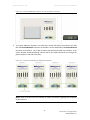
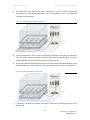
3. To connect additional chambers, use cable part number SG-219C-6 and connect the male
ENV-520 Control Network connector on Chamber 1 to the female ENV-520 Control Network
connector on Chamber 2. Up to eight chambers may be daisy chained in this fashion. If the
system includes sound-attenuating cubicles (SACs), the cables should be run through the
grommet plate on the side of the SACs.
Figure 2.3 – Interface Connections for Additional Chambers
NOTE: Refer to the DIG-729 User’s Manual for further instructions regarding the installation
of device drivers.
-6DOC-102 Rev. 1.5 Copyright © 2012
MED Associates, Inc.