1
3. During the dial-out procedure, one of the stored dial-numbers is sent to the modem, prefixed by an
ATD command. The call is given 2m to be answered.
Once the call is answered, the master system issues commands to stop subsequent dial-outs to the current
number pair. If there is no answer, the modem is power-cycled and the system repeats the previous signalwaiting procedure.
Each number is tried 3 times in total. Up to 2 numbers can be specified for each master. When each
number has been tried 3 times, the system waits for 30m, then the entire procedure is repeated.
The dial numbers (1–4) are tried in the the following sequence:
Master no 1
111222
→
Master no 2
333444
111222
→
333444
111222
→
333444
30m break
←
30m break
←
If an alarm, check-in or dial-out command occurs during the 30m break, the sleep ends and the dialler
restarts as fresh. If they occur when the dialler is active, waiting for signal or waiting to be answered, they
do not cause a dialler re-start.
This is so that multiple alarms that occur rapidly do not disrupt the dialler timing. If you are only dialling
one master, use either numbers 1 and 2 or numbers 3 and 4, but not all four or you will get duplicate calls
for each alarm or check-in.
Logger configuration for Timeview
Important: Do this before you go to site. Everything should be tested and working before you leave for
site.
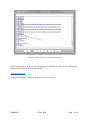
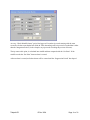
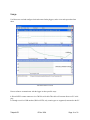
1. Read the logger with Harvest, right-click on the plot that appears and select Configure.
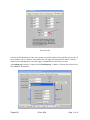
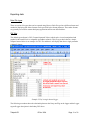
2. Select the Time Switch tab. Configure a check-in time of typically between 0600 and 0800 hours as
shown. Also, configure a time switch window between 1000 and 1005, as shown. A check-in time is only
necessary if the logger is set to daily check-in.
Note: The timeswitch “On” and “Off” fields are used to switch the modem on and off at the specified
time. This is only necessary in unique occasions for remote communications or polling and has no effect
on the “Check-in” time.
Tadpole R2
12 Dec 2014
Page 12 of 38