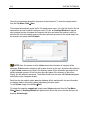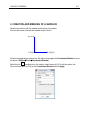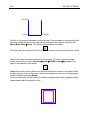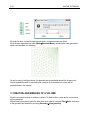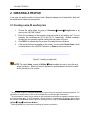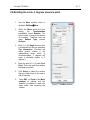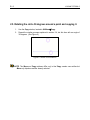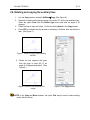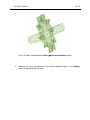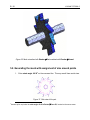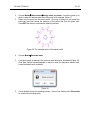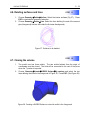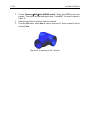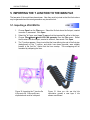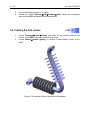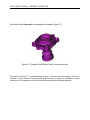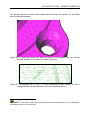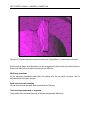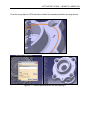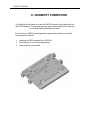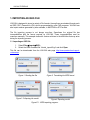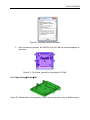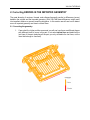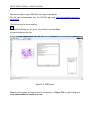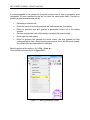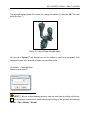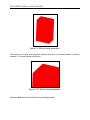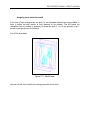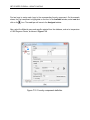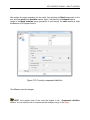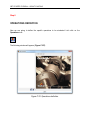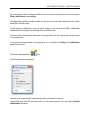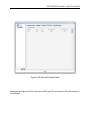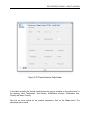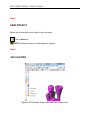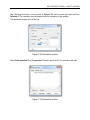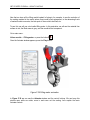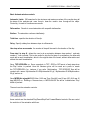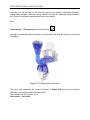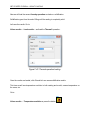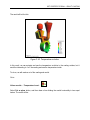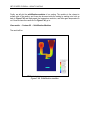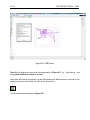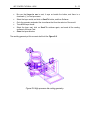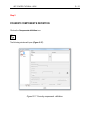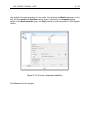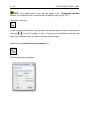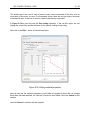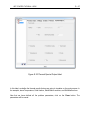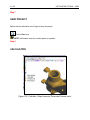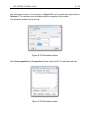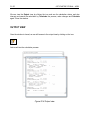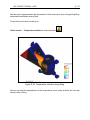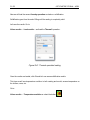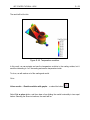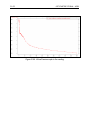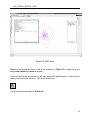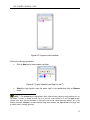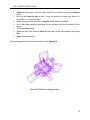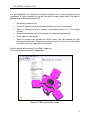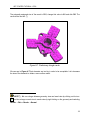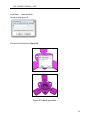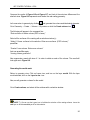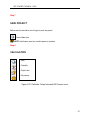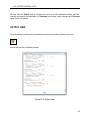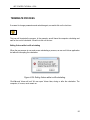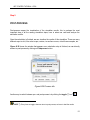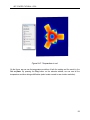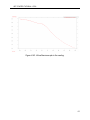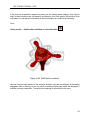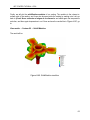
1
VULCAN TUTORIALS VULCAN SIMULATION SOFTWARE FOR CASTING PROCESS OPTIMIZATION Version 10.0 Tutorials VULCAN TUTORIALS Copyright 2007 Quantech ATZ S.A. Barcelona, Spain This tutorial manual may not be reproduced in whole or in part, or processed by computer or transmitted in any form or by any other means, whether electronic, by photocopy, by recording or any other method, without the prior consent in writing of the owners of the Copyright. Quantech ATZ S.A. Edificio NEXUS Gran Capitán, 2-4 08034 Barcelona SPAIN Phone: +34·932 047 083 Fax: +34·932 047 256 Email: [email protected] http://www.quantech.es VULCAN TUTORIALS Foreword This book consists of 8 guided tutorials that will serve as a starting point for using Vulcan. The time that will take to complete these tutorials will depend upon the user’s skills in the related topics that involve casting processes’ computer simulation. The tutorials are thought to be completed as a self-training guide for a Vulcan new user, although technical assistance by Quantech ATZ might be necessary. The tutorials may require some computer files as a starting point (geometries, calculations, etc.), which will be provided by Quantech ATZ. In order to successfully complete these tutorials, we recommend to also having a copy of the Vulcan User’s Manual as a reference guide. VULCAN TUTORIALS [This page is intentionally left blank] VULCAN TUTORIALS INDEX Tutorial Subject A Initiation: basic tools for geometry B Tutorial: Implementing a mechanical part C Tutorial: Implementing a cooling pipe D Geometry preparation in other CAD systems E Geometry correction: tools for correcting geometries once imported into Vulcan environment F Tutorial of a complete casting process: Gravity casting G Tutorial of a complete casting process: High Pressure die casting H Tutorial of a complete casting process: Low Pressure die casting NOTE: For beginning level users, we recommend to complete the tutorials in the given order. VULCAN TUTORIALS [This page is intentionally left blank] VULCAN TUTORIALS A-1 A. INITIATION TO VULCAN With this example, the user is introduced to the basic tools for the creation of geometric entities and mesh generation. A-2 [This page is intentionally left blank] VULCAN TUTORIALS VULCAN TUTORIALS A-3 FIRST STEPS Before presenting all the possibilities that Vulcan offers, we will present a simple example that will introduce and familiarize the user with the Vulcan program. The example will develop a finite element problem in one of its principal phases, the preprocess, and will include the consequent data and parameter description of the problem. This example introduces creation, manipulation and meshing of the geometrical entities used in Vulcan. First, we will create a line. Next, we will save the project and it will be described in the Vulcan data base form. Starting from this line, we will create a square surface, which will be meshed to obtain a surface mesh. Finally, we will use this surface to create a cubic volume, from which a volume mesh can then be generated. 1. CREATION AND MESHING OF A LINE We will begin the example creating a line by defining its origin and end points, points 1 and 2 in the following figure, whose coordinates are (0,0,0) and (10,0,0) respectively. It is important to note that in creating and working with geometric entities, Vulcan follows the following hierarchical order: point, line, surface, and volume. 1 2 1 2 1 2 To begin working with the program, open Vulcan, and a new Vulcan project is created automatically. From this new database, we will first generate points 1 and 2. A-4 VULCAN TUTORIALS Next, we will create points 1 and 2. To do this, we will use an Auxiliary Window that will allow us to simply describe the points by entering coordinates. Then, from the Top Menu, select GeometryCreatePoint and then select the sequence: UtilitiesToolsCoordinates Window In the coordinate window opened previously, the following indicated steps should be used: (1) Introduce the coordinates of point 1 (2) Create point 1 by clicking on the button Apply or by pressing Enter on the keyboard And create point 2 in the same way, introducing its coordinates (10 0 0) in the Coordinates Window. The last step in the creation of the points, as well as any other command, is to press Escape, either via the Escape button on the keyboard or by pressing the central mouse button. Select Close to close the Coordinates Window and go to ViewZoomFrame the two points created. in order to see Now, we will create the line that joins the two points. Choose from the Top Menu: GeometryCreateStraight line. Option in the Toolbar shown below can also be used. Next, the origin point of the line must be defined. In the Mouse Menu, opened by clicking the right mouse button, select ContextualJoin C-a. VULCAN TUTORIALS A-5 NOTE: With option Join, a point already created can be selected on the screen. The command No Join is used to create a new point that has the coordinates of the point that is selected on the screen. We can see that the cursor changes form for the Join and No Join commands. Cursor during use of Join command Cursor during use of No Join command Now, choose on the screen the first point, and then the second, which define the line. Finally, press Escape to indicate that the creation of the line is completed. NOTE: It is important to note that the Contextual submenu in the Mouse Menu will always offer the options of the command that is currently being used. In this case, the corresponding submenu for line creation has the following options: A-6 VULCAN TUTORIALS Once the line has been generated, the project should be saved. To save the example select from the Top Menu: FilesSave. The program automatically saves the file if it already has a name. If it is the first time the file has been saved, the user is asked to assign a name. For this, an Auxiliary Window will appear which permits the user to browse the computer disk drive and select the location in which to save the file. Once the desired directory has been selected, the name for the actual project can be entered in the space titled File Name. NOTE: Next, the manner in which Vulcan saves the information of a project will be explained. Vulcan creates a directory with a name chosen by the user, and whose file extension is .gid. Vulcan creates a set of files in this directory where all the information generated in the present example is saved. All the files have the same name of the directory to which they belong, but with different extensions. These files should have the name that Vulcan designates and should not be changed manually. Each time the user selects option save the database will be rewritten with the new information or changes made to the project, always maintaining the same name. To exit Vulcan, simply choose FilesQuit. To access the example, example.gid, simply open Vulcan and select from the Top Menu: FilesOpen. An Auxiliary Window will appear which allows the user to access and open the directory iniciacion.gid. VULCAN TUTORIALS A-7 2. CREATION AND MESHING OF A SURFACE We will now continue with the creation and meshing of a surface. First, we will create a second line between points 1 and 3. 3 (0,10,0) 1 (0,0,0) 2 (10,0,0) We will now generate the second line. We will now use again the Coordinates Window to enter the points. (UtilitiesToolsCoordinates Window) Select the line creation tool in the toolbar, select the point (0 0 0) with the option Join Ctrl-a and enter point (0,10,0) in the Coordinates Window and click Apply. A-8 VULCAN TUTORIALS 3 (0,10,0) 1 (0,0,0) 2 (10,0,0) With this, a right angle of the square has been defined. If the user wants to view everything that has been created to this point, the image can be centered on the screen by choosing in the Mouse Menu: ZoomFrame. This option is also available in the toolbar. Finish the square by creating point (10,10,0) and the lines that join this point with points 2 and 3. Now, we will create the surface that these four lines define. To do this, access the create surface command by choosing: GeometryCreateNURBS surfaceBy contour. This option is also available in the toolbar: Vulcan then asks the user to define the 4 lines that describe the contour of the surface. Select the lines using the cursor on the screen, either by choosing them one by one or selecting them all with a window. Next, press Escape. As can be seen below, the new surface is created and appears as a smaller, magenta-colored square drawn inside the original four lines. VULCAN TUTORIALS A-9 Once the surface has been created, the mesh can be created in the same way as was done for the line. From the Top Menu select: MeshGenerate mesh. An Auxiliary Window appears which asks for the maximum size of the element, in this example we define a size of 1. When the mesh it´s finished, if we want to see the mesh we have to select this option. This option allows to show or to hide the mesh. We can see that the lines containing elements of two nodes have not been meshed. Rather the mesh generated over the surface consists of planes of three-nodded, triangular elements. NOTE: Vulcan meshes by default the entity of highest order with which it is working. Vulcan allows the user to concentrate elements in specified geometry zones. Next, a brief example will be presented in which the elements are concentrated in the top right corner of the square. This operation is realized by assigning a smaller element size to the point in this zone than for the rest of the mesh. Select the following sequence: Mesh UnstructuredAssign sizes on points. The following dialog box appears, in which the user can define the size: A-10 VULCAN TUTORIALS We enter the size, choose the right superior point, and press escape two times. We must now regenerate the mesh (MeshGenerate Mesh), canceling the mesh generated earlier, and we obtain the following: As can be seen in the figure above, the elements are concentrated around the chosen point. Various possibilities exist for controlling the evolution of the element size, which will be presented later in the manual. 3. CREATION AND MESHING OF A VOLUME We will now present a study of entities of volume. To illustrate this, a cube and a volume mesh will be generated. Without leaving the project, save the work done up to now by choosing FilesSave, and return to the geometry last created by choosing GeometryView geometry. VULCAN TUTORIALS A-11 In order to create a volume from the existing geometry, firstly we must create a point that will define the height of the cube. This will be point 5 with coordinates (0,0,10), superimposed on point 1. (To view the new point, we must rotate the figure by selecting from the Mouse Menu, RotateTrackball. This option is also available in the toolbar: Rotate the figure until the following position is achieved: 5 1 Next, we will create the upper face of the cube by copying from point 1 to point 5 the surface created previously. To do this, select the copy command, UtilitiesCopy. In the Copy window, we define the translation vector with the first and second points, in this case (0,0,0) and (0,0,10). Option Do extrude surfaces must be selected; this option allows us to create the lateral surfaces of the cube. A-12 VULCAN TUTORIALS NOTE: If we look at the Copy Window, we can see an option called Duplicate entities. By activating this option, when the entities are copied (in this case from point 1 to point 5) Vulcan would create a new point (point 6) with the same coordinates as point 5. If the user does not choose option Duplicate entities, point 6 will be merged with point 5 when the entities are copied. By labeling the entities we could verify that only one point has been created. VULCAN TUTORIALS A-13 Finishing the copy command for the surface, we obtain the following surfaces: Now, we can generate the volume delimited by these surfaces. To create the volume, simply select the command GeometryCreateVolumeBy contour. This option is also available in the toolbar: Select all the surfaces. Vulcan automatically generates the volume of the cube. The volume viewed on the screen is represented by a cube with an interior color of sky blue. A-14 VULCAN TUTORIALS Before proceeding with the mesh generation of the volume, we should eliminate the information of the structured mesh created previously for the surface. Do this by selecting MeshReset mesh data, and the following dialog box will appear on the screen: In which the user is asked to confirm the erasure of the mesh information. NOTE: Another valid option would be to assign a size of 0 to all entities. This would eliminate all the previous size information as well as the information for the mesh, and the default options would become active. Next, generate the mesh of the volume by choosing MeshGenerate mesh. Another Auxiliary Window appears into which the size of the volumetric element must be entered. In this example, the value is 1. VULCAN TUTORIALS A-15 The mesh generated above is composed of tetrahedral elements of four nodes, but Vulcan also permits the use of hexahedral, eight-nodded structured elements. We will generate a structured mesh of the volume of the cube. This is done by selecting in the right command bar: MeshingStructuredVolumes. Again, there are no structured meshes in casting problems. You can skip this step and continue with the next tutorial. Now select the volume to mesh and enter the number of partitions in its edges which will be created. Then, create again the mesh. A-16 VULCAN TUTORIALS NOTE: Vulcan only allows the generation of structured meshes of 6-sided volumes. With this example, the user has been introduced to the basic tools for the creation of geometric entities and mesh generation. VULCAN TUTORIALS B-1 CASE STUDY 1 B. IMPLEMENTING A MECHANICAL PART The objective of this case study is implementing a mechanical part in order to study it through meshing analysis. The development of the model consists of the following steps: Creating a profile of the part Generating a volume defined by the profile Generating the mesh for the part At the end of this case study, the user should be able to handle the 2D tools available in VULCAN as well as the options for generating meshes and visualizing the prototype. B-2 [This page is intentionally left blank] VULCAN TUTORIALS VULCAN TUTORIALS B-3 1. WORKING BY LAYERS 1.1.Defining the layers A geometric representation is composed of four types of entities, namely, points, lines, surfaces, and volumes. A layer is a grouping of entities. Defining layers in computer-aided design permits us to work collectively with all the entities in one layer. The creation of a profile of the mechanical part in our case study will be carrried out with the help of auxiliary lines. Two layers will be defined in order to prevent these lines from appearing in the final drawing. The lines that define the profile will be assigned to one of the layers, called the "profile" layer, while the auxiliary lines will be assigned to the other layer, called the "aux" layer. When the design of the part has been completed, the entities in the "aux" layer will be eliminated. NOTE: You can find the finished model in the VULCAN CD-ROM. VULCAN TUTORIALS B-4 1.2.Creating two new layers 1. 2. 3. Open the layer management window. This is found in UtilitiesLayers. Create two new layers called "aux" and "profile." Select “layer0” and with the right button mouse select Rename and write the new name (aux). Then create a new layer called “profile” using the option New layer of the right button mouse and rename it as a profile. Choose “aux” as the activated layer. To do this, doubleclick on "aux" to highlight it. From now on, all the entities created will belong to this layer. Figure 1. The Layers window Figure 2. The Layers window VULCAN TUTORIALS B-5 2. CREATING A PROFILE In our case, the profile consists of various teeth. Begin by drawing one of these teeth, which will be copied later to obtain the entire profile. 2.1.Creating a size-55 auxiliary line 1. 2. 3. 4. Choose the option Line, by going to GeometryCreateStraight Line or by 1 going to the VULCAN Toolbox . 2 Enter the coordinates of the beginning and end points of the auxiliary line . For our example, the coordinates are (0, 0) and (55, 0), respectively. Besides creating a straight line, this operation implies creating the end points of the line. 3 Press ESC to indicate that the process of creating the line is finished. If the entire line does not appear on the screen, use the option Zoom Frame, which is located either in the VULCAN Toolbox or in Zoom on the mouse menu. Figure 2. Creating a straight line NOTE: The option Undo, located in UtilitiesUndo, enables the user to undo the most recent operations. When this option is activated, a window appears in which to select all the operations to be undone. 1 The VULCAN Toolbox is a window containing the icons for the most frequently executed operations. For information on a particular tool, click on the corresponding icon with the right mouse button. 2 The coordinates of a point may be entered on the command line with either a separation between them or a comma between them. If the Z coordinate 0 0is not entered, it is considered 0 by default. After entering the numbers, press Return. Another option for entering a point is using the Coordinates Window, found in UtilitiesToolsCoordinates Window. 3 Pressing the ESC key is equivalent to pressing the center mouse button. VULCAN TUTORIALS B-6 2.2. Dividing the auxiliary line near "point" (coordinates) (40, 0) 1. 2. 3. 4. Choose GeometryEditDivideLinesNear Point. This option will divide the line at the point ("element") on the line closest to the coordinates entered. Enter the coordinates of the point that will divide the line. In this example, the coordinates are (40, 0). On dividing the line, a new point (entity) has been created. Notice that the pointer has become a cross. Select the line that is to be divided by clicking on it. Press ESC to indicate that the process of dividing the line is finished. Figure 3. Division of the straight line near "point" (coordinates) (40, 0) 2.3. Creating a 3.8-radius circle around point (40, 0) 1. 2. 3. 4. 5. Choose the option GeometryCreateObjectCircle. The center of the circle (40, 0) is a point that already exists. To select it, go to ContextualJoin C-a on the mouse menu (right button). The pointer will become a cross, which means that you may click on the point. Enter any point that, together with the center of the circle, defines a normal to the XY plane, i.e., (0, 0, 40). 4 Enter the radius of the circle. The radius is 3.8 . Two circumferences are created; the inner circumference represents the surface of the circle. Press ESC to indicate that the process of creating the circle is finished. Figure 4. Creating a circle around a point (40, 0) 4 In VULCAN the decimals are entered with a point, not a comma. VULCAN TUTORIALS B-7 2.4.Rotating the circle -3 degrees around a point 1. Use the Move window, which is located in UtilitiesMove. 2. Within the Move menu and from among the Transformation possibilities, select Rotation. The type of entity to receive the rotation is a surface. Therefore, from the menu Entities Type, choose Surfaces. 3. Enter -3 in the Angle box and click a checkmark into the box preceding Two dimensions. (Provided we define positive rotation in the mathematical sense, which is counterclockwise, -3 degrees will mean a clockwise rotation of 3 degrees.) 4. Enter the point (0, 0, 0) under First Point. This is the point that defines the center of rotation. 5. Click Select to select the surface that is to rotate, which in this case is that of the circle. 6. Press ESC (or Finish in the Move window) to indicate that the selection of surfaces to rotate has been made, thus executing the rotation. Figure 5. The Move window VULCAN TUTORIALS B-8 2.5. Rotating the circle 36 degrees around a point and copying it. 1. 2. Use the Copy window, located in UtilitiesCopy. Repeat the rotation process explained in section 2.4, but this time with an angle of 36 degrees. (See Figure 6.) Figure 6. Result of the rotations NOTE: The Move and Copy windows differ only in that Copy creates new entities but Move only displaces entities already selected. VULCAN TUTORIALS B-9 2.6. Rotating and copying the auxiliary lines Use the Copy window, located in UtilitiesCopy. (See Figure 9.) Repeat the rotating and copying process from section 2.5 for the two auxiliary lines. Select the option Lines from the Entities type menu and enter an angle of 36 degrees. Select the lines to copy and rotate. Do this by clicking Select in the Copy window. Press ESC to indicate that the process of selecting is finished, thus executing the task. (See Figure 7.) 1. 2. 3. 4. Figure 7. Result of copying and rotating the line. 5. Rotate the line segment that goes from the origin to point (40, 0) an angle of 33 degrees and copy it. (See Figure 8.) Figure 8. Result of the rotations and copies Figure 9. The Copy window NOTE: In the Copy and Move windows, the option Pick may be used to select existing points with the mouse. VULCAN TUTORIALS B - 10 2.7. Intersecting lines 1. Choose the option Geometry EditIntersectionLines. 2. Select the upper circle resulting from the 36-degree rotation executed in section 2.5. 3. Select the line resulting from the 33-degree rotation executed in section 2.6. (See Figure 10). The intersection has created a point (Figure 11) 4. Press ESC to conclude intersection of lines. 5. Create a line between point (55, 0) and the point generated by the intersection. To select the points, use the option Join C-a in the tool Line. Figure 10. The two lines selected the 6. Choose the option Geometry EditIntersectionLines to make another intersection between the lower circle and the line segment between point (40, 0) and point (55, 0). (See Figure 12.) 7. Again, go to the option Geometry EditIntersectionLines to make an intersection between the upper circle and the farthest segment of the line that was rotated 36 degrees. (See Figure 12.) Figure 11. Intersecting lines Figure 12. Intersecting lines NOTE: The order of selection in the intersecting process is important since the second line selected can not have higher entities. VULCAN TUTORIALS B - 11 2.8. Creating and arc tangential to two lines 1. Choose GeometryCreateArcBy3points Toolbox). 2. Open the mouse menu and go to Contextual, click By Tangents. Enter a radius of 1.35 on the command line (see footnote 2 on page 4). (or go to the VULCAN Figure 13. The line segments to be selected 3. And select the two line segments shown in Figure 13. Then press ESC to indicate that the process of creating the arcs is finished. 2.9. Translating the definitive lines to the "profile" layer 1. If the "profile" layer is not already selected, doubleclick on it to select it. 2. Select the "profile" layer in the Layers window. The auxiliary lines will have been eliminated and the "profile" layer will contain only the definitive lines. 3. Click the right button mouse over the layer profile and select Send To, choose Lines in order to select the lines to be translated. Select only the lines that form the profile (Figure 14). To conclude the selection process, press the ESC key or click Finish in the Layers window. VULCAN TUTORIALS B - 12 Figure 14. Lines to be selected 2.10. Deleting the "aux" layer 1. Click Off the profile layer. 2. 3. Choose GeometryDeleteAll Types (or use the VULCAN Toolbox). Select all the lines that appear on the screen. (The click-and-drag technique may be used to make the selection.) Press ESC to conclude the selection of elements to delete. Select the "aux" layer in the Layers window and click Delete. 4. 5. NOTE: When a layer is clicked Off, VULCAN gives note of this. From that moment on, whatever is drawn does not appear on the screen since it goes on the hidden layer. NOTE: To cancel the deletion of elements after they have been selected, open the mouse menu, go to Contextual and choose Clear Selection. NOTE: Elements forming part of higher level entities may not be deleted. For example, a point that defines a line may not be deleted. NOTE: A layer containing information may not be deleted. First the contents must be deleted. VULCAN TUTORIALS B - 13 2.11.Rotating and obtaining the final profile 1. Make sure that the activated layer is the "profile" layer. (By dobleclick). 2. In the Copy window, select the line rotation (Rotation, Lines). 3. Enter an angle of 36 degrees. Make sure that the center is point (0, 0, 0) and that you are working in two dimensions. 4. In the option Multiple Copies enter 9. This way, 9 copies will be made, thus obtaining the 10 teeth that form the profile of the model (9 copies and the original). 5. Highlight Select and select the profile. To conclude the operation, press the ESC key or click Finish in the Copy window. The result is shown in Figure 15. Figure 15. The part resulting from this process 2.12. Creating a surface 1. 2. 3. Create a NURBS surface. To do this, select the option Geometry Create NURBS SurfaceBy Contour. This option can also be found in the VULCAN Toolbox. Select the lines that define the profiel of the part and press ESC to create the surface. Press ESC again to exit the function. The result is shown in Figure 16. Figure 16. Creating a surface starting from the contour NOTE: To create a surface there must be a set of lines that define a closed contour. VULCAN TUTORIALS B - 14 3. CREATING A HOLE IN THE PART In the previous sections we drew the profile of the part and created the surface. In this section we will make a hole, an octagon with a radius of 10 units, in the surface of the part. First we will draw the octagon. 3.1. Creating two sides of the octagon 1. Create a point (10, 0). Choose GeometryCreatePoint and enter the coordinates in the command bar. Press ESC to conclude the insertion of the point. 2. In the Copy window, select Points and Rotation. Enter an angle of 45 degrees and select the two dimensions option. In the option Multiple Copies enter 2. 3. Select the tool Line. Select three consecutive points to create two sides of the octagon with Join C-a located in Contextual on the mouse menu. Press ESC to close the tool Line. See Figure 17. Figure 17. Creating the first quadrant Figure 18. Symmetry relative to the vertical axis Figure 19. Symmetry relative to the horizontal axis VULCAN TUTORIALS B - 15 3.2. Creating the rest of the octagon by mirror effect 1. In the Copy window, choose Lines and Mirror. Be sure the option Two Dimensions has been selected. 2. Enter two points that define a vertical axis of symmetry, for example (0, 0, 0) and (0, 10, 0). 3. Choose Select and select the two sides of the octagon that have been drawn. Press ESC to conclude the selection. (Figure 18) 4. Repeat the process entering two points that define a horizontal axis of symmetry, for example (0, 0, 0) and (10, 0, 0). This time select the four sides of the octagon (Figure 19) 3.3. Creating a hole in the surface of the mechanical part 1. 2. 3. Choose the option GeometryEditHole NURBS Surface. Select the surface in which to make the hole. (Figure 20) Select the lines that define the hole (Figure 21) and press ESC. Figure 20. The selected surface in which to create the hole 4. Again, press ESC to exit this function. Figure 21. The selected lines that define the hole VULCAN TUTORIALS B - 16 Figure 22. The model part with the hole in it 4. CREATING VOLUMES FROM SURFACES The mechanical part to be constructed is composed of two volumes: the volume of the wheel (defined by the profile), and the volume of the axle, which is a prism with an octagonal base that fits into the hole in the wheel. Creating this prism will be the first step of this stage. It willl be created in a new layer that we will name "prism." 4.1. Creating the "prism" layer and translating the octagon to this layer 1. 2. 3. In the Layers window, create a new layer and rename as a “prism”. Select the "prism" layer and doubleclick to configure it as the activated layer. With the right button mouse over the layer prism choose send to/ Lines. Select the lines that define the octagon. Press ESC to conclude the selection. VULCAN TUTORIALS B - 17 Figure 23. The lines that form the octagon 4. Select the "profile" layer and click Off to deactivate it again over the layer “prism”. . And doubleclick 4.2. Creating the volume of the prism 1. 2. First copy the octagon at a distance of -50 units relative to the surface of the wheel, which is where the base of the prism will be located. In the Copy window, choose Translation and Lines. Since we want to translate 50 units, enter two points that define the vector of this translation, for example (0, 0, 0) and (0, 0, 50). Choose Select and select the lines of the octagon. Press ESC to conclude the selection. Figure 24. Selection of the lines that form the octagon VULCAN TUTORIALS B - 18 3. Since the Z axis is parallel to the user's line of vision, the perspective must be changed to visualize the result. To do this, use the tool Rotate Trackball, which is located in the VULCAN Toolbox or on the mouse menu. Figure 25. Copying the octagon and changing the perspective 4. Choose GeometryCreateNurbs surfaceBy contour. Select the lines that form the displaced octagon and press ESC to conclude the selection. Again, press ESC to exit the function of creating the surfaces. Figure 26. The surface created on the translated octagon 5. 6. 7. In the Copy window, choose Translation and Surfaces. Make a translation of 110 units. Enter two points that define a vector for this translation, for example (0, 0, 0) y (0, 0, -110). To create the volume defined by the translation, select Do Extrude Surfaces in the Copy window. Click Select and select the surface of the octagon. Press ESC. The result is shown in Figure 27. VULCAN TUTORIALS B - 19 Figure 27. The result of the extrusion 8. 9. Choose GeometryCreateVolumeBy contour. Select all the surfaces that form the prism and press ESC. Again, press ESC to exit the function of creating volumes Figure 28. Selection of the surfaces of the prism Figure 29. Creation of the volume of the prism 10. Choose the option RenderFlat from the mouse menu to visualize a more realistic version of the model. Then return to the normal visualization using Render Normal. VULCAN TUTORIALS B - 20 Figure 30. Visualization of the prism with the option RenderFlat. NOTE: In the option Color in the Layers window, the user may define the color of the selected layer. The color of the layer is that used in the rendering. 4.3. Creating the volume of the wheel 1. 2. 3. 4. 5. 6. Deactivate the "prism" layer. Visualize the "profile" layer and activate it (doble click on it). The volume of the wheel will be created in this layer. In the Copy window, choose Translation and Surfaces. A translation of 10 units will be made. To do this, enter two points that define a vector for this translation, for example (0, 0, 0) and (0, 0, -10). Choose the option Do Extrude Volume from the Copy window. The volume that is defined by the translation will be created. Click Select and select the surface of the wheel. Press ESC. Select the two layers and click them On so that they are visible. Choose RenderFlat from the mouse menu to visualize a more realistic version of the model (Figure 31). VULCAN TUTORIALS B - 21 Figure 31. Image of the wheel 5. GENERATING THE MESH Now that the part has been drawn and the volumes created, the mesh may be generated. First we will generate a simple mesh by default. Depending on the form of the entity to mesh, VULCAN makes an automatic correction of the element size. This correction option, which by default is activated, maybe modified from the Preferences window, in Meshing, under the name of Automatic correct sizes. Automatic correction is sometimes not sufficient. In such cases, the user must indicate where a more precise mesh is needed. Thus, in this example, we will increase the concentration of elements along the profile of the wheel by following two methods: 1) assigning element sizes around points and 2) assigning element sizes around lines. 5.1. Generating the mesh by default 1. 2. Choose MeshGenerate Mesh. A window comes up in which to enter the maximum element size of the mesh to be generated (Figure 32). Leave the default value given by VULCAN unaltered and click OK. VULCAN TUTORIALS B - 22 Figure 32. The window in which to enter the maximum element size 3. A window appears that shows the meshing progression. Once the process is finished, another window comes up with information about the mesh that has been generated (Figure 33). Click View mesh to visualize the resulting mesh (Figure 34). Figure 33. The window with information about the mesh generated 4. Figure 34. The mesh generated by default Use the option MeshView mesh boundary to see only the contour of the volumes meshed without their interior (Figure 35). This mode of visualization may be combined with the various rendering methods. Use this button between the geometry and the mesh. to toogle VULCAN TUTORIALS B - 23 Figure 35. Mesh visualized with the MeshView mesh boundary option 5. Visualize the mesh generated with the various rendering option in the Render menu, located on the mouse menu. VULCAN TUTORIALS B - 24 Figure 36. Mesh visualized with RenderFlat combined with RenderNormal. 5.2. Generating the mesh with assignment of size around points 1. 5 Enter rotate angle -90 90 on the command line. This way we will have a side view. Figure 37. Side view of the part. 5 Another option equivalent to rotate angle -90 90 is RotatePlane XY, located on the mouse menu. VULCAN TUTORIALS 2. 3. B - 25 Choose MeshUnstructuredAssign sizes on points. A window comes up in which to enter the element size around the point to be selected. Enter 0.7. Select only the points on the wheel profile. One way of doing this is to select the entire part and then cancel the selection of the points that form the prism hole. Press ESC two times to conclude the selection process. Figure 38. The selected points of the wheel profile 4. Choose MeshGenerate mesh. 5. A window comes up asking if the previous mesh should be eliminated (Figure 39). Click Yes. Another window appears in which to enter the maximum element size. Leave the default value unaltered. 6. A third window shows the meshing process. Once it has finished, click View mesh to visualize the resulting mesh. Figure 39 VULCAN TUTORIALS B - 26 Figure 40. Mesh with assignment of sizes around the points on the wheel profile 7. A greater concentration of elements has been achieved around the points selected. 8. Choose GeometryView Geometry to return to the normal visualization. 5.3. Generating the mesh with assignment of size around lines 1. Open the Preferences window, which is found in Utilities. Bring forward the Meshing card. In this window there is an option called Unstructured Size Transitions, which defines the size gradient of the elements. A high gradient number enables the user to concentrate more elements on the wheel profile. To do this, select a gradient size of 0.8. Click Accept and close. 2. Choose MeshReset mesh data to delete the previously assigned sizes from section 5.2. 3. Choose MeshUnstructuredAssign sizes on lines. A window comes up in which to enter the element size around the lines to be selected. Enter size 0.7. Select only the lines of the wheel profile using the same process as in section 5.2. VULCAN TUTORIALS B - 27 Figure 41. Selected lines of the wheel profile 4. 5. 6. Choose MeshGenerate mesh. A window appears asking if the previous mesh should be eliminated. Click Yes. Another window comes up in which to enter the maximum element size. Leave the default value unaltered. A greater concentration of elements has been achieved around the lines selected. In contrast to the case in section 5.2., this mesh is more accurate since lines define the profile much better than points do (Figure 42). VULCAN TUTORIALS B - 28 Figure 42. Mesh with assignment of sizes around lines 6. OPTIMIZING THE DESIGN OF THE PART The part we have designed can be optimized, thus achieving a more efficient product. Given that the part will rotate clockwise, reshaping the upper part of the teeth could reduce the weight of the part as well as increase its resistance. We could also modify the profile of the hole in order to increase resistance in zones under axe pressure. To carry out these optimizations, we will use new tools such as NURBS lines. The final steps in this process will be generating a mesh and visualizing the changes made relative to the previous design. This example begins with a file named "optimizacion.gid". This file can be downloaded from the VULCAN web page http://www.quantech.es/support-vulcan.aspx VULCAN TUTORIALS B - 29 6.1. Modifying the profile 1. 2. Choose the option Open from the Files menu and open the file "optimizacion.gid". The file contents appears on the screen. In order to work more comfortably, select Zoom In, thus magnifying the image. This option is located both in the VULCAN Toolbox or in the mouse menu under Zoom. Figure 43. Contents of the file “optimizacion.gid”. 3. Make sure that the "aux" layer is activated (doubleckick). 4. Choose GeometryEditDivideLinesNum Divisions. This option divides a line into a specified number of segments A window comes up in which to enter the number of partitions (8). Select the line segment from the upper part of a tooth (Figure 43). 5. 6. 7. Using the option GeometryCreatePoint, create a point at the coordinates (40, 8.5). 8. Choose GeometryCreateNURBS line to create a NURBS curve. The NURBS line to be created will pass through the two first points which have been created on dividing the line at point (40 8.5) and by the two last points of the divided line. VULCAN TUTORIALS B - 30 Figure 44. Optimizing the design 9. 10. 11. 12. 13. Select the first point through which the curve will pass. To do this use Join C-a, located in Contextual on the mouse menu. One at a time, select the rest of the points except the last one. Use Join C-a each time in order to ensure that the line passes through the point. Before selecting the last point, choose Last Point in Contextual on the mouse menu. Then finish the NURBS line. The result is shown in Figure 44. Translate the new profile to the "profile" layer and eliminate the auxiliary lines and his points. (see the figure 45) Repeat the process explained in section 2.11 to create the wheel surface. And, using GeometryCreateNURBS SurfaceBy contour, select it to create a NURBS surface Figure 455. Optimizing the design VULCAN TUTORIALS B - 31 6.2. Modifying the profile of the hole 1. From now on we will work with the layer aux. Select like a layer to use (double click). 2. Choose GeometryCreateObjectCircle. Enter (-10.5, 0) as the center point. Enter a normal to the XY plane (Positive Z) and a radius of 1. 3. With the tool GeometryDeleteSurface in the Toolbox, delete the surface of the circle so that only the line is left. This way the option GeometryEdit IntersectionLines may be used to intersect the circle (circumference). Select only the circle and the two straight lines that intersect it. Choose Copy from the Utilities menu and make two copies, rotating the circle -45 degrees. Using the intersection options, delete the auxiliary lines leaving only the valid lines, thus obtaining a quarter of the profile of the hole. The result is illustrated in Figure 46. In the Copy window, choose Mirror and Lines. Make sure that the option Two Dimensions is highlighted. Complete the mirror process obtaining a new hole (this process was explained in section 3.2. Delete the auxiliary lines. Send to this lines to the layer “profile” and delete the layer “aux”Create the hole in the surface of the wheel using GeometryEditHole NURBS Surface. 4. 5. 6. 7. Figure 466. A quarter of the new hole profile Figure 477. The surface of the new optimized design VULCAN TUTORIALS B - 32 6.3. Creating the volume of the new design 1. 2. 3. 4. Repeat the same process as in section 4.3: In the Copy window, choose Translation and Surfaces. Enter two points that define a translation of 10 units, for example (0, 0, 10) and (0, 0, 0). Choose Do Extrude Surfaces in the Copy window. Click Select and select the surface of the wheel. Press ESC. Choose GeometryCreateVolumeBy contour and select all the surfaces of the part. Figure 488. The volume of the optimized design GENERATING THE MESH FOR THE NEW DESIGN Generating the mesh for the optimized design is more complex. In this geometry it is especially important to obtain a precise mesh on the surfaces around the hole and on the surfaces of the teeth. VULCAN TUTORIALS Initially, we will generate a simple mesh by default. 6 Chordal Error to obtain a more accurate mesh. B - 33 Then we will generate a mesh using 7.1. Generating a mesh for the new design by default 1. 2. Choose the option MeshGenerate Mesh. A window comes up in which to enter the maximum element size for the mesh to be generated. Leave the default value provided by VULCAN unaltered and click OK. 3. Once the mesh generating process is finished, select the icon result (Figure 49). to visualize the Figure 499. A detail of the mesh generated by default 6 The Chordal Error is the distance between the element generated by the meshing process and the real profile. VULCAN TUTORIALS B - 34 7.2. Generating a mesh using "Chordal Error" 1. 2. 3. Choose MeshUnstructuredSizes by Chordal error. Now the maximum element size must be entered. Enter 15 on that command line. The next step is entering the chordal error. Enter 0.05. 4. 5. Choose MeshGenerate Mesh A greatly improved approximation has been achieved in zones containing curves and, more specifically, along the wheel profile and the profile of the hole. (See Figure 50.) Figure 50. A detail of the mesh generated using Chordal Error VULCAN TUTORIALS C-1 CASE STUDY 2 C. IMPLEMENTING A COOLING PIPE This case study shows the modeling of a more complex piece and concludes with a detailed explanation of the corresponding meshing process. The piece is a cooling pipe composed of two sections forming a 60-degree angle. The modeling process consists of four steps: Modeling the main pipes Modeling the elbow between the two main pipes, using a different file Importing the elbow to the main file Generating the mesh for the resulting piece At the end of this case study, the user should be able to use the CAD tools available in VULCAN as well as the options for generating meshes and visualizing the result. C-2 [This page is intentionally left blank] VULCAN TUTORIALS VULCAN TUTORIALS C-3 1. WORKING BY LAYERS Various auxiliary lines will be needed in order to draw the part. Since these auxiliary lines must not appear in the final drawing, they will be in a layer apart from the one used for the finished model. 1.1. Creating two new layers 1. Open the layer management window, which is found in the UtilitiesLayers menu. 2. Create two new layers called "aux” and "ok”. Enter the name for each layer in the Layers window (Figure 1). 3. Choose “aux” as the activated layer. (DoubleClick) Figure 1. The Layers window VULCAN TUTORIALS C-4 2. CREATING THE AUXILIARY LINES The auxiliary lines used in this project are those that make it possible to determine the center of rotation and the tangential center, which will be used later to create the model. STEP 1 2.1. Creating the axes 1. 2. 3. 4. 5. 1 Choose the option Line, which is located in Geometry CreateLine . Enter the coordinate (0, 0) on the command line. Enter the coordinate (200, 0) on the command line. 2 Press ESC to indicate that the process of creating the line is finished. Again, choose Line. Draw a line between points (0, 25) and (200, 25). The result is shown in Figure 2. Figure 2 6. 7. 8. 1 2 Go to the Copy window (Figure 4), which is found in UtilitiesCopy. Choose Rotation from the Transformation menu and Lines from the Entities Type menu. Enter an angle of -60 degrees and click on Two dimensions. This option is also found in the VULCAN Toolbox. Pressing the ESC key is equivalent to pressing the center mouse button. VULCAN TUTORIALS 9. C-5 Enter point (200, 0, 0) in First Point. This is the point that defines the center of rotation. 10. Click Select to select the first line to be drawn. 11. After making the selection, press ESC (or Finish in the Move window) to indicate that the selection of lines to rotate is finished. The result is shown in Figure 3. Figure 3. Creating the axes Figure 4. The Copy window VULCAN TUTORIALS C-6 2.2. Creating the tangential center 1. 2. 3. STEP 2 Choose the option Line, located in Geometry CreateLine. On the mouse menu, choose Contextual and use Join C-a (or tap Ctrl + A) to select points (0, 0) and (0, 25). Press ESC. In the Copy window, choose Rotation from the Transformation menu, Lines from the Entities Type menu and Two dimensions. Enter an angle of 120 degrees and select the point (0 25 0), thus rotating the last line created 120 degrees. In the Copy window, choose Translation from the Transformation menu and Lines from the Entities Type menu. The translation vector for the translation to be made is the line just created. As the first point of the translation, select the point farthest from this line segment. For the second point, select the other point of the line. (Figure 5) First point Second point Figure 2. The line segment selected is the translation vector. 4. 5. 6. 7. Figure 6. Result of the translation with copy Click Select to select the line segment that forms an angle of -60 degrees with the horizontal. Press ESC to indicate that the selection has been made. Choose GeometryEditIntersectionLines. Select the two inner lines. The intersection between the two entities (lines) creates a point. This point will be the tangential center. VULCAN TUTORIALS C-7 Figure 3. The auxiliary lines NOTE: The option Undo enables the user to undo the operations most recently carried out. If an error is made, go to UtilitiesUndo; a window comes up in which to select all the options to be eliminated. VULCAN TUTORIALS C-8 3. CREATING THE FIRST COMPONENT PART In this section the entire model, except the T junction, will be created. The model to be created is composed of two pipes forming a 60-degree angle. To start with, the first pipe will be created. This pipe will then be rotated to create the second pipe. 3.1. Creating the profile 1. 2. 3. STEP 3 Select the ok layer by double click. From now on, all entities created will belong to the ok layer. Choose the option Line, located in Geometry CreateLine. Enter the following points: (0, 11), (8, 11), (8, 31), (11, 31), (11, 11) and (15, 11). Press ESC to indicate that the process of creating lines is finished. Figure 8. Profile of one of the disks around the pipe 4. From the Copy window, choose Lines and Translation. A translation defined by points (0, 11) and (15, 11) will be made. In the Multiple copies option, enter 8 (the number of copies to be added to the original). Select the lines that have just been drawn. Figure 4. The profile of the disks using Multiple copies VULCAN TUTORIALS 5. 6. Choose Line, located in Geometry CreateStraight Line. Select the last point on the profile using the option Join C-a, which is in Contextual on the mouse menu. Now choose the option No join C-a. Enter point (200, 11). Press ESC to finish the process of creating lines. Again, choose the Line option and enter points (0, 9) and (200, 9). Press ESC to conclude the process of creating lines. (Figure 10) Figure 5. Creating the lines of the profile . 7. 8. C-9 Figure 11. Copy of the vertical line segment starting at the origin of coordinates From the Copy window, choose Lines and Translation. As the first and second point of the translation, enter the points indicated in Figure 11. Click Select and select the vertical line segment starting at the origin of coordinates. Press ESC. Choose GeometryEditIntersectionLines. Select the two last lines created and the vertical line segment coming down from the tangential center. (See Figure 12.) Press ESC. VULCAN TUTORIALS C - 10 Figure 12. Selecting the lines to intersect 9. Choose GeometryDeleteAll Types. (This tool may also be found in the VULCAN Toolbox.) Select (to delete) the lines and points beyond the vertical that passes through the tangential center. Press ESC. The result should look like that shown in Figure 13. Figure 13. Profile of the pipe and the auxiliary lines VULCAN TUTORIALS 3.2. Creating the volume by revolution 1. 2. 3. C - 11 STEP 4 Rotation of the profile will be carried out in two rotations of 180 degrees each. This way, the figure will be defined by a greater number of points. From the Copy window, select Lines and Rotation. Enter an angle of 180 degrees and from the Do extrude menu, select Surfaces. The axis of rotation is that defined by the line that goes from point (0, 0) to point (200, 0). Enter these two points as the First Point and Second Point. Be sure to enter 1 in Multiple Copies. Click Select. For an improved view when selecting the profile, click Off the “aux” layer. Press ESC when the selection is finished. The result should be that illustrated in Figure 14. Figure 14. Result of the first step in the rotation (180 degrees) 4. 5. 6. Repeat the process, this time entering an angle of –180 degrees. To return to the side view (elevation), choose RotatePlane XY. Choose RenderFlat lighting from the mouse menu to visualize a more realistic version of the model. Return to the normal visualization with RenderNormal. This option is more comfortable to work with. VULCAN TUTORIALS C - 12 Figure 15. The pipe with disks, created by rotating the profile. NOTE: To select the profile once the first rotation has been done, first select all the lines and then delete those that do not form the profile. Use the option RotateTrackball from the mouse menu to rotate the model and facilitate the process of selection. 3.3. Creating the union of the main pipes STEP 5 1. Choose the option ZoomIn from the mouse menu. Magnify the right end of the model. 2. Make sure the "aux" layer is visible. 3. From the Copy window, select Lines and Rotation. Enter an angle of 120 degrees and from the Do extrude menu, select Surfaces. Since the rotation may be done in 2D, choose the option Two Dimensions. The center of the rotation is the tangential center. VULCAN TUTORIALS C - 13 Figure 16. The magnified right end of the model 4. Click Select and select the four lines that define the right end of the pipe. (See Figure 16.) Press ESC when the selection is finished. Figure 17. Result of the rotation VULCAN TUTORIALS C - 14 3.4. Rotating the main pipe 1. 2. STEP 6 From the Copy window, select Surfaces and Rotation. Enter an angle of -60 degrees. Since the rotation may be done in 2D, choose the option Two Dimensions. The center of the rotation is the intersection of the axes, namely, point (200, 0). Be sure the Do Extrude menu is in the No mode. Click Select and select all the surfaces except those defining the elbow of the pipe. Press ESC when the selection is finished. Figure 18. Geometry of the two pipes and the auxiliary lines VULCAN TUTORIALS 3.5. Creating the end of the pipe 1. 2. 3. 4. 6. 7. STEP 7 From the Copy window, select Surfaces and Rotation. Enter an angle of 180 degrees. Since the rotation may be done in 2D, choose the option Two Dimensions. The center of rotation is the upper right point of the pipe elbow. Make sure the Do Extrude menu is in the No mode. Click Select and select the surfaces that join the two pipe sections. In the Move window, select Surfaces and Translation. The points defining the translation vector are circled in Figure 19. Click Select and select the surfaces to be moved. Press ESC. Figure 19. The circled points define the translation vector. 5. C - 15 Choose Geometry Create NURBS SurfaceBy contour and select the four lines that define the opening of the pipe. (Figure 21) Press ESC. Go to Geometry Edit Collapse Model in order to collapse the isolated lines. From the Files menu, choose Save in order to save the file. Enter a name for the file and click Save. Figure 20. The final position of the translated elbow. Figure 21. Opening at the end of the pipe VULCAN TUTORIALS C - 16 4. CREATING THE SECOND COMPONENT PART: THE T JUNCTION Now, an intersection composed of two pipe sections will be created in a separate file and the surfaces will be trimmed. Then this file will be imported to the original model to create the entire part. 4.1. Creating one of the pipe sections 1. 2. 3. 4. 5. Choose FilesNew, thus starting work in a new file. Choose GeometryCreatePoint and enter points (0, 9) and (0, 11). Press ESC to conclude the creation of points. From the Copy window, select Points and Rotation. Enter an angle of 180 degrees and from the Do extrude menu, select Lines. The axis of rotation is the x axis. Enter two points defining the axis, one in First Point and the other in Second Point, for example, (0, 0, 0) and (100, 0, 0). (Figure 22) Click Select and select the two points just created. Repeat the process, this time entering an angle of –180 degrees, thus creating the profile of the pipe section with a second rotation of 180 degrees. The rotation could have been carried out in only one rotation of 360 degrees. However, in the present example, each circumference must be defined between two points. (Figure 23) Figure 22. The result of the first 180-degree rotation 6. 7. STEP 8 Figure 23. The combined result of the first rotation and the second rotation of –180 degrees, thus obtaining the profile of the pipe section From the Copy window, choose Lines and Translation. In First Point and Second Point, enter the points defining the translation vector. Since the pipe section must measure 40 length units, the vector is defined by points (0, 0, 0) and (-40, 0, 0). From the Do extrude menu, choose the option Surfaces. VULCAN TUTORIALS 8. C - 17 Click Select to select the lines that define the cross-section of the pipe. Press ESC to conclude the selection process. Figure 24. Creating a pipe by extruding circumferences 4.2. Creating the other pipe section 1. 2. 3. 4. 5. 6. STEP 9 Choose GeometryCreatePoint and enter points (-20, 9) and (-20, 11). Press ESC to conclude the creation of points. From the Copy window, select Points and Rotation. Enter an angle of 180 degrees and from the Do extrude menu, select Lines. Since the rotation may be done on the xy plane, choose Two Dimensions. The center of rotation is (-20, 0, 0). Click Select and select the two points just created. Repeat the process, this time entering an angle of -180 degrees. From the Copy window, select Lines and Translation. In First Point and Second Point, enter the points defining the translation vector. Since this pipe section must also measure 40 length units, the vector is defined by points (0, 0, 0) and (0, 0, 40). From the Do extrude menu, select the option Surfaces. Click Select to select the lines that define the cross-section of the second pipe. Press ESC to conclude the selection. Figure 25. A rendering of the two intersecting pipes VULCAN TUTORIALS C - 18 4.3. Creating the lines of intersection 1. 2. 3. STEP 10 Choose Geometry Edit Intersection Surface-surface. Select the outer surfaces of each pipe, thus forming the intersection of the two surfaces selected. Repeat the process to obtain the four lines of intersection. Figure 26. Creating lines of intersection between the surfaces VULCAN TUTORIALS C - 19 4.6. Deleting surfaces and lines 1. 2. STEP 11 Choose GeometryDeleteSurface. Select the interior surfaces( Fig 27 ). Press ESC to conclude the process of selection. Choose GeometryDeleteLine. Select the lines defining the end of the second pipe (foreground) that are still inside the first pipe (background). Figure 27. Surfaces to be deleted. 4.7. Closing the volume 1. 2. STEP 12 The model now has three outlets. The two outlets farthest from the origin of coordinates must be closed. The third will be connected to the rest of the piece when the T junction is imported. Choose GeometryCreateNURBS SurfaceBy contour and select the two lines defining the outlet in the foreground of Figure 30. Press ESC. (See Figure 28) Figure 28. Creating a NURBS Surface to close the outlet in the foreground VULCAN TUTORIALS C - 20 3. 4. 5. Choose GeometryEditHole NURBS surface. Select the NURBS surface just created. Then select the lines defining the hole. Press ESC. The result is shown in Figure 31. Repeat the process for the other outlet to be closed. From the Files menu, select Save in order to save the file. Enter a name for the file and click Save. Figure 296. A rendering of the T junction VULCAN TUTORIALS C - 21 5. IMPORTING THE T JUNCTION TO THE MAIN FILE The two parts of the model have been drawn. Now they must be joined so that the final volume may be generated and the mesh generation may be carried out. 5.1. Importing a VULCAN file 1. 2. 3. 4. STEP 13 Choose Open from the Files menu. Select the file that where the first part, created in section 3, was saved. Click Open. Select the "ok” layer, as a Layer To use so that the imported file will be in this layer. Choose FilesImportInsert VULCAN geometry from the Files menu. Select the file where the second part, created in section 4, was saved. Click Open. The T junction appears. Keep in mind that the lines defining the end of the first pipe (background) of the T junction, and which have been imported, were already present in the first file. Notice that the lines overlap. This overlapping will be remedied by collapsing the lines. Figure 30. Importing the T junction file to the main file. Some points are duplicated and must be collapsed. Figure 31. Here you can see that the importation creates a new layer if the names are different. VULCAN TUTORIALS C - 22 3. 4. Pass the imported geometry to “ok” layer. Choose the option GeometryEditCollapseLines. Select the overlapping lines and press ESC and delete the sheared surface. 5.2. Creating the final volume 1. 2. STEP 14 Choose GeometryCreateVolume and select all the surfaces defining the volume. Press ESC to conclude the selection process. Choose RenderSmooth lighting to visualize a more realistic version of the model. Figure 32. A rendering of the finished piece of equipment VULCAN TUTORIALS C - 23 6. GENERATING THE MESH Now that the model is finished, it is ready to be meshed. The mesh will be generated using Chordal Error in order to achieve greater accuracy in the discretization of the geometry. The chordal error is the distance between the elements generated by the meshing process and the real profile of the model. By selecting a sufficiently small chordal error, the elements will be smaller in the zones with greater curvature. 6.1. Generating the mesh using Chordal Error 1. 2. 3. 4. 5. 6. 7. 8. 9. STEP 15 Choose the option MeshUnstructuredSizes by Chordal error. The minimum element size is automatically chosen VULCAN asks for the maximum element size. Enter 10 on the command line. VULCAN asks for the chordal error. Enter 0.1 Choose MeshGenerate Mesh. A window comes up in which to enter the maximum element size of the mesh to be generated. Assign 8 and click OK. When the meshing process is finished, a window appears with information on the mesh that has been generated. Click OK to visualize the mesh. Choose MeshView Mesh Boundary to see only the contour of the volumes meshed but not their interior. This way, the visualization may be rendered using the various options on the Render menu, located on the mouse menu. NOTE: By default VULCAN corrects element size depending on the form of the entity to mesh. This correction option may be deactivated or reactivated in the Preferences window on the Meshing card under the name Automatic correct sizes. VULCAN TUTORIALS Figure 33. The mesh generated for the pie GET STARTED TUTORIAL – GEOMETRY CORRECTION D. GEOMETRY PREPARATION IMPORTING CAD GEOMETRIES INTO VULCAN ENVIRONMENT Version 10.0 GET STARTED TUTORIAL – GEOMETRY CORRECTION [This page is intentionally left blank] GET STARTED TUTORIAL – GEOMETRY CORRECTION INTRODUCTION In Finite Element Analysis, the meshing is a very important step towards the success of the simulation process. Finite element meshes are very precise and they fit very well to the real shape of the casting under study, but sometimes too many details in the part leads to element distortion, or a to a very high number of elements, which will increase the calculation time. Vulcan is a software that has the tools for geometry preparation, but the dedicated CAD system in which the part has been designed is usually well known by the user, and a few geometry preparation steps previously done in the CAD system will help to export the files and will make the meshing easier; so the preparation should start in the dedicated CAD system, this way will be faster and will drastically reduce preparation in Vulcan. In this tutorial we will show some procedures that can be done in the CAD system used before exporting the part into Vulcan, and this way avoiding distortions and saving calculation time. We will see a mesh without corrections, and then a mesh previously corrected before importing into Vulcan, in order to study the differences and understand why it is convenient to simplify some aspects of the geometry under study. GET STARTED TUTORIAL – GEOMETRY CORRECTION EXPORTING A GEOMETRY DESIGNED IN A CAD ENVIRONMENT In this tutorial, we are going to generate a Finite Element mesh in Vulcan out of a geometry made in a parametrical CAD environment; we will mesh the following part, generated in CATIA 1 V5 ( ): Figure D.1. Part made with CATIA V5 Part Design module. NOTE (1) CATIA and CATIA V5 are registered trademarks of Dassault Systemes. GET STARTED TUTORIAL – GEOMETRY CORRECTION 2 Now we will import this part into Vulcan interface as an IGES file ( ): Go to File → Import → IGES…, and select the file tutorial_import3.igs. This file can be downloaded from the VULCAN web page http://www.quantech.es/supportvulcan.aspx Figure D.2. IGES file importing in Vulcan. NOTE (2) For more details about importing and exporting, see Meshing section in Vulcan user’s Manual. GET STARTED TUTORIAL – GEOMETRY CORRECTION Now we will have a look over the imported part: we see it in render view, we check the higher entities, we see the details, etc. (Note that this part is only a surface geometry): Figure D.3. Renderizing and Higher entities of the imported part. GET STARTED TUTORIAL – GEOMETRY CORRECTION This part, as we see in Figure D.3, is a set of closed surfaces, as we see when we check with higher entities; all the surface entities are well connected, and there are no volumes generated. Due to the characteristics of Vulcan mesher, surface mesh will be generated prior to volume mesh; furthermore, volume tetrahedral mesh will be based on the surface triangular mesh and will be generated advancing from this surface mesh; so it is always necessary, for complex parts, to firstly generate the surface mesh in order to check its quality regarding to distortion. Now, go to: Mesh → generate mesh… Figure D.4. Mesh generation. GET STARTED TUTORIAL – GEOMETRY CORRECTION And enter an element size of 3: Figure D.5. Mesh size. This is the result we get: Figure D.6. Generated mesh. GET STARTED TUTORIAL – GEOMETRY CORRECTION Now after clicking View mesh the meshed part will appear (Figure D.7): Figure D.7: Triangular Finite Element mesh of the imported part. The mesh of Figure D.7 is generated without errors, but there are some areas in which the distortion of the elements could generate problems when it comes to calculation, volume meshing, etc. It is important to correct as much as possible all the distorted elements. GET STARTED TUTORIAL – GEOMETRY CORRECTION 3 Now we will examine the quality of this surface mesh by having a look at them ( ) and finding zones of distorted elements: Figure D.8. A machining groove done after the casting is also drawn in the part, causing distorted elements. It is convenient to delete the groove. Figure D.9. An engraved text (“Pocket” in CATIA) representing a part number; this text is causing distorted and small elements, and it is convenient to delete it. NOTE (3) There is also a Mesh quality tool that can be used to check the mesh. For more information, see Meshing section on Vulcan manual. GET STARTED TUTORIAL – GEOMETRY CORRECTION Figure D.10. Element distortion caused by small radii (“edge fillets”) in some zones of the part. Even though all these mesh distortions can be corrected with Vulcan, there are some measures that we can take before we export the part into an IGES file. Machining operations All the machining operations made after the casting over the part (slots, grooves), can be excluded before we export the part. Small radii and small chamfers We can also exclude the small fillets and chamfers of the part. Texts and logos embossed or engraved They usually don’t represent the body of the part and generate distortions. GET STARTED TUTORIAL – GEOMETRY CORRECTION To do this, we go back to CATIA and have a delete the unneeded operations by using the tree: Figure D.11. Groove operation before and after deleting it. GET STARTED TUTORIAL – GEOMETRY CORRECTION Now we will delete a Pocket operation: Figure D.12. Pocket operation deletion. GET STARTED TUTORIAL – GEOMETRY CORRECTION Here wee see EdgeFillet operations: Figure D.13. EdgeFillet operations. GET STARTED TUTORIAL – GEOMETRY CORRECTION And after the deletion, the same parts will look like this: Figure D.14. Edge fillets deleted. GET STARTED TUTORIAL – GEOMETRY CORRECTION And finally, the deletion of Chamfer operations: Figure D.15. Chamfer operation deletion. GET STARTED TUTORIAL – GEOMETRY CORRECTION Once all operations from Figure D.11 to Figure D.15 are deleted, the quality of the mesh generated in Vulcan environment will automatically increase; by working in this manner, we can decrease the meshing time of our part in Vulcan.3 Now, let’s see how the part without small radii, etc. will look in Vulcan. Go to Files → New Go to Files → Import → IGES…, and select the file tutorial_import4.igs. This file can be downloaded from the VULCAN web page http://www.quantech.es/supportvulcan.aspx After meshing the part, we can see the result and compare the effect of removing the fillets, machining operations, etc.: Figure D.16. Part meshed without distortion. We can compare the results of Figure D.16 with the previous mesh, Figure D.7 to Figure D.10. VULCAN TUTORIALS E. GEOMETRY CORRECTION The objective of this tutorial is to see how VULCAN imports files created with any other CAD software. The imported geometry may contain imperfections that must be corrected before generating the mesh. For this study, an IGES formatted geometry representing a casting is imported. These steps are followed: Importing an IGES formatted file to VULCAN Correcting errors in the imported geometry Generating the correct mesh VULCAN TUTORIALS [This page is intentionally left blank] VULCAN TUTORIALS 1. IMPORTING AN IGES FILE VULCAN is designed to import a variety of file formats. Among them are standard formats such as IGES, DXF, Parasolid or VDA, which are generated by most CAD programs. VULCAN can also import meshes generated by other software, in NASTRAN or STL formats. The file importing process is not always error-free. Sometimes the original file has incompatibilities with the format required by VULCAN. These incompatibilities must be overcome manually. This example deals with various solutions to the difficulties that may arise during the importing process. 1.1. Importing an IGES file 1. Select FilesImportIGES… 2. Select the IGES-formatted file “tutorial_importi5.igs” and click Open. This file can be downloaded from the VULCAN web page http://www.quantech.es/supportvulcan.aspx Figure 1. Reading the file. Figure 3. Collapsing the model. Figure 2. Translating the IGES format. Figure 4 Repairing model. Figure E.1. IGES importing progress. VULCAN TUTORIALS Figure E.2. Importing process information 3. After the importing process, the IGES file that VULCAN has imported appears on the screen. Figure E.3. File “tutorial_importi5.igs” imported by VULCAN. Select Right buttonRenderFlat Figure E.4. Renderization of the geometry in which we can see pieces lying on different layers. VULCAN TUTORIALS Figure 5. The Preferences window. 4. Go to the automatic import tolerance value and change the default value to 0.1 in order to collapse some lines that we cannot collapse with the previous value. And now we can see with the higher entities how we have reduced the number of bad lines. NOTE: One of the operations in the importing process is collapsing the model (Figure 3). We say that two entities collapse when, being separated by a distance less than the so-called Import Tolerance, they become one. The Import Tolerance value may be modified by going to the Utilities menu, opening Preferences, and bringing up the Import card. By default, the Automatic import tolerance value is selected. With this option selected, VULCAN computes an appropriate value for the Import Tolerance based on the size of the geometry. Collapsing the model may also be done manually. This option is found in Utilities CollapseModel. VULCAN TUTORIALS 2. Correcting ERRORS IN THE IMPORTED GEOMETRY The great diversity of versions, formats, and software frequently results in differences (errors) between the original and the imported geometry. With VULCAN these differences might result into imperfect meshes or prevent meshing altogether. In this section we will see how to detect errors in imported geometry and how to correct them. 2.1. Correcting the geometry 1. If we select the higher entities command, we will see how there are different places with different kinds of errors in this part. If not select delete lines and delete all the lost lines of the part (selecting all the part you only will delete the lost lines, not the lines that belongs to a surface) VULCAN TUTORIALS 2. First of all we go to close the holes of the part (5 holes). Go to Geomtry Create Hole Nurbs Surface By Contour and select the lines that border on the surface. Figure 87. Creation of surfaces. 3. Also we have to close and repair this bad surfaces in one corner of the part. First of all we have to generate the missing surfaces, then with the option join merge the bad surfaces and finally we collapse all the points of this area. Figure 88. Correction of the corner. we VULCAN TUTORIALS 4. Now we have the surface almost ready to generate the volume but first we have to correct these previous issues. We can solve these kinds of problems collapsing the lines with higher entities 1. But for do this we have to increase the tolerance value. Figure 89. Changing the collapsing tolerance value. 5. We have to be careful to collapse with this value, and only choose the lines that we want to collapse because we can break the part. 6. And we have the part closed, ready to create the volume and mesh. VULCAN TUTORIALS Figure 90. Final part. GET STARTED TUTORIAL – GRAVITY CASTING F. GRAVITY GRAVITY CASTING SIMULATION USING VULCAN Version 10.0 GET STARTED TUTORIAL – GRAVITY CASTING [This page is intentionally left blank] GET STARTED TUTORIAL – GRAVITY CASTING INTRODUCTION In this tutorial, we will follow an entire step-by-step procedure in order to run a gravity casting 1 simulation ( ) using Finite Element Analysis with Vulcan. We will import an IGES geometry into Vulcan’s graphical interface, mesh it, set the process parameters, and finally get simulation results (temperatures, velocities, turbulences, porosity, defects, etc.) Basically, a Finite Element Analysis consists of three phases: Pre-process Calculation Post-Process During the pre-process phase, we will completely define the problem geometry, set the types of analyses to perform, and establish the physical properties of the materials, temperatures, etc. Once the problem is completely defined, we will launch the calculation; the total calculation time will depend on the complexity of the problem (this is, the number of elements in both the casting and the mould). During the calculation time, user’s participation is not required. The calculation will let us know when is finished. When calculation is finished, the user can start the post-processing phase; this is the results loading, view and analysis; this is the objective of the finite element simulation. This tutorial consists of 9 steps, that will guide you trough all the gravity casting simulation process. Before we start, let’s describe Vulcan the interface. You can skip the Step 0 if you have previously worked with the interface. NOTE (1): The term “Gravity casting simulation” includes gravity sand casting, gravity die casting and tilt pouring processes. GET STARTED TUTORIAL – GRAVITY CASTING Step 0 THE PROCESS BAR 2 Vulcan has incorporated an entirely new process bar ( ), that will guide us through all the simulations process of filling, thermal.. of our casting process. This process bar is normally located on the left side of the screen: Figure F.1. The process bar. NOTE (2): If not present, you can activate the Process bar from the menu Utilities → Tools →Toolbars and also change its position to top, bottom, right, etc. GET STARTED TUTORIAL – GRAVITY CASTING Process bar icons 1. Load results 2. Visualize filling mater result 3. Visualize filling temperature evolution result 4. Visualize filling vectors result 5. Visualize front encounter result 6. Visualize last air result 7. Visualize mold erosion result 8. Visualize filling time result 9. Visualize thermal temperature evolution result 10. Visualize solid fraction result 11. Cut with a plane the temperature result 12. Visualize the temperature evolution with graphs 13. View process info 14. Reload the results 15. Calculate rise from modulus These icons are placed in a logical order: 1 2 to 8 Load results Filling results GET STARTED TUTORIAL – GRAVITY CASTING 9,10,11,12,15 13,14 Thermal results Process info Let’s begin by opening Vulcan and then with the step-by-step guided tutorial. On the computer Desktop, double-click on the Vulcan icon: the main screen will show up: Figure F.2. Vulcan main screen. Once Vulcan is opened, go to the main menu and click on: Data → Problemtype → Vulcan GET STARTED TUTORIAL – GRAVITY CASTING The following window will appear (Figure F.3): (If the window doesn’t appear, you can go directly to Step 1) Figure F.3. Vulcan problemtype window. Click OK and the process bar will open automatically; it will be used and described in detail in the present tutorial. Now that we have the Vulcan pre-process interface opened and set, let’s begin with the first step. GET STARTED TUTORIAL – GRAVITY CASTING Step 1 READ AN IGES FILE Before reading the IGES file, we are going to set Vulcan parameters in the optimal configuration for importing this type of files. In the main menu, click on Utilities → Preferences… The following window will open: Figure F.4. Setting importing preferences. The following checkboxes must be selected in Figure F.4: Automatic collapse after import Automatic import tolerance value Accept the changes and Close the window. GET STARTED TUTORIAL – GRAVITY CASTING Now we are ready to import IGES files. Let’s import a sample file. This file can be downloaded from the VULCAN web page http://www.quantech.es/supportvulcan.aspx Click the first icon on the process bar: and read the following file: Rev_gravity_V8.igs Select it and click Open. the result should look like this: Figure F.5. IGES read. Close the info window and have a look at the geometry of Figure F.55 by right-clicking and doing rotate-trackball and zoom in and out. GET STARTED TUTORIAL – GRAVITY CASTING Once done with looking at geometry, we will start working with different layers: one layer for the casting, one layer for the mould, etc. Click on the Layers icon: The following window will appear (Figure F.66): Figure F.6. Layers control window. GET STARTED TUTORIAL – GRAVITY CASTING Perform the following operations: Click on New button, and create a new layer. 3 Figure F.7. Layer selection and layer to use.( ) Select the layer Layer0, change the name “cast” selecting the Rename button. Select the layer Layer1, change the name “mould” selecting the Rename button. NOTE (3): The selected layer is highlighted in black. After selecting a layer by simply clicking on it, we can delete it, rename it, change its color, turn it on, and off, send elements to it, etc. The layer to use, instead, is the layer with the checkmark: in the layer to use we can create geometry, delete it, etc. in the drawing. Summary: Selected is to make changes by using layers window, and layer to use is the layer used to create, delete, or modify geometry. We can change the layer to use by doubleclick. GET STARTED TUTORIAL – GRAVITY CASTING Be sure that Layer to use is cast; it says so beside the button, and there is a checkmark () in the layer name. Select the layer mould, and click on Send To, and then Surfaces. Go to the casting geometry and select the six surfaces that form the exterior of the mould. Turn off the layer mould. Select the layer cast, and Send To again, select all the cast surfaces and press Esc Close the layers window. The resulting geometry at this moment shall look like Figure F.. Figure F.8 Gravity casting geometry. GET STARTED TUTORIAL – GRAVITY CASTING The geometrical entities in Vulcan have the following hierarchy order: Points Lines Surfaces Volumes We can interpret the hierarchy by higher entities and lower entities. For example, a surface is higher than a line, a surface is lower than a volume, etc; we cannot delete a surface if there are related higher entities present (Volumes). In Figure F.8 we can see the points in black, lines in blue and surfaces in pink. There are always points that define line ends, lines that define surfaces, etc. Now that we have a geometry to work with, let’s begin with the next step, geometry treatment. GET STARTED TUTORIAL – GRAVITY CASTING Step 2 GEOMETRY TREATMENT This geometry apparently has no errors, so we won’t collapse points or lines. Let’s check the integrity of the geometry by selecting Draw higher option. The result shall look like this: Figure F.9. Draw Higher screen. GET STARTED TUTORIAL – GRAVITY CASTING In Figure F. we can check the geometrical integrity of the model before we mesh it. To form a closed surface, all the lines need to be the end of two surfaces (“Interior” in the figure). If there would be open edges on the geometry, the lines would appear under a different colour and labelled “Boundary”, or “Isolated” lines. The lines at the entrance of the material (“Other”) are connected to more than two surfaces because they are also connected to the mould surfaces, so they have a different colour; this is correct. The other lines are all “interior” (in red). This means that all the lines are connected to two surfaces (the lines are not forming open boundaries or are isolated lines). In other words, this geometry, consisting of points, lines and surfaces, is sound. We can rotate, and zoom the casting while we are in draw higher mode. Now let’s press Esc to go back to the geometry. We have now a repaired geometry. Let’s move on to the next step. GET STARTED TUTORIAL – GRAVITY CASTING Step 3 MESH GENERATION Before start the meshing generation, we will set the Meshing parameters as shown in Figure F.5.Go to Utilities → Preferences and select the label Meshing. Set all the parameters as shown in the figure: Figure F.5 Meshing preferences. Click Accept and then Close the window. GET STARTED TUTORIAL – GRAVITY CASTING It is recommendable to first generate a (triangular) surface mesh in order to generate a good (tetrahedral) 3D mesh, because this way we can check the mesh quality faster. The steps to generate a good tetrahedral mesh will be: Generating a surface mesh Check the quality of the mesh generated and make corrections, if necessary Return to geometry view and generate a geometrical volume out of the casting surfaces Generate a tetrahedral mesh of the casting, overwriting the previous mesh Check again for mesh quality Return to geometry and generate the mould volume, and then generate the final casting and mould mesh, overwriting the previous mesh; this is the only mesh needed; the previous ones were generated for verification Save the project before meshing. Go to File → Save as… Go to the Mesh menu as shown in Figure F.611: Figure F.6. Mesh generation screen. GET STARTED TUTORIAL – GRAVITY CASTING The automatic assigned size of the mesh is 6; change this value to 2.5 and click OK. The result 4 will be like this: ( ) Figure F.7. Non-uniform triangle mesh. We can see in Figure F.7 that elements are not too uniform in order to be acceptable. Let’s decrease the size of the elements to obtain a more uniform mesh. Go to Mesh → Generate Mesh… And set a mesh size of 1: 4 NOTE ( ): We can change between geometry view and mesh view by clicking on the icon: and also change normal view to render view by right-clicking on the geometry and selecting Render →Flat or Render →Normal GET STARTED TUTORIAL – GRAVITY CASTING The result should be like in Figure F.8: Figure F.8. Mesh generation. GET STARTED TUTORIAL – GRAVITY CASTING Compare the results of Figure F.72 and Figure F.8, and look, for example, in Figure F.8, the sizes of elements in the upper part of the casting, the small cylinder (entrance of material). We can see there how the mesh quality is improved. Let’s now return to geometry by clicking and generate the volume and tetrahedral elements. Go to Geometry → Create → Volume → By contour or click the Create volume icon . The following will appear in the command line: “Enter surfaces to define volume (ESC to leave)” 5 Select all the surfaces of the casting with a selection window ( ): “Added 108 new surfaces to the selection. Enter more surfaces. (ESC to leave)” press Esc “Created 1 new volume. Enter more volumes” And now press Esc again: “Leaving volume generation” Now regenerate a mesh with size of 1 in order to obtain a mesh of the volume. The result will look again as in Figure F.8. Generating the mould mesh Return to geometry view. Click on Layers icon, and turn on the layer mould. With the layer mould selected, double click on the layer mould. Now, we will generate a volume for the mould. Go to Create volume, and select all the surfaces with a selection window: NOTE (5): We can use the Layers icon to facilitate the selection of the casting surfaces. Leave the cast layer on and the mould layer off for this selection. GET STARTED TUTORIAL – GRAVITY CASTING Figure F.9. Mould volume generation. Now zoom on the small circle (material entrance) and click on the small surface in order to deselect it. The result should look like this: Figure F.105. Mould volume generation. Now press Esc twice and the mould volume will be generated. GET STARTED TUTORIAL – GRAVITY CASTING Assigning mesh size to the mould In the case of the mould geometry, we will try to use tetrahedral elements as big as possible, in order to reduce the total number of finite elements of the problem. This will reduce the calculation time; so, instead of assigning an automatic size of 1 to all the geometry (cast + mould) we are going to do the following: Turn off the layer cast. Figure F.11. Mould layer. And now, we will see in detail how to assign properties to the mesh. GET STARTED TUTORIAL – GRAVITY CASTING Using the assign mesh sizes icon, we will assign properties to the geometrical entities of our geometry: We have to assign mesh sizes in geometrical hierarchy order: Points, Lines, Surfaces and Volumes. Let’s assign a mesh size of 7.0 to the points, lines and surfaces of the mould, and a size of 5.0 to the mould’s volume. a) Click on assign sizes to points, the first icon . The following window will open: Figure F.12. Mesh generation GET STARTED TUTORIAL – GRAVITY CASTING b) c) Assign a size of 7 in the window and click the Assign button. Select all the points of the mould, with a selection window: Figure F.13. Selection window d) In the command line, the following message will be displayed: “Added 8 new points to the selection. Enter more points. (ESC to leave)” These are all the points added to the selection; the points are added, and as it says in the command line, we have to press Esc to accept the selection and leave. The following message will appear in the command line: “Assigned size=7 to 8 new entities” e) click Close to close the enter value window. Now we repeat points a) to e) for lines and surfaces, with the same size of 7. Once done, we repeat points a) to e) for volumes with size 5. We can use the button to assign the sizes directly to points, lines and surfaces. (it will be assigned to all the active points, lines and surfaces) Once the sizes are all assigned, we generate the mesh again (same general mesh size: 1). The result shall look like this (Figure F.14): GET STARTED TUTORIAL – GRAVITY CASTING Figure F.14. Generated mesh Now that the mesh is generated, we will see in detail how to set the process parameters for this particular type of problem, gravity casting. We will continue the step-by-step process with the Process bar. GET STARTED TUTORIAL – GRAVITY CASTING Step 4 FOUNDRY PROCESS DEFINTION Until now we were dealing with geometrical parameters, definitions, etc. From now on, we will deal with real foundry parameters, characteristics, processes, etc. It is very important to set the parameters properly. The closer the parameters to reality, the more accurate results. So read on and let’s do casting simulation. The first step we take once we have the casting and mould geometry defined and meshed, is let Vulcan know what type of process we are going to calculate. Click on define the main process th characteristic, the 7 icon: A window with 3 labels will appear. In the Process type label, select Gravity, as shown in Figure F.15. GET STARTED TUTORIAL – GRAVITY CASTING Figure F.150. The Process type window Once this step is taken, Vulcan adjusts all the internal parameters and the remaining icons to this particular type of process. GET STARTED TUTORIAL – GRAVITY CASTING In the General label, we have a set options to define: units, gravity direction (with respect to the coordinate system compass), environment temperature, etc. Set the gravity direction to –Z, and the Environment temperature to 25 Degrees Celsius, as shown in Figure F.16: Figure F.16. The Process type – General window GET STARTED TUTORIAL – GRAVITY CASTING In the Symmetries label (Figure F.17) we have to define the symmetry planes created; if there are no planes of symmetry, simply leave No planes selected: Figure F.172. The Process type – Symmetries window 6 Now the gravity casting process is defined; click Close ( ) to continue to the next step. 6 NOTE ( ): All the changes made will be saved upon clicking on the Close button. GET STARTED TUTORIAL – GRAVITY CASTING Step 5 FOUNDRY COMPONENTS DEFINTION Click on the Components definition icon: The following window will open (Figure F.18): Figure F.18. Foundry components definition. GET STARTED TUTORIAL – GRAVITY CASTING First we have to assign each layer to the corresponding foundry component. On the example shown, the Part component is highlighted on the tree. In the Available window, select cast and click on the Icon. The cast layer will move to the Assigned window. Now, select the Material group and specific material from the database, and set a temperature of 1500 Degrees Celsius, as shown in Figure F.19: Figure F.19. Foundry components definition. GET STARTED TUTORIAL – GRAVITY CASTING Now perform the same procedure for the mould, first selecting the Mould component on the tree, and then mould from Available window. Again, it should move to Assigned window. Assign in the Mould materials group (permanent or sand mould), the sand material at initial temperature of 20 Degrees Celsius: Figure F.20. Foundry components definition. Click Close to save the changes. NOTE: Let’s explain some of the icons that appear in the Components definition window. You can skip this note to continue with the example, and go to the Step 6. GET STARTED TUTORIAL – GRAVITY CASTING Click again on the icon: In case of having multiple layers, you can assign and unassign layers to foundry components by using the icons (for example, in case of having the mould divided in upper part and lower part on different layers, or in case of having to make changes). Now click on the Add new foundry component icon: The following window will appear: GET STARTED TUTORIAL – GRAVITY CASTING This window has to be used in case of need to insert more components to the tree, such as more parts of the mould, or cores. On the example shown, there are only two layers, the whole mould and the part, so there is no need to create a new foundry component. In Figure F.20 we can also see the Use coating checkbox. If we use this option, we can change the conductivity and the thickness for the specific coating we are using. Now click on the Edit… button; this window will open: Figure F.21. Editing material properties Here we can see the material properties in both table and graphical views. We can change these data, add new materials, etc. See the Tutorials for more details. Now click Cancel on this window. And click Cancel to continue with the example. GET STARTED TUTORIAL – GRAVITY CASTING Step 6 OPERATIONS DEFINITION Now we are going to define the specific operations to be simulated. Let’s click on the Operations icon: The following window will appear (Figure F.227): Figure F.22. Operations definition. GET STARTED TUTORIAL – GRAVITY CASTING From the point of view of casting simulation, we can divide the casting process into three parts: filling, solidification, and cooling. The filling begins when the material starts to enter into the mould, and finishes when the molten metal fills the entire mould. At this moment, solidification starts, as metal begins to cool down and solidify; solidification finishes when the last part of the casting turns into solid phase. At this moment, cooling starts, and goes all the way down until the casting and mould reaches room temperature. In our gravity casting example, we are going to run a simulation the filling and solidification parts of the process. Click on the add operations icon: The following window will appear: Here we have to select all the operations we want to simulate one by one: Leave Filling and click OK, and then enter on the same previous icon, and select Thermal solidification operation. GET STARTED TUTORIAL – GRAVITY CASTING The result should look like this: Figure F.238. Operations definition. In Figure F.23 we can see that all the foundry components are assigned by default to the filling and solidification operations. In (Figure F.18) we created those foundry components. Here we have the option of changing the foundry components, selecting different components for different operations, etc. To continue with the example, we leave the default selection, and then, we are going to view and set all the parameters for both operations. We have to go trough all the labels and change the default parameters for those of interest. In our example, we will see all the options and a short explanation of the principal parameters. GET STARTED TUTORIAL – GRAVITY CASTING 3 In strategy label (Figure F.2429), we set the Flow rate for gravity filling (default: 2 dm /Sec), and we decide whether to use tilt pouring or not. In case of using tilt pouring, we have to select it and 3 enter all the options. Change flow rate to 0.4 dm /Sec, and continue (Click) to the next label. We also can calculate by filling time or by gravity (in this case we have to assign the height between the spoon and the mould. Another parameter to assign is the Mould Surface Finish. We have 4 values to decide the roughness of the mould, between low and high. Figure F.24. Strategy label GET STARTED TUTORIAL – GRAVITY CASTING Figure F.25. Contacts label In the Contacts label (Figure F.25), we set the values of the Heat Transfer Coefficients (HTC) for the contact between the casting and the mould. This contact is characterized by two different values: HTC conduction and HTC convection. Change values to: HTC conduction: 800 HTC convection: 250 And continue to the next label. GET STARTED TUTORIAL – GRAVITY CASTING Figure F.26.HTC-Environment label Let’s have a look on Figure F.26. Here we set the value of heat transfer coefficient with environment (HTC-Env) in this case, environment is the air at the temperature set on the 7 problem definition ( ). To continue with the example, leave all the default options and continue to the next label. 7 NOTE ( ): We can modify or create a new value for this parameter by entering on the button and setting a new value. The parameter could change, for example, if the air is not still (there is air circulation with fans) GET STARTED TUTORIAL – GRAVITY CASTING Figure F.27. Special Output label In Figure F.27, we define the number of results to be written during the analysis. Leave the default option. GET STARTED TUTORIAL – GRAVITY CASTING Now, change to Thermal1 operation on the operations tree, as shown in Figure F.28: Figure F.28 Thermal1 settings In this screen, foundry components are already selected. Go to the next screen: GET STARTED TUTORIAL – GRAVITY CASTING Figure F.29. Thermal Strategy label In this screen, we define the De-moulding and Termination characteristics of our process. In the current problem, we leave de-moulding deselected, and we select termination by Casting temperature, 300 ºC. Click on the next label. GET STARTED TUTORIAL – GRAVITY CASTING Figure F.30.Thermal Contacts label Here again we change the HTC conduction to 800, and HTC convection to 250, and continue to the next label. GET STARTED TUTORIAL – GRAVITY CASTING Figure F.31.HTC-Environment label We have pre-selected the same options as for the filling analysis. Continue to the next label. GET STARTED TUTORIAL – GRAVITY CASTING Figure F.32.Thermal Special Output label In this label, we define the thermal results that we are going to visualize on the post-process. In the example, leave Temperature, Solid fraction, Solidification modulus, Solidification time, Porosity and Macro Porosity. Now that we have defined all the problem parameters, click on the Close button. The parameters will be saved. GET STARTED TUTORIAL – GRAVITY CASTING Step 7 SAVE PROJECT Before start the calculation, don’t forget to save the project: Click on Save icon. NOTE: the filename must not contain spaces or symbols. Step 8 CALCULATION Figure F.33.Calculate, Output view and Kill Process icons. GET STARTED TUTORIAL – GRAVITY CASTING Now, following the column of icons shown in Figure F.33, we first saved the project and then Calculate it. The calculation time will depend upon the complexity of the problem. The calculation window will look like this: Figure F.39.Calculation window Select From operation filling To operation Thermal1 and click OK. The calculation will start: Figure F.34.Calculation window GET STARTED TUTORIAL – GRAVITY CASTING We can view the Output view by clicking the icon and see the calculation status, and also interrupt and cancel the calculation by Terminate the process, make changes and Calculate again. Close the window. OUTPUT VIEW Once the window is closed, we can still access to the output view by clicking on the icon: And we will see the calculation process: Figure F.35.Output view. GET STARTED TUTORIAL – GRAVITY CASTING TERMINATE PROCESS If we want to change parameters and calculate again, we would click on the last icon: This icon will terminate the process. In the example, we will leave the computer calculating and wait for the end of calculation. We will not click on the icon. Exiting Vulcan while is still calculating When the pre-process is over and we are calculating a process, we can exit Vulcan application but without interrupting the calculation: Figure F.36. Exiting Vulcan while is still calculating. Click No and Vulcan will exit. We can open Vulcan later, during or after the calculation. The computer, of course, must remain on. GET STARTED TUTORIAL – GRAVITY CASTING Step 9 POST-PROCESS Post-process means the visualization of the simulation results; this is perhaps the most important step of all the casting simulation steps; here is where we read and analyze the simulation results. Once the calculation is finished, we can visualize the results of this simulation. There are many different ways to do it, like colour maps, vectors, iso-surface curves, virtual thermocouples, etc. Figure F.37 shows the window that appears once calculation step is finished; we can directly access to post-process by clicking on Postprocess button. Figure F.37.Process info. 8 Another way to switch between pre- and post-process is by clicking the toggle ( ) icon NOTE ( 8): Every time we toggle, when we return to post-process, we have to load the results. . GET STARTED TUTORIAL – GRAVITY CASTING The first step in results visualization is to load results of any foundry operation (Filling, thermal solidification, thermo-mechanical solidification). Let’s load the filling operation and analyze the results. Go to Vulcan results → Load results… or select And select the Filling1 operation: Figure F.38. Results loading Click Ok and the filling results will be loaded. GET STARTED TUTORIAL – GRAVITY CASTING Now that we have all the filling results loaded, let’s begin, for example, to see the evolution of the casting material in the mould; where there could be air entrapment; or the advancing fronts of material could encounter; the last spots of the mould to be filled, etc. To see this, we will use a tool called filling mater. In this animation, we will see the material free surface in red, the filled areas in grey, and the mould will be transparent. Go to main menu: Vulcan results → Filling mater or press the button Once the Animate window appears, press the Play button: Figure F.39 Filling mater animation. In Figure F.39 we can see the Animate window and the control buttons. We can keep this window open while we rotate, zoom in and zoom out the casting. Let’s explain the basic Animate controls. GET STARTED TUTORIAL – GRAVITY CASTING Basic Animate window controls Automatic Limits: GiD searches for the minimum and maximum values of the results along all the steps of the analysis and uses them to draw the results view through all the steps. Previously, it needs to visualize some resutls. Deformation: Permits to record animation with a specific deformation. Endless: The animation continues indefinately. Total time: specfies the duration of the clip. Delay: Specify a delay time between steps in milliseconds. Use step values as seconds: the number of step will be used to the duration of the clip. From step I to step K: allows the user to do an animation between step number I and setp number J , both included. This is also useful to skip the first step of an animation of a deformed mesh with a result visualization, which is the original state of the mesh, without deformation and without the result visualization. Save TIFF/JPEG/GIFs on: Save snapshots, in TIFF, JPEG or GIF format, of each step when the 'Play' button is pushed. Here the filename given will be used as a prefix to create the TIFF/JPEG/GIFs; for instance, if you write MyAnimation, TIFF/JPEG/GIF files will be created with names MyAnimation-01.tif/MyAnimation-01.gif, MyAnimation-02.tif/MyAnimation02.gif, and so on. Save MPEG/Avi mjpeg/AVI MS Video 1/AVI raw True Color/AVI raw 15 bpp (VD) /AVI raw 16 bpp (MS)/GIF on: Entering a filename here, a MPEG/AVI/GIF file will be created when 'Play' button is pushed. Then we have the animation controls: these controls are the standard Play/Pause/Stop/Fast Forward/Rewind controls. We can control the evolution of the animation with them. GET STARTED TUTORIAL – GRAVITY CASTING Let’s say now that we want to see other phenomena, for example, turbulences formation, highest filling velocities inside the casting, velocities at which the advancing fronts encounter, etc. We will use a different representation to see these results. Go to: Vulcan results → Filling vectors or press the button And again, the animate window will show up. The animation will show the velocity vectors inside the casting: Figure F.40. Filling vectors animation The colour scale represents the module of velocity. In Figure F.40 we can see the highest velocities in red, and the lowest velocities in blue. Once finished with filling vectors, go to: View results → No results GET STARTED TUTORIAL – GRAVITY CASTING Now we want to see parameters like temperature of front encounters, early cooling during filling, and possible solidification during filling. To see this kind of results, we will go to: Vulcan results → Temperature evolution or press the button Figure F.41. Temperature evolution during filling. Here we can see the temperatures and the temperatures colour scale, and also the time step since the start of filling. GET STARTED TUTORIAL – GRAVITY CASTING Now we will load the second foundry operation we had run: solidification. Solidification goes from the end of filling until the casting is completely solid. Let’s see the results. Go to: Vulcan results → Load results… and load the Thermal1 operation: Figure F.42. Thermal operation loading. Once the results are loaded, click Ok and let’s see some solidification results. This time we will see temperature evolution in both casting and mould, excess temperature on the cores, etc. Go to: Vulcan results → Temperature evolution or press the button GET STARTED TUTORIAL – GRAVITY CASTING The result will be like this: Figure F.43. Temperature evolution. In this result, we can animate and see the temperature evolution in the casting surface, but it would be interesting to “cut” the casting and see the temperature inside. To do so, we will make a cut of the casting and mould. Go to: Vulcan results → Temperature in cut… Select Cut xz plane button, and then draw a line dividing the mould horizontally in two equal halves. The result will be: GET STARTED TUTORIAL – GRAVITY CASTING Figure F.44. Temperature in cut. On the figure, we can see the temperature evolution of both the casting and the mould, in the Cut xz plane. By pressing the Play button on the animate window, we can see all the temperature evolution during solidification. GET STARTED TUTORIAL – GRAVITY CASTING Now, we will add a virtual thermocouple in a point in the middle of the casting. Go to: View results → Graphs → Point evolution → Temperatures And select a point in the middle of the casting: Figure F.45. Point selection. To select the point, first we click on Select Nodes in the right menu on the Vulcan screen: because we will plot the temperatures in a node of the mesh; then, we have to click once in the zone shown in Figure F.45, for example. Once there is a red point signalled, we press Esc. The result will be: GET STARTED TUTORIAL – GRAVITY CASTING Figure F.46. Virtual thermocouple in the casting. Once finished, to View results → No graphs and then, View results → No results GET STARTED TUTORIAL – GRAVITY CASTING In the previous temperature images we cannot see the casting phase change, from liquid to solid. In order to see this and, for example, the effectivity of our riser system, the evolution of the solid phase, the last points in the casting to reach solid state, etc, we will do the following: Go to: Vulcan results → Solid fraction evolution Figure F.47. Solid fraction evolution. Here we have the liquid fraction of the casting is plotted in red, and the solid part of the casting disappears while is forming, so we only see the remaining liquid parts inside the casting as it solidifies, during the animation. The last points remaining in red should be the risers. GET STARTED TUTORIAL – GRAVITY CASTING Finally, we will plot the solidification modulus of our casting. The modulus is the volume-tosurface ratio of the casting, and it can also be seen inside the casting by making cuts. Let’s go back to Figure F.43 and make again the temperature evolution, and then again temperature in cut. Once we have the results like in Figure F.44, go to: View results → Contour fill → Solidification Modulus The result will be: Figure F.48. Solidification modulus. GET STARTED TUTORIAL - HPDC G-1 G. HPDC HIGH PRESSURE DIE CASTING SIMULATION USING VULCAN Version 10.0 G-2 [This page is intentionally left blank] GET STARTED TUTORIAL - HPDC GET STARTED TUTORIAL - HPDC G-3 INTRODUCTION In this tutorial, we will follow an entire step-by-step procedure in order to run a high pressure 1 die casting simulation ( ) using Finite Element Analysis with Vulcan. We will import an IGES geometry into Vulcan’s graphical interface, mesh it, set the process parameters, and finally get simulation results (temperatures, velocities, turbulences, porosity defects, etc.) Basically, a Finite Element Analysis consists of three phases: Pre-process Calculation Post-Process During the pre-process phase, we will completely define the problem geometry, set the types of analyses to perform, and establish the physical properties of the materials, temperatures, etc. Once the problem is completely defined, we will launch the calculation; the total calculation time will depend on the complexity of the problem (this is, the number of elements in both the casting and the mould). During the calculation time, user’s participation is not required. The calculation will let us know when is finished. When calculation is finished, the user can start the post-processing phase; this is the results loading, view and analysis; this is the objective of the finite element simulation. This tutorial consists of 9 steps, that will guide you trough all the HPDC casting simulation process. Before we start, let’s describe Vulcan interface. You can skip Step 0 if you have previously worked with this interface. NOTE (1): The term “high pressure die casting” includes both hot chamber process and cold chamber process in the diecasting nomenclature, but not the process called low pressure die casting, which is treated separately in the next tutorial. GET STARTED TUTORIAL - HPDC G-4 Step 0 THE PROCESS BAR 2 Vulcan has a process bar ( ), that will guide us trough all the preparations, settings and calculation of our casting process. This process bar is normally located on the left side of the screen: Figure G.1. The Process bar highlighted in red NOTE (2): If not present, you can activate the Process bar from the menu Utilities → Tools →Toolbars and also change its position to top, bottom, right, etc. GET STARTED TUTORIAL - HPDC G-5 Process bar icons 1. IGES read 2. Collapse entities 3. Mesh properties 4. Define the main process characteristic 5. Define foundry components 6. Define operations 7. Save the project 8. Calculate 8.1. Process info 8.2. Kill the process These icons are placed in a logical order: 1 to 6 7 8 Pre-process Save the project before calculate Calculation We can completely define and calculate the casting component under study using this bar, and in case necessary, interrupt the calculation by clicking icon 8.2. Let’s begin by opening Vulcan and then with the step-by-step guided tutorial. GET STARTED TUTORIAL - HPDC G-6 On the computer Desktop, double-click on the Vulcan icon: the main screen will show up: Figure G.2. Vulcan main screen. Once Vulcan is opened, go to the main menu and click on: Data → Problemtype → Vulcan GET STARTED TUTORIAL - HPDC G-7 The following window will appear (Figure G.3): (If the window doesn’t appear, you can go directly to Step 1) Figure G.3. Vulcan problemtype window. Click OK and the process bar will open automatically; it will be used and described in detail in the present tutorial. Now that we have the Vulcan pre-process interface opened and set, let’s begin with the first step. GET STARTED TUTORIAL - HPDC G-8 Step 1 READ AN IGES FILE Before reading the IGES file, we are going to set Vulcan parameters in the optimal configuration for importing this type of files. In the main menu, click on Utilities → Preferences… The following window will open: Figure G.4. Setting importing preferences. The following checkboxes must be selected in Figure G.4: Automatic collapse after import Automatic import tolerance value Accept the changes and Close the window. GET STARTED TUTORIAL - HPDC G-9 Now we are ready to import IGES files. Let’s import a sample file. Click the first icon on the process bar: and read the following file: “part_hpdc.igs” and click Open. This file can be downloaded from the VULCAN web page http://www.quantech.es/supportvulcan.aspx the result should look like this: GET STARTED TUTORIAL - HPDC G - 10 Figure G.5. IGES read. Close the info window and have a look at the geometry of Figure G.5 by doing rotate-trackball and zoom in and out. right-clicking and Once done with looking at geometry, we will start working with different layers: one layer for the casting, one layer for the mould, etc. Click on the Layers icon: The following window will appear (Figure G.6): GET STARTED TUTORIAL - HPDC Figure G.6. Layers control window. Perform the following operations: Click on New button, and create a new layer. G - 11 G - 12 GET STARTED TUTORIAL - HPDC 3 Figure G.7. Layer selection and layer to use.( ) Select the layer Layer0, enter the name “cast” in the textbox and click on Rename button. Select the layer Layer1, enter the name “mould” in the textbox and click on Rename button. NOTE ( 3): The selected layer is highlighted in black. After selecting a layer by simply clicking on it, we can delete it, rename it, change its color, turn it on, and off, send elements to it, etc. The layer to use, instead, is the layer with the checkmark: in the layer to use we can create geometry, delete it, etc. in the drawing. Summary: selected is to make changes using layers window, and layer to use is the layer used to create, delete, or modify geometry. We can change the layer to use by selecting a layer and click on Layer to use icon. GET STARTED TUTORIAL - HPDC G - 13 Be sure that Layer to use is cast; it says so beside the button, and there is a checkmark () in the layer name. Select the layer mould, and click on Send To button, and then Surfaces. Go to the geometry and select the six surfaces that form the exterior of the mould. Turn off the layer mould. Select the layer cast, click on Send To surfaces again, and send all the casting surfaces to the layer Cast. Close the layers window. The resulting geometry at this moment shall look like Figure G.8. Figure G.8 High pressure die casting geometry. G - 14 GET STARTED TUTORIAL - HPDC The geometrical entities in Vulcan have the following hierarchy order: Points Lines Surfaces Volumes We can interpret the hierarchy by higher entities and lower entities. For example, a surface is higher than a line, a surface is lower than a volume, etc; we cannot delete a surface if there are related higher entities present (Volumes). In Figure G.8 we can see the points in black, lines in blue and surfaces in pink. There are always points that define line ends, lines that define surfaces, etc. Now that we have a geometry to work with, let’s begin with the next step, geometry treatment. GET STARTED TUTORIAL - HPDC G - 15 Step 2 GEOMETRY TREATMENT This geometry apparently has no errors, so we won’t collapse points or lines. Let’s check the integrity of the geometry by selecting Draw higher option. The result shall look like this: Figure G.9. Draw Higher screen. G - 16 GET STARTED TUTORIAL - HPDC In Figure G. we can check the geometrical integrity of the model before we mesh it. To form a closed surface, all the lines need to be the end of two surfaces (“Interior” in the figure). If there would be open edges on the geometry, the lines would appear under a different colour and labelled “Boundary”, or “Isolated” lines. The lines at the entrance of the material (“Other”) are connected to more than two surfaces because they are also connected to the mould surfaces, so they have a different colour; this is correct. The other lines are all “interior” (in red). This means that all the lines are connected to two surfaces (the lines are not forming open boundaries or are isolated lines). In other words, this geometry, consisting of points, lines and surfaces, is sound. We can rotate, and zoom the casting while we are in draw higher mode. Now let’s press Esc to go back to the geometry. We have now a repaired geometry. Let’s move on to the next step. GET STARTED TUTORIAL - HPDC G - 17 Step 3 MESH GENERATION Before start the meshing generation, we will set the Meshing parameters as shown in Figure G.5.Go to Utilities → Preferences and select the label Meshing. Set all the parameters as shown in the figure: Figure G.5. Meshing preferences. Click Accept and then Close the window. GET STARTED TUTORIAL - HPDC G - 18 It is recommendable to first generate a (triangular) surface mesh in order to generate a good (tetrahedral) 3D mesh, because this way we can check the mesh quality faster. The steps to generate a good tetrahedral mesh will be: Generating a surface mesh Check the quality of the mesh generated and make corrections, if necessary Return to geometry view and generate a geometrical volume out of the casting surfaces Generate a tetrahedral mesh of the casting, overwriting the previous mesh Check again for mesh quality Return to geometry and generate the mould volume, and then generate the final casting and mould mesh, overwriting the previous mesh; this is the only mesh needed; the previous ones were generated for verification Save the project before meshing. Go to File → Save as… Go to the Mesh menu as shown in Figure G.6: Figure G.6. Mesh generation screen. GET STARTED TUTORIAL - HPDC G - 19 The automatic assigned size of the mesh is 20.5; change this value to 9: 4 and click OK. The result will be like this: ( ) Figure G.7. Non-uniform triangle mesh. 4 NOTE ( ): We can toggle between geometry view and mesh view by clicking on the icon: and also change normal view to render view by right-clicking on the geometry and selecting Render →Flat or Render →Normal G - 20 GET STARTED TUTORIAL - HPDC We can see in Figure G.7 that elements are not too uniform in order to be acceptable. Let’s decrease the size of the elements to obtain a more uniform mesh. Go to Mesh → Generate Mesh… And set a mesh size of 5. The result should be like in Figure G.8: Figure G.83. Mesh generation. GET STARTED TUTORIAL - HPDC G - 21 Compare the results of Figure G.7 and Figure G.8, to see that, in order to improve the mesh quality, we have to decrease the elements size. The mesh in Figure G.8 is a more uniform mesh, but the number of elements had increased. Let’s now return to geometry by clicking and generate the volume and tetrahedral elements. Go to Geometry → Create → Volume → By contour or click the Create volume icon . The following will appear in the command line: “Enter surfaces to define volume (ESC to leave)” 5 Select all the surfaces of the casting with a selection window ( ): “Added 173 new surfaces to the selection. Enter more surfaces. (ESC to leave)” press Esc “Created 1 new volume. Enter more volumes” And now press Esc again: “Leaving volume generation” Now regenerate a mesh with size of 5 in order to obtain a mesh of the volume. The result will look again as in Figure G.8. Generating the mould mesh Return to geometry view. Click on Layers icon, and turn on the layer mould. With the layer mould selected, double click on the layer mould. Now, we will generate a volume for the mould. Go to Create volume, and select all the surfaces with a selection window: NOTE (5): We can use the Layers icon to facilitate the selection of the casting surfaces. Leave the cast layer on and the mould layer off for this selection. GET STARTED TUTORIAL - HPDC G - 22 Rotate the geometry in order to see the material entrance slot: Figure G.9. Mould volume generation. Now zoom on the slot (material entrance) and click on the small surface in order to deselect it. The result should look like this: Figure G.10. Mould volume generation. Now press Esc twice and the mould volume will be generated. GET STARTED TUTORIAL - HPDC G - 23 Assigning mesh size to the mould In the case of the mould geometry, we will try to use tetrahedral elements as big as possible, in order to reduce the total number of finite elements of the problem. This will reduce the calculation time; so, instead of assigning an automatic size of 5 to all the geometry (cast + mould) we are going to do the following: Turn off the layer cast. Figure G.11. Mould layer. And now, we will see in detail how to assign properties to the mesh. GET STARTED TUTORIAL - HPDC G - 24 Using the assign mesh sizes icon, we will assign properties to the geometrical entities of our geometry: We have to assign mesh sizes in geometrical hierarchy order: Points, Lines, Surfaces and Volumes. Let’s assign a mesh size of 30.0 to all the entities of the mould: a) Click assign sizes to points, the first icon . The following window will open: Figure G.12. Mesh generation GET STARTED TUTORIAL - HPDC b) c) G - 25 Assign a size of 30 in the window and click the Assign button. Select all the points of the mould, with a selection window: Figure G.13. Selection window d) In the command line, the following message will be displayed: “Added 8 new points to the selection. Enter more points. (ESC to leave)” These are all the points added to the selection; the points are added, and as it says in the command line, we have to press Esc to accept the selection and leave. The following message will appear in the command line: “Assigned size=30 to 8 new entities” e) click Close to close the enter value window. Now we repeat points a) to e) for lines, surfaces and volumes, with the same size of 30. Also we can use the button to assign directly the size to the points, lines and surfaces. Once the sizes are all assigned, we generate the mesh again (same general mesh size: 5). The result shall look like this (Figure G.19): G - 26 GET STARTED TUTORIAL - HPDC Figure G.19. Generated mesh Now that the mesh is generated, we will see in detail how to set the process parameters for this particular type of problem, high pressure die casting. We will continue the step-by-step process with the Process bar. GET STARTED TUTORIAL - HPDC G - 27 Step 4 FOUNDRY PROCESS DEFINTION Until now we were dealing with geometrical parameters, definitions, etc. From now on, we will deal with real foundry parameters, characteristics, processes, etc. It is very important to set the parameters properly. To have closer parameters to reality, give us more accurate results. So read on and let’s do casting simulation. The first step we take once we have the casting and mould geometry defined and meshed, is let Vulcan know what type of process we are going to calculate. Click on define the main process th characteristic, the 7 icon: A window with 3 labels will appear. In the Process type label, select High pressure, as shown in Figure G.14 G - 28 GET STARTED TUTORIAL - HPDC Figure G.14. The Process type window Once this step is taken, Vulcan adjusts all the internal parameters and the remaining icons to this particular type of process. GET STARTED TUTORIAL - HPDC G - 29 In the General label, we have a set options to define: units, gravity direction (with respect to the coordinate system compass), environment temperature, etc. Set the gravity direction to +Y, and the Environment temperature to 25 Degrees Celsius, as shown in Figure G.15: Figure G.15. The Process type – General window GET STARTED TUTORIAL - HPDC G - 30 In the Symmetries label (Figure G.16) we have to define the symmetry planes created; if there are no planes of symmetry, simply leave No planes selected: Figure G.16. The Process type – Symmetries window 6 Now the gravity casting process is defined; click Close ( ) to continue to the next step. 6 NOTE ( ): All the changes made will be saved upon clicking on the Close button. GET STARTED TUTORIAL - HPDC Step 5 FOUNDRY COMPONENTS DEFINTION Click on the Components definition icon: The following window will open (Figure G.17): Figure G.17. Foundry components definition. G - 31 G - 32 GET STARTED TUTORIAL - HPDC First we have to assign each layer to the corresponding foundry component. On the example shown, the Part component is highlighted on the tree. In the Available window, select cast and click on the Icon. The cast layer will move to the Assigned window. Now, select the Material group and specific material from the database, and set a temperature of 650 Degrees Celsius, as shown in Figure G.18: Figure G.18. Foundry components definition. GET STARTED TUTORIAL - HPDC G - 33 Now perform the same procedure for the mould, first selecting the Mould component on the tree, and then mould from Available window. Again, it should move to Assigned window. Assign in the Mould materials group, the Steel material at initial temperature of 300 Degrees Celsius: Figure G.19. Foundry components definition. Click Close to save the changes. G - 34 GET STARTED TUTORIAL - HPDC NOTE: Let’s explain some of the icons that appear in the Components definition window. You can skip this note to continue with the example, and go to the .Step 6 Click again on the icon: In case of having multiple layers, you can assign and unassign layers to foundry components by using the icons (for example, in case of having the mould divided in upper part and lower part on different layers, or in case of having to make changes). Now click on the Add new foundry component icon: The following window will appear: GET STARTED TUTORIAL - HPDC G - 35 This window has to be used in case of need to insert more components to the tree, such as more parts of the mould, or cores. On the example shown, there are only two layers, the whole mould and the part, so there is no need to create a new foundry component. In Figure G.19 we can also see the Use coating checkbox. If we use this option, we can change the conductivity and the thickness for the specific coating we are using. Now click on the Edit… button; this window will open: Figure G.20. Editing material properties Here we can see the material properties in both table and graphical views. We can change these data, add new materials, etc. See the Tutorials for more details. Now click Cancel on this window. And click Cancel to continue with the example. GET STARTED TUTORIAL - HPDC G - 36 Step 6 OPERATIONS DEFINITION Now we are going to define the specific operations to be simulated. Let’s click on the Operations icon: The following window will appear (Figure G.21): Figure G.21. Operations definition. GET STARTED TUTORIAL - HPDC G - 37 From the point of view of casting simulation, we can divide the casting process into three parts: filling, solidification, and cooling. The filling begins when the material starts to enter into the mould, and finishes when the molten metal fills the entire mould. At this moment, solidification starts, as metal begins to cool down and solidify; solidification finishes when the last part of the casting turns into solid phase. At this moment, cooling starts, and goes all the way down until the casting and mould reaches room temperature. In our gravity casting example, we are going to run a simulation the filling and solidification parts of the process. Click on the add operations icon: The following window will appear: Here we have to select all the operations we want to simulate one by one: Leave Filling and click OK, and then enter on the same previous icon, and select Thermal solidification operation. GET STARTED TUTORIAL - HPDC G - 38 The result should look like this: Figure G.22. Operations definition. In Figure G.22 we can see that all the foundry components are assigned by default to the filling and solidification operations. In (Figure G.17) we created those foundry components. Here we have the option of changing the foundry components, selecting different components for different operations, etc. To continue with the example, we leave the default selection, and then, we are going to view and set all the parameters for both operations. We have to go trough all the labels and change the default parameters for those of interest. In our example, we will see all the options and a short explanation of the main parameters. GET STARTED TUTORIAL - HPDC G - 39 In strategy label (Figure G.29), we set the piston diameter, and we build the Time vs. Velocity curve, for the specific injection machine. On the example, we set a piston diameter of 70 mm, and change the piston velocity to 2.5 m/s, for times 0 and 0.5 seconds, as shown in figure: Figure G.29. Strategy label G - 40 GET STARTED TUTORIAL - HPDC Figure G.23. Contacts label In the Contacts label (Figure G.23), we set the values of the Heat Transfer Coefficients (HTC) for the contact between the casting and the mould. This contact is characterized by two different values: HTC conduction and HTC convection. Change values to: HTC conduction: 2000 HTC convection: 1000 And continue to the next label. GET STARTED TUTORIAL - HPDC G - 41 Figure G.24.HTC-Environment label Let’s have a look on Figure G.24. Here we set the value of heat transfer coefficient with environment (HTC-Env) in this case, environment is the air at the temperature set on the 7 problem definition ( ). To continue with the example, leave all the default options and continue to the next label. 7 NOTE ( ): We can modify or create a new value for this parameter by entering on the button and setting a new value. The parameter could change, for example, if the air is not still (there is air circulation with fans) G - 42 GET STARTED TUTORIAL - HPDC Figure G.25. Special Output label In Figure G.25, we define the number of results to be written during the analysis. Leave the default option. In HPDC we can select the clamping forces of the mould during the filling. GET STARTED TUTORIAL - HPDC Now, change to Thermal1 operation on the operations tree, as shown in Figure G.26: Figure G.26 Thermal1 settings In this screen, foundry components are already selected. Go to the next screen: G - 43 G - 44 GET STARTED TUTORIAL - HPDC Figure G.27. Thermal Strategy label In this screen, we define the De-moulding and Termination characteristics of our process. In the current problem, we leave de-moulding deselected, and we select termination by Casting temperature, 300 ºC. Click on the next label. GET STARTED TUTORIAL - HPDC G - 45 Figure G.28.Thermal Contacts label Here again we leave the HTC conduction in 2000, and HTC convection in 1000, and continue to the next label. G - 46 GET STARTED TUTORIAL - HPDC Figure G.29.HTC-Environment label We have pre-selected the same options as for the filling analysis. Continue to the next label. GET STARTED TUTORIAL - HPDC G - 47 Figure G.30.Thermal Special Output label In this label, we define the thermal results that we are going to visualize on the post-process. In the example, leave Temperature, Solid fraction, Solidification modulus, and Solidification time. Now that we have defined all the problem parameters, click on the Close button. The parameters will be saved. GET STARTED TUTORIAL - HPDC G - 48 Step 7 SAVE PROJECT Before start the calculation, don’t forget to save the project: Click on Save icon. NOTE: the filename must not contain spaces or symbols. Step 8 CALCULATION Figure G.31.Calculate, Output view and Terminate Process icons. GET STARTED TUTORIAL - HPDC G - 49 Now, following the column of icons shown in Figure G.31, we first saved the project and then Calculate it. The calculation time will depend upon the complexity of the problem. The calculation window will look like this: Figure G.32.Calculation window Select From operation filling To operation Thermal1 and click OK. The calculation will start: Figure G.33.Calculation window GET STARTED TUTORIAL - HPDC G - 50 We can view the Output view by clicking the icon and see the calculation status, and also interrupt and cancel the calculation by Terminate the process, make changes and Calculate again. Close the window. OUTPUT VIEW Once the window is closed, we can still access to the output view by clicking on the icon: And we will see the calculation process: Figure G.34.Output view. GET STARTED TUTORIAL - HPDC G - 51 TERMINATE PROCESS If we want to change parameters and calculate again, we would click on the last icon: This icon will terminate the process. In the example, we will leave the computer calculating and wait for the end of calculation. We will not click on the icon. Exiting Vulcan while is still calculating When the pre-process is over and we are calculating a process, we can exit Vulcan application but without interrupting the calculation: Figure G.35. Exiting Vulcan while is still calculating. Click No and Vulcan will exit. We can open Vulcan later, during or after the calculation. The computer, of course, must remain on. GET STARTED TUTORIAL - HPDC G - 52 Step 9 POST-PROCESS Post-process means the visualization of the simulation results; this is perhaps the most important step of all the casting simulation steps; here is where we read and analyze the simulation results. Once the calculation is finished, we can visualize the results of this simulation. There are many different ways to do it, like colour maps, vectors, iso-surface curves, virtual thermocouples, etc. Figure G.36 shows the window that appears once calculation step is finished; we can directly access to post-process by clicking on Postprocess button. Figure G.36.Process info. GET STARTED TUTORIAL - HPDC G - 53 8 Another way to switch between pre- and post-process is by clicking the toggle ( ) icon . The first step in results visualization is to load results of any foundry operation (Filling, thermal solidification, thermo-mechanical solidification). Let’s load the filling operation and analyze the results. Go to Vulcan results → Load results… And select the Filling1 operation: Figure G.37. Results loading Click Ok and the filling results will be loaded. NOTE ( 8): Every time we toggle, when we return to post-process, we have to load the results. GET STARTED TUTORIAL - HPDC G - 54 Now that we have all the filling results loaded, let’s begin, for example, to see the evolution of the casting material in the mould; where there could be air entrapment; or the advancing fronts of material could encounter; the last spots of the mould to be filled, etc. To see this, we will use a tool called filling mater. In this animation, we will see the material free surface in red, the filled areas in grey, and the mould will be transparent. Go to main menu: Vulcan results → Filling mater or select the button Once the Animate window appears, press the Play button: Figure G.38. Filling mater animation. In Figure G.38 we can see the Animate window and the control buttons. We can keep this window open while we rotate, zoom in and zoom out the casting. Let’s explain the basic Animate controls. GET STARTED TUTORIAL - HPDC G - 55 Basic Animate window controls Delay: We can set this time in order to “slow down” the animation; delay time is not the real time, but a time we can increase in order to ease the visualization. Step: This box shows the real time step. It shows the time in seconds since the filling process had begun. Then we have the animation controls: these controls are the standard Play/Pause/Stop/Fast Forward/Rewind controls. We can control the evolution of the animation with them. GET STARTED TUTORIAL - HPDC G - 56 Let’s say now that we want to see other phenomena, for example, turbulences formation, highest filling velocities inside the casting, velocities at which the advancing fronts encounter, etc. We will use a different representation to see these results. Go to: Vulcan results → Filling vectors or select the button And again, the animate window will show up. The animation will show the velocity vectors inside the casting: Figure G.39. Filling vectors animation The colour scale represents the module of velocity. In Figure G.39 we can see the highest velocities in red, and the lowest velocities in blue. GET STARTED TUTORIAL - HPDC G - 57 Now we want to see parameters like temperature of front encounters, early cooling during filling, and possible solidification during filling. To see this kind of results, we will go to: Vulcan results → Temperature evolution or select the button Figure G.40. Temperature evolution during filling. Here we can see the temperatures and the temperatures colour scale, and also the time step since the start of filling. GET STARTED TUTORIAL - HPDC G - 58 Now we will load the second foundry operation we had run: solidification. Solidification goes from the end of filling until the casting is completely solid. Let’s see the results. Go to: Vulcan results → Load results… and load the Thermal1 operation: Figure G.41. Thermal operation loading. Once the results are loaded, click Ok and let’s see some solidification results. This time we will see temperature evolution in both casting and mould, excess temperature on the chillers, cores, etc. Go to: Vulcan results → Temperature evolution or select the button GET STARTED TUTORIAL - HPDC G - 59 The result will be like this: Figure G.49. Temperature evolution. In this result, we can animate and see the temperature evolution in the casting surface, but it would be interesting to “cut” the casting and see the temperature inside. To do so, we will make a cut of the casting and mould. Go to: Vulcan results → Results evolution with graphs… or select the button Select Cut xz plane button, and then draw a line dividing the mould horizontally in two equal halves. Selecting the Show cut sections, the result will be: G - 60 GET STARTED TUTORIAL - HPDC Figure G.42. Temperature in cut. On the figure, we can see the temperature evolution of both the casting and the mould, in the Cut xz plane. By pressing the Play button on the animate window, we can see all the temperature evolution during solidification (select render normal to see a better resolution). GET STARTED TUTORIAL - HPDC Now, we will add a virtual thermocouple in a point in the middle of the casting. Go to: View results → Graphs → Point evolution → Temperatures or select the button And select a point in the middle of the casting : Figure G.43. Point selection. The result will be: G - 61 G - 62 GET STARTED TUTORIAL - HPDC Figure G.44. Virtual thermocouple in the casting. GET STARTED TUTORIAL - HPDC G - 63 In the previous temperature images we cannot see the casting phase change, from liquid to solid. In order to see this and, for example, the effectivity of our riser system, the evolution of the solid phase, the last points in the casting to reach solid state, etc, we will do the following: Go to: Vulcan results → Solid fraction evolution or select the button Figure G.45. Solid fraction evolution. Here we have the liquid fraction of the casting is plotted in red, and the solid part of the casting disappears while is forming, so we only see the remaining liquid parts inside the casting as it solidifies, during the animation. The last points remaining in red should be the risers. GET STARTED TUTORIAL - HPDC G - 64 Finally, we will plot the solidification modulus of our casting. The modulus is the volume-tosurface ratio of the casting, and it can also be seen inside the casting by making cuts. Let’s go back to Figure G.49 and make again the temperature evolution, and then again temperature in cut. Once we have the results like in Figure G.42, go to: View results → Contour fill → Solidif Modulus The result will be: Figure G.46. Solidification modulus. H. LPDC LOW PRESSURE DIE CASTING SIMULATION USING VULCAN Version 10.0 GET STARTED TUTORIAL - LPDC [This page is intentionally left blank] 2 GET STARTED TUTORIAL - LPDC INTRODUCTION In this tutorial, we will follow an entire step-by-step procedure in order to run a low pressure die 1 casting simulation ( ) using Finite Element Analysis with Vulcan. We will import an IGES geometry into Vulcan’s graphical interface, mesh it, set the process parameters, and finally get simulation results (temperatures, velocities, turbulences, porosity, defects, etc.) Basically, a Finite Element Analysis consists of three phases: Pre-process Calculation Post-Process During the pre-process phase, we will completely define the problem geometry, set the types of analyses to perform, and establish the physical properties of the materials, temperatures, etc. Once the problem is completely defined, we will launch the calculation; the total calculation time will depend on the complexity of the problem (this is, the number of elements in both the casting and the mould). During the calculation time, user’s participation is not required. The calculation will let us know when is finished. When calculation is finished, the user can start the post-processing phase; this is the results loading, view and analysis; this is the objective of the finite element simulation. This tutorial consists of 9 steps, that will guide you trough all the low pressure die casting simulation process. Before we start, let’s describe Vulcan 10.0 interface. If you have previously worked with the new interface, you can skip Step 0 and continue to the next section. NOTE (1): The “low pressure die casting” is the process in which gas pressure is injected into the crucible, and the filling material goes up trough a refractory stalk, often used in the production of automobile wheels, axysymmetric parts, etc. 3 GET STARTED TUTORIAL - LPDC Step 0 THE PROCESS BAR 2 Vulcan has a process bar ( ), that will guide us trough all the preparations, settings and calculation of our casting process. This process bar is normally located on the left side of the screen: Figure H.1. The process bar. NOTE (2): If not present, you can activate the Process bar from the menu Utilities → Tools →Toolbars and also change its position to top, bottom, right, etc. 4 GET STARTED TUTORIAL - LPDC Process bar icons 1. IGES read 2. Collapse entities 3. Mesh properties 4. Define the main process characteristic 5. Define foundry components 6. Define operations 7. Save the project 8. Calculate 8.1. Process info 8.2. Kill the process These icons are placed in a logical order: 1 to 6 7 8 Pre-process Save the project before calculate Calculation We can completely define and calculate the casting component under study using this bar, and in case necessary, interrupt the calculation by clicking icon 8.2. Let’s begin by opening Vulcan and then with the step-by-step guided tutorial. 5 GET STARTED TUTORIAL - LPDC On the computer Desktop, double-click on the Vulcan icon: the main screen will show up: Figure H.2. Vulcan main screen. Once Vulcan is opened, go to the main menu and click on: Data → Problemtype → Vulcan 6 GET STARTED TUTORIAL - LPDC The following window will appear (Figure H.3): (If the window doesn’t appear, you can go directly to Step 1) Figure H.3. Vulcan problemtype window. Click OK and the process bar will open automatically; it will be used and described in detail in the present tutorial. Now that we have the Vulcan pre-process interface opened and set, let’s begin with the first step. 7 GET STARTED TUTORIAL - LPDC Step 1 READ AN IGES FILE Before reading the IGES file, we are going to set Vulcan parameters in the optimal configuration for importing this type of files. In the main menu, click on Utilities → Preferences… The following window will open: Figure H.4. Setting importing preferences. The following checkboxes must be selected in Figure H.4: Automatic collapse after import Automatic import tolerance value Accept the changes and Close the window. 8 GET STARTED TUTORIAL - LPDC Now we are ready to import IGES files. Let’s import a sample file. Click the first icon on the process bar: and read the following file: “piezalpdc.igs” and click Open. This file can be downloaded from the VULCAN web page http://www.quantech.es/supportvulcan.aspx Select it and click Open. the result should look like this: 9 GET STARTED TUTORIAL - LPDC Figure H.5. IGES read. Close the info window and have a look at the geometry of Figure H.5 by right-clicking and doing rotate-trackball and zoom in and out. Once done with looking at geometry, we will start working with different layers: one layer for the casting, one layer for the mould, etc. Click on the Layers icon: The following window will appear (Figure H.6): 10 GET STARTED TUTORIAL - LPDC Figure H.6. Layers control window. Perform the following operations: Click on New button, and create a new layer. 3 Figure H.7. Layer selection and layer to use.( ) Select the layer Layer0, enter the name “cast” in the textbox and click on Rename button. NOTE ( 3) The selected layer is highlighted in black. After selecting a layer by simply clicking on it, we can delete it, rename it, change its color, turn it on, and off, send elements to it, etc. The layer to use, instead, is the layer with the checkmark: in the layer to use we can create geometry, delete it, etc. in the drawing. Summary: selected is to make changes using layers window, and layer to use is the layer used to create, delete, or modify geometry. 11 GET STARTED TUTORIAL - LPDC Select the layer Layer1, enter the name “mould” in the textbox by clicking on Rename button. Be sure that Layer to use is cast; it says so beside the button, and there is a checkmark () in the layer name. Select the layer mould, and click on Send To button, and then Surfaces. Go to the casting geometry and select the six surfaces that form the exterior of the mould. Turn off the layer mould. Select the layer cast, and then Send To and select all the cast surfaces; then press Esc Close the layers window. The resulting geometry at this moment shall look like Figure H.8. Figure H.8 Gravity casting geometry. 12 GET STARTED TUTORIAL - LPDC The geometrical entities in Vulcan have the following hierarchy order: Points Lines Surfaces Volumes We can interpret the hierarchy by higher entities and lower entities. For example, a surface is higher than a line, a surface is lower than a volume, etc; we cannot delete a surface if there are related higher entities present (Volumes). In Figure H.8 we can see the points in black, lines in blue and surfaces in pink. There are always points that define line ends, lines that define surfaces, etc. Now that we have a geometry to work with, let’s begin with the next step, geometry treatment. 13 GET STARTED TUTORIAL - LPDC Step 2 GEOMETRY TREATMENT This geometry apparently has no errors, so we won’t collapse points or lines. Let’s check the integrity of the geometry by selecting Draw higher option. Once the three-icon submenu is open, click on the Draw Higher icon: The result shall look like this: 14 GET STARTED TUTORIAL - LPDC Figure H.9. Draw Higher screen. In Figure H.9 we can check the geometrical integrity of the model before we mesh it. To form a closed surface, all the lines need to be the end of two surfaces (“Interior” in the figure). If there would be open edges on the geometry, the lines would appear under a different colour and labelled “Boundary”, or “Isolated” lines. The lines at the entrance of the material (“Other”) are connected to more than two surfaces because they are also connected to the mould surfaces, so they have a different colour; this is correct. The other lines are all “interior” (in red). This means that all the lines are connected to two surfaces (the lines are not forming open boundaries or are isolated lines). In other words, this geometry, consisting of points, lines and surfaces, is sound. We can rotate, and zoom the casting while we are in draw higher mode. Now let’s press Esc to go back to the geometry. We have now a repaired geometry. Let’s move on to the next step. 15 GET STARTED TUTORIAL - LPDC Step 3 MESH GENERATION Before start the meshing generation, we will set the Meshing parameters as shown in ¡Error! No se encuentra el origen de la referencia..Go to Utilities → Preferences and select the label Meshing. Set all the parameters as shown in the figure: Figure H.5 Meshing preferences. Click Accept and then Close the window. 16 GET STARTED TUTORIAL - LPDC It is recommendable to first generate a (triangular) surface mesh in order to generate a good (tetrahedral) 3D mesh, because this way we can check the mesh quality faster. The steps to generate a good tetrahedral mesh will be: Generating a surface mesh Check the quality of the mesh generated and make corrections, if necessary Return to geometry view and generate a geometrical volume out of the casting surfaces Generate a tetrahedral mesh of the casting, overwriting the previous mesh Check again for mesh quality Return to geometry and generate the mould volume, and then generate the final casting and mould mesh, overwriting the previous mesh; this is the only mesh needed; the previous ones were generated for verification Save the project before meshing. Go to File → Save as… Go to the Mesh menu as shown in Figure H.6: Figure H.6. Mesh generation screen. 17 GET STARTED TUTORIAL - LPDC The automatic assigned size of the mesh is 12.5; change this value to 6.0 and click OK. The 4 result will be like this: ( ) Figure H.7. Preliminary triangle mesh. We can see in Figure H.7 that elements are too big in order to be acceptable. Let’s decrease the size of the elements to obtain a more uniform mesh. 4 NOTE ( ): We can change between geometry view and mesh view by clicking on the icon: and also change normal view to render view by right-clicking on the geometry and selecting Render →Flat or Render →Normal 18 GET STARTED TUTORIAL - LPDC Go to Mesh → Generate Mesh… And set a mesh size of 2: The result should be like in Figure H.8: Figure H.8. Mesh generation. 19 GET STARTED TUTORIAL - LPDC Compare the results of Figure H.8 and Figure H.7, and look at the notorious difference at the element sizes. Figure H.8 represents much better the real casting geometry. Let’s now return to geometry by clicking and generate the volume and tetrahedral elements. Go to Geometry → Create → Volume → By contour or click the Create volume icon . The following will appear in the command line: “Enter surfaces to define volume (ESC to leave)” 5 Select all the surfaces of the casting with a selection window ( ): “Added 114 new surfaces to the selection. Enter more surfaces. (ESC to leave)” press Esc “Created 1 new volume. Enter more volumes” And now press Esc again: “Leaving volume generation” Now regenerate a mesh with size of 1 in order to obtain a mesh of the volume. The result will look again as in Figure H.8. Generating the mould mesh Return to geometry view. Click on Layers icon, and turn on the layer mould. With the layer mould selected, click on the Layer to use: icon. Now, we will generate a volume for the mould. Go to Create volume, and select all the surfaces with a selection window: NOTE (5): We can use the Layers icon to facilitate the selection of the casting surfaces. Leave the cast layer on and the mould layer off for this selection. 20 GET STARTED TUTORIAL - LPDC Figure H.9. Mould volume generation. Now zoom on the small circle (material entrance) and click on the small surface in order to deselect it. The result should look like this: Figure H.10. Mould volume generation. Now press Esc twice and the mould volume will be generated. 21 GET STARTED TUTORIAL - LPDC Assigning mesh size to the mould In the case of the mould geometry, we will try to use tetrahedral elements as big as possible, in order to reduce the total number of finite elements of the problem. This will reduce the calculation time; so, instead of assigning an automatic size of 2 to all the geometry (cast + mould) we are going to do the following: Turn off the layer cast. Figure H.11. Mould layer. And now, we will see in detail how to assign properties to the mesh. 22 GET STARTED TUTORIAL - LPDC Using the assign mesh sizes icon, we will assign properties to the geometrical entities of our geometry: We have to assign mesh sizes in geometrical hierarchy order: Points, Lines, Surfaces and Volumes. Let’s assign a mesh size of 10 to all the entities of the mould: a) Click on the first icon . The following window will open: Figure H.12. Mesh generation 23 GET STARTED TUTORIAL - LPDC b) c) Assign a size of 7 in the window and click the Assign button. Select all the points of the mould, with a selection window: Figure H.13. Selection window d) In the command line, the following message will be displayed: “Added 8 new points to the selection. Enter more points. (ESC to leave)” These are all the points added to the selection; the points are added, and as it says in the command line, we have to press Esc to accept the selection and leave. The following message will appear in the command line: “Assigned size=10 to 8 new entities” e) click Close to close the enter value window. Now we repeat points a) to e) for lines, surfaces and volumes, with the same size of 7. Once the sizes are all assigned, we generate the mesh again (same general mesh size: 2). The result shall look like this (Figure H.19): 24 GET STARTED TUTORIAL - LPDC Figure H.19. Generated mesh Now that the mesh is generated, we will see in detail how to set the process parameters for this particular type of problem, low pressure die casting. We will continue the step-by-step process with the Process bar. 25 GET STARTED TUTORIAL - LPDC Step 4 FOUNDRY PROCESS DEFINTION Until now we were dealing with geometrical parameters, definitions, etc. From now on, we will deal with real foundry parameters, characteristics, processes, etc. It is very important to set the parameters properly. The closer the parameters to reality, the more accurate results. So read on and let’s do casting simulation. The first step we take once we have the casting and mould geometry defined and meshed, is let Vulcan know what type of process we are going to calculate. Click on define the main process th characteristic, the 4 icon: A window with 3 labels will appear. In the Process type label, select Low pressure, as shown in Figure H.14. 26 GET STARTED TUTORIAL - LPDC Figure H.14. The Process type window Once this step is taken, Vulcan adjusts all the internal parameters and the remaining icons to this particular type of process. 27 GET STARTED TUTORIAL - LPDC In the General label, we have a set options to define: units, gravity direction (with respect to the coordinate system compass), environment temperature, etc. Set the gravity direction to –Z, and the Environment temperature to 25 Degrees Celsius, as shown in Figure H.15: Figure H.15. The Process type – General window 28 GET STARTED TUTORIAL - LPDC In the Symmetries label (Figure H.16) we have to define the symmetry planes created; if there are no planes of symmetry, simply leave No planes selected: Figure H.16. The Process type – Symmetries window 6 Now the gravity casting process is defined; click Close ( ) to continue to the next step. 6 NOTE ( ): All the changes made will be saved upon clicking on the Close button. 29 GET STARTED TUTORIAL - LPDC Step 5 FOUNDRY COMPONENTS DEFINTION Click on the Components definition icon: The following window will open (Figure H.17): Figure H.17. Foundry components definition. 30 GET STARTED TUTORIAL - LPDC First we have to assign each layer to the corresponding foundry component. On the example shown, the Part component is highlighted on the tree. In the Available window, select cast and click on the Icon. The cast layer will move to the Assigned window. Now, select the Material group and specific material from the database, and set a temperature of 640 Degrees Celsius, as shown in Figure H.18: Figure H.18. Foundry components definition. 31 GET STARTED TUTORIAL - LPDC Now perform the same procedure for the mould, first selecting the Mould component on the tree, and then mould from Available window. Again, it should move to Assigned window. Assign in the Mould materials group, the steel material at initial temperature of 20 Degrees Celsius: Figure H.19. Foundry components definition. Click Close to save the changes. 32 GET STARTED TUTORIAL - LPDC NOTE: Let’s explain some of the icons that appear in the Components definition window. You can skip this note to continue with the example, and go to the Step 6. Click again on the icon: In case of having multiple layers, you can assign and unassign layers to foundry components by using the icons (for example, in case of having the mould divided in upper part and lower part on different layers, or in case of having to make changes). Now click on the Add new foundry component icon: The following window will appear: 33 GET STARTED TUTORIAL - LPDC This window has to be used in case of need to insert more components to the tree, such as more parts of the mould, or cores. On the example shown, there are only two layers, the whole mould and the part, so there is no need to create a new foundry component. In Figure H.19 we can also see the Use coating checkbox. If we use this option, we can change the conductivity and the thickness for the specific coating we are using. Now click on the Edit… button; this window will open: Figure H.20. Editing material properties Here we can see the material properties in both table and graphical views. We can change these data, add new materials, etc. See the Tutorials for more details. Now click Cancel on this window. And click Cancel to continue with the example. 34 GET STARTED TUTORIAL - LPDC Step 6 OPERATIONS DEFINITION Now we are going to define the specific operations to be simulated. Let’s click on the Operations icon: The following window will appear (Figure H.21): Figure H.21. Operations definition. 35 GET STARTED TUTORIAL - LPDC From the point of view of casting simulation, we can divide the casting process into three parts: filling, solidification, and cooling. The filling begins when the material starts to enter into the mould, and finishes when the molten metal fills the entire mould. At this moment, solidification starts, as metal begins to cool down and solidify; solidification finishes when the last part of the casting turns into solid phase. At this moment, cooling starts, and goes all the way down until the casting and mould reaches room temperature. In our gravity casting example, we are going to run a simulation the filling and solidification parts of the process. Click on the add operations icon: The following window will appear: Here we have to select all the operations we want to simulate one by one: Leave Filling and click OK, and then enter on the same previous icon, and select Thermal solidification operation. 36 GET STARTED TUTORIAL - LPDC The result should look like this: Figure H.22. Operations definition. In Figure H.22 we can see that all the foundry components are assigned by default to the filling and solidification operations. In (Figure H.17) we created those foundry components. Here we have the option of changing the foundry components, selecting different components for different operations, etc. To continue with the example, we leave the default selection, and then, we are going to view and set all the parameters for both operations. We have to go trough all the labels and change the default parameters for those of interest. In our example, we will see all the options and a short explanation of the principal parameters. 37 GET STARTED TUTORIAL - LPDC In strategy label (Figure H.29), we set the parameters for the low pressure die casting process, and we decide whether to use tilt pouring or not. In case of using tilt pouring, we have to select it and enter all the options. In the figure, we can see that we have to set some parameters of the filling process; we have to enter the distance between the free surface of the crucible and the end of the filling stalk, and also the Time vs. Pressure curve of the filling machine. Figure H.29. Strategy label Select the option “Filling time” in Figure H.29 enter a value of 0.3 sec, and continue to the next label. 38 GET STARTED TUTORIAL - LPDC Figure H.23. Contacts label In the Contacts label (Figure H.23), we set the values of the Heat Transfer Coefficients (HTC) for the contact between the casting and the mould. This contact is characterized by two different values: HTC conduction and HTC convection. Keep values to: HTC conduction: 2000 HTC convection: 1000 And continue to the next label. 39 GET STARTED TUTORIAL - LPDC Figure H.24.HTC-Environment label Let’s have a look on Figure H.24. Here we set the value of heat transfer coefficient with environment (HTC-Env) in this case, environment is the air at the temperature set on the 7 problem definition ( ). To continue with the example, leave all the default options and continue to the next label. 7 NOTE ( ): We can modify or create a new value for this parameter by entering on the button and setting a new value. The parameter could change, for example, if the air is not still (there is air circulation with fans) 40 GET STARTED TUTORIAL - LPDC Figure H.25. Special Output label In Figure H.25, we define the number of results to be written during the analysis. Leave the default option. 41 GET STARTED TUTORIAL - LPDC Now, change to Thermal1 operation on the operations tree, as shown in Figure H.26: Figure H.26 Thermal1 settings In this screen, foundry components are already selected. Go to the next screen: 42 GET STARTED TUTORIAL - LPDC Figure H.27. Thermal Strategy label In this screen, we define the De-moulding and Termination characteristics of our process. In the current problem, we leave de-moulding deselected, and we select termination by Casting temperature, 300 ºC. Click on the next label. 43 GET STARTED TUTORIAL - LPDC Figure H.28.Thermal Contacts label Here again we set the HTC conduction to 2000, and HTC convection to 1000, and continue to the next label. 44 GET STARTED TUTORIAL - LPDC Figure H.29.HTC-Environment label We have pre-selected the same options as for the filling analysis. Continue to the next label. 45 GET STARTED TUTORIAL - LPDC Figure H.30.Thermal Special Output label In this label, we define the thermal results that we are going to visualize on the post-process. In the example, leave Temperature, Solid fraction, Solidification modulus, and Solidification time. Now that we have defined all the problem parameters, click on the Close button. The parameters will be saved. 46 GET STARTED TUTORIAL - LPDC Step 7 SAVE PROJECT Before start the calculation, don’t forget to save the project: Click on Save icon. NOTE: the filename must not contain spaces or symbols. Step 8 CALCULATION Save Calculate Output view Kill process Figure H.31.Calculate, Output view and Kill Process icons. 47 GET STARTED TUTORIAL - LPDC Now, following the column of icons shown in Figure H.31, we first saved the project and then Calculate it. The calculation time will depend upon the complexity of the problem. The calculation window will look like this: Figure H.39.Calculation window Select From operation filling To operation Thermal1 and click OK. The calculation will start: Figure H.320.Calculation window 48 GET STARTED TUTORIAL - LPDC We can view the Output view by clicking the icon and see the calculation status, and also interrupt and cancel the calculation by Terminate the process, make changes and Calculate again. Close the window. OUTPUT VIEW Once the window is closed, we can still access to the output view by clicking on the icon: And we will see the calculation process: Figure H.33.Output view. 49 GET STARTED TUTORIAL - LPDC TERMINATE PROCESS If we want to change parameters and calculate again, we would click on the last icon: This icon will terminate the process. In the example, we will leave the computer calculating and wait for the end of calculation. We will not click on the icon. Exiting Vulcan while is still calculating When the pre-process is over and we are calculating a process, we can exit Vulcan application but without interrupting the calculation: Figure H.34. Exiting Vulcan while is still calculating. Click No and Vulcan will exit. We can open Vulcan later, during or after the calculation. The computer, of course, must remain on. 50 GET STARTED TUTORIAL - LPDC Step 9 POST-PROCESS Post-process means the visualization of the simulation results; this is perhaps the most important step of all the casting simulation steps; here is where we read and analyze the simulation results. Once the calculation is finished, we can visualize the results of this simulation. There are many different ways to do it, like colour maps, vectors, iso-surface curves, virtual thermocouples, etc. Figure H.35 shows the window that appears once calculation step is finished; we can directly access to post-process by clicking on Postprocess button. Figure H.35.Process info. 8 Another way to switch between pre- and post-process is by clicking the toggle ( ) icon . NOTE (8): Every time we toggle, when we return to post-process, we have to load the results. 51 GET STARTED TUTORIAL - LPDC The first step in results visualization is to load results of any foundry operation (Filling, thermal solidification, thermo-mechanical solidification). Let’s load the filling operation and analyze the results. Go to Vulcan results → Load results… And select the Filling1 operation: Figure H.36. Results loading Click Ok and the filling results will be loaded. 52 GET STARTED TUTORIAL - LPDC Now that we have all the filling results loaded, let’s begin, for example, to see the evolution of the casting material in the mould; where there could be air entrapment; or the advancing fronts of material could encounter; the last spots of the mould to be filled, etc. To see this, we will use a tool called filling mater. In this animation, we will see the material free surface in red, the filled areas in grey, and the mould will be transparent. Go to main menu: Vulcan results → Filling mater Once the Animate window appears, press the Play button: Figure H.37. Filling mater animation. In Figure H.37 we can see the Animate window and the control buttons. We can keep this window open while we rotate, zoom in and zoom out the casting. Let’s explain the basic Animate controls. 53 GET STARTED TUTORIAL - LPDC Basic Animate window controls Delay: We can set this time in order to “slow down” the animation; delay time is not the real time, but a time we can increase in order to ease the visualization. Step: This box shows the real time step. It shows the time in seconds since the filling process had begun. Then we have the animation controls: these controls are the standard Play/Pause/Stop/Fast Forward/Rewind controls. We can control the evolution of the animation with them. Once the filling mater analysis is done, go to: View results → No results 54 GET STARTED TUTORIAL - LPDC Let’s say now that we want to see other phenomena, for example, turbulences formation, highest filling velocities inside the casting, velocities at which the advancing fronts encounter, etc. We will use a different representation to see these results. Go to: Vulcan results → Filling vectors And again, the animate window will show up. The animation will show the velocity vectors inside the casting: Figure H.38. Filling vectors animation The colour scale represents the module of velocity. In Figure H.38 we can see the highest velocities in red, and the lowest velocities in blue. Once finished with filling vectors, go to: View results → No results 55 GET STARTED TUTORIAL - LPDC Now we want to see parameters like temperature of front encounters, early cooling during filling, and possible solidification during filling. To see this kind of results, we will go to: Vulcan results → Temperature evolution Figure H.39. Temperature evolution during filling. Here we can see the temperatures and the temperatures colour scale, and also the time step since the start of filling. 56 GET STARTED TUTORIAL - LPDC Now we will load the second foundry operation we had run: solidification. Solidification goes from the end of filling until the casting is completely solid. Let’s see the results. Go to: Vulcan results → Load results… and load the Thermal1 operation: Figure H.40. Thermal operation loading. Once the results are loaded, click Ok and let’s see some solidification results. This time we will see temperature evolution in both casting and mould, excess temperature on the cores, etc. Go to: Vulcan results → Temperature evolution 57 GET STARTED TUTORIAL - LPDC The result will be like this: Figure H.49. Temperature evolution. In this result, we can animate and see the temperature evolution in the casting surface, but ti would be interesting to “cut” the casting and see the temperature inside. To do so, we will make a cut of the casting and mould. Go to: Vulcan results → Results evolution with graphs… or select the button Select Cut xz plane button, and then draw a line dividing the mould horizontally in two equal halves. Selecting the Show cut sections, the result will be: 58 GET STARTED TUTORIAL - LPDC Figure H.41. Temperature in cut. On the figure, we can see the temperature evolution of both the casting and the mould, in the Cut xz plane. By pressing the Play button on the animate window, we can see all the temperature evolution during solidification (select render normal to see a better resolution). 59 GET STARTED TUTORIAL - LPDC Now, we will add a virtual thermocouple in a point in the middle of the casting. Go to: View results → Graphs → Point evolution → Temperatures or select the button And select a point in the middle of the casting : Figure H.42. Point selection. The result will be: 60 GET STARTED TUTORIAL - LPDC Figure H.43. Virtual thermocouple in the casting. 61 GET STARTED TUTORIAL - LPDC In the previous temperature images we cannot see the casting phase change, from liquid to solid. In order to see this and, for example, the effectivity of our riser system, the evolution of the solid phase, the last points in the casting to reach solid state, etc, we will do the following: Go to: Vulcan results → Solid fraction evolution or select the button Figure H.44. Solid fraction evolution. Here we have the liquid fraction of the casting is plotted in red, and the solid part of the casting disappears while is forming, so we only see the remaining liquid parts inside the casting as it solidifies, during the animation. The last points remaining in red should be the risers. 62 GET STARTED TUTORIAL - LPDC Finally, we will plot the solidification modulus of our casting. The modulus is the volume-tosurface ratio of the casting, and it can also be seen inside the casting by making cuts. Let’s go back to ¡Error! No se encuentra el origen de la referencia. and make again the temperature evolution, and then again temperature in cut. Once we have the results like in Figure H.41, go to: View results → Contour fill → Solidif Modulus The result will be: Figure H.45. Solidification modulus. 63