1
2.8 Changes and modifications
As the EUMETCast-GEONETCast data stream is changing-evolving the user has the
capability to easily modify or create new import routines and subsequently change the
graphical user interface. For all these actions no programming experiences are required.
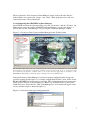
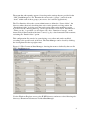
New lines can be added in the “config.xml” file, and using the option “folderid” a new
entry is created in the “geonetcast.ini” file. When opening a new instance of the
GEONETCast toolbox GUI, these changes are incorporated and using the option
“Configuration” and “Folders” the appropriate input and output directories can be
specified. A new script can be made, which in turn is executing a new batch file, to be
created by the user. There are over 120 batch files already and portions of these files can
be used as example how to create new ones.
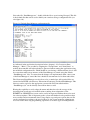
It is advised to keep track of the changes using the XML version number. This version
number can be modified in the “config.xml” file as well.
2.9 Advanced use
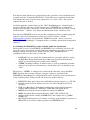
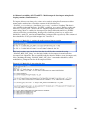
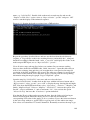
If certain operations have to be repeated on a continuous basis, e.g. import of a certain
data type, e.g. for which basically only the time stamp has to be modified, it is advised to
copy the command line string that is generated through the graphical user interface,
available from the command line, in the main menu of ILWIS, to the WINDOWS
command line processor (CMD.exe). Delete the “!” from the start of the string and
execute the expression. Within the string the date stamp can be easily modified.
Also from the main menu of ILWIS, the command line history can be checked. Select the
appropriate string generated through the graphical user interface, modify the time stamp
and execute the expression again.
Chapter 4.9 is describing how to execute batch looping routines. This is the most efficient
way to import and pre-process the data needed, e.g. to construct time series.
2.10 Concluding remark
With all the configuration settings provided you are now ready to utilize the
GEONETCast Toolbox and explore the (real time) data that is delivered via DVB
broadcast. Note that services available in Europe (like the MSG1-RSS and some for
METOP) are NOT available via the African and American turnaround services. The
Geonetcast-toolbox under ILWIS is able to import and process a multitude of data types
delivered via EUMETCast-GEONETCast, but it depends on the service channels
activated which data is actually received at the various ground receiving stations located
in the world. Check the services actually received by contacting the local ground
receiving system administrator.
23