1
Table of Contents
Overview
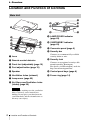
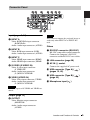
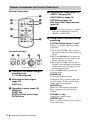
Location and Function of Controls .... 4
Main Unit ..................................... 4
Connector Panel ........................... 5
Remote Commander and Control
Panel Keys ................................. 6
Preparation
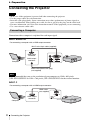
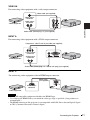
Connecting the Projector ................... 8
Connecting a Computer ................ 8
Connecting a Video
equipment ................................ 10
Connecting a microphone .......... 12
Connecting a USB memory
device ...................................... 12
Connecting an External Monitor and
Audio Equipment .................... 12
Projecting/Adjusting an
Image
Projecting an Image ......................... 13
Adjusting the Projected image ... 14
Turning Off the Power ................ 17
Adjustments and Settings
Using a Menu
Using a MENU ................................ 18
The Picture Menu ............................. 19
The Screen Menu ............................. 20
The Function Menu .......................... 24
The Operation Menu ........................ 25
The Connection/Power Menu .......... 26
The Installation Menu ...................... 28
2
Table of Contents
The Information Menu .....................29
Network
Using Network Features ...................30
Displaying the Control Window of
the Projector with a Web
Browser ...................................30
Confirming the Information
regarding the Projector ............31
Operating the Projector from a
Computer .................................31
Using the e-mail report
Function ...................................32
Setting the LAN Network of the
projector ..................................33
Setting the WLAN Network of the
projector ..................................33
Setting the Control Protocol of the
Projector ..................................36
Presentation Function via
Network
Using Presentation Function via
Network .........................................39
Installing Projector Station for
Network Presentation ..............39
Starting Projector Station for
Network Presentation ..............39
Projecting an Image ....................40
Connection Settings ....................40
Using the Controller ...................41
Displaying Images or Files Sent
from a Tablet PC/
Smartphone ..............................41