1
10. Thematic windows: a place to each application
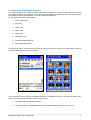
The windows sections are for the users to place their personal program shortcuts organized in application
categories such as:
1. Office (4 sub-sections)
2. E-books (2 sub-sections)
3. Calculation (4 sub-sections)
4. Messages (4 sub-sections)
5. Pictures & Photo-retouch (4 sub-sections)
6. Multi-Media (2 sub-sections)
7. Symbian Games (8 sub-sections)
8. Emulators (2 sub-sections)
9. Utilities (4 sub-sections)
10. Connections (2 sub-sections)
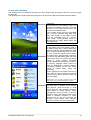
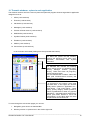
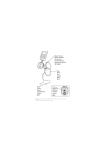
In each window are located (looking from the up towards the bottom):
• Menu Bar
The Menu Bar (below the title window)
regroups the following menus: Main, New,
Favourites, Connections and System
Information
• Standard and sub-Standard Bar
The Standard Bar includes the following
buttons: Move Arrows (or application links),
Memory
Manager
buttons
(Compact
Memory, Tasks and Close all programs),
and File manager button.
The sub-Standard Bar includes: Status Bar
Label (with windows-switch function) and
add shortcut/note buttons.
• Window section
It is structured in two regions: Azure area
and White area. In first region are located:
Modify section (linked to: application list –
Install button – and control panel – Setup
button), specify category section (linked to:
internal, SymbianWare or other very popular
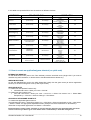
applications – see table below) and directory
section (with folder buttons to move into
sub-windows). In the White area the users
can place their favorite shortcuts.
To move through the sub-section pages you can use:
1. Navigation green Arrows in Standard Bar.
2. Directory section or Up/down bar in the window right side.
________________________________________________________________________________
XPX00/910 Mobile O.S. User Manual
12