1
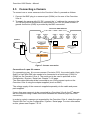
8 General Notes 8.1 The Convision V6xx A as a Video Server If the Convision V6xx A is integrated in your LAN using a fixed IP address, it can be used directly via the Internet as a web server. However, do bear in mind that the capacity of the video server is limited – with large numbers of users, a proxy server solution is strongly recommended (CGI script and daemon on a more powerful web server). A great advantage of this connection option is the high image refresh rate. 8.2 Server Push and JAVA Applet There are two options for streaming images from the Convision V6xx A to your browser: Server Push is a program developed by Netscape which supports the continuous playback of images without interrupting the connection between the server and browser. As the server push option is only supported by Netscape Navigator, Convision Technology GmbH has developed a JAVA applet which can be used with other browsers. 8.3 FTP For transmitting images via FTP (File Transfer Protocol) the Convision V6xx A can be used both as an FTP server and as an FTP client. The transmission is always initiated by the FTP client. As a server it responds to a request from the client, e.g. the browser, and sends the requested images (FTP download). As a client the Convision V6xx A calls a server and transmits one or more pre-configured images. A FTP upload is performed. 8.4 Control using CGI Parameters The CGI (Common Gateway Interface) is a way of providing programs which can be opened from HTML files. The program and the parameters to be used to open the program are appended to the URL, after the IP address. This follows the pattern given below: http://IP-address/path/CGI-program?parameter1=value1¶m2=value2&... This program can be opened with its parameters using a button, a link, a form or using the address line for a web page. The Convision Call service or control of nonsupported devices via the serial URL port, for example, use CGI programs. - 70 -