1
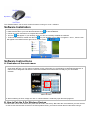
Step 1: Right click on the icon
taskbar
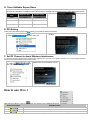
Step 2: Press “Start Pair ID” to refresh ID Code.
in the
and select “Pair ID Program”
Step 3: Remove the mouse batteries and insert again in 15 seconds, 6 digits of matching code will be displayed on
the menu as shown “Mouse Pair ID OK”.
C. How to Indicate Battery Status
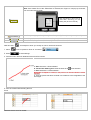
All of G7 series have Battery status Indicator in the software, click “ ”in the
main menu of the software, then the battery power status will be displayed
on the screen. It is convenient that you can easily be aware when the
battery power is low and change battery in time.
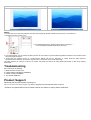
Smart Mouse Battery Low Warning
When the mouse power is low, Figure. A will pop up in the right corner of your
screen to remind you to replace the battery right away.
Mouse Battery
Low Warning
Mouse Working
Voltage
100%
1.2V and Above
75%
50%
25%
Display
1.12~1.19V
Figure. A
1.06V~1.11V
1.0~1.05V