1
Program Selection
The EC1 comes with 6 pre-defined splicing programs that are
intended to deal with the most common types of splicing. The
following explains the content of these programs in brief, and
how you go about selecting a splicing program. More information about splicing programs and details as to how you can
specify your own splicing programs is covered in the chapter
entitled “Advanced Functions.”
Predefined Programs (Numbers 1-6)
Program Number
1
2
3
4
5
6
Fiber Types
General single mode fiber and pigtails
General single mode fiber
Concentric single mode fiber
Multimode fiber 50 µm core
Multimode fiber 62.5 µm core
Dispersion shifted fiber
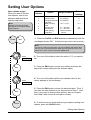
How to select a program
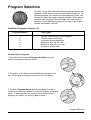
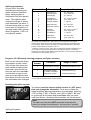
1. Press the button marked Program Selection to put the
splicer into program selection mode.
2. Turn either of the dials to select the desired program number. The program numbers are shown in the red display.
3. Press the Program Select button once again in order to
confirm your selection, thereby returning the splicer to splicing
mode. If after this point you change your mind as to the
program you desire, you must go back to Step 1.
Program Selection
7