1
Connections
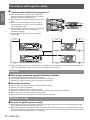
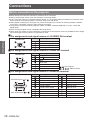
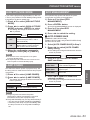
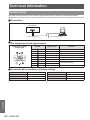
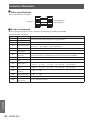
JJPin assignments and signal names of <DVI-D IN> terminal
Pin No.
Signal names
T.M.D.S data 2T.M.D.S data 2+
T.M.D.S data 2/4 shield
—
—
DDC clock
DDC data
—
T.M.D.S data 1T.M.D.S data 1+
T.M.D.S data 1/3 shield
—
Pin No.
Signal names
—
+5V
GND
Hot plug detection
T.M.D.S data 0T.M.D.S data 0+
T.M.D.S data 0/5 shield
—
—
T.M.D.S clock shield
T.M.D.S clock +
T.M.D.S clock -
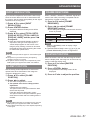
½½½ The PT-DX500U has the same DVI-D input terminal with the 180-degree rotated pin layout.
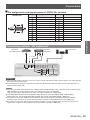
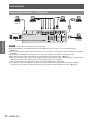
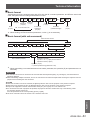
Connecting example : AV equipment
DVD player
with HDMI terminal
Video deck
(TBC built-in)
Audio system
or
Attention
zz When connecting with a video deck, be sure to use the one with a built-in time base corrector (TBC) or use a TBC between
the projector and the video deck.
zz If nonstandard burst signals are connected, the image may be distorted. If this is the case, connect a TBC between the
projector and the video deck.
Note
zz When using an HDMI cable, check that it is compliant with the HDMI standard. Using a cable that is not compliant with the
HDMI standard may result in problems such as the image cutting out or not appearing.
When connecting the 1 080p signal using HDMI, use a cable compliant with 1 080p signal.
zz The HDMI terminal supports voice signals having 48 kHz, 44.1kHz and 32kHz linear PCM sampling
frequencies only. For the supported video signals, see "List of compatible signals." (Æpage 87)
zz It is possible to connect the HDMI input terminal with an external device having a DVI terminal using an HDMI/DVI
conversion cable, but with some devices the images may not appear or other problems may occur. (Æpage 57)
zz It is possible to connect the DVI-D input terminal with an HDMI- or DVI-D compliant device, but with some devices the
images may not appear or other problems may be encountered in operation. (Æpage 57)
ENGLISH - 29
Getting Started
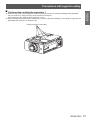
Outside view