1
PROJECTOR SETUP menu
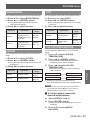
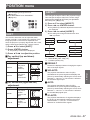
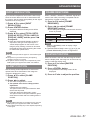
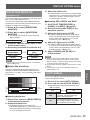
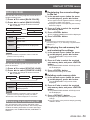
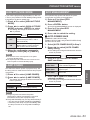
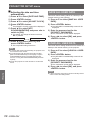
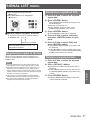
REMOTE MODE
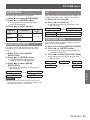
AUDIO SETTING
You can customize the [REMOTE IN] terminal
function.
1111 Press ▲▼ to select [REMOTE MODE].
2222 Press ◄► to switch [REMOTE MODE].
zz The setting will change as follows each time
◄► is pressed.
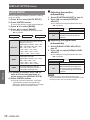
DEFAULT
USER
F SERIES
DEFAULT
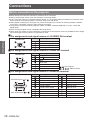
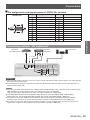
The pin assignment of the [REMOTE
IN] terminal is used as the projector
default setting. (Æpage 85)
USER
This is used for changing the settings
for the REMOTE terminal.
Any settings you make for pins 2
to 8 become valid once you press
<ENTER> button.
F SERIES
Use the setting for F Series-compatible
REMOTE terminal.
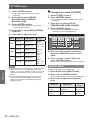
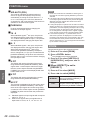
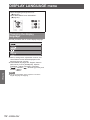
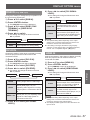
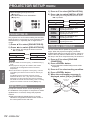
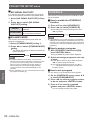
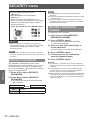
FUNCTION BUTTON
Three function buttons (<FUNCTION1 to 3>) on the
remote control and the <FUNCTION1> button on the
projector can be assigned to any frequent operations.
They can be used as a useful shortcut button.
buttons
Settings
1111 Press any of the <FUNCTION1 to 3>
buttons on the remote control or the
<FUNCTION1> button on the projector.
2222 Press <MENU> button on the remote
control or the projector to select a
menu option (Main Menu, Submenu or
Advanced Menu).
zz For the on-screen menu selection, see “On-
screen menu". (Æpage 39)
3333 Hold down any of the <FUNCTION1
to 3> buttons on the remote control
or the <FUNCTION1> button on the
projector more than 3 seconds.
Note
zz For details, see “FUNCTION BUTTON” section of
“PROJECTOR SETUP”. (Æpage 66)
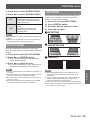
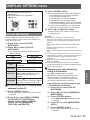
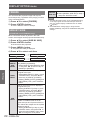
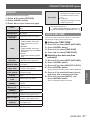
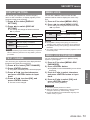
JJVOLUME
You can adjust the volume of the built-in monaural
speaker and VARIABLE AUDIO OUT terminal.
zz ◄ Decrease
zz ► Increase
JJBALANCE
You can adjust to hear the sound played equally
through both right and left from VARIABLE AUDIO
OUT, or shift the balance so more sound plays
through the left or right side.
zz ◄ More sound plays through the left side
zz ► More sound plays through the right side
JJIN STANDBY MODE
You can switch on/off the sound output in standby
mode.
zz OFF No sound in standby mode.
zz ON Output audio in standby mode.
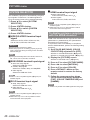
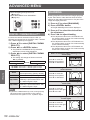
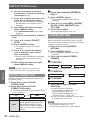
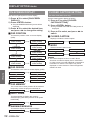
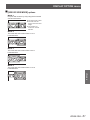
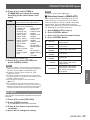
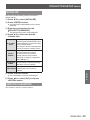
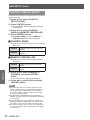
JJAUDIO IN SELECT
A sound input terminal of [AUDIO IN 1], [AUDIO IN
2], [AUDIO IN 3], [HDMI AUDIO IN] and [NETWORK
AUDIO IN] can be selected.
1111 Press ▲▼ to select a [AUDIO IN
SELECT] terminal.
2222 Press ◄► to switch [AUDIO IN
SELECT].
zz The setting will change as follows each time the
button is pressed.
AUDIO IN 1
NETWORK
AUDIO IN *2
AUDIO IN 3
HDMI AUDIO
IN *1
***** An input terminal having the HDMI port only
***** An input terminal having the network port only
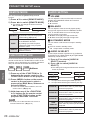
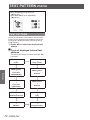
AUDIO IN 1
Sound is output from AUDIO IN 1
terminal when video of preset input
terminal is projected.
AUDIO IN 2
Sound is output from AUDIO IN 2
terminal when video of preset input
terminal is projected.
AUDIO IN 3
Sound is output from AUDIO IN 3
terminal when video of preset input
terminal is projected.
HDMI
AUDIO IN
NETWORK
AUDIO IN
66 - ENGLISH
AUDIO IN 2
Sound is output from HDMI terminal
when video of preset input terminal is
projected.
Sound is output from NETWORK
terminal when video of preset input
terminal is projected.