1
820iR User Manual
6. FINALIZING CONNECTIONS
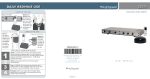
1. Ensure the power switch is in the “OFF” position and all front panel volume controls
are turned fully counter-clockwise.
LES 820iR Classroom Amplification System
B VOLUME
A VOLUME
IR
AF
POWER
IR
TV/VCR
CD/DVD
ASSISTIVE LISTENING
AF
WIRELESS MICROPHONE VOLUME
AUDIO INPUT VOLUME
ALD VOLUME
2. Ensure speaker wire connections are secure and not frayed. Under normal
conditions, each speaker volume control should remain in the center position.
1
2
AUDIO INPUT
TV/VCR
DC
POWER
CHARGERS
24V
DC
250
CD/DVD
2.06/2.54
SPEAKER OUTPUTS
L
L
R
R
400
700
1K
+10
1K4
2K5
4K
6K3
SENSOR INPUT
0
-10
SENSOR
SHORT
Helpful Hint
Use conduit to
protect wires.
• Conduit is the
best means to
keep the wires/
cables out of
sight and safe
from wear.
(Conduit is not
included.)
820iR User Manual | 18