1
KT4H Temperature Controller
BASIC OPERATING PROCEDURES
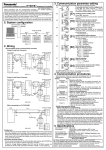
1. Setup Procedures
The setup procedures of this controller is shown below. Refer to each
item for details.
1. Specification setting:
Settings for input type, alarm actions, etc., are set using the
specification setting mode.
(If the users’ specification is the same as the default value,
specification setting is not necessary for the controller.)
2. Main setting mode:
Set Step SV during main setting mode.
3. Sub setting mode:
Set PID values, A1 setting, etc.
(If the users’ PID values are the same as the default value, it
is not necessary to set them.)
Set the Lock function, Communication conditions (Option:
serial communication), etc.
(If the users’ specification is the same as the default value, it
is not necessary to set them.)
4. Auxiliary function setting mode:
2. Specification setting
Before using the unit, it is necessary to adjust settings, such as input
type, alarm actions, control actions, and other items, to match the
conditions of use. This is known as specification setting.
Factory settings at time of shipment are, input: K -200° to 1,370°C; and
Alarm 1: no operation, comes into operation reverse (heating). If the
factory settings are acceptable, the specification settings will be
appropriate when the device is installed into the equipment and the
specification setting procedure will not be required
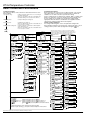
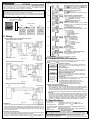
3. Basic setting operations
For setting-mode navigation, refer to the particular setting mode.
After navigation using the
and
keys, setting (selection) of each
setting (selection) item is done by registration using the
key.
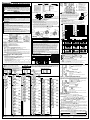
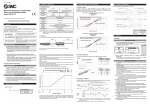
Power on
Running
Power on
Control output off function or manual control function
When control output is OFF PV/SV display mode (automatic control)
(approx. 1 sec.)
After the power is turned on, for about 3 seconds the PV display
shows the input type, and the SV display shows the upper value of
the input range (thermocouple and resistance temperature detector
input) or scaling upper limit (DC voltage, DC input current).
(approx. 3 sec.)
Output Operation Volume (MV) indication
When control is automatic/manual
[Main setting mode]
SV setting
[Sub setting mode]
Auto-tuning/
Auto-reset selection
(approx. 3 sec.)
(approx. 3 sec.)
[Auxiliary function setting mode]
[Specification setting mode]
Setting value lock
Input type selection
selection
Alarm 2 Operation
energized/non-energized
selection
SV2 setting
OUT1 Proportional
band setting
Sensor calibration
setting
Scaling high limit
setting
Alarm 1 Operation
gap setting
SV3 setting
OUT2 Proportional
band setting
Communication
protocol selection
Scaling low limit
setting
Alarm 2 Operation
gap setting
SV4 setting
Integral time setting
Device number
setting
Decimal point
location selection
Alarm 1 Operation
delay timer setting
Derivative time setting
Communication
speed selection
PV Filter time
Constant Setting
Alarm 2 Operation
delay timer setting
ARW setting
Data bit/Parity
selection
OUT1 high limit
setting
SV elevation rate set
OUT1 Proportional
frequency setting
Stop bit selection
OUT1 low limit
setting
SV decline rate set
OUT2 Proportional
frequency setting
Communication
response time
selection
OUT1 ON/OFF
operation gap setting
Normal/Reverse
control operation
selection
Alarm 1 setting
OUT2 Operation
mode selection
AT bias setting
Alarm 2 setting
OUT2 high limit
setting
Contact input
function selection
Heater cutoff
alarm setting
OUT2 low limit
setting
Output status on
input fault selection
Heater cutoff
alarm2 setting
Overlap/Dead
band setting
OUT/OFF key
function selection
OUT2 ON/OFF
operation gap setting
Backlight illumination
segment selection
Alarm 1 operation
selection
PV display color
switch selection
Alarm 2 operation
selection
PV display color
switch range setting
Alarm 1 Operation
energized/non-energized
selection
Backlight illumination
time setting
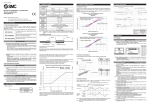
[Key operation]
While pressing
key, press the
key.
(approx. 3 sec.) While pressing
key, press the
key for about 3 sec.
(approx. 3 sec.) While pressing
key, press the
key for about 3 sec.
When the
key is pressed, navigation to the arrowed item is indicated.
Setting items in dotted line boxes only appear when options are added.
Numbers in square brackets [ ], correspond to numbered setting items in this document.
Note: Please refer to the user manual for detailed operating procedures.
4