1
Chapter 6
Troubleshoot the System
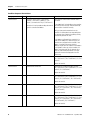
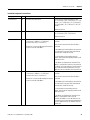
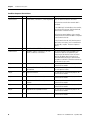
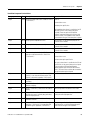
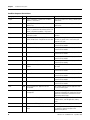
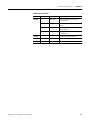
PanelView Component Terminal Alerts
Category
ID
Recipe
1021 Recipe /*S:0 Param1*/ failed. Cause: Unable to
read from /*S:0 Param2*/
Check the communication settings, and data point
specification.
Recipe
1022 Recipe /*S:0 Param1*/ failed. Cause: Unable to
read from Tag.
Check the communication settings, and data point
specification.
Recipe
1023 Recipe download failed. Cause: The value /*S:0
Param1*/ is greater than the maximum value /*S:0
Param2*/ allowed for ingredient /*S:0 Param3*/
Correct the dataset value.
Recipe
1024 Recipe /*S:0 Param1*/ failed. Cause: Table does
not contain a recipe.
Restore the recipe in the table before doing a save
operation.
Recipe
1025 Recipe /*S:0 Param1*/ of recipe /*S:0
Try to reload the application to see if the recipe is
Param2*/failed. Cause: · Recipe file not accessible. still there, or restore from a .cha file from your
computer or SD card.
Recipe
1026 Recipe Upload Failed.
This message is for informational purposes. No
corrective action needed.
Recipe
1027 Recipe operation in progress.
This message is for informational purposes. No
corrective action needed.
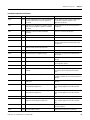
Alert
2000 Loading.
This message is for informational purposes. No
corrective action needed.
Alert
2001 Unloading.
This message is for informational purposes. No
corrective action needed.
Alert
2002 Terminal is starting up...
This message is for informational purposes. No
corrective action needed.
Alert
2003 Application is currently being edited, user input is
disabled.
Put the application into Test or Run mode to enable
user input.
Alert
2004 Copying file...
This message is for informational purposes. No
corrective action needed.
Alert
2005 Deleting file...
This message is for informational purposes. No
corrective action needed.
Alert
2006 Operation failed.
This message is for informational purposes. No
corrective action needed.
Alert
2007 Operation succeeded.
This message is for informational purposes. No
corrective action needed.
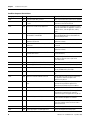
Alert
2008 Cannot run application. Application version
incompatible.
Edit, validate, and then save the application with
this version and try again.
Alert
2009 Cannot run application. Communication connection
not supported.
Terminal does not support the communication
connection configured in this application. Edit the
application and configure communication for the
supported connection type.
Alert
2010 Cannot run an invalid application.
Edit and validate the application. Correct all
validation errors, save the application, and try
again.
Alert
2011 Cannot run a modified application.
Save the application and try again.
Alert
2012 Application has been modified. Continue without
saving?
Edit the application and save prior to performing
this operation, otherwise changes to the
application may be lost.
82
Description
Corrective Action
Publication 2711C-UM001B-EN-P - September 2008