1
Contents
Contents
1
2
3
3.1
4
5
5.1
Introduction
Getting Started
Overview
Terminology Used in this User Manual
VP-311DVI Automatic DVI / Audio Switcher
Connecting the VP-311DVI Automatic DVI / Audio Switcher
Setting the Dipswitches
1
1
2
3
3
5
7
5.1.1
Priority Switching Applications
5.2
5.3
5.4
Connecting the Contact Closure Remote Control PINs
Controlling via RS-232 (for example, using a PC)
Controlling via the ETHERNET
8
9
10
5.4.1
5.4.2
Connecting the ETHERNET Port directly to a PC (Crossover Cable)
Connecting the ETHERNET Port via a Network Hub (Straight-Through Cable)
10
12
5.5
Configuring the Ethernet Port
12
5.5.1
5.5.2
Setting a Virtual Port
Setting an Ethernet Connection
14
15
6
Technical Specifications
16
8
Figures
Figure 1: VP-311DVI Automatic DVI / Audio Switcher
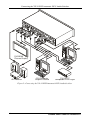
Figure 2: Connecting the VP-311DVI Automatic DVI / Audio Switcher
Figure 3: VP-311DVI Dipswitches
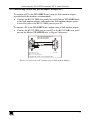
Figure 4: Connecting the Contact Closure Remote Control PINS
Figure 5: Connecting a PC without using a Null-modem Adapter
Figure 6: RJ-45 PINOUT
Figure 7: Local Area Connection Properties Window
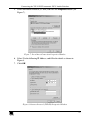
Figure 8: Internet Protocol (TCP/IP) Properties Window
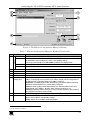
Figure 9: The Ethernet Configuration Manager Window
Figure 10: The Virtual Serial Port Manager Window
Figure 11: The Virtual Serial Port Properties Window
Figure 12: The Virtual Serial Port Properties Window (COM 3 and COM 4)
Figure 13: The Port Window – Selecting a Virtual Serial Port
Figure 14: The Port Window – Selecting a Remote Connection
4
6
7
8
9
10
11
11
13
14
14
15
15
15
i