1
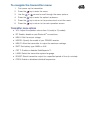
To navigate the transmitter menu:
1.
First power up the transmitter.
2.
Press the
3.
Use the
4.
Press the
key to enter the option’s submenu.
5.
Press the
key to return to the previous level or exit the menu.
6.
Press the
key to return to the main operation screen.
key to enter the menu.
or
arrows to scroll through the menu options.
Transmitter menu options
• VOL: Adjust the speaker volume from 0 (mute) to 3 (loudest).
• BT: Enable, disable or pair Bluetooth® connections.
• MAX V: Set the output voltage.
• MODEL: Specify the model of your RD8000 receiver.
• MAX P: Allow the transmitter to output its maximum wattage.
• BATT: Set battery type. NiMH or ALK.
• OPT F: Enable or disables SideStepauto™.
• LANG: Select the transmitter system language.
• BOOST: Boost transmitter output for a specified period of time (in minutes).
• FREQ: Enable or disables individual frequencies.